
CREATING A MAKERSPACE
SIMON McKENZIE
DIGITAL ADVISOR: TEACHING AND LEARNING
Faith Lutheran College, SA
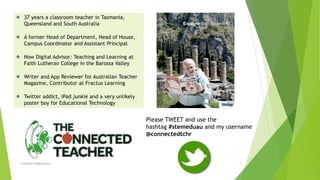
37 years a classroom teacher in Tasmania,
Queensland and South Australia
A former Head of Department, Head of House,
Campus Coordinator and Assistant Principal
Now Digital Advisor: Teaching and Learning at
Faith Lutheran College in the Barossa Valley
Writer and App Reviewer for Australian Teacher
Magazine, Contributor at Fractus Learning
Twitter addict, iPad junkie and a very unlikely
poster boy for Educational Technology
Creating A Makerspace 2
Please TWEET and use the
hashtag #stemeduau and my username
@connectedtchr
Bronze Age Orientation Day
Creating A Makerspace 3
HUMANS HAVE ALWAYS BEEN MAKERS
Creating a Makerspace
Creating A Makerspace 4
“… dynamic effects of curiosity on knowledge acquisition and on the
fundamental individual and intrinsic motivation to learn.”
Laura Fleming in Worlds of Making, p. 48 referencing Sugata Mitra’s Hole In The Wall Project
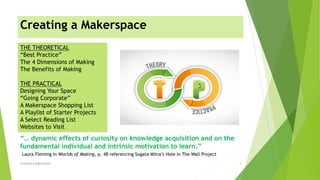
THE THEORETICAL
“Best Practice”
The 4 Dimensions of Making
The Benefits of Making
THE PRACTICAL
Designing Your Space
“Going Corporate”
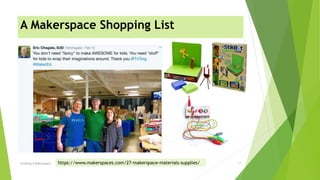
A Makerspace Shopping List
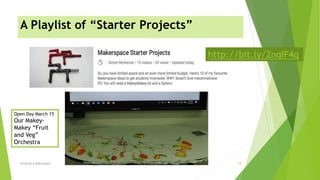
A Playlist of Starter Projects
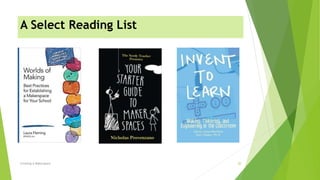
A Select Reading List
Websites to Visit
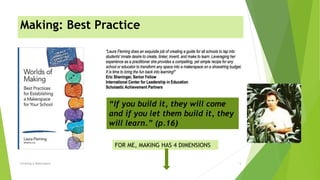
Making: Best Practice
Creating A Makerspace 5
FOR ME, MAKING HAS 4 DIMENSIONS
“If you build it, they will come
and if you let them build it, they
will learn.” (p.16)
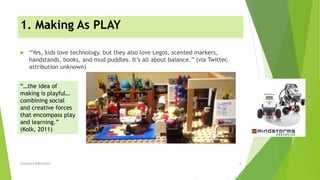
1. Making As PLAY
 “Yes, kids love technology, but they also love Legos, scented markers,
handstands, books, and mud puddles. It’s all about balance.” (via Twitter,
attribution unknown)
Creating A Makerspace 6
“…the idea of
making is playful…
combining social
and creative forces
that encompass play
and learning.”
(Kolk, 2011)
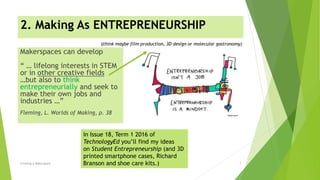
2. Making As ENTREPRENEURSHIP
Creating A Makerspace 7
Makerspaces can develop
“ … lifelong interests in STEM
or in other creative fields
…but also to think
entrepreneurially and seek to
make their own jobs and
industries …”
Fleming, L. Worlds of Making, p. 38
In Issue 18, Term 1 2016 of
TechnologyEd you’ll find my ideas
on Student Entrepreneurship (and 3D
printed smartphone cases, Richard
Branson and shoe care kits.)
(think maybe film production, 3D design or molecular gastronomy)
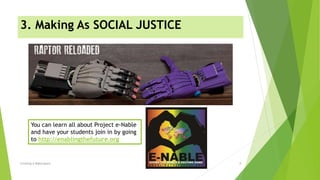
3. Making As SOCIAL JUSTICE
Creating A Makerspace 8
You can learn all about Project e-Nable
and have your students join in by going
to http://enablingthefuture.org
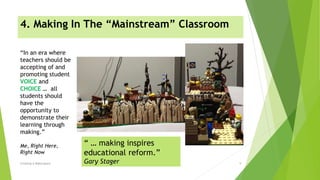
4. Making In The “Mainstream” Classroom
Creating A Makerspace 9
“In an era where
teachers should be
accepting of and
promoting student
VOICE and
CHOICE … all
students should
have the
opportunity to
demonstrate their
learning through
making.”
Me, Right Here,
Right Now
“ … making inspires
educational reform.”
Gary Stager
Making the Internet in 8 Digital Technologies
Creating A Makerspace 10
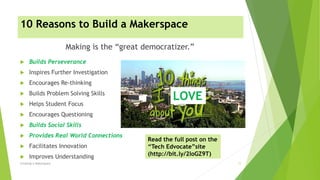
10 Reasons to Build a Makerspace
 Builds Perseverance
 Inspires Further Investigation
 Encourages Re-thinking
 Builds Problem Solving Skills
 Helps Student Focus
 Encourages Questioning
 Builds Social Skills
 Provides Real World Connections
 Facilitates Innovation
 Improves Understanding
Making is the “great democratizer.”
Creating A Makerspace 11
LOVE
Read the full post on the
“Tech Edvocate”site
(http://bit.ly/2loGZ9T)
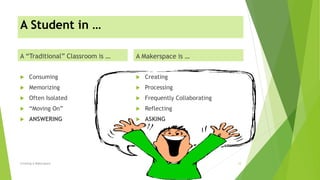
A Student in …
A “Traditional” Classroom is …
 Consuming
 Memorizing
 Often Isolated
 “Moving On”
 ANSWERING
A Makerspace is …
 Creating
 Processing
 Frequently Collaborating
 Reflecting
 ASKING
Creating A Makerspace 12
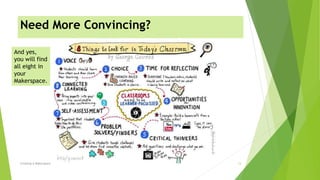
Need More Convincing?
Creating A Makerspace 13
And yes,
you will find
all eight in
your
Makerspace.
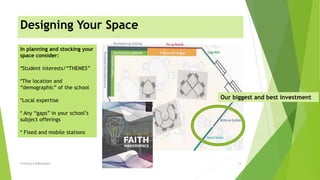
Designing Your Space
Creating A Makerspace 14
In planning and stocking your
space consider:
*Student interests/“THEMES”
*The location and
“demographic” of the school
*Local expertise
* Any “gaps” in your school’s
subject offerings
* Fixed and mobile stations
Our biggest and best investment
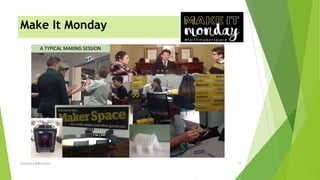
Make It Monday
Creating A Makerspace 15
Creating A Makerspace 16
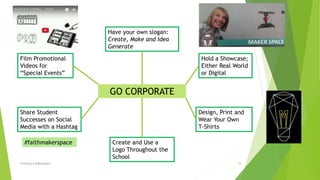
GO CORPORATE
Have your own slogan:
Create, Make and Idea
Generate
Film Promotional
Videos for
“Special Events”
Hold a Showcase;
Either Real World
or Digital
Share Student
Successes on Social
Media with a Hashtag
Design, Print and
Wear Your Own
T-Shirts
Create and Use a
Logo Throughout the
School
#faithmakerspace
A Makerspace Shopping List
Creating A Makerspace 17https://www.makerspaces.com/27-makerspace-materials-supplies/
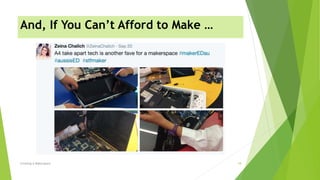
And, If You Can’t Afford to Make …
Creating A Makerspace 18
A Playlist of “Starter Projects”
Creating A Makerspace 19
http://bit.ly/2nqIF4q
Open Day March 15
Our Makey-
Makey “Fruit
and Veg”
Orchestra
A Select Reading List
Creating A Makerspace 20
Four “Must Visit” Websites
Creating A Makerspace 21
http://worlds-of-learning.com
www.makerspaces.com
http://www.digipubs.vic.edu.
au/pubs/maker/home
www.renovatedlearning.com
For a free
printable PDF
Makerspace
Planner
Sources and Image Credits
Title Slide: https://www.mathews360.com/mathews-maker-movement/ Icons from
http://icons.mysitemyway.com
Slide 2: Connected Teacher logo and image are © Simon McKenzie; Twitter icon from
http://www.bajanthings.biz/images/ticon.png
Slide 3: https://youtu.be/EZ15vUjgqvw
Slide 4: Quote as cited from Laura Fleming; image from https://yorkforum.org/
Slide 5: Screenshots and content from http://worlds-of-learning.com; Still image from Field of Dreams
Slide 6: Big Bang Theory Lego Image taken by the presenter; Lego Robotics image from
http://www.education.rec.ri.cmu.edu/content/lego/
Slide 7: Quote as cited from Laura Fleming; entrepreneurship image from
http://gapingvoid.com/content/uploads/2016/08/entrepreneurship-isnt-a-job-1.jpg
Slide 8: Images from http://enablingthefuture.org
Slide 9: Images of Lego creation by Year 9 student at Faith Lutheran College; ”Voice and Choice” image
from https://pluginandpowerup.files.wordpress.com/2015/09/voicechoice-ade.png; Gary Stager quote
from Laura Fleming’s Worlds of Making p.55
Slide 10: Time lapse video created by Year 8 students at Faith Lutheran College
Slide 11: http://bit.ly/2loGZ9T Adjusted movie image sourced from
https://img.buzzfeed.com/buzzfeed-static/static/2016-02/17/8/enhanced/webdr15/enhanced-2441-
1455714040-1.jpg
Creating A Makerspace 22
Creating A Makerspace 23
Slide 12: www.clipartkid.com
Slide 13: Sketch-note by Sylvia Duckworth based upon The Innovator’s Mindset by George Couros
Slide 14: Room plans screenshot from Faith Lutheran College Project
Slide 15: All images from the Faith Lutheran College Makerspace, taken by the presenter
Slide 16: Diagram and all images by the presenter
Slide 17: Eric Chagala (@drchagala) Tweet, February 12 2017; other images from
www.makeymakey.com and http://www.brainstormltd.co.uk/StikBot_ZANIMATION_Studio.htm
Slide 18: Zeina Chalich (@ZeinaChalich) Tweet, September 20 2016
Slide 19: “Fruit and Veg” Orchestra image taken by the presenter
Slide 20: Book screenshots as shown
Slide 21: Screenshots from http://worlds-of-learning.com ; www.makerspaces.com;
www.renovatedlearning.com and http://www.digipubs.vic.edu.au/pubs/maker/home

Creating a Makerspace

  • 1.
    CREATING A MAKERSPACE SIMONMcKENZIE DIGITAL ADVISOR: TEACHING AND LEARNING Faith Lutheran College, SA
  • 2.
    37 years aclassroom teacher in Tasmania, Queensland and South Australia A former Head of Department, Head of House, Campus Coordinator and Assistant Principal Now Digital Advisor: Teaching and Learning at Faith Lutheran College in the Barossa Valley Writer and App Reviewer for Australian Teacher Magazine, Contributor at Fractus Learning Twitter addict, iPad junkie and a very unlikely poster boy for Educational Technology Creating A Makerspace 2 Please TWEET and use the hashtag #stemeduau and my username @connectedtchr
  • 3.
    Bronze Age OrientationDay Creating A Makerspace 3 HUMANS HAVE ALWAYS BEEN MAKERS
  • 4.
    Creating a Makerspace CreatingA Makerspace 4 “… dynamic effects of curiosity on knowledge acquisition and on the fundamental individual and intrinsic motivation to learn.” Laura Fleming in Worlds of Making, p. 48 referencing Sugata Mitra’s Hole In The Wall Project THE THEORETICAL “Best Practice” The 4 Dimensions of Making The Benefits of Making THE PRACTICAL Designing Your Space “Going Corporate” A Makerspace Shopping List A Playlist of Starter Projects A Select Reading List Websites to Visit
  • 5.
    Making: Best Practice CreatingA Makerspace 5 FOR ME, MAKING HAS 4 DIMENSIONS “If you build it, they will come and if you let them build it, they will learn.” (p.16)
  • 6.
    1. Making AsPLAY  “Yes, kids love technology, but they also love Legos, scented markers, handstands, books, and mud puddles. It’s all about balance.” (via Twitter, attribution unknown) Creating A Makerspace 6 “…the idea of making is playful… combining social and creative forces that encompass play and learning.” (Kolk, 2011)
  • 7.
    2. Making AsENTREPRENEURSHIP Creating A Makerspace 7 Makerspaces can develop “ … lifelong interests in STEM or in other creative fields …but also to think entrepreneurially and seek to make their own jobs and industries …” Fleming, L. Worlds of Making, p. 38 In Issue 18, Term 1 2016 of TechnologyEd you’ll find my ideas on Student Entrepreneurship (and 3D printed smartphone cases, Richard Branson and shoe care kits.) (think maybe film production, 3D design or molecular gastronomy)
  • 8.
    3. Making AsSOCIAL JUSTICE Creating A Makerspace 8 You can learn all about Project e-Nable and have your students join in by going to http://enablingthefuture.org
  • 9.
    4. Making InThe “Mainstream” Classroom Creating A Makerspace 9 “In an era where teachers should be accepting of and promoting student VOICE and CHOICE … all students should have the opportunity to demonstrate their learning through making.” Me, Right Here, Right Now “ … making inspires educational reform.” Gary Stager
  • 10.
    Making the Internetin 8 Digital Technologies Creating A Makerspace 10
  • 11.
    10 Reasons toBuild a Makerspace  Builds Perseverance  Inspires Further Investigation  Encourages Re-thinking  Builds Problem Solving Skills  Helps Student Focus  Encourages Questioning  Builds Social Skills  Provides Real World Connections  Facilitates Innovation  Improves Understanding Making is the “great democratizer.” Creating A Makerspace 11 LOVE Read the full post on the “Tech Edvocate”site (http://bit.ly/2loGZ9T)
  • 12.
    A Student in… A “Traditional” Classroom is …  Consuming  Memorizing  Often Isolated  “Moving On”  ANSWERING A Makerspace is …  Creating  Processing  Frequently Collaborating  Reflecting  ASKING Creating A Makerspace 12
  • 13.
    Need More Convincing? CreatingA Makerspace 13 And yes, you will find all eight in your Makerspace.
  • 14.
    Designing Your Space CreatingA Makerspace 14 In planning and stocking your space consider: *Student interests/“THEMES” *The location and “demographic” of the school *Local expertise * Any “gaps” in your school’s subject offerings * Fixed and mobile stations Our biggest and best investment
  • 15.
    Make It Monday CreatingA Makerspace 15
  • 16.
    Creating A Makerspace16 GO CORPORATE Have your own slogan: Create, Make and Idea Generate Film Promotional Videos for “Special Events” Hold a Showcase; Either Real World or Digital Share Student Successes on Social Media with a Hashtag Design, Print and Wear Your Own T-Shirts Create and Use a Logo Throughout the School #faithmakerspace
  • 17.
    A Makerspace ShoppingList Creating A Makerspace 17https://www.makerspaces.com/27-makerspace-materials-supplies/
  • 18.
    And, If YouCan’t Afford to Make … Creating A Makerspace 18
  • 19.
    A Playlist of“Starter Projects” Creating A Makerspace 19 http://bit.ly/2nqIF4q Open Day March 15 Our Makey- Makey “Fruit and Veg” Orchestra
  • 20.
    A Select ReadingList Creating A Makerspace 20
  • 21.
    Four “Must Visit”Websites Creating A Makerspace 21 http://worlds-of-learning.com www.makerspaces.com http://www.digipubs.vic.edu. au/pubs/maker/home www.renovatedlearning.com For a free printable PDF Makerspace Planner
  • 22.
    Sources and ImageCredits Title Slide: https://www.mathews360.com/mathews-maker-movement/ Icons from http://icons.mysitemyway.com Slide 2: Connected Teacher logo and image are © Simon McKenzie; Twitter icon from http://www.bajanthings.biz/images/ticon.png Slide 3: https://youtu.be/EZ15vUjgqvw Slide 4: Quote as cited from Laura Fleming; image from https://yorkforum.org/ Slide 5: Screenshots and content from http://worlds-of-learning.com; Still image from Field of Dreams Slide 6: Big Bang Theory Lego Image taken by the presenter; Lego Robotics image from http://www.education.rec.ri.cmu.edu/content/lego/ Slide 7: Quote as cited from Laura Fleming; entrepreneurship image from http://gapingvoid.com/content/uploads/2016/08/entrepreneurship-isnt-a-job-1.jpg Slide 8: Images from http://enablingthefuture.org Slide 9: Images of Lego creation by Year 9 student at Faith Lutheran College; ”Voice and Choice” image from https://pluginandpowerup.files.wordpress.com/2015/09/voicechoice-ade.png; Gary Stager quote from Laura Fleming’s Worlds of Making p.55 Slide 10: Time lapse video created by Year 8 students at Faith Lutheran College Slide 11: http://bit.ly/2loGZ9T Adjusted movie image sourced from https://img.buzzfeed.com/buzzfeed-static/static/2016-02/17/8/enhanced/webdr15/enhanced-2441- 1455714040-1.jpg Creating A Makerspace 22
  • 23.
    Creating A Makerspace23 Slide 12: www.clipartkid.com Slide 13: Sketch-note by Sylvia Duckworth based upon The Innovator’s Mindset by George Couros Slide 14: Room plans screenshot from Faith Lutheran College Project Slide 15: All images from the Faith Lutheran College Makerspace, taken by the presenter Slide 16: Diagram and all images by the presenter Slide 17: Eric Chagala (@drchagala) Tweet, February 12 2017; other images from www.makeymakey.com and http://www.brainstormltd.co.uk/StikBot_ZANIMATION_Studio.htm Slide 18: Zeina Chalich (@ZeinaChalich) Tweet, September 20 2016 Slide 19: “Fruit and Veg” Orchestra image taken by the presenter Slide 20: Book screenshots as shown Slide 21: Screenshots from http://worlds-of-learning.com ; www.makerspaces.com; www.renovatedlearning.com and http://www.digipubs.vic.edu.au/pubs/maker/home