Google ProfilesBe Google-tastic!sah upd 04/10
Do YOU Google Yourself?You should.  Go ahead …I won’t tell.  Do it!!!  You need to know what is out there on the web under YOUR NAME.  Getting setup with a Google Profile will help you to ALWAYS be on that coveted first page of Google results, but it’s still a good idea to know what else is out there …sah upd 04/10
Check Out Your ResultsAre all of the results on the first page related to you?  Click on the links – know what is out there.sah upd 04/10
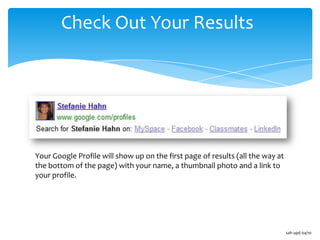
Check Out Your ResultsYour Google Profile will show up on the first page of results (all the way at the bottom of the page) with your name, a thumbnail photo and a link to your profile.sah upd 04/10
What’s in a Google Profile?sah upd 04/10
Create Your Google Profile!Go to www.google.com/profiles to get started ...sah upd 04/10
Start with a Google AccountYou will need a Google Account to have a Google Profile.  You do not need to have a Gmail (Google email) address though.  - Sign into your existing account OR … Create an accountsah upd 04/10
Build Your Profile- Click Edit profile- Enter your information- Click SaveHere are some of the details you can add to your profile:- where you've lived- where you've worked- a short bio- other names you've gone by- where you grew up- schools you've attended- your superpower*Add a picture to your profile by clicking the Change photolinksah upd 04/10
Add About Me InfoEnter your About Me info here …sah upd 04/10
Show Some PersonalityShow a little personality … add a bio and answer some fun Google questions!sah upd 04/10
Add Your LinksAdd your links – you can add your personal website, blog and social media links here.  Google will suggest links for you to add (links that are associated with you) on the left, OR -     Type in your URLName your link
Click Addsah upd 04/10
Select Your URLsah upd 04/10
Link to Picasa or FlickrLink your Picasa or Flickr photos to your Google Profile.  Click the radio button
Type in your info
Click Add PhotosNote:  Only photos/albums you have marked “public” will display here.sah upd 04/10

Create Your Google Profile

  • 1.
  • 2.
    Do YOU GoogleYourself?You should. Go ahead …I won’t tell. Do it!!! You need to know what is out there on the web under YOUR NAME. Getting setup with a Google Profile will help you to ALWAYS be on that coveted first page of Google results, but it’s still a good idea to know what else is out there …sah upd 04/10
  • 3.
    Check Out YourResultsAre all of the results on the first page related to you? Click on the links – know what is out there.sah upd 04/10
  • 4.
    Check Out YourResultsYour Google Profile will show up on the first page of results (all the way at the bottom of the page) with your name, a thumbnail photo and a link to your profile.sah upd 04/10
  • 5.
    What’s in aGoogle Profile?sah upd 04/10
  • 6.
    Create Your GoogleProfile!Go to www.google.com/profiles to get started ...sah upd 04/10
  • 7.
    Start with aGoogle AccountYou will need a Google Account to have a Google Profile. You do not need to have a Gmail (Google email) address though. - Sign into your existing account OR … Create an accountsah upd 04/10
  • 8.
    Build Your Profile-Click Edit profile- Enter your information- Click SaveHere are some of the details you can add to your profile:- where you've lived- where you've worked- a short bio- other names you've gone by- where you grew up- schools you've attended- your superpower*Add a picture to your profile by clicking the Change photolinksah upd 04/10
  • 9.
    Add About MeInfoEnter your About Me info here …sah upd 04/10
  • 10.
    Show Some PersonalityShowa little personality … add a bio and answer some fun Google questions!sah upd 04/10
  • 11.
    Add Your LinksAddyour links – you can add your personal website, blog and social media links here. Google will suggest links for you to add (links that are associated with you) on the left, OR - Type in your URLName your link
  • 12.
  • 13.
  • 14.
    Link to Picasaor FlickrLink your Picasa or Flickr photos to your Google Profile. Click the radio button
  • 15.
  • 16.
    Click Add PhotosNote: Only photos/albums you have marked “public” will display here.sah upd 04/10