Thank You for Tuning In!


LinkedIn Endorsements
                                              Have you been endorsed?


     © Stefanie Hahn | www.StefanieHahn.com| October 2012
www.LinkedIn.com
LinkedIn has added a fast and fun new way for
consumers to recommend your services.
Connections can now “endorse” you for skills and
expertise that you add to your profile.
Connections can even add skills you didn’t think
of (and endorse those skills) to your profile.

Connections = anyone you are connected with on
LinkedIn.

             © Stefanie Hahn | www.StefanieHahn.com| October 2012
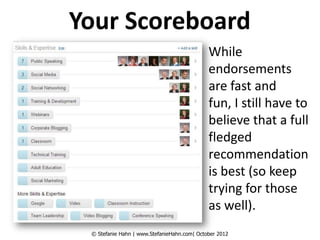
Your Scoreboard
                                             While
                                             endorsements
                                             are fast and
                                             fun, I still have to
                                             believe that a full
                                             fledged
                                             recommendation
                                             is best (so keep
                                             trying for those
                                             as well).
 © Stefanie Hahn | www.StefanieHahn.com| October 2012
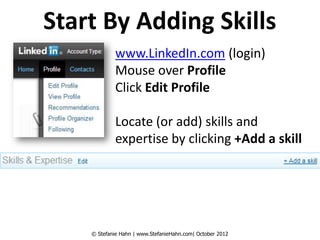
Start By Adding Skills
             www.LinkedIn.com (login)
             Mouse over Profile
             Click Edit Profile

             Locate (or add) skills and
             expertise by clicking +Add a skill


    © Stefanie Hahn | www.StefanieHahn.com| October 2012
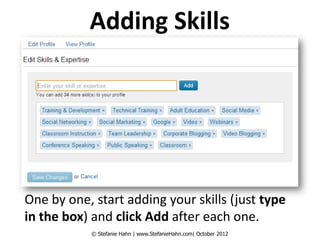
Adding Skills


One by one, start adding your skills (just type
in the box) and click Add after each one.
            © Stefanie Hahn | www.StefanieHahn.com| October 2012
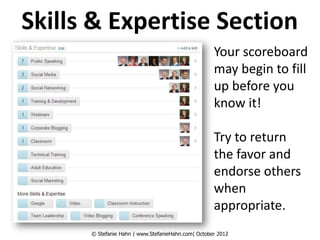
Skills & Expertise Section
                                                    Your scoreboard
                                                    may begin to fill
                                                    up before you
                                                    know it!

                                                    Try to return
                                                    the favor and
                                                    endorse others
                                                    when
                                                    appropriate.
      © Stefanie Hahn | www.StefanieHahn.com| October 2012
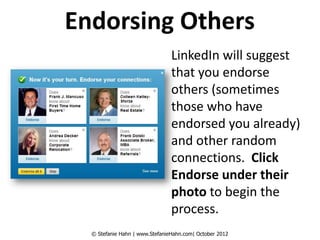
Endorsing Others
                                LinkedIn will suggest
                                that you endorse
                                others (sometimes
                                those who have
                                endorsed you already)
                                and other random
                                connections. Click
                                Endorse under their
                                photo to begin the
                                process.
  © Stefanie Hahn | www.StefanieHahn.com| October 2012
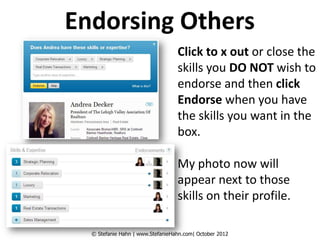
Endorsing Others
                                  Click to x out or close the
                                  skills you DO NOT wish to
                                  endorse and then click
                                  Endorse when you have
                                  the skills you want in the
                                  box.

                                  My photo now will
                                  appear next to those
                                  skills on their profile.

  © Stefanie Hahn | www.StefanieHahn.com| October 2012
Go Forth & Be Endorsed
I encourage you to add skills to
your LinkedIn profile so that
others may endorse you. To
start the fun, endorse someone
yourself :) Thanks for
watching!                                        Stefanie Hahn
                                    stefanie@stefaniehahn.com
                                        www.StefanieHahn.com


           © Stefanie Hahn | www.StefanieHahn.com| October 2012

LinkedIn Endorsements

  • 1.
    Thank You forTuning In! LinkedIn Endorsements Have you been endorsed? © Stefanie Hahn | www.StefanieHahn.com| October 2012
  • 2.
    www.LinkedIn.com LinkedIn has addeda fast and fun new way for consumers to recommend your services. Connections can now “endorse” you for skills and expertise that you add to your profile. Connections can even add skills you didn’t think of (and endorse those skills) to your profile. Connections = anyone you are connected with on LinkedIn. © Stefanie Hahn | www.StefanieHahn.com| October 2012
  • 3.
    Your Scoreboard While endorsements are fast and fun, I still have to believe that a full fledged recommendation is best (so keep trying for those as well). © Stefanie Hahn | www.StefanieHahn.com| October 2012
  • 4.
    Start By AddingSkills www.LinkedIn.com (login) Mouse over Profile Click Edit Profile Locate (or add) skills and expertise by clicking +Add a skill © Stefanie Hahn | www.StefanieHahn.com| October 2012
  • 5.
    Adding Skills One byone, start adding your skills (just type in the box) and click Add after each one. © Stefanie Hahn | www.StefanieHahn.com| October 2012
  • 6.
    Skills & ExpertiseSection Your scoreboard may begin to fill up before you know it! Try to return the favor and endorse others when appropriate. © Stefanie Hahn | www.StefanieHahn.com| October 2012
  • 7.
    Endorsing Others LinkedIn will suggest that you endorse others (sometimes those who have endorsed you already) and other random connections. Click Endorse under their photo to begin the process. © Stefanie Hahn | www.StefanieHahn.com| October 2012
  • 8.
    Endorsing Others Click to x out or close the skills you DO NOT wish to endorse and then click Endorse when you have the skills you want in the box. My photo now will appear next to those skills on their profile. © Stefanie Hahn | www.StefanieHahn.com| October 2012
  • 9.
    Go Forth &Be Endorsed I encourage you to add skills to your LinkedIn profile so that others may endorse you. To start the fun, endorse someone yourself :) Thanks for watching! Stefanie Hahn stefanie@stefaniehahn.com www.StefanieHahn.com © Stefanie Hahn | www.StefanieHahn.com| October 2012