Building a Management
Cluster with VSAN
DAN BARR, PENN STATE ARL
CENTRAL PA VMUG, APRIL 6, 2016
4/5/2016 1
Why a Management Cluster?
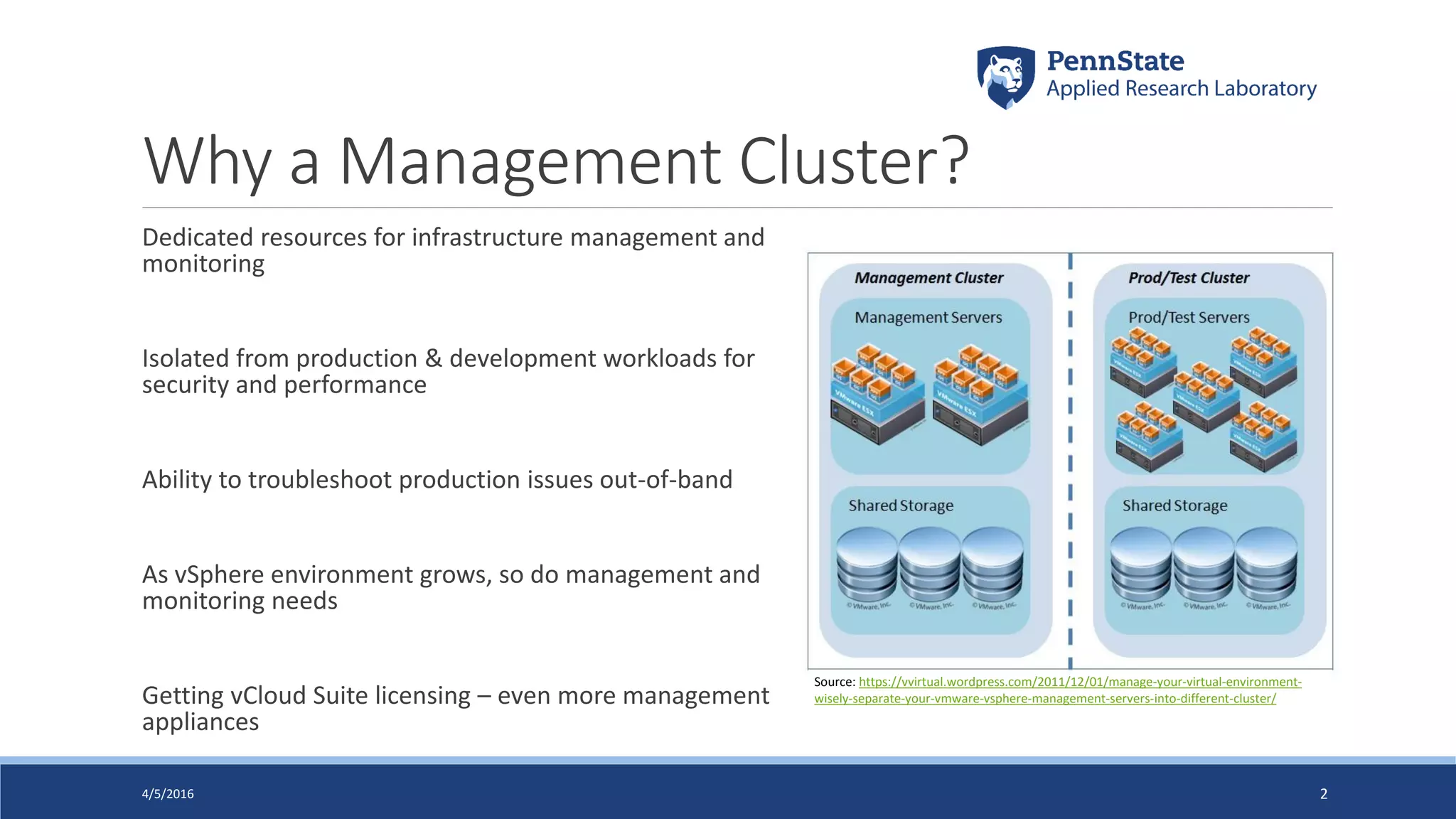
Dedicated resources for infrastructure management and
monitoring
Isolated from production & development workloads for
security and performance
Ability to troubleshoot production issues out-of-band
As vSphere environment grows, so do management and
monitoring needs
Getting vCloud Suite licensing – even more management
appliances
4/5/2016 2
Source: https://vvirtual.wordpress.com/2011/12/01/manage-your-virtual-environment-
wisely-separate-your-vmware-vsphere-management-servers-into-different-cluster/
Why VSAN?
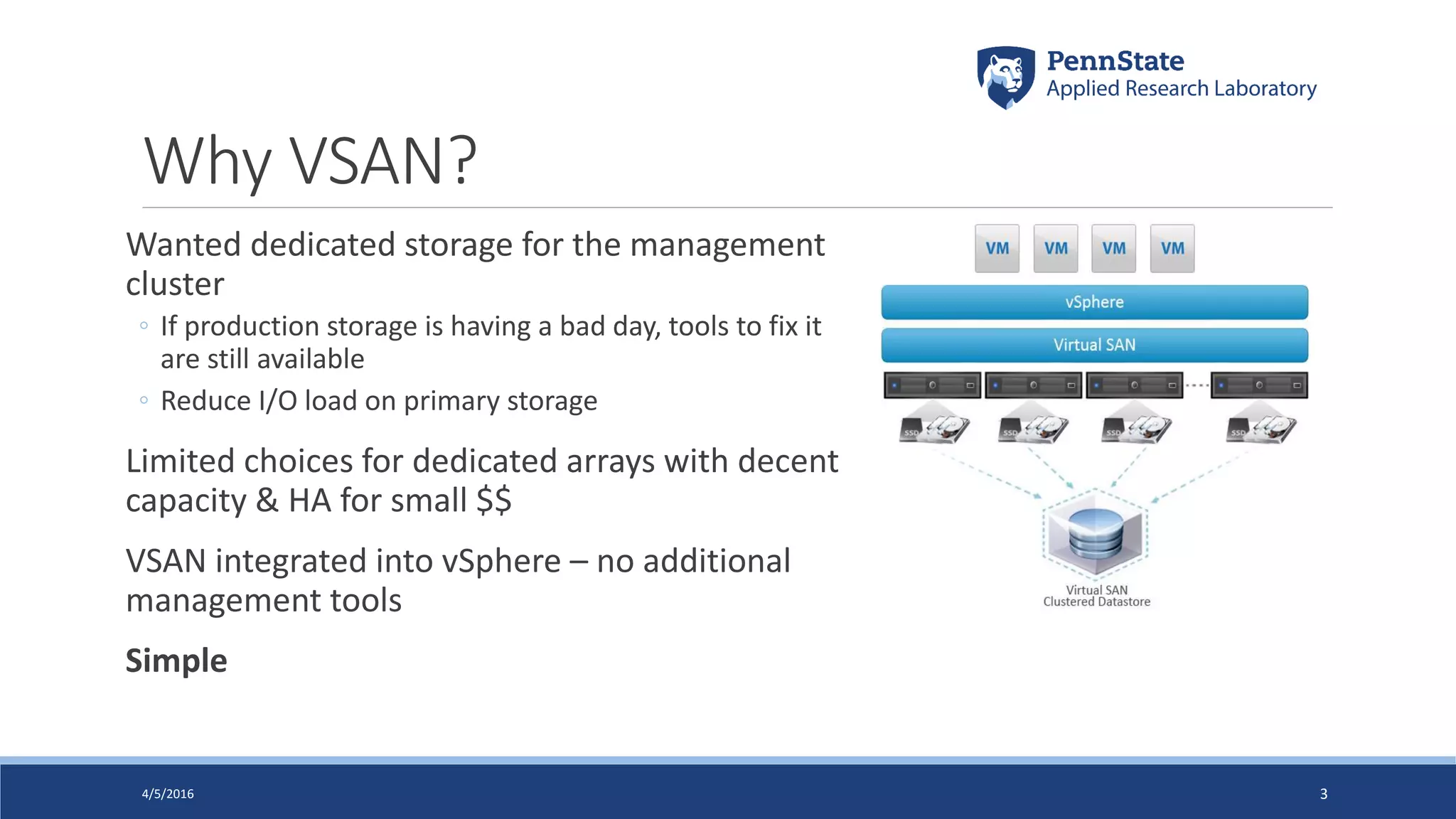
Wanted dedicated storage for the management
cluster
◦ If production storage is having a bad day, tools to fix it
are still available
◦ Reduce I/O load on primary storage
Limited choices for dedicated arrays with decent
capacity & HA for small $$
VSAN integrated into vSphere – no additional
management tools
Simple
4/5/2016 3
Workloads
vSphere Management:
◦ vCenter (VCSA + external PSC), VUM, vSphere Replication
Storage/Server Management:
◦ Compellent Enterprise Manager, Dell OpenManage, EMC InsightIQ, WhatsUp
Network Management:
◦ Switch NAC & policy manager, firewall monitoring, IPAM, vulnerability scanners
Supporting Infrastructure:
◦ AD, DNS, MS SQL Server, management jump servers (RDS hosts)
Total: 30 VMs, 74 vCPU, 170 GB RAM, 6.2 TB disk
Future: SRM, vRealize Suite, NSX = 35 vCPU, 90 GB RAM, 600 GB disk
4/5/2016 4
Hardware
Targeted 2:1 vCPU:Logical Core ratio, 12 TB usable storage
Factored in current & future workloads plus organic growth
All components on VSAN hardware compatibility list
Modest IO needs, so Hybrid VSAN chosen over all-flash
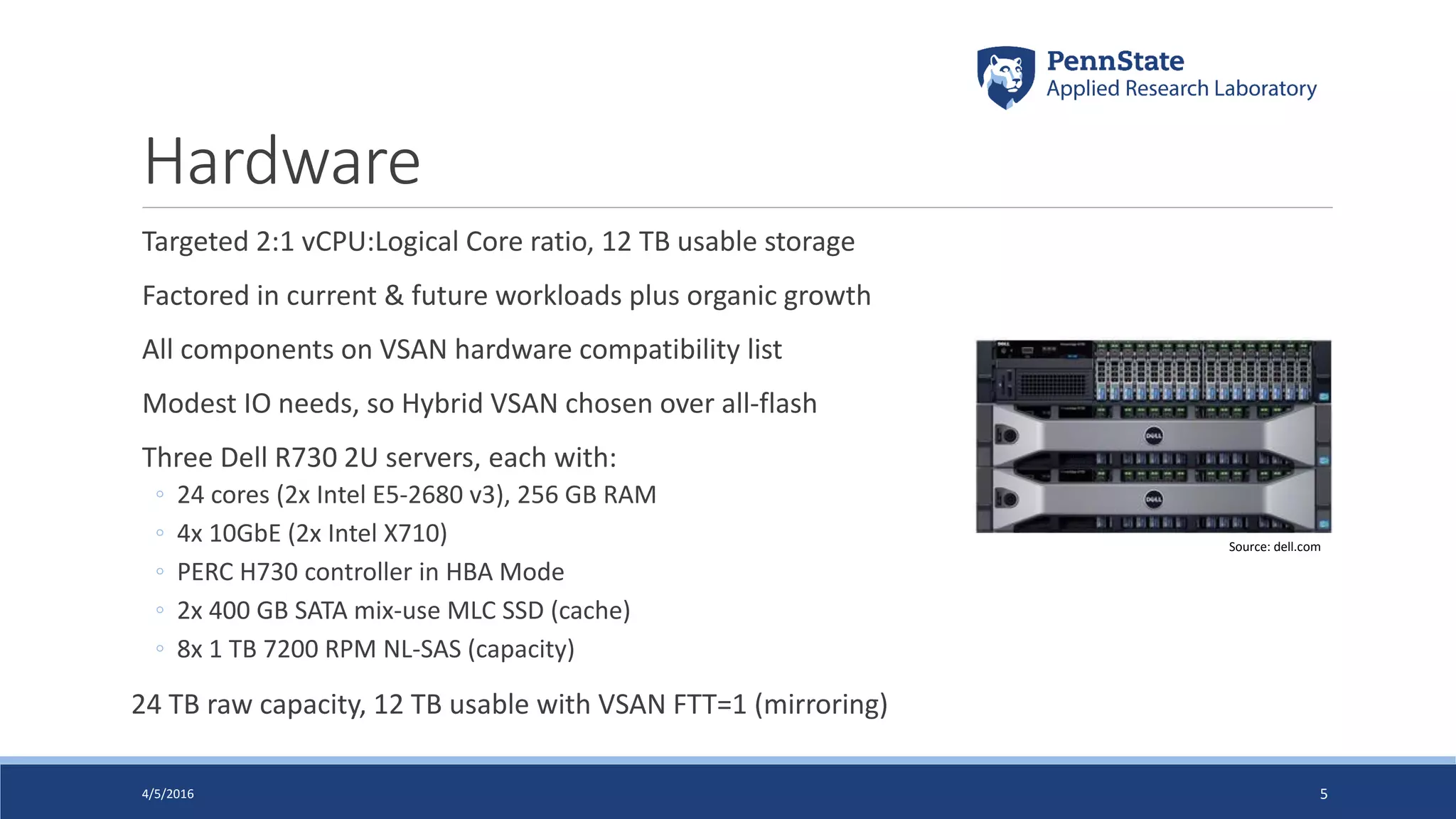
Three Dell R730 2U servers, each with:
◦ 24 cores (2x Intel E5-2680 v3), 256 GB RAM
◦ 4x 10GbE (2x Intel X710)
◦ PERC H730 controller in HBA Mode
◦ 2x 400 GB SATA mix-use MLC SSD (cache)
◦ 8x 1 TB 7200 RPM NL-SAS (capacity)
24 TB raw capacity, 12 TB usable with VSAN FTT=1 (mirroring)
4/5/2016 5
Source: dell.com
Disk Layout
E S T
6 74 52 30 1 14 1512 1310 118 9
SAS
1TB7.2k
SAS
400GBSSD
SAS
400GBSSD
SAS
1TB7.2k
SAS
1TB7.2k
SAS
1TB7.2k
SAS
1TB7.2k
SAS
1TB7.2k
SAS
1TB7.2k
SAS
1TB7.2k
4/5/2016 6
Disk Group 1 Disk Group 2
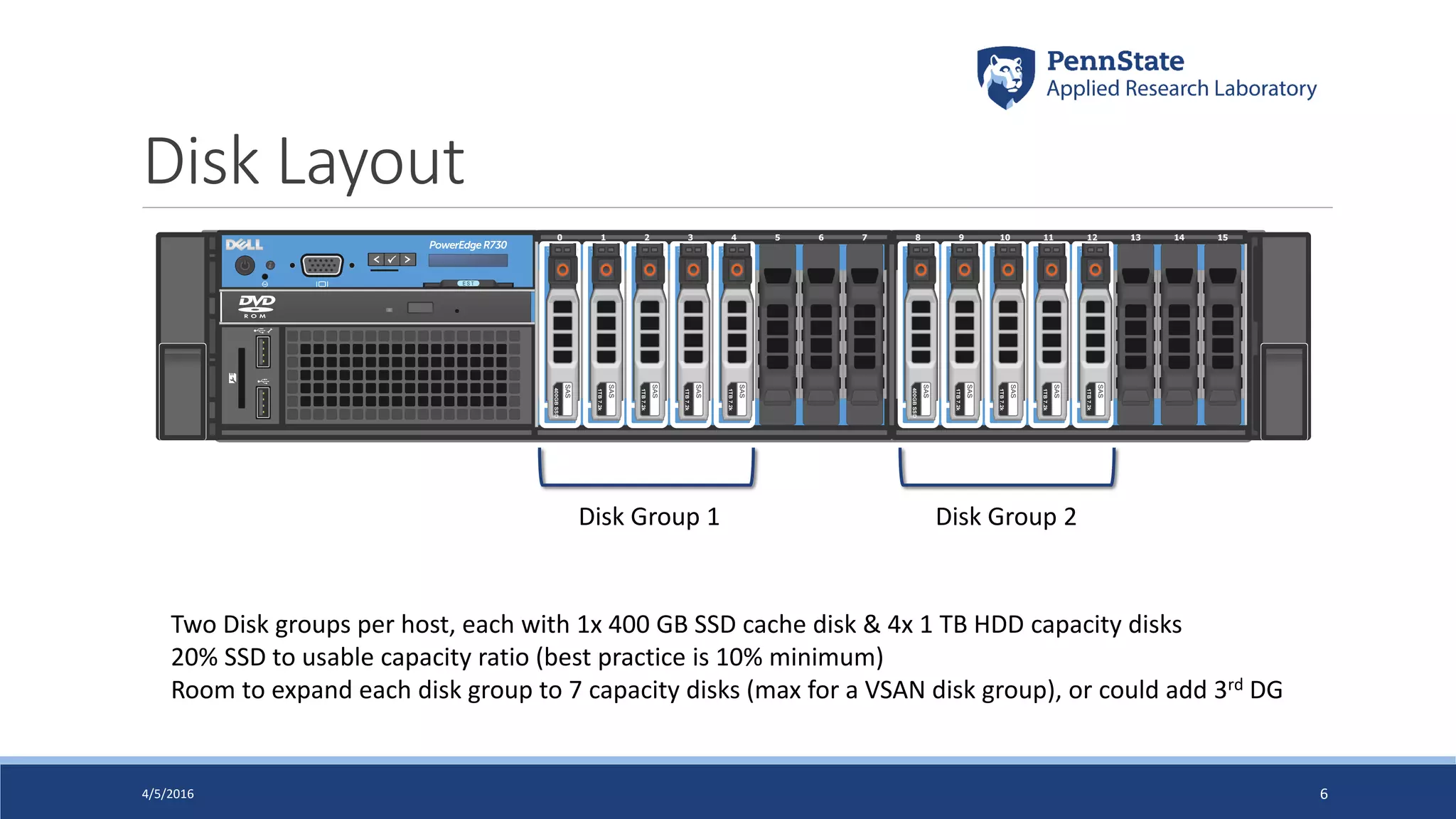
Two Disk groups per host, each with 1x 400 GB SSD cache disk & 4x 1 TB HDD capacity disks
20% SSD to usable capacity ratio (best practice is 10% minimum)
Room to expand each disk group to 7 capacity disks (max for a VSAN disk group), or could add 3rd DG
Networking
4/5/2016 7
vmnic0
vmnic1 vmnic4
vmnic5
VMsManagement Replication ... iSCSI-2vMotion iSCSI-1 VSAN
Uplink 1 Uplink 2 Uplink 1 Uplink 2
Unused
Standby
Active
vmk0 vmk6 vmk2 vmk3 vmk4 vmk5
VDS-FrontEnd VDS-BackEnd
Port Group
Virtual Distributed Switch
Virtual Standard Switch
VMkernel NIC
Health Checks
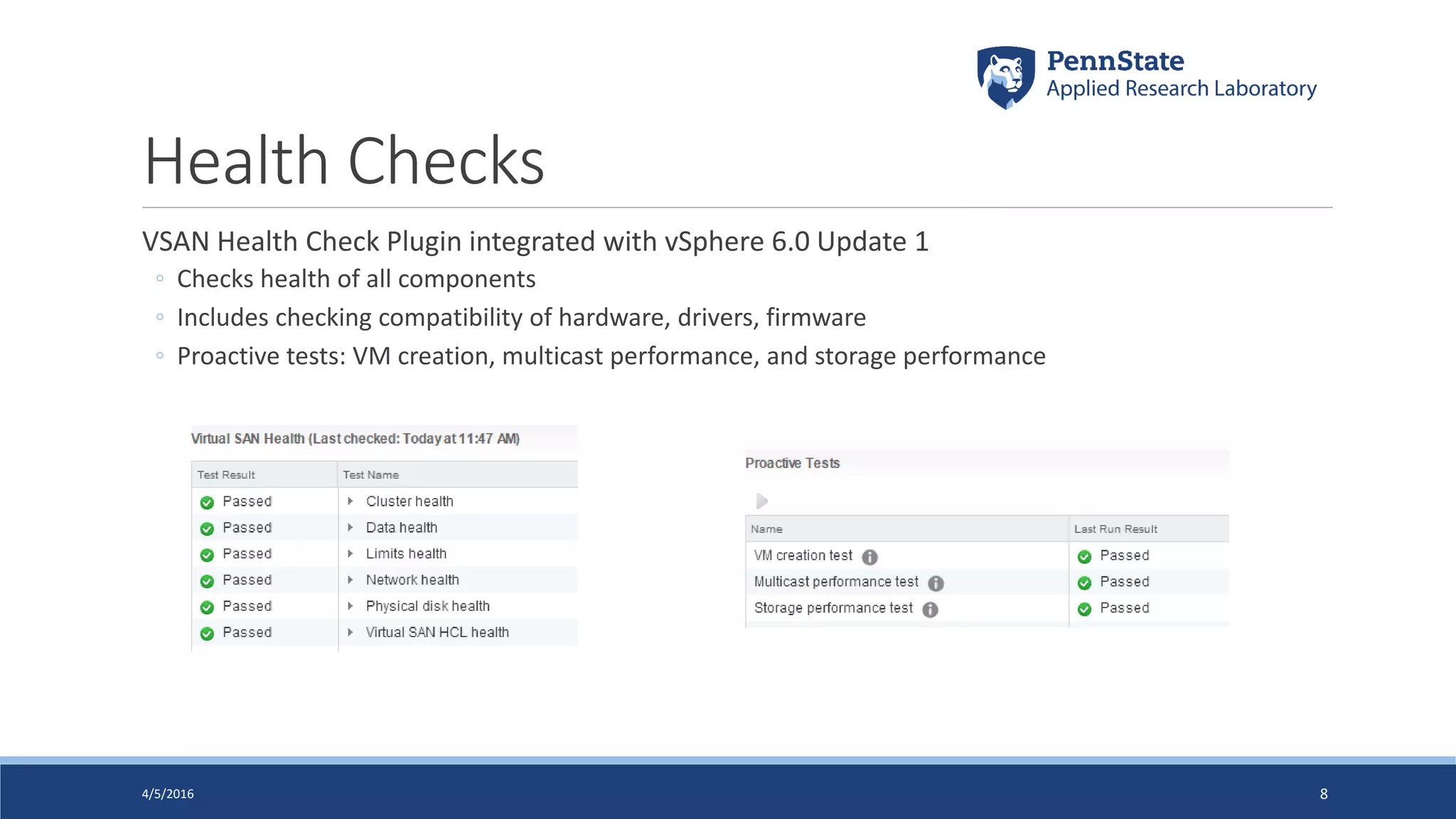
VSAN Health Check Plugin integrated with vSphere 6.0 Update 1
◦ Checks health of all components
◦ Includes checking compatibility of hardware, drivers, firmware
◦ Proactive tests: VM creation, multicast performance, and storage performance
4/5/2016 8
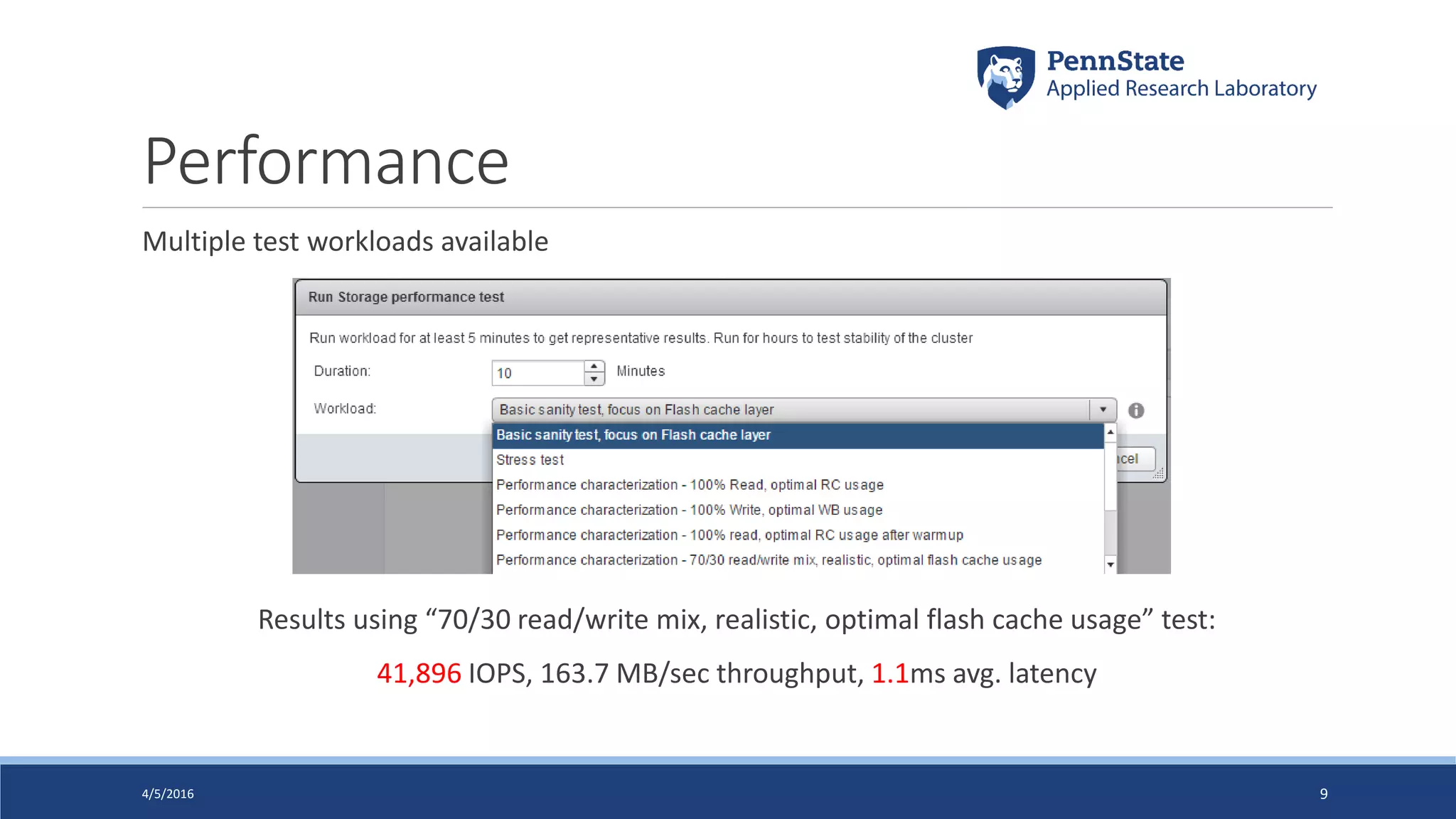
Performance
Multiple test workloads available
Results using “70/30 read/write mix, realistic, optimal flash cache usage” test:
41,896 IOPS, 163.7 MB/sec throughput, 1.1ms avg. latency
4/5/2016 9
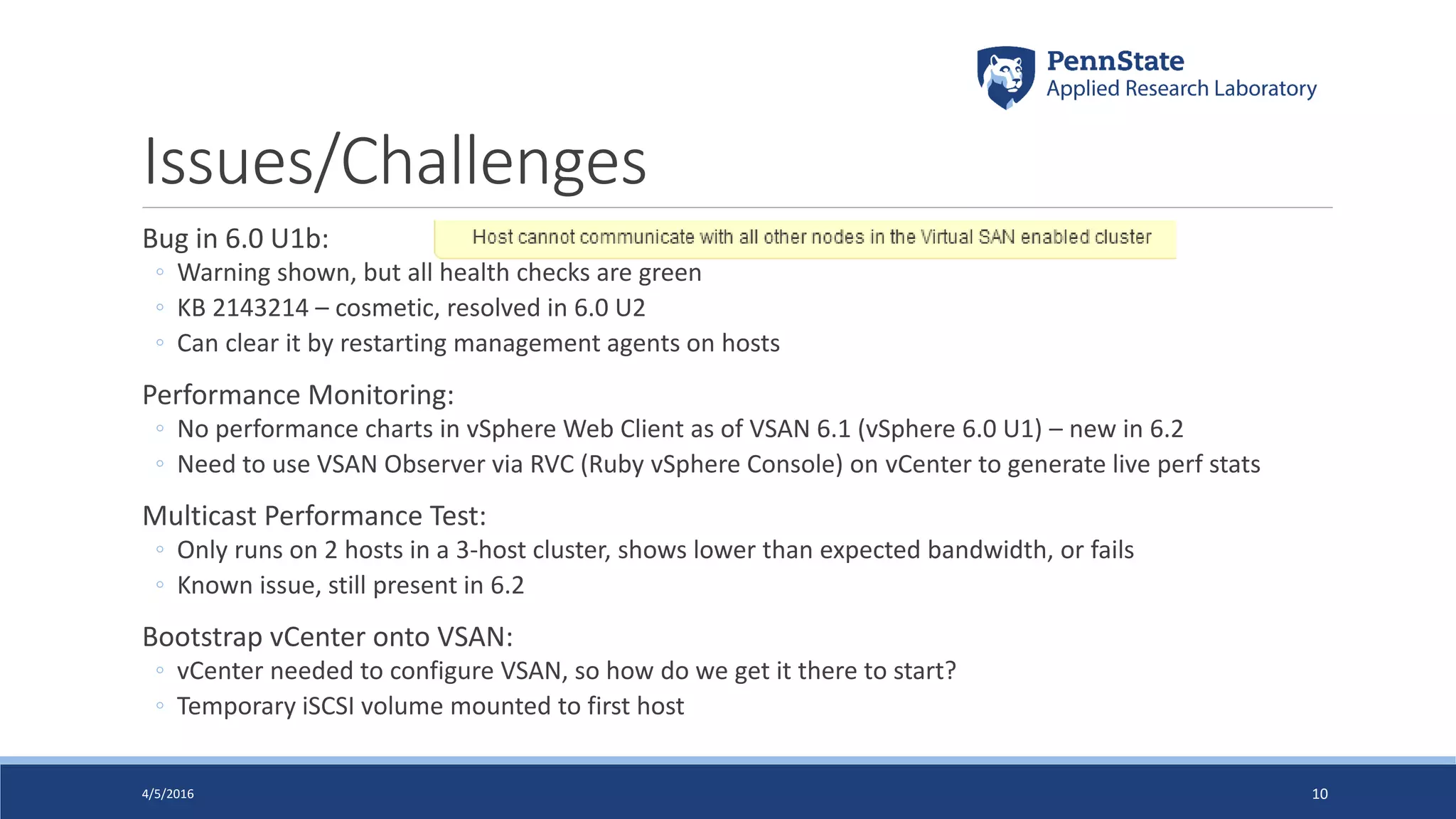
Issues/Challenges
Bug in 6.0 U1b:
◦ Warning shown, but all health checks are green
◦ KB 2143214 – cosmetic, resolved in 6.0 U2
◦ Can clear it by restarting management agents on hosts
Performance Monitoring:
◦ No performance charts in vSphere Web Client as of VSAN 6.1 (vSphere 6.0 U1) – new in 6.2
◦ Need to use VSAN Observer via RVC (Ruby vSphere Console) on vCenter to generate live perf stats
Multicast Performance Test:
◦ Only runs on 2 hosts in a 3-host cluster, shows lower than expected bandwidth, or fails
◦ Known issue, still present in 6.2
Bootstrap vCenter onto VSAN:
◦ vCenter needed to configure VSAN, so how do we get it there to start?
◦ Temporary iSCSI volume mounted to first host
4/5/2016 10
Tips
Check the HCL!
◦ Always important with vSphere, even more with VSAN
Read the VSAN 6.0 Design and Sizing Guide
◦ http://www.vmware.com/files/pdf/products/vsan/VSAN_Design_and_Sizing_Guide.pdf
Use the VSAN Sizing Calculator
◦ https://vsantco.vmware.com
Document your shutdown & startup procedures
◦ Potential chicken & egg problem with vCenter running on VSAN
◦ http://www.virtuallyghetto.com/2014/07/quick-tip-steps-to-shutdownstartup-vsan-cluster-wvcenter-
running-on-vsan-datastore.html
Set up alerts!
◦ Lots available, set notifications for anything health-related
4/5/2016 11
Thank You!
Questions?
Contact:
Twitter: @vDanBarr
LinkedIn: https://www.linkedin.com/in/vdanbarr
Email: drb45@psu.edu
4/5/2016 12
This document was created using the official VMware icon and diagram library. Copyright © 2012 VMware, Inc. All rights reserved. This
product is protected by U.S. and international copyright and intellectual property laws. VMware products are covered by one or more
patents listed at http://www.vmware.com/go/patents.
VMware does not endorse or make any representations about third party information included in this document, nor does the inclusion
of any VMware icon or diagram in this document imply such an endorsement.

CPAVMUG Presentation 2016-04-06 - Management Cluster

  • 1.
    Building a Management Clusterwith VSAN DAN BARR, PENN STATE ARL CENTRAL PA VMUG, APRIL 6, 2016 4/5/2016 1
  • 2.
    Why a ManagementCluster? Dedicated resources for infrastructure management and monitoring Isolated from production & development workloads for security and performance Ability to troubleshoot production issues out-of-band As vSphere environment grows, so do management and monitoring needs Getting vCloud Suite licensing – even more management appliances 4/5/2016 2 Source: https://vvirtual.wordpress.com/2011/12/01/manage-your-virtual-environment- wisely-separate-your-vmware-vsphere-management-servers-into-different-cluster/
  • 3.
    Why VSAN? Wanted dedicatedstorage for the management cluster ◦ If production storage is having a bad day, tools to fix it are still available ◦ Reduce I/O load on primary storage Limited choices for dedicated arrays with decent capacity & HA for small $$ VSAN integrated into vSphere – no additional management tools Simple 4/5/2016 3
  • 4.
    Workloads vSphere Management: ◦ vCenter(VCSA + external PSC), VUM, vSphere Replication Storage/Server Management: ◦ Compellent Enterprise Manager, Dell OpenManage, EMC InsightIQ, WhatsUp Network Management: ◦ Switch NAC & policy manager, firewall monitoring, IPAM, vulnerability scanners Supporting Infrastructure: ◦ AD, DNS, MS SQL Server, management jump servers (RDS hosts) Total: 30 VMs, 74 vCPU, 170 GB RAM, 6.2 TB disk Future: SRM, vRealize Suite, NSX = 35 vCPU, 90 GB RAM, 600 GB disk 4/5/2016 4
  • 5.
    Hardware Targeted 2:1 vCPU:LogicalCore ratio, 12 TB usable storage Factored in current & future workloads plus organic growth All components on VSAN hardware compatibility list Modest IO needs, so Hybrid VSAN chosen over all-flash Three Dell R730 2U servers, each with: ◦ 24 cores (2x Intel E5-2680 v3), 256 GB RAM ◦ 4x 10GbE (2x Intel X710) ◦ PERC H730 controller in HBA Mode ◦ 2x 400 GB SATA mix-use MLC SSD (cache) ◦ 8x 1 TB 7200 RPM NL-SAS (capacity) 24 TB raw capacity, 12 TB usable with VSAN FTT=1 (mirroring) 4/5/2016 5 Source: dell.com
  • 6.
    Disk Layout E ST 6 74 52 30 1 14 1512 1310 118 9 SAS 1TB7.2k SAS 400GBSSD SAS 400GBSSD SAS 1TB7.2k SAS 1TB7.2k SAS 1TB7.2k SAS 1TB7.2k SAS 1TB7.2k SAS 1TB7.2k SAS 1TB7.2k 4/5/2016 6 Disk Group 1 Disk Group 2 Two Disk groups per host, each with 1x 400 GB SSD cache disk & 4x 1 TB HDD capacity disks 20% SSD to usable capacity ratio (best practice is 10% minimum) Room to expand each disk group to 7 capacity disks (max for a VSAN disk group), or could add 3rd DG
  • 7.
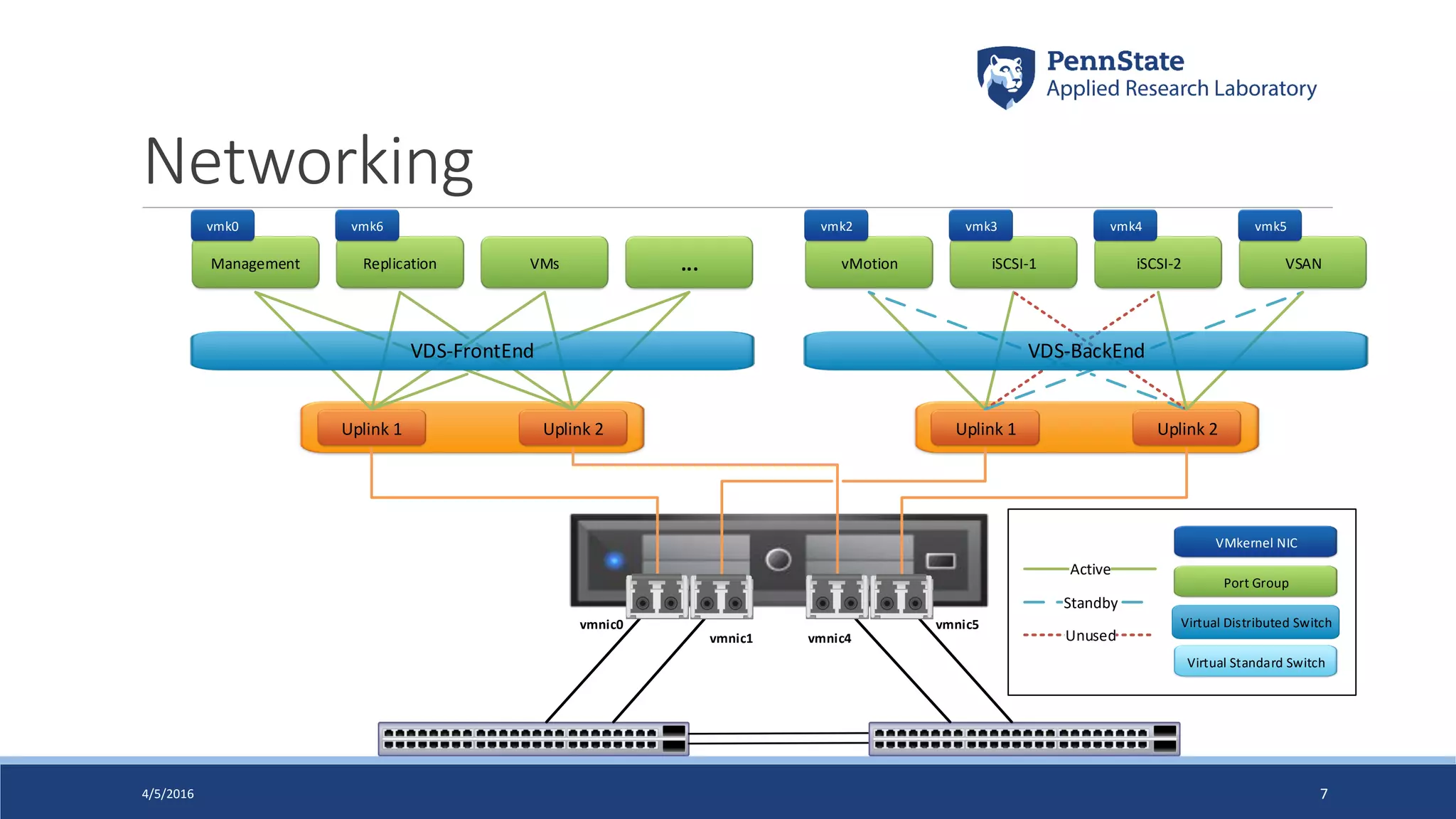
    Networking 4/5/2016 7 vmnic0 vmnic1 vmnic4 vmnic5 VMsManagementReplication ... iSCSI-2vMotion iSCSI-1 VSAN Uplink 1 Uplink 2 Uplink 1 Uplink 2 Unused Standby Active vmk0 vmk6 vmk2 vmk3 vmk4 vmk5 VDS-FrontEnd VDS-BackEnd Port Group Virtual Distributed Switch Virtual Standard Switch VMkernel NIC
  • 8.
    Health Checks VSAN HealthCheck Plugin integrated with vSphere 6.0 Update 1 ◦ Checks health of all components ◦ Includes checking compatibility of hardware, drivers, firmware ◦ Proactive tests: VM creation, multicast performance, and storage performance 4/5/2016 8
  • 9.
    Performance Multiple test workloadsavailable Results using “70/30 read/write mix, realistic, optimal flash cache usage” test: 41,896 IOPS, 163.7 MB/sec throughput, 1.1ms avg. latency 4/5/2016 9
  • 10.
    Issues/Challenges Bug in 6.0U1b: ◦ Warning shown, but all health checks are green ◦ KB 2143214 – cosmetic, resolved in 6.0 U2 ◦ Can clear it by restarting management agents on hosts Performance Monitoring: ◦ No performance charts in vSphere Web Client as of VSAN 6.1 (vSphere 6.0 U1) – new in 6.2 ◦ Need to use VSAN Observer via RVC (Ruby vSphere Console) on vCenter to generate live perf stats Multicast Performance Test: ◦ Only runs on 2 hosts in a 3-host cluster, shows lower than expected bandwidth, or fails ◦ Known issue, still present in 6.2 Bootstrap vCenter onto VSAN: ◦ vCenter needed to configure VSAN, so how do we get it there to start? ◦ Temporary iSCSI volume mounted to first host 4/5/2016 10
  • 11.
    Tips Check the HCL! ◦Always important with vSphere, even more with VSAN Read the VSAN 6.0 Design and Sizing Guide ◦ http://www.vmware.com/files/pdf/products/vsan/VSAN_Design_and_Sizing_Guide.pdf Use the VSAN Sizing Calculator ◦ https://vsantco.vmware.com Document your shutdown & startup procedures ◦ Potential chicken & egg problem with vCenter running on VSAN ◦ http://www.virtuallyghetto.com/2014/07/quick-tip-steps-to-shutdownstartup-vsan-cluster-wvcenter- running-on-vsan-datastore.html Set up alerts! ◦ Lots available, set notifications for anything health-related 4/5/2016 11
  • 12.
    Thank You! Questions? Contact: Twitter: @vDanBarr LinkedIn:https://www.linkedin.com/in/vdanbarr Email: drb45@psu.edu 4/5/2016 12 This document was created using the official VMware icon and diagram library. Copyright © 2012 VMware, Inc. All rights reserved. This product is protected by U.S. and international copyright and intellectual property laws. VMware products are covered by one or more patents listed at http://www.vmware.com/go/patents. VMware does not endorse or make any representations about third party information included in this document, nor does the inclusion of any VMware icon or diagram in this document imply such an endorsement.