©2018 VMware, Inc.
VMware and HCI
vSAN Software Defined Storage
Senior Systems Engineer
October 2018
Pavel Kovář
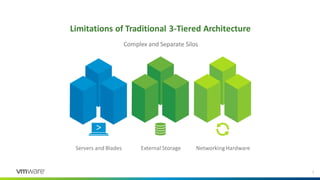
Complex and Separate Silos
Servers and Blades External Storage Networking Hardware
Limitations of Traditional 3-Tiered Architecture
2
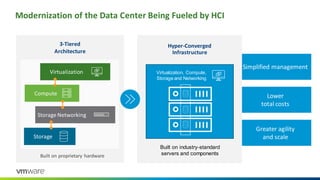
Modernization of the Data Center Being Fueled by HCI
3-Tiered
Architecture
Built on proprietary hardware
Virtualization
Compute
Storage Networking
Storage
Greater agility
and scale
Lower
total costs
Simplified management
Built on industry-standard
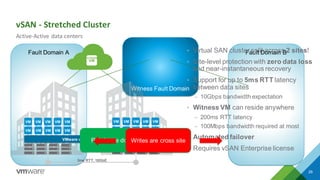
servers and components
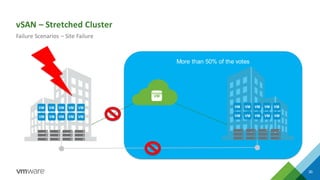
Hyper-Converged
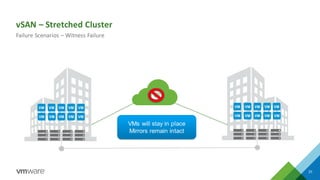
Infrastructure
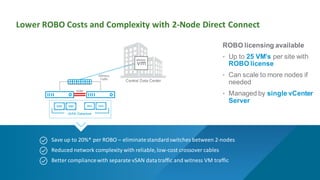
Virtualization, Compute,
Storage and Networking
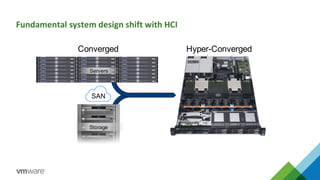
Fundamental system design shift with HCI
Storage
Servers
Converged
SAN
Hyper-Converged
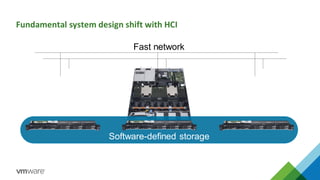
Fundamental system design shift with HCI
Fast network
Scale-out Scale-out
Software-defined storage
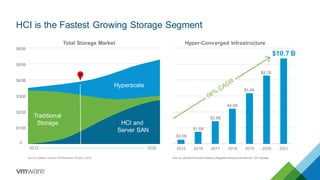
HCI is the Fastest Growing Storage Segment
Hyperscale
HCI and
Server SAN
Traditional
Storage
2012 2026 2015 2016 2017 2018 2019 2020 2021
$10.7 B
$4.4B
$2.8B
$1.5B
$0.5B
0
$10B
$20B
$30B
$40B
$50B
Total Storage Market
Source: Gartner Forecast Analysis: Integrated Systems Worldw ide, 1Q17 UpdateSource: Wikibon Server SANResearch Project, 2016
$60B
$8.7B
Hyper-Converged Infrastructure
$6.4B
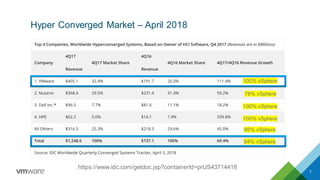
Hyper Converged Market – April 2018
7
https://www.idc.com/getdoc.jsp?containerId=prUS43714418
78% vSphere
100% vSphere
100% vSphere
100% vSphere
94% vSphere
95% vSphere
VMware vSAN
Software Defined Storage
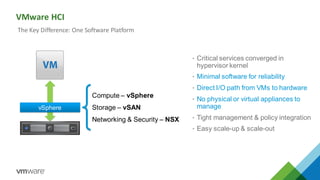
VMware HCI
9
• Critical services converged in
hypervisor kernel
• Minimal software for reliability
• Direct I/O path from VMs to hardware
• No physical or virtual appliances to
manage
• Tight management & policy integration
• Easy scale-up & scale-out
vSphere
Compute – vSphere
Storage – vSAN
Networking & Security – NSX
The Key Difference: One Software Platform
10Confidential │ ©2018 VMw are, Inc.
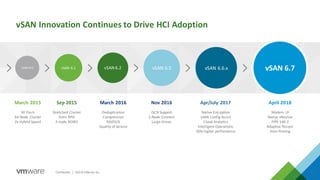
vSAN 6.0 vSAN 6.1 vSAN6.2 vSAN 6.5 vSAN 6.6.x vSAN 6.7
March 2015
All Flash
64 Node Cluster
2x Hybrid Speed
Sep 2015
Stretched Cluster
5min RPO
2-node ROBO
March 2016
Deduplication
Compression
RAID5/6
Quality of Service
Nov 2016
iSCSI Support
2-Node Connect
Large Drives
vSAN Innovation Continues to Drive HCI Adoption
Apr/July 2017
Native Encryption
vSAN Config Assist
Cloud Analytics
Intelligent Operations
50% higher performance
April 2018
Modern UI
Native vRealize
FIPS 140-2
Adaptive Resync
Host Pinning
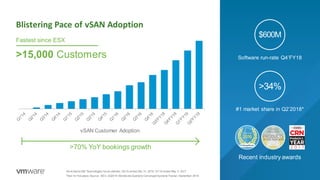
Blistering Pace of vSAN Adoption
vSAN Customer Adoption
>70% YoY bookings growth
>15,000 Customers
Fastest since ESX
Sw itched to Dell Technologies fiscalcalendar. Q4’16 ended Dec 31, 2016. Q1’18 ended May 5, 2017
*Tied for first place; Source: IDC’s 2Q2018 Worldw ide Quarterly Converged Systems Tracker, September 2018
Software run-rate Q4’FY18
$600M
Recent industry awards
#1 market share in Q2’2018*
>34%
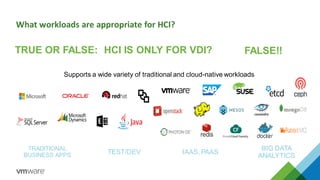
What workloads are appropriate for HCI?
TRUE OR FALSE: HCI IS ONLY FOR VDI? FALSE!!
Supports a wide variety of traditional and cloud-native workloads
TRADITIONAL
BUSINESS APPS TEST/DEV IAAS, PAAS
BIG DATA
ANALYTICS
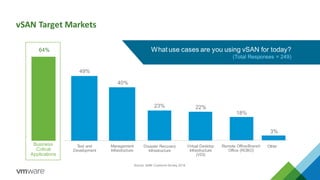
vSAN Target Markets
What use cases are you using vSAN for today?
(Total Responses = 249)
Source: vSAN Customer Survey, 2016
Business
Critical
Applications
Test and
Development
Management
Infrastructure
Disaster Recovery
Infrastructure
Virtual Desktop
Infrastructure
(VDI)
Remote Office/Branch
Office (ROBO)
Other
49%
40%
23% 22%
18%
3%
64%
15Confidential │ ©2018 VMw are, Inc.
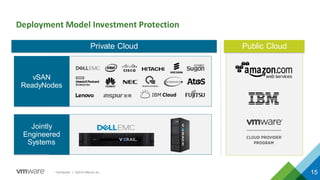
Deployment Model Investment Protection
15
vSAN
ReadyNodes
Public CloudPrivate Cloud
Jointly
Engineered
Systems
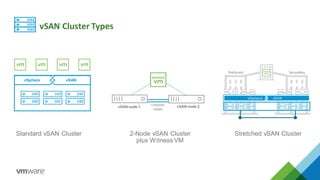
vSAN Cluster Types
Standard vSAN Cluster 2-Node vSAN Cluster
plus Witness VM
Stretched vSAN Cluster
vSphere vSAN
Preferred Secondary
Crossover
Cables
vSAN node 1 vSAN node 2
vSphere vSAN
vSphere vSAN
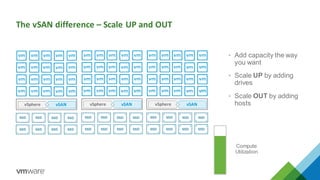
The vSAN difference – Scale UP and OUT
vSphere vSAN
• Add capacity the way
you want
• Scale UP by adding
drives
• Scale OUT by adding
hostsvSphere vSAN
Compute
Utilization
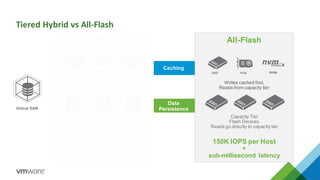
Tiered Hybrid vs All-Flash
All-Flash
150K IOPS per Host
+
sub-millisecond latency
Caching
Writes cached first,
Reads from capacity tier
Capacity Tier
Flash Devices
Reads go directly to capacity tier
SSD PCIe
Data
Persistence
Hybrid
40K IOPS per Host
Read and Write Cache
Capacity Tier
SAS / NL-SAS / SATA
SSD PCIe Ultra DIMM
Virtual SAN
NVMe
21Confidential │ ©2018VMware,Inc.
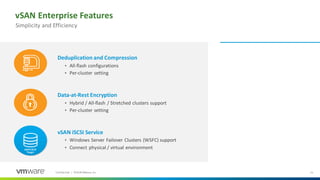
vSAN Enterprise Features
Deduplication and Compression
• All-flash configurations
• Per-cluster setting
Data-at-Rest Encryption
• Hybrid / All-flash / Stretched clusters support
• Per-cluster setting
vSAN iSCSI Service
• Windows Server Failover Clusters (WSFC) support
• Connect physical / virtual environment
Simplicity and Efficiency
vSAN iSCSI
Target
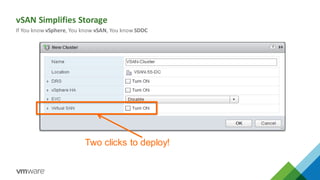
Two clicks to deploy!
vSAN Simplifies Storage
If You know vSphere, You know vSAN, You know SDDC
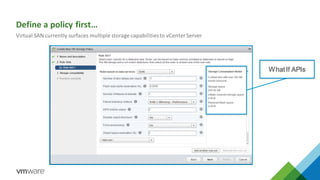
Define a policy first…
Virtual SAN currently surfaces multiple storage capabilitiesto vCenterServer
WhatIf APIs
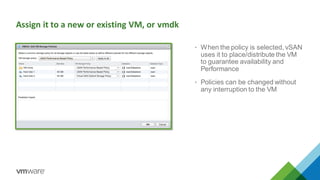
Assign it to a new or existing VM, or vmdk
• When the policy is selected, vSAN
uses it to place/distribute the VM
to guarantee availability and
Performance
• Policies can be changed without
any interruption to the VM
25©2018 VMw are, Inc.
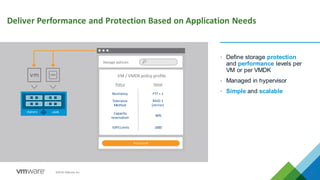
Deliver Performance and Protection Based on Application Needs
• Define storage protection
and performance levels per
VM or per VMDK
• Managed in hypervisor
• Simple and scalable
Storage policies
VM / VMDK policy profile
PolicyGold
Resiliency
Capacity
reservation
IOPSLimits
Value
FTT = 1
RAID-1
(mirror)
1000
Policy
Tolerance
Method
40%
vSphere vSAN
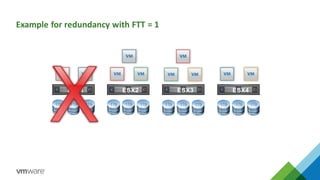
Example for redundancy with FTT = 1
1TB 1TB 1TB 1TB 1TB 1TB 1TB 1TB 1TB
ESX1 ESX2 ESX3
1TB 1TB 1TB
ESX4
Witness Fault Domain
Fault Domain BFault Domain A
vSAN - Stretched Cluster
29
Active-Active data centers
• Virtual SAN cluster split across 2 sites!
• Site-level protection with zero data loss
and near-instantaneous recovery
• Support for up to 5ms RTT latency
between data sites
– 10Gbps bandwidth expectation
• Witness VM can reside anywhere
– 200ms RTT latency
– 100Mbps bandwidth required at most
• Automated failover
• Requires vSAN Enterprise license
witness
5ms RTT, 10GbE
Today
VMware vSphere & Virtual SANReads are done locally to the VMWrites are cross site
More than 50% of the votes
vSAN – Stretched Cluster
30
Failure Scenarios – Site Failure
witness
Today
vSAN – Stretched Cluster
31
Failure Scenarios – Witness Failure
witness
Today
VMs will stay in place
Mirrors remain intact
Save up to 20%* per ROBO – eliminatestandardswitches between 2-nodes
Reduced network complexity with reliable,low-cost crossover cables
Better compliancewith separate vSAN datatraffic and witness VM traffic
Central Data Center
Lower ROBO Costs and Complexity with 2-Node Direct Connect
vSAN Datastore
vSAN
Witness
Traffic
witness
ROBO licensing available
• Up to 25 VM’s per site with
ROBO license
• Can scale to more nodes if
needed
• Managed by single vCenter
Server
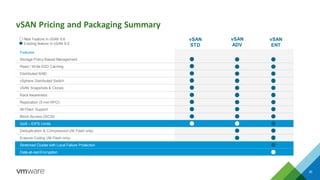
vSAN Pricing and Packaging Summary
35
vSAN
STD
vSAN
ADV
vSAN
ENT
Features
Storage Policy-Based Management
Read / Write SSD Caching
Distributed RAID
vSphere Distributed Switch
vSAN Snapshots & Clones
Rack Awareness
Replication (5 min RPO)
All-Flash Support
Block Access (iSCSI)
QoS – IOPS Limits
Deduplication & Compression (All Flash only)
Erasure Coding (All Flash only)
Stretched Cluster with Local Failure Protection
Data-at-rest Encryption
New Feature in vSAN 6.6
Existing feature in vSAN 6.5
vSphere
Ess+
vSAN
STD
vCenter Server
Essentials
vSphere
ENT+
vSAN
ENT
vROPs ADV
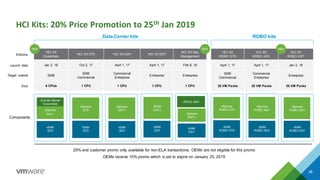
HCI Kits: 20% Price Promotion to 25th Jan 2019
36
Components
ROBO kits
vSphere
ROBO ADV
vSAN
ROBO ADV
vSphere
ROBO STD
vSAN
ROBO STD
vSphere
ROBO ADV
vSAN
ROBO ENT
Data Center kits
vSphere
ENT+
vSAN
ADV
vSphere
STD
vSAN
STD
vSOM
ENT+
vSAN
ENT
HCI Kit
Essentials
HCI Kit STD HCI Kit ADV HCI Kit ENT
HCI Kit Ops
Management
Jan 2, 18 Oct 2, 17 April 1, 17 April 1, 17 Feb 8, 18
SMB
SMB
Commercial
Commercial
Enterprise
Enterprise Enterprise
6 CPUs 1 CPU 1 CPU 1 CPU 1 CPU
HCI Kit
ROBO STD
HCI Kit
ROBO ADV
HCI Kit
ROBO ENT
April 1, 17 April 1, 17 Jan 2, 18
SMB
Commercial
Commercial
Enterprise
Enterprise
25 VM Packs 25 VM Packs 25 VM Packs
NEW NEW NEW
20% end customer promo only available for non-ELA transactions; OEMs are not eligible for this promo
OEMs receive 10% promo which is set to expire on January 25, 2019
Editions
Launch date
Target market
Size
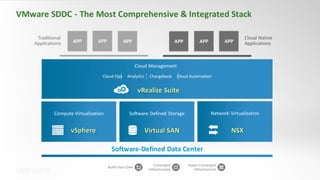
VMware SDDC - The Most Comprehensive & Integrated Stack
37
Software-Defined Data Center
Traditional
Applications
Cloud Native
ApplicationsAPP APP APPAPP APP APP
Compute Virtualization
vSphere
Software Defined Storage
Virtual SAN
Network Virtualization
NSX
Cloud Ops Analytics Chargeback Cloud Automation
vRealize Suite
Cloud Management
Build-Your-Own
Converged
Infrastructure
Hyper-Converged
Infrastructure
Confidential │ ©2018 VMw are, Inc.
Thank You
Pavel Kovář
pkovar@vmware.com
+420 731 435 652

Proč je vSAN č. 1 v software defined storage a HCI

  • 1.
    ©2018 VMware, Inc. VMwareand HCI vSAN Software Defined Storage Senior Systems Engineer October 2018 Pavel Kovář
  • 2.
    Complex and SeparateSilos Servers and Blades External Storage Networking Hardware Limitations of Traditional 3-Tiered Architecture 2
  • 3.
    Modernization of theData Center Being Fueled by HCI 3-Tiered Architecture Built on proprietary hardware Virtualization Compute Storage Networking Storage Greater agility and scale Lower total costs Simplified management Built on industry-standard servers and components Hyper-Converged Infrastructure Virtualization, Compute, Storage and Networking
  • 4.
    Fundamental system designshift with HCI Storage Servers Converged SAN Hyper-Converged
  • 5.
    Fundamental system designshift with HCI Fast network Scale-out Scale-out Software-defined storage
  • 6.
    HCI is theFastest Growing Storage Segment Hyperscale HCI and Server SAN Traditional Storage 2012 2026 2015 2016 2017 2018 2019 2020 2021 $10.7 B $4.4B $2.8B $1.5B $0.5B 0 $10B $20B $30B $40B $50B Total Storage Market Source: Gartner Forecast Analysis: Integrated Systems Worldw ide, 1Q17 UpdateSource: Wikibon Server SANResearch Project, 2016 $60B $8.7B Hyper-Converged Infrastructure $6.4B
  • 7.
    Hyper Converged Market– April 2018 7 https://www.idc.com/getdoc.jsp?containerId=prUS43714418 78% vSphere 100% vSphere 100% vSphere 100% vSphere 94% vSphere 95% vSphere
  • 8.
  • 9.
    VMware HCI 9 • Criticalservices converged in hypervisor kernel • Minimal software for reliability • Direct I/O path from VMs to hardware • No physical or virtual appliances to manage • Tight management & policy integration • Easy scale-up & scale-out vSphere Compute – vSphere Storage – vSAN Networking & Security – NSX The Key Difference: One Software Platform
  • 10.
    10Confidential │ ©2018VMw are, Inc. vSAN 6.0 vSAN 6.1 vSAN6.2 vSAN 6.5 vSAN 6.6.x vSAN 6.7 March 2015 All Flash 64 Node Cluster 2x Hybrid Speed Sep 2015 Stretched Cluster 5min RPO 2-node ROBO March 2016 Deduplication Compression RAID5/6 Quality of Service Nov 2016 iSCSI Support 2-Node Connect Large Drives vSAN Innovation Continues to Drive HCI Adoption Apr/July 2017 Native Encryption vSAN Config Assist Cloud Analytics Intelligent Operations 50% higher performance April 2018 Modern UI Native vRealize FIPS 140-2 Adaptive Resync Host Pinning
  • 11.
    Blistering Pace ofvSAN Adoption vSAN Customer Adoption >70% YoY bookings growth >15,000 Customers Fastest since ESX Sw itched to Dell Technologies fiscalcalendar. Q4’16 ended Dec 31, 2016. Q1’18 ended May 5, 2017 *Tied for first place; Source: IDC’s 2Q2018 Worldw ide Quarterly Converged Systems Tracker, September 2018 Software run-rate Q4’FY18 $600M Recent industry awards #1 market share in Q2’2018* >34%
  • 12.
    What workloads areappropriate for HCI? TRUE OR FALSE: HCI IS ONLY FOR VDI? FALSE!! Supports a wide variety of traditional and cloud-native workloads TRADITIONAL BUSINESS APPS TEST/DEV IAAS, PAAS BIG DATA ANALYTICS
  • 13.
    vSAN Target Markets Whatuse cases are you using vSAN for today? (Total Responses = 249) Source: vSAN Customer Survey, 2016 Business Critical Applications Test and Development Management Infrastructure Disaster Recovery Infrastructure Virtual Desktop Infrastructure (VDI) Remote Office/Branch Office (ROBO) Other 49% 40% 23% 22% 18% 3% 64%
  • 14.
    15Confidential │ ©2018VMw are, Inc. Deployment Model Investment Protection 15 vSAN ReadyNodes Public CloudPrivate Cloud Jointly Engineered Systems
  • 15.
    vSAN Cluster Types StandardvSAN Cluster 2-Node vSAN Cluster plus Witness VM Stretched vSAN Cluster vSphere vSAN Preferred Secondary Crossover Cables vSAN node 1 vSAN node 2 vSphere vSAN
  • 16.
    vSphere vSAN The vSANdifference – Scale UP and OUT vSphere vSAN • Add capacity the way you want • Scale UP by adding drives • Scale OUT by adding hostsvSphere vSAN Compute Utilization
  • 17.
    Tiered Hybrid vsAll-Flash All-Flash 150K IOPS per Host + sub-millisecond latency Caching Writes cached first, Reads from capacity tier Capacity Tier Flash Devices Reads go directly to capacity tier SSD PCIe Data Persistence Hybrid 40K IOPS per Host Read and Write Cache Capacity Tier SAS / NL-SAS / SATA SSD PCIe Ultra DIMM Virtual SAN NVMe
  • 18.
    21Confidential │ ©2018VMware,Inc. vSANEnterprise Features Deduplication and Compression • All-flash configurations • Per-cluster setting Data-at-Rest Encryption • Hybrid / All-flash / Stretched clusters support • Per-cluster setting vSAN iSCSI Service • Windows Server Failover Clusters (WSFC) support • Connect physical / virtual environment Simplicity and Efficiency vSAN iSCSI Target
  • 19.
    Two clicks todeploy! vSAN Simplifies Storage If You know vSphere, You know vSAN, You know SDDC
  • 20.
    Define a policyfirst… Virtual SAN currently surfaces multiple storage capabilitiesto vCenterServer WhatIf APIs
  • 21.
    Assign it toa new or existing VM, or vmdk • When the policy is selected, vSAN uses it to place/distribute the VM to guarantee availability and Performance • Policies can be changed without any interruption to the VM
  • 22.
    25©2018 VMw are,Inc. Deliver Performance and Protection Based on Application Needs • Define storage protection and performance levels per VM or per VMDK • Managed in hypervisor • Simple and scalable Storage policies VM / VMDK policy profile PolicyGold Resiliency Capacity reservation IOPSLimits Value FTT = 1 RAID-1 (mirror) 1000 Policy Tolerance Method 40% vSphere vSAN
  • 23.
    Example for redundancywith FTT = 1 1TB 1TB 1TB 1TB 1TB 1TB 1TB 1TB 1TB ESX1 ESX2 ESX3 1TB 1TB 1TB ESX4
  • 24.
    Witness Fault Domain FaultDomain BFault Domain A vSAN - Stretched Cluster 29 Active-Active data centers • Virtual SAN cluster split across 2 sites! • Site-level protection with zero data loss and near-instantaneous recovery • Support for up to 5ms RTT latency between data sites – 10Gbps bandwidth expectation • Witness VM can reside anywhere – 200ms RTT latency – 100Mbps bandwidth required at most • Automated failover • Requires vSAN Enterprise license witness 5ms RTT, 10GbE Today VMware vSphere & Virtual SANReads are done locally to the VMWrites are cross site
  • 25.
    More than 50%of the votes vSAN – Stretched Cluster 30 Failure Scenarios – Site Failure witness Today
  • 26.
    vSAN – StretchedCluster 31 Failure Scenarios – Witness Failure witness Today VMs will stay in place Mirrors remain intact
  • 27.
    Save up to20%* per ROBO – eliminatestandardswitches between 2-nodes Reduced network complexity with reliable,low-cost crossover cables Better compliancewith separate vSAN datatraffic and witness VM traffic Central Data Center Lower ROBO Costs and Complexity with 2-Node Direct Connect vSAN Datastore vSAN Witness Traffic witness ROBO licensing available • Up to 25 VM’s per site with ROBO license • Can scale to more nodes if needed • Managed by single vCenter Server
  • 28.
    vSAN Pricing andPackaging Summary 35 vSAN STD vSAN ADV vSAN ENT Features Storage Policy-Based Management Read / Write SSD Caching Distributed RAID vSphere Distributed Switch vSAN Snapshots & Clones Rack Awareness Replication (5 min RPO) All-Flash Support Block Access (iSCSI) QoS – IOPS Limits Deduplication & Compression (All Flash only) Erasure Coding (All Flash only) Stretched Cluster with Local Failure Protection Data-at-rest Encryption New Feature in vSAN 6.6 Existing feature in vSAN 6.5
  • 29.
    vSphere Ess+ vSAN STD vCenter Server Essentials vSphere ENT+ vSAN ENT vROPs ADV HCIKits: 20% Price Promotion to 25th Jan 2019 36 Components ROBO kits vSphere ROBO ADV vSAN ROBO ADV vSphere ROBO STD vSAN ROBO STD vSphere ROBO ADV vSAN ROBO ENT Data Center kits vSphere ENT+ vSAN ADV vSphere STD vSAN STD vSOM ENT+ vSAN ENT HCI Kit Essentials HCI Kit STD HCI Kit ADV HCI Kit ENT HCI Kit Ops Management Jan 2, 18 Oct 2, 17 April 1, 17 April 1, 17 Feb 8, 18 SMB SMB Commercial Commercial Enterprise Enterprise Enterprise 6 CPUs 1 CPU 1 CPU 1 CPU 1 CPU HCI Kit ROBO STD HCI Kit ROBO ADV HCI Kit ROBO ENT April 1, 17 April 1, 17 Jan 2, 18 SMB Commercial Commercial Enterprise Enterprise 25 VM Packs 25 VM Packs 25 VM Packs NEW NEW NEW 20% end customer promo only available for non-ELA transactions; OEMs are not eligible for this promo OEMs receive 10% promo which is set to expire on January 25, 2019 Editions Launch date Target market Size
  • 30.
    VMware SDDC -The Most Comprehensive & Integrated Stack 37 Software-Defined Data Center Traditional Applications Cloud Native ApplicationsAPP APP APPAPP APP APP Compute Virtualization vSphere Software Defined Storage Virtual SAN Network Virtualization NSX Cloud Ops Analytics Chargeback Cloud Automation vRealize Suite Cloud Management Build-Your-Own Converged Infrastructure Hyper-Converged Infrastructure
  • 31.
    Confidential │ ©2018VMw are, Inc. Thank You Pavel Kovář pkovar@vmware.com +420 731 435 652