VMware VSAN
Introduction
VMware VSAN
1. Introduction to vSAN
2. Key Features of vSAN
3. Benefits of vSAN
4. Architecture of vSAN
5. vSAN Data Services
6. vSAN Licensing Options
VMware VSAN
• What is vSAN?
• VMware vSAN is a popular storage solution provided by VMware in order to eliminate the requirement of additional
storage containers using local server storage. VSAN stands for virtual storage area network and it basically
abstracts the local level storage of ESXi hosts and make a pool out of it. It is subsequently used as shared storage.
As in case, you are required to use the local storage space, there would not be any requirement to arrange extra
storage boxes in order to store the files, which eventually helps in bringing down the TCO i.e. Total Cost of
Ownership.
• VMware vSAN is a software-defined storage solution that seamlessly integrates with vSphere, transforming your underlying
storage infrastructure.
 It aggregates local storage resources from ESXi hosts to create a distributed shared storage platform.
 vSAN eliminates the need for traditional storage arrays, reducing costs and simplifying management.
VMware VSAN
• Key Features of vSAN
• V Sphere Integration
• Simple Configuration:
• Flexibility
• Policy of Storage:
• Compression and Duplication:
• Encryption Features:
• All Hybrid or Flash:
• Integrated Data Protection
VMware VSAN
• Benefits of vSAN
• Simplified Management
• Cost Efficiency
• High Performance
• Scalability
• Data Protection and Availability
VMware VSAN
• vSAN Data Services
• vSAN offers several data services to enhance storage capabilities:
1. Encryption
2. Quality of Service (QoS)
3. Deduplication and Compression
4. Erasure Coding
5. File Services (vSAN File Service)
VMware VSAN
• vSAN Licensing Options
 vSAN is available in different licensing options:
1. vSAN Standard: Provides core vSAN functionality.
2. vSAN Advanced: Adds advanced features like deduplication, compression, and stretched clustering.
3. vSAN Enterprise: Includes advanced data services and support for all-flash deployments.
4. vSAN Enterprise Plus: Offers the complete set of vSAN features and enhanced support for mission-critical workloads.
VMware VSAN
• Deployment Considerations
 Before deploying vSAN, consider the following factors:
1. Hardware Compatibility: Ensure that your hardware is on the VMware Compatibility Guide.
2. Network Requirements: Design a robust network infrastructure to support vSAN traffic.
3. Capacity Planning: Assess your storage requirements and plan for future growth.
4. Performance Considerations: Optimize your vSAN cluster for maximum performance.
VMware VSAN
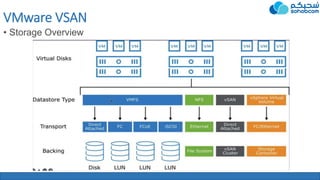
• Storage Overview
VMware VSAN
• Storage
• DAS Direct attached storage
• NAS Network attached
storage
• SAN Storage area network
VMware VSAN
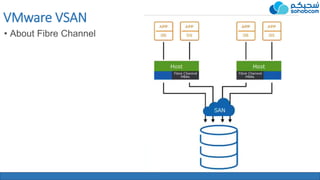
• About Fibre Channel
VMware VSAN
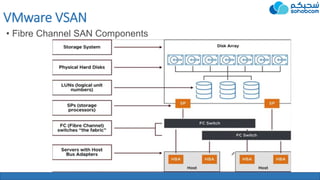
• Fibre Channel SAN Components
VMware VSAN
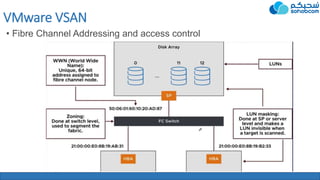
• Fibre Channel Addressing and access control
VMware VSAN
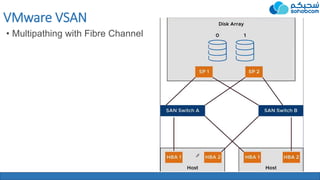
• Multipathing with Fibre Channel
VMware VSAN
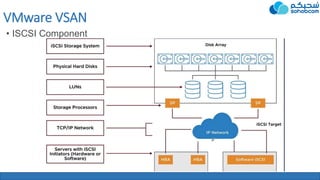
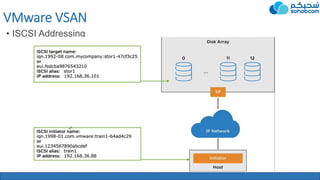
• ISCSI Component
VMware VSAN
• ISCSI Addressing
VMware VSAN
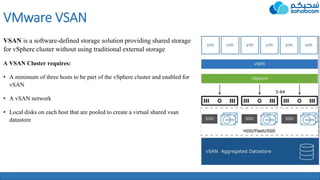
VSAN is a software-defined storage solution providing shared storage
for vSphere cluster without using traditional external storage
A VSAN Cluster requires:
• A minimum of three hosts to be part of the vSphere cluster and enabled for
vSAN
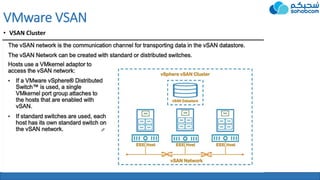
• A vSAN network
• Local disks on each host that are pooled to create a virtual shared vsan
datastore
VMware VSAN
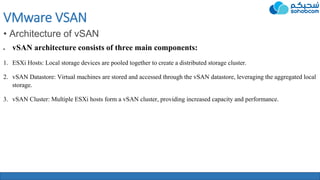
• Architecture of vSAN
 vSAN architecture consists of three main components:
1. ESXi Hosts: Local storage devices are pooled together to create a distributed storage cluster.
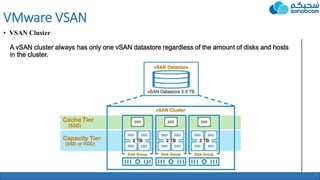
2. vSAN Datastore: Virtual machines are stored and accessed through the vSAN datastore, leveraging the aggregated local
storage.
3. vSAN Cluster: Multiple ESXi hosts form a vSAN cluster, providing increased capacity and performance.
VMware VSAN
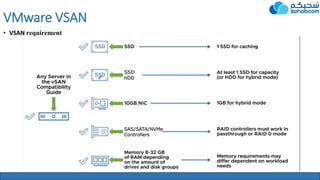
• VSAN requirement
VMware VSAN
• VSAN Cluster
VMware VSAN
• VSAN Cluster
VMware VSAN
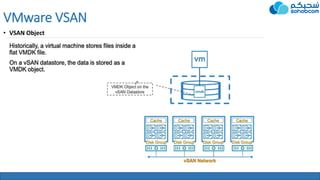
• VSAN Object
VMware VSAN
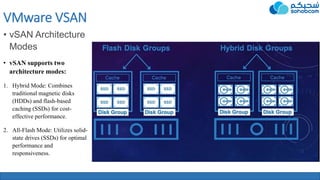
• vSAN Architecture
Modes
• vSAN supports two
architecture modes:
1. Hybrid Mode: Combines
traditional magnetic disks
(HDDs) and flash-based
caching (SSDs) for cost-
effective performance.
2. All-Flash Mode: Utilizes solid-
state drives (SSDs) for optimal
performance and
responsiveness.
VMware VSAN
• vSAN ReadyNodes
 vSAN ReadyNodes are pre-validated server configurations designed for vSAN:
1. They are built on industry-standard hardware.
2. ReadyNodes are certified to work seamlessly with vSAN.
3. They offer flexibility and choice for your vSAN deployments.
VMware VSAN
• vSAN Monitoring and Management
 vSAN provides robust monitoring and management capabilities:
1. vSphere Web Client: A centralized interface for managing your vSAN environment.
2. vRealize Operations: Enables proactive monitoring, capacity planning, and performance optimization.
3. vSAN Health Service: Monitors the health and performance of your vSAN cluster.
VMware VSAN
• vSAN Upgrades and Maintenance
 vSAN upgrades and maintenance can be performed with minimal disruption:
1. Rolling Upgrades: Upgrade hosts in a vSAN cluster one at a time, ensuring continuous availability.
2. Maintenance Mode: Evacuate virtual machines from a host temporarily for maintenance tasks.
3. vSAN Health Checks: Validate the health of your vSAN cluster before and after upgrades.
VMware VSAN
• vSAN Best Practices
 Follow these best practices for optimal vSAN deployment:
1. Design for Resilience: Use appropriate fault tolerance mechanisms.
2. Balance Workloads: Distribute virtual machines and their associated storage across hosts.
3. Optimize Network Configuration: Ensure proper network bandwidth and latency for vSAN traffic.
4. Use vSAN Performance Service: Leverage built-in performance monitoring and troubleshooting tools.
VMware VSAN
• Troubleshooting vSAN
 Address common issues and troubleshoot vSAN effectively:
1. vSAN Health Checks: Regularly run health checks to identify and resolve potential problems.
2. vSAN Observer: Use the vSAN Observer tool for in-depth performance analysis.
3. VMware Support: Engage VMware support for assistance with complex issues.
Conclusion
 In conclusion, vSAN revolutionizes storage infrastructure by providing a
software-defined, scalable, and cost-effective solution.
 With its robust features, benefits, and use cases, vSAN empowers
organizations to optimize their storage infrastructure and drive digital
transformation.
• Thank you for your attention!

VMware vSphere Vcenter Vsan presentation

  • 1.
  • 2.
    Introduction VMware VSAN 1. Introductionto vSAN 2. Key Features of vSAN 3. Benefits of vSAN 4. Architecture of vSAN 5. vSAN Data Services 6. vSAN Licensing Options
  • 3.
    VMware VSAN • Whatis vSAN? • VMware vSAN is a popular storage solution provided by VMware in order to eliminate the requirement of additional storage containers using local server storage. VSAN stands for virtual storage area network and it basically abstracts the local level storage of ESXi hosts and make a pool out of it. It is subsequently used as shared storage. As in case, you are required to use the local storage space, there would not be any requirement to arrange extra storage boxes in order to store the files, which eventually helps in bringing down the TCO i.e. Total Cost of Ownership. • VMware vSAN is a software-defined storage solution that seamlessly integrates with vSphere, transforming your underlying storage infrastructure.  It aggregates local storage resources from ESXi hosts to create a distributed shared storage platform.  vSAN eliminates the need for traditional storage arrays, reducing costs and simplifying management.
  • 4.
    VMware VSAN • KeyFeatures of vSAN • V Sphere Integration • Simple Configuration: • Flexibility • Policy of Storage: • Compression and Duplication: • Encryption Features: • All Hybrid or Flash: • Integrated Data Protection
  • 5.
    VMware VSAN • Benefitsof vSAN • Simplified Management • Cost Efficiency • High Performance • Scalability • Data Protection and Availability
  • 6.
    VMware VSAN • vSANData Services • vSAN offers several data services to enhance storage capabilities: 1. Encryption 2. Quality of Service (QoS) 3. Deduplication and Compression 4. Erasure Coding 5. File Services (vSAN File Service)
  • 7.
    VMware VSAN • vSANLicensing Options  vSAN is available in different licensing options: 1. vSAN Standard: Provides core vSAN functionality. 2. vSAN Advanced: Adds advanced features like deduplication, compression, and stretched clustering. 3. vSAN Enterprise: Includes advanced data services and support for all-flash deployments. 4. vSAN Enterprise Plus: Offers the complete set of vSAN features and enhanced support for mission-critical workloads.
  • 8.
    VMware VSAN • DeploymentConsiderations  Before deploying vSAN, consider the following factors: 1. Hardware Compatibility: Ensure that your hardware is on the VMware Compatibility Guide. 2. Network Requirements: Design a robust network infrastructure to support vSAN traffic. 3. Capacity Planning: Assess your storage requirements and plan for future growth. 4. Performance Considerations: Optimize your vSAN cluster for maximum performance.
  • 9.
  • 10.
    VMware VSAN • Storage •DAS Direct attached storage • NAS Network attached storage • SAN Storage area network
  • 11.
    VMware VSAN • AboutFibre Channel
  • 12.
    VMware VSAN • FibreChannel SAN Components
  • 13.
    VMware VSAN • FibreChannel Addressing and access control
  • 14.
    VMware VSAN • Multipathingwith Fibre Channel
  • 15.
  • 16.
  • 17.
    VMware VSAN VSAN isa software-defined storage solution providing shared storage for vSphere cluster without using traditional external storage A VSAN Cluster requires: • A minimum of three hosts to be part of the vSphere cluster and enabled for vSAN • A vSAN network • Local disks on each host that are pooled to create a virtual shared vsan datastore
  • 18.
    VMware VSAN • Architectureof vSAN  vSAN architecture consists of three main components: 1. ESXi Hosts: Local storage devices are pooled together to create a distributed storage cluster. 2. vSAN Datastore: Virtual machines are stored and accessed through the vSAN datastore, leveraging the aggregated local storage. 3. vSAN Cluster: Multiple ESXi hosts form a vSAN cluster, providing increased capacity and performance.
  • 19.
  • 20.
  • 21.
  • 22.
  • 23.
    VMware VSAN • vSANArchitecture Modes • vSAN supports two architecture modes: 1. Hybrid Mode: Combines traditional magnetic disks (HDDs) and flash-based caching (SSDs) for cost- effective performance. 2. All-Flash Mode: Utilizes solid- state drives (SSDs) for optimal performance and responsiveness.
  • 24.
    VMware VSAN • vSANReadyNodes  vSAN ReadyNodes are pre-validated server configurations designed for vSAN: 1. They are built on industry-standard hardware. 2. ReadyNodes are certified to work seamlessly with vSAN. 3. They offer flexibility and choice for your vSAN deployments.
  • 25.
    VMware VSAN • vSANMonitoring and Management  vSAN provides robust monitoring and management capabilities: 1. vSphere Web Client: A centralized interface for managing your vSAN environment. 2. vRealize Operations: Enables proactive monitoring, capacity planning, and performance optimization. 3. vSAN Health Service: Monitors the health and performance of your vSAN cluster.
  • 26.
    VMware VSAN • vSANUpgrades and Maintenance  vSAN upgrades and maintenance can be performed with minimal disruption: 1. Rolling Upgrades: Upgrade hosts in a vSAN cluster one at a time, ensuring continuous availability. 2. Maintenance Mode: Evacuate virtual machines from a host temporarily for maintenance tasks. 3. vSAN Health Checks: Validate the health of your vSAN cluster before and after upgrades.
  • 27.
    VMware VSAN • vSANBest Practices  Follow these best practices for optimal vSAN deployment: 1. Design for Resilience: Use appropriate fault tolerance mechanisms. 2. Balance Workloads: Distribute virtual machines and their associated storage across hosts. 3. Optimize Network Configuration: Ensure proper network bandwidth and latency for vSAN traffic. 4. Use vSAN Performance Service: Leverage built-in performance monitoring and troubleshooting tools.
  • 28.
    VMware VSAN • TroubleshootingvSAN  Address common issues and troubleshoot vSAN effectively: 1. vSAN Health Checks: Regularly run health checks to identify and resolve potential problems. 2. vSAN Observer: Use the vSAN Observer tool for in-depth performance analysis. 3. VMware Support: Engage VMware support for assistance with complex issues.
  • 29.
    Conclusion  In conclusion,vSAN revolutionizes storage infrastructure by providing a software-defined, scalable, and cost-effective solution.  With its robust features, benefits, and use cases, vSAN empowers organizations to optimize their storage infrastructure and drive digital transformation. • Thank you for your attention!