
© 2010 VMware Inc. All rights reserved
Welcome to the
CZ VMUG
Meeting
4 December 2017
2
The dark side of stretched clusters
Andrea Mauro – VCDX & vExpert
http://vinfrastructure.it/en/
Italian VMUG Founder and Board Member
http://www.vmug.it
3
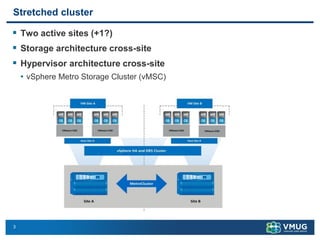
Stretched cluster
▪ Two active sites (+1?)
▪ Storage architecture cross-site
▪ Hypervisor architecture cross-site
• vSphere Metro Storage Cluster (vMSC)
4
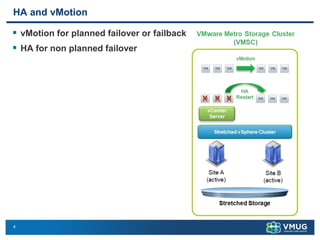
HA and vMotion
▪ vMotion for planned failover or failback
▪ HA for non planned failover
5
Requirements and limitations
▪ Networking
• Higher latency in vMotion supported in vSphere Enterprise Plus
• although Enterprise Plus requirement is no longer indicated in vSphere 6.x
• stretched cluster not geographically?
• ESXi vSphere vMotion network requirements:
• minimum link bandwidth of 250Mbps
• maximum supported network latency between sites should be around 10ms round-trip
time (RTT)
• Note that vSphere vMotion supports a maximum of 150ms latency as of vSphere
6.0, but this is not intended for stretched clustering usage
• VMs networks should be the “same” on both sites
• stretched L2 network
• or some network virtualization techniques
• Note that ESXi Management network and vMotion network could be also L3
6
Requirements and limitations
▪ Storage
• Storage must be certified for vMSC architecture
• Maximum supported latency for synchronous storage replication links
• 5ms RTT?
• Vendor specific requirements and architectures
• Supported storage protocols are Fibre Channel, iSCSI, NFS, and FCoE
• Hyper-converged solutions?
• vSAN is supported
• single vSAN stretched cluster
• Other solutions can have different architecture
• two storage clusters
7
Requirements and limitations
▪ Other
• Cluster size?
• 64?
• in a vSAN Stretched Cluster: 30+1 (15+15+1)
• 3rd site?
• Number of shared datastore?
• vCenter location?
8
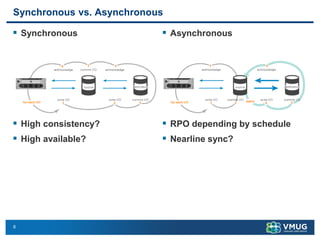
Synchronous vs. Asynchronous
▪ Synchronous
▪ High consistency?
▪ High available?
▪ Asynchronous
▪ RPO depending by schedule
▪ Nearline sync?
9
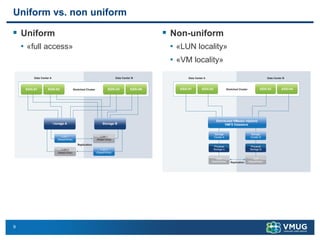
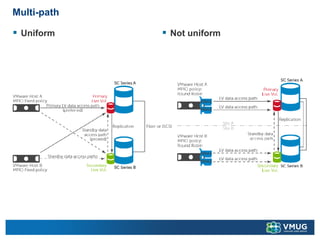
Uniform vs. non uniform
▪ Uniform
• «full access»
▪ Non-uniform
• «LUN locality»
• «VM locality»
10
Disaster recovery vs. disaster avoidance
▪ Disaster avoidance prevent or significantly reduce the probability
that a disaster will occur (like for human errors)
• if such an event does occur (like for a natural disaster) that the effects upon
the organization’s technology systems are minimized as much as possible
▪ Disaster avoidance provides better "resilience" rather than good
recovery
• infrastructure availability solutions?
• application availability and redundancy?
▪ Multi datacenter (or multi-region cloud) replication is one part
• the second part is having active-active datacenters or have applications
spanned between the multiple site that provide service availability
▪ Stretched cluster is an example of disaster avoidance at the
infrastructure layer
11
Application vs. infrastructure resiliency
▪ Mostly of the new cloud native application are designed high
availability and resiliency
▪ Fault domain or availability zone concepts
▪ There are also some example of traditional applications with high
availability concepts at the application level that can work also
geographically
• DNS services
• Active Directory Domain Controllers
• Exchange DAG
• SQL Always-On clusters
12
Disaster recovery vs. Stretched cluster
▪ Stretched cluster can provide both disaster recovery and disaster
avoidances for some cases
▪ There are some possible limitation on using a stretched cluster
also as disaster recovery:
• Stretched cluster is coupled, disaster recovery site is de-coupled
• Stretched cluster can’t protect you from site link failures and can be affected by
the split-brain scenario
• A witness can minimize this problem
• Stretched cluster usually works with synchronous replication, that means
• limited distance
• bandwidth requirements are really high, to minimize storage latency
• difficult to provide multiple consistent restore point at different time
▪ In most cases, where a stretched cluster is used, then there could
be third site acting as a traditional DR, using in this way a multi-
level protection approach
13
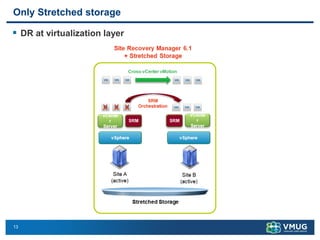
Only Stretched storage
▪ DR at virtualization layer
14
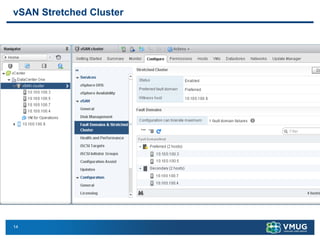
vSAN Stretched Cluster
15
Design aspects
▪ Split-brain scenario
• How avoid it
• Networking consideration
▪ Dependencies
▪ Availability & Resiliency
• Host failure
• Storage failure
• Site failure
▪ Data resiliency
• Local resiliency, not only cross-site resiliency
▪ Data locality
• Block storage and paths
• NFS and IPs/networks
• vSAN and other hyper-converged solution
16
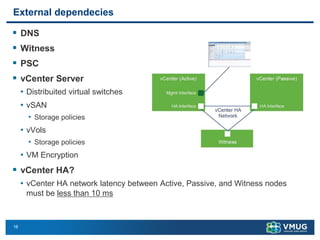
External dependecies
▪ DNS
▪ Witness
▪ PSC
▪ vCenter Server
• Distribuited virtual switches
• vSAN
• Storage policies
• vVols
• Storage policies
• VM Encryption
▪ vCenter HA?
• vCenter HA network latency between Active, Passive, and Witness nodes
must be less than 10 ms
17
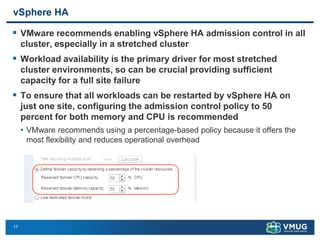
vSphere HA
▪ VMware recommends enabling vSphere HA admission control in all
cluster, especially in a stretched cluster
▪ Workload availability is the primary driver for most stretched
cluster environments, so can be crucial providing sufficient
capacity for a full site failure
▪ To ensure that all workloads can be restarted by vSphere HA on
just one site, configuring the admission control policy to 50
percent for both memory and CPU is recommended
• VMware recommends using a percentage-based policy because it offers the
most flexibility and reduces operational overhead
18
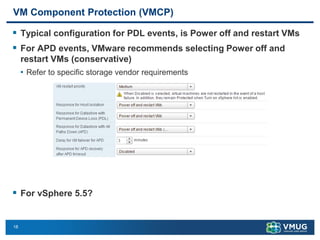
VM Component Protection (VMCP)
▪ Typical configuration for PDL events, is Power off and restart VMs
▪ For APD events, VMware recommends selecting Power off and
restart VMs (conservative)
• Refer to specific storage vendor requirements
▪ For vSphere 5.5?
19
Network heartbeat
▪ VMware vSphere HA network heartbeat
• if a host is not receiving any heartbeats, it uses a fail-safe mechanism to detect
if it is merely isolated from its master node or completely isolated from the
network
• By default, it does this by pinging the default gateway
• In addition to this mechanism, one or more isolation addresses can be
specified manually to enhance reliability of isolation validation
▪ VMware recommends specifying a minimum of two additional
isolation addresses, with each address site local
• This enables vSphere HA validation for complete network isolation, even in
case of a connection failure between sites
20
Storage heartbeat
▪ VMware vSphere HA storage heartbeat
• the minimum number of heartbeat datastores is two and the maximum is five
▪ Stretched cluster specific hints
• For vSphere HA datastore heartbeating to function correctly in any type of
failure scenario, VMware recommends increasing the number of heartbeat
datastores from two to four
• This provides full redundancy for both data center locations
• Defining four specific datastores as preferred heartbeat datastores is also
recommended, selecting two from one site and two from the other
• This enables vSphere HA to heartbeat to a datastore even in the case of a connection
failure between sites
• Subsequently, it enables vSphere HA to determine the state of a host in any scenario
▪ VMware recommends selecting two datastores in each location to
ensure that datastores are available at each site in the case of a
site partition
▪ vSAN?
21
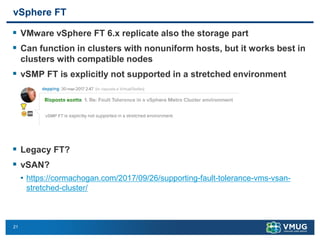
vSphere FT
▪ VMware vSphere FT 6.x replicate also the storage part
▪ Can function in clusters with nonuniform hosts, but it works best in
clusters with compatible nodes
▪ vSMP FT is explicitly not supported in a stretched environment
▪ Legacy FT?
▪ vSAN?
• https://cormachogan.com/2017/09/26/supporting-fault-tolerance-vms-vsan-
stretched-cluster/
22
vSphere DRS
▪ To provide VM locality you should build specific VMs to hosts
affinity rules
▪ VMware recommends implementing the “should rule” because
these are violated by vSphere HA in the case of a full site failure
• Note that vSphere DRS communicates these rules to vSphere HA, and these
are stored in a “compatibility list” governing allowed start-up
• If a single host fails, VM-to-host “should rules” are ignored by default
▪ For vSAN, VMware recommends that DRS is placed in partially
automated mode if there is an outage
• Customers will continue to be informed about DRS recommendations when
the hosts on the recovered site are online, but can now wait until vSAN has
fully resynced the virtual machine components
• DRS can then be changed back to fully automated mode, which will allow virtual
machine migrations to take place to conform to the VM/Host affinity rules
23
vSphere Storage DRS
▪ For Storage DRS (if applicable), this should be configured in
manual mode or partially automated
▪ This enables human validation per recommendation and allows
recommendations to be applied during off-peak hours
▪ Note that the use of I/O Metric or VMware vSphere Storage I/O
Control is not supported in a vMSC configuration
• VMware KB article 2042596 - https://kb.vmware.com/kb/2042596
▪ Also SIOC is not supported!
Multi-path
▪ Uniform ▪ Not uniform
Conclusions
▪ Stretched cluster vs. disaster recovery
▪ Stretched cluster + disaster recovery
▪ Applications & services first
▪ Business driven
▪ Design considerations
▪ More sites for campus deployment?
26
Enjoy The Day!
Join the Conversation!
#VMUGCZ
www.vmug.com

The dark side of stretched cluster

  • 1.
    © 2010 VMwareInc. All rights reserved Welcome to the CZ VMUG Meeting 4 December 2017
  • 2.
    2 The dark sideof stretched clusters Andrea Mauro – VCDX & vExpert http://vinfrastructure.it/en/ Italian VMUG Founder and Board Member http://www.vmug.it
  • 3.
    3 Stretched cluster ▪ Twoactive sites (+1?) ▪ Storage architecture cross-site ▪ Hypervisor architecture cross-site • vSphere Metro Storage Cluster (vMSC)
  • 4.
    4 HA and vMotion ▪vMotion for planned failover or failback ▪ HA for non planned failover
  • 5.
    5 Requirements and limitations ▪Networking • Higher latency in vMotion supported in vSphere Enterprise Plus • although Enterprise Plus requirement is no longer indicated in vSphere 6.x • stretched cluster not geographically? • ESXi vSphere vMotion network requirements: • minimum link bandwidth of 250Mbps • maximum supported network latency between sites should be around 10ms round-trip time (RTT) • Note that vSphere vMotion supports a maximum of 150ms latency as of vSphere 6.0, but this is not intended for stretched clustering usage • VMs networks should be the “same” on both sites • stretched L2 network • or some network virtualization techniques • Note that ESXi Management network and vMotion network could be also L3
  • 6.
    6 Requirements and limitations ▪Storage • Storage must be certified for vMSC architecture • Maximum supported latency for synchronous storage replication links • 5ms RTT? • Vendor specific requirements and architectures • Supported storage protocols are Fibre Channel, iSCSI, NFS, and FCoE • Hyper-converged solutions? • vSAN is supported • single vSAN stretched cluster • Other solutions can have different architecture • two storage clusters
  • 7.
    7 Requirements and limitations ▪Other • Cluster size? • 64? • in a vSAN Stretched Cluster: 30+1 (15+15+1) • 3rd site? • Number of shared datastore? • vCenter location?
  • 8.
    8 Synchronous vs. Asynchronous ▪Synchronous ▪ High consistency? ▪ High available? ▪ Asynchronous ▪ RPO depending by schedule ▪ Nearline sync?
  • 9.
    9 Uniform vs. nonuniform ▪ Uniform • «full access» ▪ Non-uniform • «LUN locality» • «VM locality»
  • 10.
    10 Disaster recovery vs.disaster avoidance ▪ Disaster avoidance prevent or significantly reduce the probability that a disaster will occur (like for human errors) • if such an event does occur (like for a natural disaster) that the effects upon the organization’s technology systems are minimized as much as possible ▪ Disaster avoidance provides better "resilience" rather than good recovery • infrastructure availability solutions? • application availability and redundancy? ▪ Multi datacenter (or multi-region cloud) replication is one part • the second part is having active-active datacenters or have applications spanned between the multiple site that provide service availability ▪ Stretched cluster is an example of disaster avoidance at the infrastructure layer
  • 11.
    11 Application vs. infrastructureresiliency ▪ Mostly of the new cloud native application are designed high availability and resiliency ▪ Fault domain or availability zone concepts ▪ There are also some example of traditional applications with high availability concepts at the application level that can work also geographically • DNS services • Active Directory Domain Controllers • Exchange DAG • SQL Always-On clusters
  • 12.
    12 Disaster recovery vs.Stretched cluster ▪ Stretched cluster can provide both disaster recovery and disaster avoidances for some cases ▪ There are some possible limitation on using a stretched cluster also as disaster recovery: • Stretched cluster is coupled, disaster recovery site is de-coupled • Stretched cluster can’t protect you from site link failures and can be affected by the split-brain scenario • A witness can minimize this problem • Stretched cluster usually works with synchronous replication, that means • limited distance • bandwidth requirements are really high, to minimize storage latency • difficult to provide multiple consistent restore point at different time ▪ In most cases, where a stretched cluster is used, then there could be third site acting as a traditional DR, using in this way a multi- level protection approach
  • 13.
    13 Only Stretched storage ▪DR at virtualization layer
  • 14.
  • 15.
    15 Design aspects ▪ Split-brainscenario • How avoid it • Networking consideration ▪ Dependencies ▪ Availability & Resiliency • Host failure • Storage failure • Site failure ▪ Data resiliency • Local resiliency, not only cross-site resiliency ▪ Data locality • Block storage and paths • NFS and IPs/networks • vSAN and other hyper-converged solution
  • 16.
    16 External dependecies ▪ DNS ▪Witness ▪ PSC ▪ vCenter Server • Distribuited virtual switches • vSAN • Storage policies • vVols • Storage policies • VM Encryption ▪ vCenter HA? • vCenter HA network latency between Active, Passive, and Witness nodes must be less than 10 ms
  • 17.
    17 vSphere HA ▪ VMwarerecommends enabling vSphere HA admission control in all cluster, especially in a stretched cluster ▪ Workload availability is the primary driver for most stretched cluster environments, so can be crucial providing sufficient capacity for a full site failure ▪ To ensure that all workloads can be restarted by vSphere HA on just one site, configuring the admission control policy to 50 percent for both memory and CPU is recommended • VMware recommends using a percentage-based policy because it offers the most flexibility and reduces operational overhead
  • 18.
    18 VM Component Protection(VMCP) ▪ Typical configuration for PDL events, is Power off and restart VMs ▪ For APD events, VMware recommends selecting Power off and restart VMs (conservative) • Refer to specific storage vendor requirements ▪ For vSphere 5.5?
  • 19.
    19 Network heartbeat ▪ VMwarevSphere HA network heartbeat • if a host is not receiving any heartbeats, it uses a fail-safe mechanism to detect if it is merely isolated from its master node or completely isolated from the network • By default, it does this by pinging the default gateway • In addition to this mechanism, one or more isolation addresses can be specified manually to enhance reliability of isolation validation ▪ VMware recommends specifying a minimum of two additional isolation addresses, with each address site local • This enables vSphere HA validation for complete network isolation, even in case of a connection failure between sites
  • 20.
    20 Storage heartbeat ▪ VMwarevSphere HA storage heartbeat • the minimum number of heartbeat datastores is two and the maximum is five ▪ Stretched cluster specific hints • For vSphere HA datastore heartbeating to function correctly in any type of failure scenario, VMware recommends increasing the number of heartbeat datastores from two to four • This provides full redundancy for both data center locations • Defining four specific datastores as preferred heartbeat datastores is also recommended, selecting two from one site and two from the other • This enables vSphere HA to heartbeat to a datastore even in the case of a connection failure between sites • Subsequently, it enables vSphere HA to determine the state of a host in any scenario ▪ VMware recommends selecting two datastores in each location to ensure that datastores are available at each site in the case of a site partition ▪ vSAN?
  • 21.
    21 vSphere FT ▪ VMwarevSphere FT 6.x replicate also the storage part ▪ Can function in clusters with nonuniform hosts, but it works best in clusters with compatible nodes ▪ vSMP FT is explicitly not supported in a stretched environment ▪ Legacy FT? ▪ vSAN? • https://cormachogan.com/2017/09/26/supporting-fault-tolerance-vms-vsan- stretched-cluster/
  • 22.
    22 vSphere DRS ▪ Toprovide VM locality you should build specific VMs to hosts affinity rules ▪ VMware recommends implementing the “should rule” because these are violated by vSphere HA in the case of a full site failure • Note that vSphere DRS communicates these rules to vSphere HA, and these are stored in a “compatibility list” governing allowed start-up • If a single host fails, VM-to-host “should rules” are ignored by default ▪ For vSAN, VMware recommends that DRS is placed in partially automated mode if there is an outage • Customers will continue to be informed about DRS recommendations when the hosts on the recovered site are online, but can now wait until vSAN has fully resynced the virtual machine components • DRS can then be changed back to fully automated mode, which will allow virtual machine migrations to take place to conform to the VM/Host affinity rules
  • 23.
    23 vSphere Storage DRS ▪For Storage DRS (if applicable), this should be configured in manual mode or partially automated ▪ This enables human validation per recommendation and allows recommendations to be applied during off-peak hours ▪ Note that the use of I/O Metric or VMware vSphere Storage I/O Control is not supported in a vMSC configuration • VMware KB article 2042596 - https://kb.vmware.com/kb/2042596 ▪ Also SIOC is not supported!
  • 24.
  • 25.
    Conclusions ▪ Stretched clustervs. disaster recovery ▪ Stretched cluster + disaster recovery ▪ Applications & services first ▪ Business driven ▪ Design considerations ▪ More sites for campus deployment?
  • 26.
    26 Enjoy The Day! Jointhe Conversation! #VMUGCZ www.vmug.com