MAP/REDUCE IN COUCHDB

<- watch the race car
                        Oliver Kurowski, @okurow
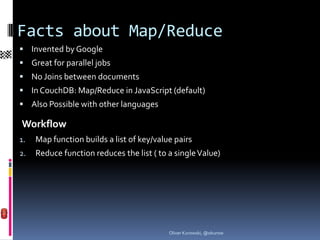
Facts about Map/Reduce
 Programming paradigm, popularized and patented by Google
 Great for parallel jobs
 No Joins between documents
 In CouchDB: Map/Reduce in JavaScript (default)
 Also Possible with other languages

Workflow
1.   Map function builds a list of key/value pairs
2.   Reduce function reduces the list ( to a single Value)


                                           Oliver Kurowski, @okurow
Simple Map Example
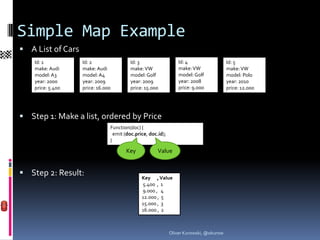
 A List of Cars
    Id: 1          Id: 2                Id: 3                    Id: 4                  Id: 5
    make: Audi     make: Audi           make: VW                 make: VW               make: VW
    model: A3      model: A4            model: Golf              model: Golf            model: Polo
    year: 2000     year: 2009           year: 2009               year: 2008             year: 2010
    price: 5.400   price: 16.000        price: 15.000            price: 9.000           price: 12.000


 Step 1: Make a list, ordered by Price
                               Function(doc) {
                                 emit (doc.price, doc.id);
                               }

                                      Key             Value


 Step 2: Result:                             Key , Value
                                              5.400 , 1
                                              9.000 , 4
                                              12.000 , 5
                                              15.000 , 3
                                              16.000 , 2


                                                             Oliver Kurowski, @okurow
Querying Maps
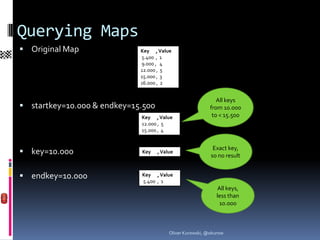
 Original Map               Key , Value
                             5.400 , 1
                             9.000 , 4
                             12.000 , 5
                             15.000 , 3
                             16.000 , 2


                                                              All keys
 startkey=10.000 & endkey=15.500                          from 10.000
                             Key , Value                    to < 15.500
                             12.000 , 5
                             15.000 , 4

                                                              Exact
 key=10.000                 Key    , Value                 key, so no
                                                              result

 endkey=10.000              Key , Value
                             5.400 , 1
                                                                All
                                                             keys, less
                                                            than 10.000


                                         Oliver Kurowski, @okurow
Map Function
 Has one document as input
 Can emit all JSON-Types as key and value:
        - Special Values: null, true, false
        - Numbers:        1e-17, 1.5, 200
        - Strings :       “+“, “1“, “Ab“, “Audi“
        - Arrays:         [1], [1,2], [1,“Audi“,true]
        - Objects:        {“price“:1300,“sold“:true}
 Results are ordered by key ( or revers)
   (order with mixed types: see above)
 In CouchDB: Each result has also the doc._id
                         {"total_rows":5,"offset":0,
                         "rows":[
                         {"id":"1","key":"Audi","value":1}, {"id":"
                         2","key":"Audi","value":1}, {"id":"3","key":
                         "VW","value":1}, {"id":"4","key":"VW","va
                         lue":1}, {"id":"5","key":"VW","value":1} ]}


                                                      Oliver Kurowski, @okurow
Reduce Function
 Has arrays of keys and values as input
 Should reduce the result of a map to a single value
 Javascript (Other languages possible)
 In CouchDB: some simple built-in native erlang functions
   (_sum,_count,_stats)
 Is automaticaly called after the map-function has finished
 Can be ignored with “reduce=false“
 Is needed for grouping


                                           Oliver Kurowski, @okurow
Simple Map/Reduce Example
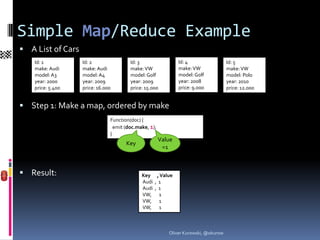
 A List of Cars
    Id: 1          Id: 2                Id: 3                  Id: 4                 Id: 5
    make: Audi     make: Audi           make: VW               make: VW              make: VW
    model: A3      model: A4            model: Golf            model: Golf           model: Polo
    year: 2000     year: 2009           year: 2009             year: 2008            year: 2010
    price: 5.400   price: 16.000        price: 15.000          price: 9.000          price: 12.000


 Step 1: Make a map, ordered by make
                               Function(doc) {
                                 emit (doc.make, 1);
                               }
                                                       Value
                                      Key
                                                        =1


 Result:                                    Key , Value
                                             Audi , 1
                                             Audi , 1
                                             VW, 1
                                             VW, 1
                                             VW, 1


                                                          Oliver Kurowski, @okurow
Simple Map/Reduce Example
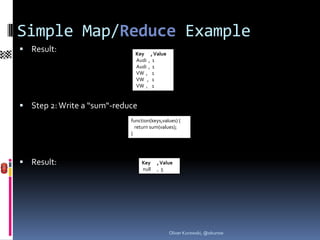
 Result:                     Key , Value
                              Audi , 1
                              Audi , 1
                              VW , 1
                              VW , 1
                              VW , 1


 Step 2: Write a “sum“-reduce
                            function(keys,values) {
                              return sum(values);
                            }


 Result:                        Key    , Value
                                 null   ,5


                                             Oliver Kurowski, @okurow
Simple Map/Reduce Example
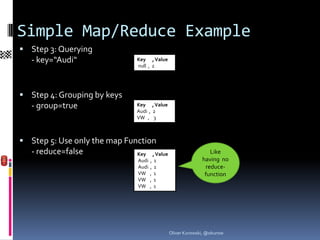
 Step 3: Querying
   - key=“Audi“               Key , Value
                              null , 2


 Step 4: Grouping by keys
   - group=true               Key , Value
                              Audi , 2
                              VW , 3


 Step 5: Use only the map Function
   - reduce=false             Key     , Value                    Like
                              Audi   ,1                       having no
                              Audi   ,1                        reduce-
                              VW     ,1                        function
                              VW     ,1
                              VW     ,1


                                                Oliver Kurowski, @okurow
Array-Key Map/Reduce Example
 A List of cars (again)
    Id: 1          Id: 2               Id: 3                Id: 4                  Id: 5
    make: Audi     make: Audi          make: VW             make: VW               make: VW
    model: A3      model: A4           model: Golf          model: Golf            model: Polo
    year: 2000     year: 2009          year: 2009           year: 2008             year: 2010
    price: 5.400   price: 16.000       price: 15.000        price: 9.000           price: 12.000


 Step 1: Make a map, with array as key
                               Function(doc) {
                                 emit ([doc.make,doc.model,doc.year], 1);
                               }


 Result (with group=true):

                                            Key              , Value
                                            [Audi, A3, 2000] , 1
                                            [Audi, A4, 2009] , 1
                                            [VW, Golf, 2008] , 1
                                            [VW, Golf, 2009] , 1
                                            [VW, Polo, 2010] , 1


                                                        Oliver Kurowski, @okurow
Array-Key Map/Reduce Querying
 startkey=[“Audi“]   Key               , Value
                      [Audi, A3, 2000] , 1
   ( &group=true)     [Audi, A4, 2009] , 1
                      [VW, Golf, 2008] , 1
                      [VW, Golf, 2009] , 1
                      [VW, Polo, 2010] , 1


 startkey=[“VW“]     Key              , Value
                      [Audi, A3, 2000] , 1
   ( &group=true)     [Audi, A4, 2009] , 1
                      [VW, Golf, 2008] , 1
                      [VW, Golf, 2009] , 1
                      [VW, Polo, 2010] , 1


                      Key              , Value
 endkey=[“VW“]       [Audi, A3, 2000] , 1
                                                         Remember:
                                                          Endkey is
   (&group=true)      [Audi, A4, 2009] , 1
                                                            not in
                      [VW, Golf, 2008] , 1
                      [VW, Golf, 2009] , 1                resultlist
                      [VW, Polo, 2010] , 1


                              Oliver Kurowski, @okurow
Array-Key Map/Reduce Ranges
 Step 4: Range queries:                   Key , Value
   - startkey=[“VW“,“Golf“]                [Audi, A3, 2000] , 1
                                           [Audi, A4, 2009] , 1
   - endkey= [“VW“,“Polo“]                 [VW, Golf, 2008] , 1
                                           [VW, Golf, 2009] , 1
   - (&group=true)                         [VW, Polo, 2010] , 1


 What, if we do not know the next model after Golf ?
   - startkey=[“VW“,“Golf“]                Key , Value
                                           [Audi, A3, 2000] , 1
   - endkey=[“VW“,“Golf“,99999]            [Audi, A4, 2009] , 1
   - (&group=true)                         [VW, Golf, 2008] , 1
                                           [VW, Golf, 2009] , 1
                                           [VW, Polo, 2010] , 1


   - better: endkey=[“VW“,“Golf“,{}]


                                       Oliver Kurowski, @okurow
Grouping with group_level
 group=true                      Key , Value
                                  [Audi, A3, 2000] ,   1
  (aka group_level=exact)         [Audi, A4, 2009] ,   1
                                  [VW, Golf, 2008] ,   1
                                  [VW, Golf, 2009] ,   1
                                  [VW, Polo, 2010] ,   1


 group_level=1                   Key , Value
  (no group=true needed)          [Audi] , 2
                                  [VW] , 3


 group_level=2                   Key , Value
                                  [Audi, A3] , 1
  (no group=true needed)          [Audi, A4] , 1
                                  [VW, Golf] , 2
                                  [VW, Polo] , 1

 group_level=3 -> group_level=exact -> group=true


                                       Oliver Kurowski, @okurow
Examples:
 Get all car makes:               Key , Value
                                   [Audi] , 2
   - group_level=1                 [VW] , 3


 Get all models from VW:
   - startkey=[“VW“]&endkey=[“VW“,{}]&group_level=2
                                   Key       , Value
                                   [VW, Golf] , 2
                                   [VW, Polo] , 1

 Get all years of VW Golf:
   - startkey=[“VW“,“Golf“]&endkey=[“VW“,“Golf“,{}]&group_level=3
                                   Key , Value
                                   [VW, Golf, 2008] , 1
                                   [VW, Golf, 2009] , 1


                                       Oliver Kurowski, @okurow
Reduce / Rereduce:
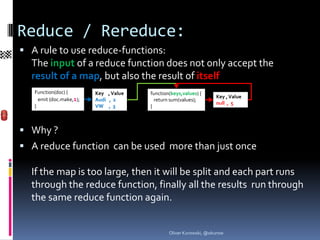
 A rule to use reduce-functions:
  The input of a reduce function does not only accept the
  result of a map, but also the result of itself
   Function(doc) {        Key , Value   function(keys,values) {
                                                                    Key , Value
     emit (doc.make,1);   Audi , 2        return sum(values);
                                                                    null , 5
   }                      VW , 3        }


 Why ?
 A reduce function can be used more than just once

  If the map is too large, then it will be split and each part runs
  through the reduce function, finally all the results run through
  the same reduce function again.


                                                Oliver Kurowski, @okurow
WTF ?
  Oliver Kurowski, @okurow
Reduce / Rereduce:
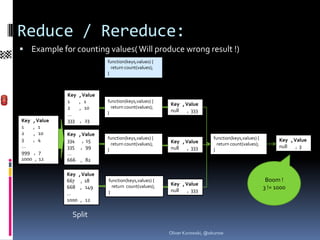
 Example for counting values( Will produce wrong result !)
                              function(keys,values) {
                                return count(values);
                              }


              Key   , Value
              1     , 1       function(keys,values) {
                                                        Key , Value
              2     , 10        return count(values);
                              }                         null   , 333
              …
Key , Value   333   , 23
1   , 1
2    , 10     Key , Value
3   , 4                       function(keys,values) {                      function(keys,values) {         Key , Value
              334 , 15                                  Key , Value
…                               return count(values);                        return count(values);
              335 , 99                                  null   , 333                                       null   ,3
                              }                                            }
999 , 7       …
1000 , 12     666 , 82

              Key , Value
              667 , 18        function(keys,values) {                                                 Boom !
                                return count(values);   Key , Value
              668 , 149
                                                        null   , 333
                                                                                                     3 != 1000
              …               }
              1000 , 12

                Split

                                                        Oliver Kurowski, @okurow
Reduce / Rereduce:
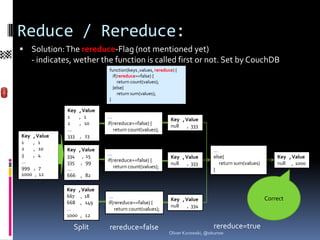
 Solution: The rereduce-Flag (not mentioned yet)
   - indicates, wether the function is called first or not. Set by CouchDB
                              function(keys ,values, rereduce) {
                                if(rereduce==false) {
                                   return count(values);
                                }else{
                                   return sum(values);
                              }

              Key   , Value
              1     , 1       …                             Key , Value
              2     , 10      if(rereduce==false) {         null   , 333
              …                  return count(values);
Key , Value   333   , 23
1   , 1
2    , 10     Key , Value                                                      …
3   , 4       334 , 15        …
                                                            Key , Value        else{                       Key , Value
…             335 , 99        if(rereduce==false) {
                                                            null   , 333          return sum(values)       null , 1000
999 , 7       …                  return count(values);
                                                                               }
1000 , 12     666 , 82

              Key , Value
              667 , 18        …                                                                        Correct
                                                            Key , Value
              668 , 149       if(rereduce==false) {
                                                            null   , 334
              …                  return count(values);
              1000 , 12

                Split         rereduce=false                                   rereduce=true
                                                            Oliver Kurowski, @okurow
Input of a reduce function:
 The map:             Doc._id ,   Key          , Value
                         4     ,    “Audi“      , 12.000
                         2     ,    “BMW“      , 20.000
                         1     ,   “Citroen“   , 9.000
                         3    ,    “Dacia“     , 6.500


 The function:        function(keys ,values, rereduce) {
                         return sum(values);
                       }


 Input Values 1 (rereduce=false):
   - keys:             [ [“Audi“,4],[“BMW“,2],[“Citroen“,1],[“Dacia“,3] ]

   - values:           [ 12.000,20.000,9.000,6.500]

   - rereduce:         false

 Input Values 2 (rereduce=true):
   - keys:             null

   - values:           [47.500]

   - rereduce:         true


                                                       Oliver Kurowski, @okurow
Where does Map/Reduce live ?
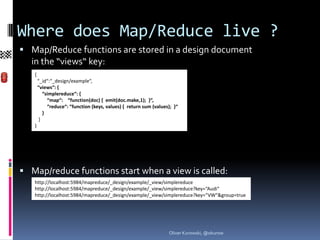
 Map/Reduce functions are stored in a design document
  in the “views“ key:
   {
       “_id“:“_design/example“,
       “views“: {
          “simplereduce“: {
            “map“: “function(doc) { emit(doc.make,1); }“,
            “reduce“: “function (keys, values) { return sum (values); }“
          }
        }
   }


 Map/reduce functions start when a view is called:
   http://localhost:5984/mapreduce/_design/example/_view/simplereduce
   http://localhost:5984/mapreduce/_design/example/_view/simplereduce?key=“Audi“
   http://localhost:5984/mapreduce/_design/example/_view/simplereduce?key=“VW“&group=true


                                                                   Oliver Kurowski, @okurow
View calling
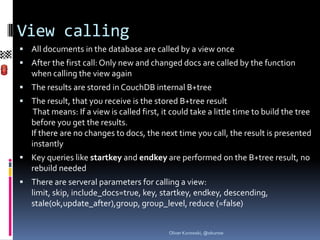
 All documents in the database are called by a view once
 After the first call: Only new and changed docs are called by the function
   when calling the view again
 The results are stored in CouchDB internal B+tree
 The result, that you receive is the stored B+tree result
    That means: If a view is called first, it could take a little time to build the tree
   before you get the results.
   If there are no changes to docs, the next time you call, the result is presented
   instantly
 Key queries like startkey and endkey are performed on the B+tree result, no
   rebuild needed
 There are serveral parameters for calling a view:
   limit, skip, include_docs=true, key, startkey, endkey, descending, stale(ok,upd
   ate_after),group, group_level, reduce (=false)


                                            Oliver Kurowski, @okurow
View calling parameters
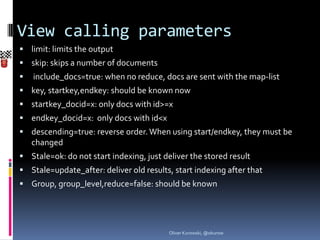
 limit: limits the output
 skip: skips a number of documents
   include_docs=true: when no reduce, docs are sent with the map-list
 key, startkey,endkey: should be known now
 startkey_docid=x: only docs with id>=x
 endkey_docid=x: only docs with id<x
 descending=true: reverse order. When using start/endkey, they must be
    changed
 Stale=ok: do not start indexing, just deliver the stored result
 Stale=update_after: deliver old results, start indexing after that
 Group, group_level,reduce=false: should be known


                                          Oliver Kurowski, @okurow
You‘ve made it !


                   Oliver Kurowski, @okurow

CouchDB Map/Reduce

  • 1.
    MAP/REDUCE IN COUCHDB <-watch the race car Oliver Kurowski, @okurow
  • 2.
    Facts about Map/Reduce Programming paradigm, popularized and patented by Google  Great for parallel jobs  No Joins between documents  In CouchDB: Map/Reduce in JavaScript (default)  Also Possible with other languages Workflow 1. Map function builds a list of key/value pairs 2. Reduce function reduces the list ( to a single Value) Oliver Kurowski, @okurow
  • 3.
    Simple Map Example A List of Cars Id: 1 Id: 2 Id: 3 Id: 4 Id: 5 make: Audi make: Audi make: VW make: VW make: VW model: A3 model: A4 model: Golf model: Golf model: Polo year: 2000 year: 2009 year: 2009 year: 2008 year: 2010 price: 5.400 price: 16.000 price: 15.000 price: 9.000 price: 12.000  Step 1: Make a list, ordered by Price Function(doc) { emit (doc.price, doc.id); } Key Value  Step 2: Result: Key , Value 5.400 , 1 9.000 , 4 12.000 , 5 15.000 , 3 16.000 , 2 Oliver Kurowski, @okurow
  • 4.
    Querying Maps  OriginalMap Key , Value 5.400 , 1 9.000 , 4 12.000 , 5 15.000 , 3 16.000 , 2 All keys  startkey=10.000 & endkey=15.500 from 10.000 Key , Value to < 15.500 12.000 , 5 15.000 , 4 Exact  key=10.000 Key , Value key, so no result  endkey=10.000 Key , Value 5.400 , 1 All keys, less than 10.000 Oliver Kurowski, @okurow
  • 5.
    Map Function  Hasone document as input  Can emit all JSON-Types as key and value: - Special Values: null, true, false - Numbers: 1e-17, 1.5, 200 - Strings : “+“, “1“, “Ab“, “Audi“ - Arrays: [1], [1,2], [1,“Audi“,true] - Objects: {“price“:1300,“sold“:true}  Results are ordered by key ( or revers) (order with mixed types: see above)  In CouchDB: Each result has also the doc._id {"total_rows":5,"offset":0, "rows":[ {"id":"1","key":"Audi","value":1}, {"id":" 2","key":"Audi","value":1}, {"id":"3","key": "VW","value":1}, {"id":"4","key":"VW","va lue":1}, {"id":"5","key":"VW","value":1} ]} Oliver Kurowski, @okurow
  • 6.
    Reduce Function  Hasarrays of keys and values as input  Should reduce the result of a map to a single value  Javascript (Other languages possible)  In CouchDB: some simple built-in native erlang functions (_sum,_count,_stats)  Is automaticaly called after the map-function has finished  Can be ignored with “reduce=false“  Is needed for grouping Oliver Kurowski, @okurow
  • 7.
    Simple Map/Reduce Example A List of Cars Id: 1 Id: 2 Id: 3 Id: 4 Id: 5 make: Audi make: Audi make: VW make: VW make: VW model: A3 model: A4 model: Golf model: Golf model: Polo year: 2000 year: 2009 year: 2009 year: 2008 year: 2010 price: 5.400 price: 16.000 price: 15.000 price: 9.000 price: 12.000  Step 1: Make a map, ordered by make Function(doc) { emit (doc.make, 1); } Value Key =1  Result: Key , Value Audi , 1 Audi , 1 VW, 1 VW, 1 VW, 1 Oliver Kurowski, @okurow
  • 8.
    Simple Map/Reduce Example Result: Key , Value Audi , 1 Audi , 1 VW , 1 VW , 1 VW , 1  Step 2: Write a “sum“-reduce function(keys,values) { return sum(values); }  Result: Key , Value null ,5 Oliver Kurowski, @okurow
  • 9.
    Simple Map/Reduce Example Step 3: Querying - key=“Audi“ Key , Value null , 2  Step 4: Grouping by keys - group=true Key , Value Audi , 2 VW , 3  Step 5: Use only the map Function - reduce=false Key , Value Like Audi ,1 having no Audi ,1 reduce- VW ,1 function VW ,1 VW ,1 Oliver Kurowski, @okurow
  • 10.
    Array-Key Map/Reduce Example A List of cars (again) Id: 1 Id: 2 Id: 3 Id: 4 Id: 5 make: Audi make: Audi make: VW make: VW make: VW model: A3 model: A4 model: Golf model: Golf model: Polo year: 2000 year: 2009 year: 2009 year: 2008 year: 2010 price: 5.400 price: 16.000 price: 15.000 price: 9.000 price: 12.000  Step 1: Make a map, with array as key Function(doc) { emit ([doc.make,doc.model,doc.year], 1); }  Result (with group=true): Key , Value [Audi, A3, 2000] , 1 [Audi, A4, 2009] , 1 [VW, Golf, 2008] , 1 [VW, Golf, 2009] , 1 [VW, Polo, 2010] , 1 Oliver Kurowski, @okurow
  • 11.
    Array-Key Map/Reduce Querying startkey=[“Audi“] Key , Value [Audi, A3, 2000] , 1 ( &group=true) [Audi, A4, 2009] , 1 [VW, Golf, 2008] , 1 [VW, Golf, 2009] , 1 [VW, Polo, 2010] , 1  startkey=[“VW“] Key , Value [Audi, A3, 2000] , 1 ( &group=true) [Audi, A4, 2009] , 1 [VW, Golf, 2008] , 1 [VW, Golf, 2009] , 1 [VW, Polo, 2010] , 1 Key , Value  endkey=[“VW“] [Audi, A3, 2000] , 1 Remember: Endkey is (&group=true) [Audi, A4, 2009] , 1 not in [VW, Golf, 2008] , 1 [VW, Golf, 2009] , 1 resultlist [VW, Polo, 2010] , 1 Oliver Kurowski, @okurow
  • 12.
    Array-Key Map/Reduce Ranges Step 4: Range queries: Key , Value - startkey=[“VW“,“Golf“] [Audi, A3, 2000] , 1 [Audi, A4, 2009] , 1 - endkey= [“VW“,“Polo“] [VW, Golf, 2008] , 1 [VW, Golf, 2009] , 1 - (&group=true) [VW, Polo, 2010] , 1  What, if we do not know the next model after Golf ? - startkey=[“VW“,“Golf“] Key , Value [Audi, A3, 2000] , 1 - endkey=[“VW“,“Golf“,99999] [Audi, A4, 2009] , 1 - (&group=true) [VW, Golf, 2008] , 1 [VW, Golf, 2009] , 1 [VW, Polo, 2010] , 1 - better: endkey=[“VW“,“Golf“,{}] Oliver Kurowski, @okurow
  • 13.
    Grouping with group_level group=true Key , Value [Audi, A3, 2000] , 1 (aka group_level=exact) [Audi, A4, 2009] , 1 [VW, Golf, 2008] , 1 [VW, Golf, 2009] , 1 [VW, Polo, 2010] , 1  group_level=1 Key , Value (no group=true needed) [Audi] , 2 [VW] , 3  group_level=2 Key , Value [Audi, A3] , 1 (no group=true needed) [Audi, A4] , 1 [VW, Golf] , 2 [VW, Polo] , 1  group_level=3 -> group_level=exact -> group=true Oliver Kurowski, @okurow
  • 14.
    Examples:  Get allcar makes: Key , Value [Audi] , 2 - group_level=1 [VW] , 3  Get all models from VW: - startkey=[“VW“]&endkey=[“VW“,{}]&group_level=2 Key , Value [VW, Golf] , 2 [VW, Polo] , 1  Get all years of VW Golf: - startkey=[“VW“,“Golf“]&endkey=[“VW“,“Golf“,{}]&group_level=3 Key , Value [VW, Golf, 2008] , 1 [VW, Golf, 2009] , 1 Oliver Kurowski, @okurow
  • 15.
    Reduce / Rereduce: A rule to use reduce-functions: The input of a reduce function does not only accept the result of a map, but also the result of itself Function(doc) { Key , Value function(keys,values) { Key , Value emit (doc.make,1); Audi , 2 return sum(values); null , 5 } VW , 3 }  Why ?  A reduce function can be used more than just once If the map is too large, then it will be split and each part runs through the reduce function, finally all the results run through the same reduce function again. Oliver Kurowski, @okurow
  • 16.
    WTF ? Oliver Kurowski, @okurow
  • 17.
    Reduce / Rereduce: Example for counting values( Will produce wrong result !) function(keys,values) { return count(values); } Key , Value 1 , 1 function(keys,values) { Key , Value 2 , 10 return count(values); } null , 333 … Key , Value 333 , 23 1 , 1 2 , 10 Key , Value 3 , 4 function(keys,values) { function(keys,values) { Key , Value 334 , 15 Key , Value … return count(values); return count(values); 335 , 99 null , 333 null ,3 } } 999 , 7 … 1000 , 12 666 , 82 Key , Value 667 , 18 function(keys,values) { Boom ! return count(values); Key , Value 668 , 149 null , 333 3 != 1000 … } 1000 , 12 Split Oliver Kurowski, @okurow
  • 18.
    Reduce / Rereduce: Solution: The rereduce-Flag (not mentioned yet) - indicates, wether the function is called first or not. Set by CouchDB function(keys ,values, rereduce) { if(rereduce==false) { return count(values); }else{ return sum(values); } Key , Value 1 , 1 … Key , Value 2 , 10 if(rereduce==false) { null , 333 … return count(values); Key , Value 333 , 23 1 , 1 2 , 10 Key , Value … 3 , 4 334 , 15 … Key , Value else{ Key , Value … 335 , 99 if(rereduce==false) { null , 333 return sum(values) null , 1000 999 , 7 … return count(values); } 1000 , 12 666 , 82 Key , Value 667 , 18 … Correct Key , Value 668 , 149 if(rereduce==false) { null , 334 … return count(values); 1000 , 12 Split rereduce=false rereduce=true Oliver Kurowski, @okurow
  • 19.
    Input of areduce function:  The map: Doc._id , Key , Value 4 , “Audi“ , 12.000 2 , “BMW“ , 20.000 1 , “Citroen“ , 9.000 3 , “Dacia“ , 6.500  The function: function(keys ,values, rereduce) { return sum(values); }  Input Values 1 (rereduce=false): - keys: [ [“Audi“,4],[“BMW“,2],[“Citroen“,1],[“Dacia“,3] ] - values: [ 12.000,20.000,9.000,6.500] - rereduce: false  Input Values 2 (rereduce=true): - keys: null - values: [47.500] - rereduce: true Oliver Kurowski, @okurow
  • 20.
    Where does Map/Reducelive ?  Map/Reduce functions are stored in a design document in the “views“ key: { “_id“:“_design/example“, “views“: { “simplereduce“: { “map“: “function(doc) { emit(doc.make,1); }“, “reduce“: “function (keys, values) { return sum (values); }“ } } }  Map/reduce functions start when a view is called: http://localhost:5984/mapreduce/_design/example/_view/simplereduce http://localhost:5984/mapreduce/_design/example/_view/simplereduce?key=“Audi“ http://localhost:5984/mapreduce/_design/example/_view/simplereduce?key=“VW“&group=true Oliver Kurowski, @okurow
  • 21.
    View calling  Alldocuments in the database are called by a view once  After the first call: Only new and changed docs are called by the function when calling the view again  The results are stored in CouchDB internal B+tree  The result, that you receive is the stored B+tree result That means: If a view is called first, it could take a little time to build the tree before you get the results. If there are no changes to docs, the next time you call, the result is presented instantly  Key queries like startkey and endkey are performed on the B+tree result, no rebuild needed  There are serveral parameters for calling a view: limit, skip, include_docs=true, key, startkey, endkey, descending, stale(ok,upd ate_after),group, group_level, reduce (=false) Oliver Kurowski, @okurow
  • 22.
    View calling parameters limit: limits the output  skip: skips a number of documents  include_docs=true: when no reduce, docs are sent with the map-list  key, startkey,endkey: should be known now  startkey_docid=x: only docs with id>=x  endkey_docid=x: only docs with id<x  descending=true: reverse order. When using start/endkey, they must be changed  Stale=ok: do not start indexing, just deliver the stored result  Stale=update_after: deliver old results, start indexing after that  Group, group_level,reduce=false: should be known Oliver Kurowski, @okurow
  • 23.
    You‘ve made it! Oliver Kurowski, @okurow