Introduction to DataFlow
management using Apache NiFi
Presented by: Anshuman Ghosh
Topics we will cover
 DataFlow and problems.
 What is Apache NiFi – History, key features, core components
 Architecture To start with NiFi (Single server setup)
 Architecture To scale with NiFi (NiFi cluster setup)
 Fundamentals of NiFi Web UI
 Building a NiFi DataFlow Processor
 Live demo
 Testing
 Deployment and automation
 What next?
 Q&A
DataFlow
 The term “DataFlow” can be used in variety of contexts.
 In our context it is the flow of information between systems.
 It is crucial to have a robust platform to create, manage and automate the
flow of enterprise data.
 There are many tools for data gathering and data flow, but more often
than not we lack an integrated platform for that.
 Probably an ideal situation would be have a seamless integration ,..
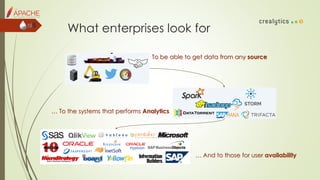
What enterprises look for
To be able to get data from any source
… To the systems that performs Analytics
… And to those for user availability
Common DataFlow challenges
 System failure
 Difference between data production and consumption
 Change in dynamic data priority
 Protocols and format changes; new systems, new protocols
 Need of bidirectional data flow
 Transparency and control
 Security and privacy
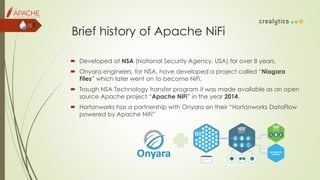
Brief history of Apache NiFi
 Developed at NSA (National Security Agency, USA) for over 8 years.
 Onyara engineers, for NSA, have developed a project called “Niagara
Files” which later went on to become NiFi.
 Trough NSA Technology transfer program it was made available as an open
source Apache project “Apache NiFi” in the year 2014.
 Hortonworks has a partnership with Onyara on their “Hortonworks DataFlow
powered by Apache NiFi”
What is Apache NiFi
 Holistically Apache NiFi is an integrated platform to collect, conduct and
curate real-time data (data in motion).
 Provides an end to end DataFlow management from any source* to any
destination*.
 Provides data logistics – real-time operational visibility and control of
DataFlow.
 Supports powerful and scalable directed graphs of data routing and data
transformation.
 All these in a reliable and secure manner.
*complete list of source and destination on official documentation
Key features
 Guaranteed data delivery – “at least once” semantics
 Data buffering and Back pressure
 Data prioritization in queue
 Flow specific setting for “latency vs. throughput”
 Data provenance
 Visual control
 Flow templates
 Recovery/ Recording through content repository
 Clustering to scale-out
 Security
 Classloader Isolation
Core components of NiFi
 NiFi at it’s core follow the concept of Flow Based programming.
 Core components of NiFi are
 FlowFile – the unit of information packet
 FlowFile Processor – the processing engine; black box.
 Connection – the relation between Processors and bounded buffer.
 Flow Controller – the scheduler in real world.
 Process Group – the compact function or subnet
Core components diagram
 This is how a typical NiFi DataFlow might look
NiFi Architecture
 NiFi executes within a JVM on a host Operating System.
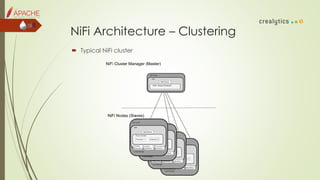
NiFi Architecture – Clustering
 Typical NiFi cluster
Core components of NiFi Cluster
 NiFi Cluster Manager
 Nodes
 Primary Node
 Isolated Processors
 Heartbeats
Fundamentals of the Web UI
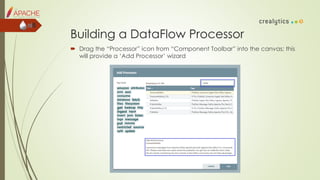
Building a DataFlow Processor
 Drag the “Processor” icon from “Component Toolbar” into the canvas; this
will provide a ‘Add Processor’ wizard
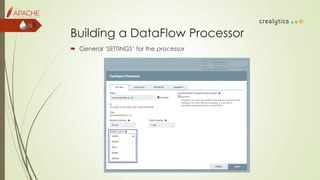
Building a DataFlow Processor
 General ‘SETTINGS’ for the processor
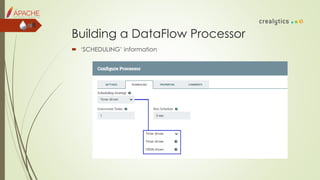
Building a DataFlow Processor
 ‘SCHEDULING’ information
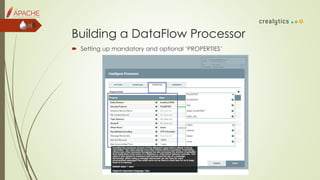
Building a DataFlow Processor
 Setting up mandatory and optional ‘PROPERTIES’
Building a DataFlow Processor
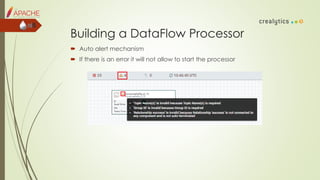
 Auto alert mechanism
 If there is an error it will not allow to start the processor
Building a DataFlow Processor
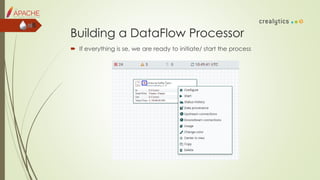
 If everything is se, we are ready to initiate/ start the process
Demo 1
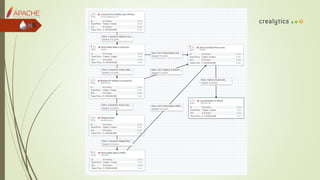
 In this demo, we will go through a NiFi DataFlow that deals with the
following steps
 Connect to Kafka and consume from a topic.
 Store consumed data in a local storage (optional).
 Anonymize IP address.
 Merge content before writing to HDFS (small file issues).
 Finally store Kafka data onto HDFS
 Look into error handling.
 Look into use of expression language.
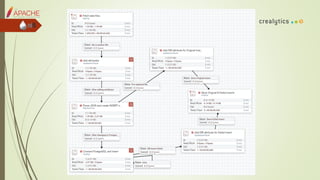
Demo 2
 In this demo, we will go through a NiFi DataFlow that deals with the
following steps
 Collect/ fetch data files from a local location.
 Update/ add attributes.
 Parse JSON strings to DB Insert statements.
 Connect to PostgreSQL and Insert.
 Error handling.
Unit testing components
 For component testing nifi-mock module can be used with JUnit.
 The TestRunner interface allows us to test Processors and Controller Services.
 We need to instantiate and get a new TestRunner (org.apache.nifi.util)
 Add Controller Services and configure
 Set property of Processors setProperty(PropertyDescriptor, String)
 Enqueue FlowFiles by using the enqueue methods of the TestRunner class.
 Processor can be started by triggering run() method of TestRunner.
 Validate output – using the TestRunners assertAllFlowFilesTransferred and
assertTransferCount methods.
 More details can be found here – https://nifi.apache.org/docs/nifi-
docs/html/developer-guide.html#testing
 Add Maven dependency
 Call static newTestRunner method of the TestRunners class
 Call addControllerService method to add controller
 Set properties by setProperty(ControllerService, PropertyDescriptor, String)
 Enable services by enableControllerService(ControllerService)
 Set processor property setProperty(PropertyDescriptor, String)
 Override enqueue method for byte[], InputStream, or Path.
 run(int); This will call methods with @OnScheduled annotation, Processor’s
onTrigger method, and then run the @OnUnscheduled and finally @OnStopped
methods.
 Validate result by assertAllFlowFilesTransferred and assertTransferCount methods.
 Access FlowFiles by calling getFlowFilesForRelationship() method
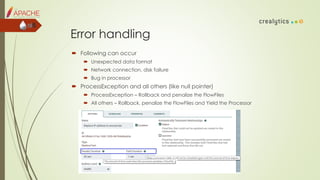
Error handling
 Following can occur
 Unexpected data format
 Network connection, disk failure
 Bug in processor
 ProcessException and all others (like null pointer)
 ProcessException – Rollback and penalize the FlowFiles
 All others – Rollback, penalize the FlowFiles and Yield the Processor
Testing automation, Deployment
 NiFi provides ‘ReST’ API for all components and entire documentation can
be found here https://nifi.apache.org/docs/nifi-docs/rest-api/index.html
 Apache NiFi Community is working to improve on this area
 We can setup the deployment in following way
 Create an application i.e. entire DataFlow in your local machine and test.
 Create a process group around that (optional though)
 Create a template. (Can be done from Web UI/ ReST API call)
 Download the template. (Can be done from Web UI/ ReST API call)
 Use ReST API call to import the template in new environment.
 Use ReST API call to Update Processors (Properties, Schedule, and Settings etc.)
 Use ReST API call to Instantiate a template
Deployment
 There can be one more option to do it.
 Copying the whole flow (flow.xml.gz) from one environment to another
 Need to copy the entire canvas.
 Need to take care of sensitive properties encryption.
What is next
 We are planning to work on the testing, deployment side and update it.
 Please read more on NiFi development here –
https://nifi.apache.org/docs/nifi-docs/html/developer-guide.html
 And for user guide – https://nifi.apache.org/docs/nifi-docs/html/user-
guide.html
 We have carried out POCs on some of our real use cases; please find them
here
 Link HDFS data ingestion using Apache
 Link How to setup Apache NiFi
 Link Expression Language Guide
 Any questions and/ or suggestions please come by or write 
Q&A
 Questions?
Thank you!
Presented by: Anshuman Ghosh

Introduction to data flow management using apache nifi

  • 1.
    Introduction to DataFlow managementusing Apache NiFi Presented by: Anshuman Ghosh
  • 2.
    Topics we willcover  DataFlow and problems.  What is Apache NiFi – History, key features, core components  Architecture To start with NiFi (Single server setup)  Architecture To scale with NiFi (NiFi cluster setup)  Fundamentals of NiFi Web UI  Building a NiFi DataFlow Processor  Live demo  Testing  Deployment and automation  What next?  Q&A
  • 3.
    DataFlow  The term“DataFlow” can be used in variety of contexts.  In our context it is the flow of information between systems.  It is crucial to have a robust platform to create, manage and automate the flow of enterprise data.  There are many tools for data gathering and data flow, but more often than not we lack an integrated platform for that.  Probably an ideal situation would be have a seamless integration ,..
  • 4.
    What enterprises lookfor To be able to get data from any source … To the systems that performs Analytics … And to those for user availability
  • 5.
    Common DataFlow challenges System failure  Difference between data production and consumption  Change in dynamic data priority  Protocols and format changes; new systems, new protocols  Need of bidirectional data flow  Transparency and control  Security and privacy
  • 6.
    Brief history ofApache NiFi  Developed at NSA (National Security Agency, USA) for over 8 years.  Onyara engineers, for NSA, have developed a project called “Niagara Files” which later went on to become NiFi.  Trough NSA Technology transfer program it was made available as an open source Apache project “Apache NiFi” in the year 2014.  Hortonworks has a partnership with Onyara on their “Hortonworks DataFlow powered by Apache NiFi”
  • 7.
    What is ApacheNiFi  Holistically Apache NiFi is an integrated platform to collect, conduct and curate real-time data (data in motion).  Provides an end to end DataFlow management from any source* to any destination*.  Provides data logistics – real-time operational visibility and control of DataFlow.  Supports powerful and scalable directed graphs of data routing and data transformation.  All these in a reliable and secure manner. *complete list of source and destination on official documentation
  • 8.
    Key features  Guaranteeddata delivery – “at least once” semantics  Data buffering and Back pressure  Data prioritization in queue  Flow specific setting for “latency vs. throughput”  Data provenance  Visual control  Flow templates  Recovery/ Recording through content repository  Clustering to scale-out  Security  Classloader Isolation
  • 9.
    Core components ofNiFi  NiFi at it’s core follow the concept of Flow Based programming.  Core components of NiFi are  FlowFile – the unit of information packet  FlowFile Processor – the processing engine; black box.  Connection – the relation between Processors and bounded buffer.  Flow Controller – the scheduler in real world.  Process Group – the compact function or subnet
  • 10.
    Core components diagram This is how a typical NiFi DataFlow might look
  • 11.
    NiFi Architecture  NiFiexecutes within a JVM on a host Operating System.
  • 12.
    NiFi Architecture –Clustering  Typical NiFi cluster
  • 13.
    Core components ofNiFi Cluster  NiFi Cluster Manager  Nodes  Primary Node  Isolated Processors  Heartbeats
  • 14.
  • 15.
    Building a DataFlowProcessor  Drag the “Processor” icon from “Component Toolbar” into the canvas; this will provide a ‘Add Processor’ wizard
  • 16.
    Building a DataFlowProcessor  General ‘SETTINGS’ for the processor
  • 17.
    Building a DataFlowProcessor  ‘SCHEDULING’ information
  • 18.
    Building a DataFlowProcessor  Setting up mandatory and optional ‘PROPERTIES’
  • 19.
    Building a DataFlowProcessor  Auto alert mechanism  If there is an error it will not allow to start the processor
  • 20.
    Building a DataFlowProcessor  If everything is se, we are ready to initiate/ start the process
  • 21.
    Demo 1  Inthis demo, we will go through a NiFi DataFlow that deals with the following steps  Connect to Kafka and consume from a topic.  Store consumed data in a local storage (optional).  Anonymize IP address.  Merge content before writing to HDFS (small file issues).  Finally store Kafka data onto HDFS  Look into error handling.  Look into use of expression language.
  • 23.
    Demo 2  Inthis demo, we will go through a NiFi DataFlow that deals with the following steps  Collect/ fetch data files from a local location.  Update/ add attributes.  Parse JSON strings to DB Insert statements.  Connect to PostgreSQL and Insert.  Error handling.
  • 25.
    Unit testing components For component testing nifi-mock module can be used with JUnit.  The TestRunner interface allows us to test Processors and Controller Services.  We need to instantiate and get a new TestRunner (org.apache.nifi.util)  Add Controller Services and configure  Set property of Processors setProperty(PropertyDescriptor, String)  Enqueue FlowFiles by using the enqueue methods of the TestRunner class.  Processor can be started by triggering run() method of TestRunner.  Validate output – using the TestRunners assertAllFlowFilesTransferred and assertTransferCount methods.  More details can be found here – https://nifi.apache.org/docs/nifi- docs/html/developer-guide.html#testing
  • 26.
     Add Mavendependency  Call static newTestRunner method of the TestRunners class  Call addControllerService method to add controller  Set properties by setProperty(ControllerService, PropertyDescriptor, String)  Enable services by enableControllerService(ControllerService)  Set processor property setProperty(PropertyDescriptor, String)  Override enqueue method for byte[], InputStream, or Path.  run(int); This will call methods with @OnScheduled annotation, Processor’s onTrigger method, and then run the @OnUnscheduled and finally @OnStopped methods.  Validate result by assertAllFlowFilesTransferred and assertTransferCount methods.  Access FlowFiles by calling getFlowFilesForRelationship() method
  • 27.
    Error handling  Followingcan occur  Unexpected data format  Network connection, disk failure  Bug in processor  ProcessException and all others (like null pointer)  ProcessException – Rollback and penalize the FlowFiles  All others – Rollback, penalize the FlowFiles and Yield the Processor
  • 28.
    Testing automation, Deployment NiFi provides ‘ReST’ API for all components and entire documentation can be found here https://nifi.apache.org/docs/nifi-docs/rest-api/index.html  Apache NiFi Community is working to improve on this area  We can setup the deployment in following way  Create an application i.e. entire DataFlow in your local machine and test.  Create a process group around that (optional though)  Create a template. (Can be done from Web UI/ ReST API call)  Download the template. (Can be done from Web UI/ ReST API call)  Use ReST API call to import the template in new environment.  Use ReST API call to Update Processors (Properties, Schedule, and Settings etc.)  Use ReST API call to Instantiate a template
  • 29.
    Deployment  There canbe one more option to do it.  Copying the whole flow (flow.xml.gz) from one environment to another  Need to copy the entire canvas.  Need to take care of sensitive properties encryption.
  • 30.
    What is next We are planning to work on the testing, deployment side and update it.  Please read more on NiFi development here – https://nifi.apache.org/docs/nifi-docs/html/developer-guide.html  And for user guide – https://nifi.apache.org/docs/nifi-docs/html/user- guide.html  We have carried out POCs on some of our real use cases; please find them here  Link HDFS data ingestion using Apache  Link How to setup Apache NiFi  Link Expression Language Guide  Any questions and/ or suggestions please come by or write 
  • 31.
  • 32.