

CoreOS in a Nutshell
Alex Crawford
Software Developer at CoreOS
alex.crawford@coreos.com
github.com/crawford
What is CoreOS?
What is CoreOS?
What is CoreOS?
What is CoreOS?
The smartest way to run your container infrastructure.
tectonic.com @tectonic
QUAY
Secure hosting for private container repositories
quay.io @quayio
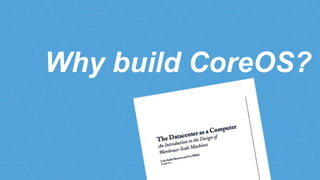
Why build CoreOS?
you
you as a sw engineer
your
with Ada.Text_IO;
procedure Hello_World is
use Ada.Text_IO;
begin
Put_Line("Hello, world!");
end;
#include <stdio.h>
int main()
{
printf("Hello, world!n");
}
package main
import "fmt"
func main() {
fmt.Println("Hello, world!")
}
your container
image
your /bin/java
/opt/app.jar
/lib/libc
your /bin/python
/opt/app.py
/lib/libc
your com.example.app
d474e8c57737625c
your d474e8c57737625c
Signed By: Alice
ops engineer
you as an ops engineer
your
your
com.example.webapp
x3
your
com.example.webapp
x3
your
???
com.example.webapp
x3
How do we do it?
reduce API contracts
minimal
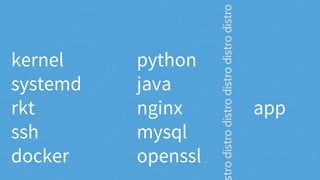
kernel
systemd
rkt
ssh
docker
python
java
nginx
mysql
openssl
app
trodistrodistrodistrodistrodistro
python
java
nginx
mysql
openssl
apptrodistrodistrodistrodistrodistro
kernel
systemd
rkt
ssh
docker
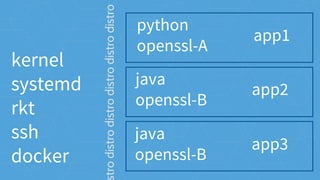
python
openssl-A
app1
trodistrodistrodistrodistrodistro
java
openssl-B
app2
java
openssl-B
app3
kernel
systemd
rkt
ssh
docker
python
openssl-A
app1
trodistrodistrodistrodistrodistro
java
openssl-B
app2
java
openssl-B
app3
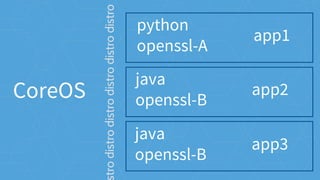
CoreOS
CoreOS
container
trodistrodistrodistrodistrodistro
container
container
OS operations
updates
OS operations
manual updates
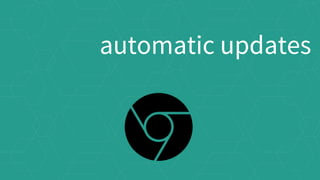
automatic updates
automatic updates
atomic update with rollback
CoreOS Updates
machine configuration
OS operations
get into the cluster
machine config
[Service]
ExecStart=/usr/bin/kubelet --
api_servers=https://172.17.4.101 --
register-node=true --hostname-
override=172.17.4.201 --
cluster_dns=10.3.0.10 --
cluster_domain=cluster.local --tls-
cert-file=worker.pem --tls-private-key-
file=worker-key.pem
[Service]
ExecStart=/usr/bin/kubelet --
api_servers=https://172.17.4.101 --
register-node=true --hostname-
override=172.17.4.201 --
cluster_dns=10.3.0.10 --
cluster_domain=cluster.local --tls-
cert-file=worker.pem --tls-private-key-
file=worker-key.pem
[Service]
ExecStart=/usr/bin/kubelet --
api_servers=https://172.17.4.101 --
register-node=true --hostname-
override=172.17.4.201 --
cluster_dns=10.3.0.10 --
cluster_domain=cluster.local --tls-
cert-file=worker.pem --tls-private-key-
file=worker-key.pem
distributed configuration
cluster operations
etcd
/etc
distributed
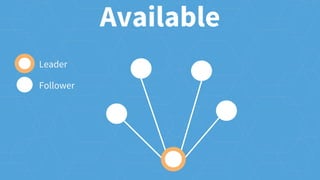
Available
Leader
Follower
Available
Leader
Follower
Available
Leader
Follower
Unavailable
Leader
Follower
Available
Leader
Follower
Available
Leader
Follower
Temporarily Unavailable
Leader
Follower
Available
Leader
Follower
Unavailable
Leader
Follower
what should run
cluster operations
k8s/mesos/etc scheduler
scheduling
getting work to servers
scheduling
You
You
Scheduler API
You
Scheduler API
Scheduler
You
Scheduler API
Scheduler
Machine(s)
while true {
todo = diff(desState, curState)
schedule(todo)
}
while true {
todo = diff(desState, curState)
schedule(todo)
}
while true {
todo = diff(desState, curState)
schedule(todo)
}
while true {
todo = diff(desState, curState)
schedule(todo)
}
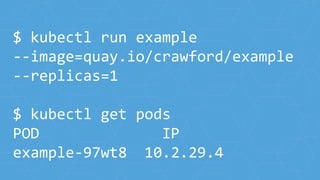
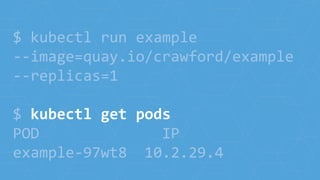
$ kubectl run example
--image=quay.io/crawford/example
--replicas=1
$ kubectl get pods
POD IP
example-97wt8 10.2.29.4
$ kubectl run example
--image=quay.io/crawford/example
--replicas=1
$ kubectl get pods
POD IP
example-97wt8 10.2.29.4
$ kubectl run example
--image=quay.io/crawford/example
--replicas=1
$ kubectl get pods
POD IP
example-97wt8 10.2.29.4
$ kubectl run example
--image=quay.io/crawford/example
--replicas=1
$ kubectl get pods
POD IP
example-97wt8 10.2.29.4
$ kubectl run example
--image=quay.io/crawford/example
--replicas=1
$ kubectl get pods
POD IP
example-97wt8 10.2.29.4
$ kubectl run example
--image=quay.io/crawford/example
--replicas=1
$ kubectl get pods
POD IP
example-97wt8 10.2.29.4
$ kubectl scale rc example
--replicas=2
$ kubectl get pods
POD IP
example-97wt8 10.2.29.4
example-f839d 10.2.29.8
$ kubectl scale rc example
--replicas=2
$ kubectl get pods
POD IP
example-97wt8 10.2.29.4
example-f839d 10.2.29.8
$ kubectl scale rc example
--replicas=2
$ kubectl get pods
POD IP
example-97wt8 10.2.29.4
example-f839d 10.2.29.8
$ kubectl scale rc example
--replicas=2
$ kubectl get pods
POD IP
example-97wt8 10.2.29.4
example-f839d 10.2.29.8
$ kubectl scale rc example
--replicas=2
$ kubectl get pods
POD IP
example-97wt8 10.2.29.4
example-f839d 10.2.29.8
$ kubectl scale rc example
--replicas=2
$ kubectl get pods
POD IP
example-97wt8 10.2.29.4
example-f839d 10.2.29.8
pod
env=prod
app=web
pod
env=prod
app=web
pod
env=prod
app=web
rc web-prod
select(env=prod,app=web)
count=3
pod
env=prod
app=web
pod
env=prod
app=web
pod
env=prod
app=web
rc web-prod
select(env=prod,app=web)
count=1
pod
env=prod
app=web
rc web-prod
select(env=prod,app=web)
count=1
pod
env=prod
app=web
rc web-prod
select(env=prod,app=web)
count=5
pod
env=prod
app=web
pod
env=prod
app=web
pod
env=prod
app=web
pod
env=prod
app=web
pod
env=prod
app=web
rc web-prod
select(env=prod,app=web)
count=5
where is it running
cluster operations
dns, LBs, k8s labels
services
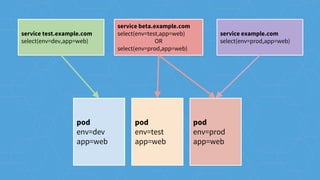
flexible service discovery
k8s labels
pod
env=dev
app=web
pod
env=test
app=web
pod
env=prod
app=web
pod
env=dev
app=web
pod
env=test
app=web
pod
env=prod
app=web
service test.example.com
select(env=dev,app=web)
service beta.example.com
select(env=test,app=web)
OR
select(env=prod,app=web)
service example.com
select(env=prod,app=web)
pod
env=test
app=web
pod
env=prod
app=web
pod
env=prod
app=web
pod
env=dev
app=web
pod
env=test
app=web
pod
env=prod
app=web
service test.example.com
select(env=dev,app=web)
service beta.example.com
select(env=test,app=web)
OR
select(env=prod,app=web)
service example.com
select(env=prod,app=web)
pod
app=foo,version=1
service foo.cluster.local
select(app=foo)
pod
app=foo,version=1
pod
app=foo,version=2
service foo.cluster.local
select(app=foo)
pod
app=foo,version=1
pod
app=foo,version=2
service foo.cluster.local
select(app=foo)
pod
app=foo,version=1
pod
app=foo,version=2
service foo.cluster.local
select(app=foo)
pod
app=foo,version=2
service foo.cluster.local
select(app=foo)
coreos.com/careers
work with us
Questions?

CoreOS in a Nutshell

Editor's Notes

  • #2 What is ignition? Utility for configuring a machine on boot. how is this different from cloudinit?
  • #3 What is CoreOS? It is a tool that is packaged like a server OS.
  • #4 In particular it is a Linux server OS. I wouldn’t be here at a Linux Foundation event if it wasn’t.
  • #5 What is ignition? Utility for configuring a machine on boot. how is this different from cloudinit?
  • #6 JOKE about hardware! PXE, Install to disk, iPXE, etc
  • #7 In particular it is a Linux server OS. I wouldn’t be here at a Linux Foundation event if it wasn’t.
  • #8 we also have a number of open source tools that can be used independently
  • #12 Why build another Linux? Google released a paper called “Datacenter as a Computer”. A system where: - You add more machines and get more capacity - Individual servers don’t matter - The application is the focus - There are no maintenance windows - Use smart software on commodity hardware OK, so lets get started building this thing!
  • #13 **JOKE**: The goal of this talk is talk about the most important person in the room: you And really the different ways that people have been interacting with our software
  • #14 as a sw engineer you will be interacting with our software in dev/test
  • #15 taking the code to your applications
  • #16 and converting it into ACIs that will be converted
  • #17 and converting it into ACIs that will be converted
  • #18 and converting it into ACIs that will be converted
  • #19 and converting it into ACIs that will be converted
  • #20 and converting it into ACIs that will be converted
  • #21 as an ops engineer you will be interacting with our products as a user
  • #22 as an ops engineer you will be interacting with our products as a user
  • #23 and converting it into ACIs that will be converted
  • #24 and converting it into ACIs that will be converted
  • #25 and converting it into ACIs that will be converted
  • #26 and converting it into ACIs that will be converted
  • #27 we also have a number of open source tools that can be used independently
  • #28 In order to achieve this we need to make the individual server less special. - Who here likes large complex API contracts? - Who likes maintaining complex inter-dependent systems? The current state of server infra makes it hard not to treat things as special.
  • #29 The current distribution model offers a large API contract. The server provides a complex pre-configured platform for you app to run against. Distros are forced to freeze versions of things for fear of breaking this API contract. How do we avoid this situation?
  • #30 but, if we re-write the contract then the OS can be dumber. How can we get away with this? - The application brings its entire userspace from libc up - Kernel syscall API is very stable for nearly all server app needs How do we do this?
  • #31 Using containers we can start to run apps side-by-side with conflicting versions JOKE I would not recommend having lots openssl versions, consider NOT embedding openssl in applications.
  • #32 Using containers we can start to run apps side-by-side with conflicting versions JOKE I would not recommend having lots openssl versions, consider NOT embedding openssl in applications.
  • #33 And to clear everything else up we have containers on the right. Nice isolated bundles of userspace code running on top of a minimal system. Now that we have reduced the API contract we are able to start doing interesting things. Lets talk about updates.
  • #34 And to clear everything else up we have containers on the right. Nice isolated bundles of userspace code running on top of a minimal system. Now that we have reduced the API contract we are able to start doing interesting things. Lets talk about updates.
  • #35 In order to achieve this we need to make the individual server less special. - Who here likes large complex API contracts? - Who likes maintaining complex inter-dependent systems? The current state of server infra makes it hard not to treat things as special.
  • #36 In order to achieve this we need to make the individual server less special. - Who here likes large complex API contracts? - Who likes maintaining complex inter-dependent systems? The current state of server infra makes it hard not to treat things as special.
  • #37 Now just because we have reduced the responsibilities of the OS doesn’t mean we can forget about it completely. Keeping an up to date kernel, init system, ssh, etc are good hygiene. How does CoreOS handle this? Remember how hard it was to update IE? Firefox was better, but still annoying Versions before Firefox 15 and IE 8 didn’t do automatic updates
  • #38 Then Chrome just did it for you And we saw the greatest step forward in web-security to date
  • #39 and we got HTML5, soon there after being able to update unlocked all this
  • #40 In order to make shipping updates to CoreOS as automated as possible we have atomic updates with rollback
  • #41 In order to make shipping updates to CoreOS as automated as possible we have atomic updates with rollback
  • #42 In order to make shipping updates to CoreOS as automated as possible we have atomic updates with rollback
  • #43 There are two parts of configuration: - machine configuration - cluster configuration
  • #44 The machine configuration is mostly about how to get into the cluster - SSH certificates to add - boot strapping etcd - any cluster agents to run - configure networking This is generally specified in CoreOS as a cloud-config file. Because on nearly all platforms you can only get a string of bytes into the system: - Kernel command line - AWS user-data - etc
  • #45 For machines in almost all environments we are limited to a string of bytes. This is OK because the things we need to do are really simple! We have just a few goals.
  • #46 For machines in almost all environments we are limited to a string of bytes. This is OK because the things we need to do are really simple! We have just a few goals.
  • #47 For machines in almost all environments we are limited to a string of bytes. This is OK because the things we need to do are really simple! We have just a few goals.
  • #48 Service discovery through API or DNS. Also, used by scheduler to figure out if work needs to be resceduled.
  • #49 You can think of etcd as /etc distributed across lots of machines.
  • #50 You can think of etcd as /etc distributed across lots of machines.
  • #60 - What should I be running? - Can I reboot for an upgrade now?
  • #61 Transition: For cluster configuration we have a data store called etcd.
  • #62 Scheduling is really the user interface we are getting towards: -
  • #88 Service discovery through API or DNS. Also, used by scheduler to figure out if work needs to be resceduled.
  • #89 There are two parts of configuration:
  • #90 There are two parts of configuration:
  • #99 What’s next? Active development. A few months away. Supercede cloudinit. Use one or the other. user_data cloudinit is not going anywhere.
  • #101 What’s next? Active development. A few months away. Supercede cloudinit. Use one or the other. user_data cloudinit is not going anywhere.