Welcome!
$ kubectl hacking
____ ___ ____
| _  _____ __ / _  _ __ ___ / ___|___ _ __
| | | |/ _   / / | | | | '_ / __| | | / _ | '_ 
| |_| | __/ V / | |_| | |_) __  | |__| (_) | | | |
|____/ ___| _/ ___/| .__/|___/ _______/|_| |_|
|_|
____ _ _
| __ ) ___ _ __| (_)_ __
| _  / _  '__| | | '_ 
| |_) | __/ | | | | | | |
|____/ ___|_| |_|_|_| |_|
My journey to Kubernetes
Java programmer -> Testautomation -> Docker -> OpenShift -> Kubernetes
..
..
........
... ..++..++..++.. ...
..+++.. .++. ..+++..
.+.++.. .++. ..++.+.
.+. .++++++++++. .+.
++. ..++....++.. .++
..++.+++++++..+++++++.++..
.....++.. .++++++. ..++.....
.++. ++. .++ .++.
..+..+. .+..+..
.+.++++++.+.
.+. .+.
+. .+
mailto:tobi@loodse.com
https://twitter.com/toschneck
https://github.com/toschneck
kubectl - what's this about?
Main command line tool for interact with Kubernetes writen in Golang
Maintained by SIG API Machinery (part of official community)
Source code:
https://github.com/kubernetes/kubernetes/tree/master/pkg/kubectl
Uses REST HTTPS calls
Caches results under ~/.kube/cache/
Other clients
client-go: https://github.com/kubernetes/client-go/
other main languages https://kubernetes.io/docs/reference/using-api/client-
libraries
Generate client from Swagger specs
curl or other REST webclient
curl --cert userbob.pem --key userBob-key.pem 
--cacert /path/to/ca.pem 
https://k8sServer:6443/api/v1/pods
# as helper use:
kubectl get pod -v 10
basic bash config
Enable bash auto completion
(https://kubernetes.io/docs/reference/kubectl/cheatsheet/#kubectl-autocomplete)
(update compatible)
# add to ~/.bashrc
source <(kubectl completion bash)
alias k=kubectl
complete -F __start_kubectl k
beautify your bash prompt -> powerline go (https://github.com/justjanne/powerline-go)
1. Install binary go get -v -u github.com/justjanne/powerline-go
2. ensure powerline-go is available in the path: export PATH=$PATH:$GOPATH/bin
3. config ~/.bashrc -> source ./powerline-go/.bashrc
kubectl help?
kubectl [command] --help is very helpful!
kubectl explain [object][.field][...] information about spec fields!
kubectl api-resources shows available objects - with CRDs!
Examples
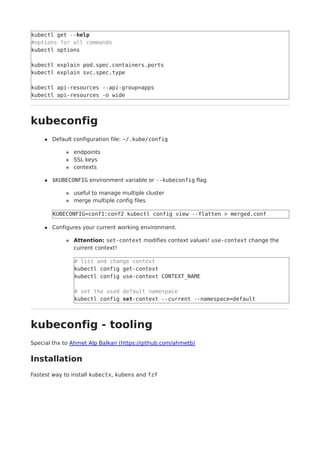
kubectl get --help
#options for all commands
kubectl options
kubectl explain pod.spec.containers.ports
kubectl explain svc.spec.type
kubectl api-resources --api-group=apps
kubectl api-resources -o wide
kubeconfig
Default configuration file: ~/.kube/config
endpoints
SSL keys
contexts
$KUBECONFIG environment variable or --kubeconfig flag
useful to manage multiple cluster
merge multiple config files
KUBECONFIG=conf1:conf2 kubectl config view --flatten > merged.conf
Configures your current working environment.
Attention: set-context modifies context values! use-context change the
current context!
# list and change context
kubectl config get-context
kubectl config use-context CONTEXT_NAME
# set the used default namespace
kubectl config set-context --current --namespace=default
kubeconfig - tooling
Special thx to Ahmet Alp Balkan (https://github.com/ahmetb)
Installation
Fastest way to install kubectx, kubens and fzf
cd $HOME/bin
wget https://raw.githubusercontent.com/ahmetb/kubectx/master/kubectx
wget https://raw.githubusercontent.com/ahmetb/kubectx/master/kubens
chmod 755 kubectx kubens
wget https://github.com/junegunn/fzf-bin/releases/download/0.18.0/fzf-0.18.0-
linux_amd64.tgz
tar xf fzf-0.18.0-linux_amd64.tgz
# → kubectx, kubens, fzf
kubeconfig - tooling
Usage kubectx, kubens
fast context switching
# fuzzy search list
kubectx
# direct select e.g. `default` context
kubectx default
# select last context
kubectx -
fast namespace switching
# fuzzy search list
kubens
# direct select e.g. `kube-system` namespace
kubens kube-system
# select last namespace
kubens -
kubeconfig - tooling
Use fuzzy search fzf
Search a file the fuzzy way
fzf
# with preview
fzf --preview 'cat {}'
Key binding → add ./fzf/.fzf.bash to your ~/.bashrc
[ -f ~/.fzf.bash ] && source ~/.fzf.bash
Pipe kubectl output, e.g. logs, config
k logs POD_NAME | fzf
k get pod POD_NAME -o yaml | fzf
kubectl output parameter
--v=9 Debug verbosity
(https://kubernetes.io/docs/reference/kubectl/cheatsheet/#kubectl-output-verbosity-
and-debugging) 0-10
-o wide, -o yaml shows more important information about an object
--show-labels and --label-columns=k8s-app structure your output
-l k8s-app=my-app, --field-selector=status.phase=Running select objects
-o json | jq 'expresion' combine JSON and jq (https://github.com/stedolan/jq) to
get more details (useful for scripting)
jsonpath=JSONPATH_EXP powerful one line helper to get multiple valuesx of a json
output
kubectl describe OBJECT shows information and events
kubectl output parameter
Examples
# all runnings pods
k get pod --field-selector=status.phase=Running
# node kernel version
k get nodes -o json | jq '.items[].status.nodeInfo.kernelVersion' -r
# all used images
kubectl get pods --all-namespaces 
-o jsonpath='{range .items[*]}{@.metadata.name}{" "}
{@.spec.containers[*].image}{"n"}{end}'
# Check which nodes are ready
JSONPATH='{range .items[*]}{"n---n"}{@.metadata.name}:
{"n"}{range @.status.conditions[*]}{@.type}={@.status}; {"n"}{end}{end}' 
&& kubectl get nodes -o jsonpath="$JSONPATH"
# troubleshoot node state
kubectl describe node NODE_NAME
Quick wins - let kubectl help you!
use run for resource creation (deprecated)
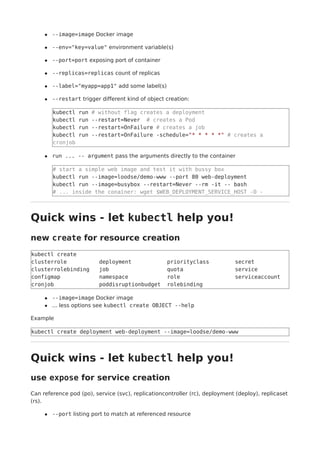
--image=image Docker image
--env="key=value" environment variable(s)
--port=port exposing port of container
--replicas=replicas count of replicas
--label="myapp=app1" add some label(s)
--restart trigger different kind of object creation:
kubectl run # without flag creates a deployment
kubectl run --restart=Never # creates a Pod
kubectl run --restart=OnFailure # creates a job
kubectl run --restart=OnFailure -schedule="* * * * *" # creates a
cronjob
run ... -- argument pass the arguments directly to the container
# start a simple web image and test it with bussy box
kubectl run --image=loodse/demo-www --port 80 web-deployment
kubectl run --image=busybox --restart=Never --rm -it -- bash
# ... inside the conainer: wget $WEB_DEPLOYMENT_SERVICE_HOST -O -
Quick wins - let kubectl help you!
new create for resource creation
kubectl create
clusterrole deployment priorityclass secret
clusterrolebinding job quota service
configmap namespace role serviceaccount
cronjob poddisruptionbudget rolebinding
--image=image Docker image
... less options see kubectl create OBJECT --help
Example
kubectl create deployment web-deployment --image=loodse/demo-www
Quick wins - let kubectl help you!
use expose for service creation
Can reference pod (po), service (svc), replicationcontroller (rc), deployment (deploy), replicaset
(rs).
--port listing port to match at referenced resource
--type type of Service: ClusterIP (default), NodePort, LoadBalancer, ExternalName
--traget-port port at the service
--selector specify label selector
k expose deployment web-deployment --type=NodePort --port=80
k expose deployment web-deployment --type=LoadBalancer --port=80
k get nodes -o wide
k get nodes --selector=kubernetes.io/role!=master 
-o jsonpath={.items[0].status.addresses[?(@.type=="ExternalIP")].address}
Combine with port-forward for quick testing or debugging
can target pod, deployment, service
use localport:remoteport for port mapping
k port-forward svc/web-deployment 8080:80 &
curl localhost:8080
Quick wins - let kubectl help you!
create templates
--dry-run combined with -o yaml and run --restart or create creates a template
for common resource
# create a deployment yaml file
kubectl run --image=loodse/demo-www --port 80 --dry-run -o yaml web-
template > dep.yaml
kubectl create deployment web-template --image=loodse/demo-www --dry-run
-o yaml > dep.yaml
# job with 10 sleep
kubectl run --image=busybox --restart=OnFailure --dry-run -o yaml job --
/bin/sleep 10 > job.yaml
--export get a pod's YAML without cluster specific information
#deployment
k get deployment web-deployment -o yaml --export > dep.export.yaml
vim dep.export.yaml
k apply -f dep.export.yaml
#service
k get service web-deployment --export -o yaml > svc.export.yaml
Quick wins - let kubectl help you!
Modify resources
Use inplace editor functionality
KUBE_EDITOR sets the local editor
kubectl edit TYP OBJECT open in cluster resource
Use apply for mutable objects, replace for immutable objects. Note: You can use -f
FOLDER for using multi manifests!
kubectl apply -f dep.yaml
# delete resource and recreates it
kubectl replace --force -f pod.yaml
Use scaling functions
k autoscale deployment foo --min=2 --max=10 add HPA
(https://kubernetes.io/docs/tasks/run-application/horizontal-pod-autoscale/)
k scale deployment --replicas=10 web-deployment scales up
Quick wins - let kubectl help you!
Modify resources
Manipulate current objects, e.g. the image value
# use set for common modification
k set image deployment/web-deployment web-deployment=loodse/demo-www
k set env deployment/web-deployment TEST=val
# use patch for all other, e.g. service type
kubectl patch svc/web-deployment -p '{"spec":{"type":"LoadBalancer"}}'
# Update a container's image; spec.containers[*].name is required
because it's a merge key
kubectl patch pod/podname -p 
'{"spec":{"containers":[{"name":"web-deployment","image":"loodse/demo-
www"}]}}'
Basic cluster information
What cluster do I use?
kubectl cluster-info
Whats about the components?
kubectl get componentstatuses
kubectl get cs
Troubleshoot the whole cluster
# download the state
kubectl cluster-info dump --output-directory=./output/cluster-state
# diagnose it
tree ./output/cluster-state
grep -r Error output/cluster-state
grep -C 5 -r Error output/cluster-state
Extend kubectl with plugins
Enable kubectl plugin manager krew (https://github.com/GoogleContainerTools/krew)
# add to ~/.bashrc
#
# export KREW_ROOT=/path/to/krew-folder
export PATH="${KREW_ROOT:-$HOME/.krew}/bin:$PATH"
Plugin management
kubectl-krew search
kubectl-krew insatll view-secret
Example: decode base64 secrets
kubectl get secret
kubectl view-secret default-token-976rc namespace
Use kubectl the fuzzy way with fubectl
(https://github.com/kubermatic/fubectl)
bash/zsh wrapper based on kubectl, jq and fzf
Interactive search and interaction with Kubernetes objects
support's also CRD's
No in-cluster installation needed
Installation
curl -LO https://rawgit.com/kubermatic/fubectl/master/fubectl.source
# add to `~/.bashrc`
[ -f <path-to>/fubectl.source ] && source <path-to>/fubectl.source
Usage of fubectl:
khelp
# [ka] get all pods in namespace
# [kall] get all pods in cluster
# [kwa] watch all pods in the current namespace
# [kwall] watch all pods in cluster
# [kp] open kubernetes dashboard with proxy
# [kwatch] watch resource
# [kdebug] start debugging in cluster
# [kube_ctx_name] get the current context
# [kube_ctx_namespace] get current namespace
# [kget] get a resource by its YAML
# [ked] edit a resource by its YAML
# [kdes] describe resource
# [kdel] delete resource
# [klog] fetch log from container
# [kex] execute command in container
# [kfor] port-forward a container port to your local machine
# [ksearch] search for string in resources
# [kcl] context list
# [kcs] context set
# [kcns] context set default namespace
# [kwns] watch pods in a namespace
Troubleshooting
Take a look for objects in state Pending, Error, CrashLoopBackOff
Use port-forward to test different connections, e.g. service or pod
Use prepared debug container for e.g. network debugging
kubectl run --image=amouat/network-utils --restart=Never --rm -it --
bash
top for resource usage, requires metrics-server (https://github.com/kubernetes-
incubator/metrics-server)
kubectl top node
kubectl top pod
Reproduce the event and stream all matching logs, e.g. with label name=myLabel
kubectl logs -f -l name=myLabel --all-containers
exec into running container
kubectl exec my-pod -- ls -la /
kubectl exec my-pod -it -- sh
Cluster Inspection Tools
++ need no running components in the cluster
k9s (https://github.com/derailed/k9s)
provides a curses based terminal UI
interactive view similar to htop
popeye (https://github.com/derailed/popeye)
Kubernetes Cluster Sanitizer
Find errors and warnings
Cluster Management by Cluster API
(https://github.com/kubernetes-
sigs/cluster-api)
Manage Cluster's by CRDs in depedent of the provider (cloud/on-prem)
Currently mostly used machine creation, see as e.g. machine-controller
(https://github.com/kubermatic/machine-controller) implementations
Used by e.g. HA cluster management tool kubeOne
(https://github.com/kubermatic/kubeone)
Immutable machine objects handle cluster nodes similar to pods
Deployment -> ReplicaSet -> Pod -> Container
MachineDeployment -> MachineSet -> Machine -> Node
# see the machine definition
k describe machine -n kube-system MACHINE_NAME
k get machinedeployment,machineset,machine,node -n kube-system
# update e.g. kubernetes version, machine size, ...
k edit machinedeployment
# machine to node reference:
k get machine -n kube-system 
-o jsonpath='{range .items[*]}{@.metadata.name}{" >> "}
{@.status.nodeRef.name}{"n"}{end}}'
Manage VMs with kubevirt
(https://github.com/kubevirt/kubevirt)
New open source project to manage virtual Machines
Approach to manage VMs inside of kubernetes
Example: https://github.com/kubevirt/demo/blob/master/manifests/vm.yaml
Questions?
I'm happy to answer!
Slides?
Take a look at https://github.com/loodse/kubectl-hacking
Something to add?
Open a pull request
Thx for your attention!
References:
https://kubernetes.io/docs/reference/kubectl/cheatsheet
https://kubectl.docs.kubernetes.io
https://medium.com/@nassim.kebbani/how-to-beat-kubernetes-ckad-certification-
c84bff8d61b1
https://www.freecodecamp.org/news/how-to-set-up-a-serious-kubernetes-terminal-
dd07cab51cd4

$ kubectl hacking @DevOpsCon Berlin 2019

  • 1.
    Welcome! $ kubectl hacking _______ ____ | _ _____ __ / _ _ __ ___ / ___|___ _ __ | | | |/ _ / / | | | | '_ / __| | | / _ | '_ | |_| | __/ V / | |_| | |_) __ | |__| (_) | | | | |____/ ___| _/ ___/| .__/|___/ _______/|_| |_| |_| ____ _ _ | __ ) ___ _ __| (_)_ __ | _ / _ '__| | | '_ | |_) | __/ | | | | | | | |____/ ___|_| |_|_|_| |_| My journey to Kubernetes Java programmer -> Testautomation -> Docker -> OpenShift -> Kubernetes .. .. ........ ... ..++..++..++.. ... ..+++.. .++. ..+++.. .+.++.. .++. ..++.+. .+. .++++++++++. .+. ++. ..++....++.. .++ ..++.+++++++..+++++++.++.. .....++.. .++++++. ..++..... .++. ++. .++ .++. ..+..+. .+..+.. .+.++++++.+. .+. .+. +. .+ mailto:tobi@loodse.com https://twitter.com/toschneck https://github.com/toschneck kubectl - what's this about?
  • 2.
    Main command linetool for interact with Kubernetes writen in Golang Maintained by SIG API Machinery (part of official community) Source code: https://github.com/kubernetes/kubernetes/tree/master/pkg/kubectl Uses REST HTTPS calls Caches results under ~/.kube/cache/ Other clients client-go: https://github.com/kubernetes/client-go/ other main languages https://kubernetes.io/docs/reference/using-api/client- libraries Generate client from Swagger specs curl or other REST webclient curl --cert userbob.pem --key userBob-key.pem --cacert /path/to/ca.pem https://k8sServer:6443/api/v1/pods # as helper use: kubectl get pod -v 10 basic bash config Enable bash auto completion (https://kubernetes.io/docs/reference/kubectl/cheatsheet/#kubectl-autocomplete) (update compatible) # add to ~/.bashrc source <(kubectl completion bash) alias k=kubectl complete -F __start_kubectl k beautify your bash prompt -> powerline go (https://github.com/justjanne/powerline-go) 1. Install binary go get -v -u github.com/justjanne/powerline-go 2. ensure powerline-go is available in the path: export PATH=$PATH:$GOPATH/bin 3. config ~/.bashrc -> source ./powerline-go/.bashrc kubectl help? kubectl [command] --help is very helpful! kubectl explain [object][.field][...] information about spec fields! kubectl api-resources shows available objects - with CRDs! Examples
  • 3.
    kubectl get --help #optionsfor all commands kubectl options kubectl explain pod.spec.containers.ports kubectl explain svc.spec.type kubectl api-resources --api-group=apps kubectl api-resources -o wide kubeconfig Default configuration file: ~/.kube/config endpoints SSL keys contexts $KUBECONFIG environment variable or --kubeconfig flag useful to manage multiple cluster merge multiple config files KUBECONFIG=conf1:conf2 kubectl config view --flatten > merged.conf Configures your current working environment. Attention: set-context modifies context values! use-context change the current context! # list and change context kubectl config get-context kubectl config use-context CONTEXT_NAME # set the used default namespace kubectl config set-context --current --namespace=default kubeconfig - tooling Special thx to Ahmet Alp Balkan (https://github.com/ahmetb) Installation Fastest way to install kubectx, kubens and fzf
  • 4.
    cd $HOME/bin wget https://raw.githubusercontent.com/ahmetb/kubectx/master/kubectx wgethttps://raw.githubusercontent.com/ahmetb/kubectx/master/kubens chmod 755 kubectx kubens wget https://github.com/junegunn/fzf-bin/releases/download/0.18.0/fzf-0.18.0- linux_amd64.tgz tar xf fzf-0.18.0-linux_amd64.tgz # → kubectx, kubens, fzf kubeconfig - tooling Usage kubectx, kubens fast context switching # fuzzy search list kubectx # direct select e.g. `default` context kubectx default # select last context kubectx - fast namespace switching # fuzzy search list kubens # direct select e.g. `kube-system` namespace kubens kube-system # select last namespace kubens - kubeconfig - tooling Use fuzzy search fzf Search a file the fuzzy way fzf # with preview fzf --preview 'cat {}' Key binding → add ./fzf/.fzf.bash to your ~/.bashrc [ -f ~/.fzf.bash ] && source ~/.fzf.bash Pipe kubectl output, e.g. logs, config k logs POD_NAME | fzf k get pod POD_NAME -o yaml | fzf
  • 5.
    kubectl output parameter --v=9Debug verbosity (https://kubernetes.io/docs/reference/kubectl/cheatsheet/#kubectl-output-verbosity- and-debugging) 0-10 -o wide, -o yaml shows more important information about an object --show-labels and --label-columns=k8s-app structure your output -l k8s-app=my-app, --field-selector=status.phase=Running select objects -o json | jq 'expresion' combine JSON and jq (https://github.com/stedolan/jq) to get more details (useful for scripting) jsonpath=JSONPATH_EXP powerful one line helper to get multiple valuesx of a json output kubectl describe OBJECT shows information and events kubectl output parameter Examples # all runnings pods k get pod --field-selector=status.phase=Running # node kernel version k get nodes -o json | jq '.items[].status.nodeInfo.kernelVersion' -r # all used images kubectl get pods --all-namespaces -o jsonpath='{range .items[*]}{@.metadata.name}{" "} {@.spec.containers[*].image}{"n"}{end}' # Check which nodes are ready JSONPATH='{range .items[*]}{"n---n"}{@.metadata.name}: {"n"}{range @.status.conditions[*]}{@.type}={@.status}; {"n"}{end}{end}' && kubectl get nodes -o jsonpath="$JSONPATH" # troubleshoot node state kubectl describe node NODE_NAME Quick wins - let kubectl help you! use run for resource creation (deprecated)
  • 6.
    --image=image Docker image --env="key=value"environment variable(s) --port=port exposing port of container --replicas=replicas count of replicas --label="myapp=app1" add some label(s) --restart trigger different kind of object creation: kubectl run # without flag creates a deployment kubectl run --restart=Never # creates a Pod kubectl run --restart=OnFailure # creates a job kubectl run --restart=OnFailure -schedule="* * * * *" # creates a cronjob run ... -- argument pass the arguments directly to the container # start a simple web image and test it with bussy box kubectl run --image=loodse/demo-www --port 80 web-deployment kubectl run --image=busybox --restart=Never --rm -it -- bash # ... inside the conainer: wget $WEB_DEPLOYMENT_SERVICE_HOST -O - Quick wins - let kubectl help you! new create for resource creation kubectl create clusterrole deployment priorityclass secret clusterrolebinding job quota service configmap namespace role serviceaccount cronjob poddisruptionbudget rolebinding --image=image Docker image ... less options see kubectl create OBJECT --help Example kubectl create deployment web-deployment --image=loodse/demo-www Quick wins - let kubectl help you! use expose for service creation Can reference pod (po), service (svc), replicationcontroller (rc), deployment (deploy), replicaset (rs). --port listing port to match at referenced resource
  • 7.
    --type type ofService: ClusterIP (default), NodePort, LoadBalancer, ExternalName --traget-port port at the service --selector specify label selector k expose deployment web-deployment --type=NodePort --port=80 k expose deployment web-deployment --type=LoadBalancer --port=80 k get nodes -o wide k get nodes --selector=kubernetes.io/role!=master -o jsonpath={.items[0].status.addresses[?(@.type=="ExternalIP")].address} Combine with port-forward for quick testing or debugging can target pod, deployment, service use localport:remoteport for port mapping k port-forward svc/web-deployment 8080:80 & curl localhost:8080 Quick wins - let kubectl help you! create templates --dry-run combined with -o yaml and run --restart or create creates a template for common resource # create a deployment yaml file kubectl run --image=loodse/demo-www --port 80 --dry-run -o yaml web- template > dep.yaml kubectl create deployment web-template --image=loodse/demo-www --dry-run -o yaml > dep.yaml # job with 10 sleep kubectl run --image=busybox --restart=OnFailure --dry-run -o yaml job -- /bin/sleep 10 > job.yaml --export get a pod's YAML without cluster specific information #deployment k get deployment web-deployment -o yaml --export > dep.export.yaml vim dep.export.yaml k apply -f dep.export.yaml #service k get service web-deployment --export -o yaml > svc.export.yaml Quick wins - let kubectl help you! Modify resources
  • 8.
    Use inplace editorfunctionality KUBE_EDITOR sets the local editor kubectl edit TYP OBJECT open in cluster resource Use apply for mutable objects, replace for immutable objects. Note: You can use -f FOLDER for using multi manifests! kubectl apply -f dep.yaml # delete resource and recreates it kubectl replace --force -f pod.yaml Use scaling functions k autoscale deployment foo --min=2 --max=10 add HPA (https://kubernetes.io/docs/tasks/run-application/horizontal-pod-autoscale/) k scale deployment --replicas=10 web-deployment scales up Quick wins - let kubectl help you! Modify resources Manipulate current objects, e.g. the image value # use set for common modification k set image deployment/web-deployment web-deployment=loodse/demo-www k set env deployment/web-deployment TEST=val # use patch for all other, e.g. service type kubectl patch svc/web-deployment -p '{"spec":{"type":"LoadBalancer"}}' # Update a container's image; spec.containers[*].name is required because it's a merge key kubectl patch pod/podname -p '{"spec":{"containers":[{"name":"web-deployment","image":"loodse/demo- www"}]}}' Basic cluster information What cluster do I use? kubectl cluster-info Whats about the components? kubectl get componentstatuses kubectl get cs Troubleshoot the whole cluster
  • 9.
    # download thestate kubectl cluster-info dump --output-directory=./output/cluster-state # diagnose it tree ./output/cluster-state grep -r Error output/cluster-state grep -C 5 -r Error output/cluster-state Extend kubectl with plugins Enable kubectl plugin manager krew (https://github.com/GoogleContainerTools/krew) # add to ~/.bashrc # # export KREW_ROOT=/path/to/krew-folder export PATH="${KREW_ROOT:-$HOME/.krew}/bin:$PATH" Plugin management kubectl-krew search kubectl-krew insatll view-secret Example: decode base64 secrets kubectl get secret kubectl view-secret default-token-976rc namespace Use kubectl the fuzzy way with fubectl (https://github.com/kubermatic/fubectl) bash/zsh wrapper based on kubectl, jq and fzf Interactive search and interaction with Kubernetes objects support's also CRD's No in-cluster installation needed Installation curl -LO https://rawgit.com/kubermatic/fubectl/master/fubectl.source # add to `~/.bashrc` [ -f <path-to>/fubectl.source ] && source <path-to>/fubectl.source Usage of fubectl:
  • 10.
    khelp # [ka] getall pods in namespace # [kall] get all pods in cluster # [kwa] watch all pods in the current namespace # [kwall] watch all pods in cluster # [kp] open kubernetes dashboard with proxy # [kwatch] watch resource # [kdebug] start debugging in cluster # [kube_ctx_name] get the current context # [kube_ctx_namespace] get current namespace # [kget] get a resource by its YAML # [ked] edit a resource by its YAML # [kdes] describe resource # [kdel] delete resource # [klog] fetch log from container # [kex] execute command in container # [kfor] port-forward a container port to your local machine # [ksearch] search for string in resources # [kcl] context list # [kcs] context set # [kcns] context set default namespace # [kwns] watch pods in a namespace Troubleshooting Take a look for objects in state Pending, Error, CrashLoopBackOff Use port-forward to test different connections, e.g. service or pod Use prepared debug container for e.g. network debugging kubectl run --image=amouat/network-utils --restart=Never --rm -it -- bash top for resource usage, requires metrics-server (https://github.com/kubernetes- incubator/metrics-server) kubectl top node kubectl top pod Reproduce the event and stream all matching logs, e.g. with label name=myLabel kubectl logs -f -l name=myLabel --all-containers exec into running container kubectl exec my-pod -- ls -la / kubectl exec my-pod -it -- sh Cluster Inspection Tools
  • 11.
    ++ need norunning components in the cluster k9s (https://github.com/derailed/k9s) provides a curses based terminal UI interactive view similar to htop popeye (https://github.com/derailed/popeye) Kubernetes Cluster Sanitizer Find errors and warnings Cluster Management by Cluster API (https://github.com/kubernetes- sigs/cluster-api) Manage Cluster's by CRDs in depedent of the provider (cloud/on-prem) Currently mostly used machine creation, see as e.g. machine-controller (https://github.com/kubermatic/machine-controller) implementations Used by e.g. HA cluster management tool kubeOne (https://github.com/kubermatic/kubeone) Immutable machine objects handle cluster nodes similar to pods Deployment -> ReplicaSet -> Pod -> Container MachineDeployment -> MachineSet -> Machine -> Node # see the machine definition k describe machine -n kube-system MACHINE_NAME k get machinedeployment,machineset,machine,node -n kube-system # update e.g. kubernetes version, machine size, ... k edit machinedeployment # machine to node reference: k get machine -n kube-system -o jsonpath='{range .items[*]}{@.metadata.name}{" >> "} {@.status.nodeRef.name}{"n"}{end}}' Manage VMs with kubevirt (https://github.com/kubevirt/kubevirt) New open source project to manage virtual Machines Approach to manage VMs inside of kubernetes
  • 12.
    Example: https://github.com/kubevirt/demo/blob/master/manifests/vm.yaml Questions? I'm happyto answer! Slides? Take a look at https://github.com/loodse/kubectl-hacking Something to add? Open a pull request Thx for your attention! References: https://kubernetes.io/docs/reference/kubectl/cheatsheet https://kubectl.docs.kubernetes.io https://medium.com/@nassim.kebbani/how-to-beat-kubernetes-ckad-certification- c84bff8d61b1 https://www.freecodecamp.org/news/how-to-set-up-a-serious-kubernetes-terminal- dd07cab51cd4