HI-TECH INSTITUTE OF
ENGINEERING AND TECHNOLOGY
PRESENTATION ON
“CORE i7 PROCESSOR”
DEPARTMENT OF IT
S U B M I T T E D B Y:
N A M E - S U M I T K U M A R
B I S W A S
C O U R S E - B - T E C H
B R A N C H - I T
S E M - 6 T H
Y E A R - 3 R D
R O L L N O . - 1 1 2 2 0 1 3 0 2 3
S U B M I T T E D TO :
M R . B H A S K E R S H A R M A
CONTENT
Introduction
Intel Core
Types of Intel Core
Features of Core i 7
Variants in i7
Comparison Between i3, i5 & i7
Advantage & Disadvantage
Conclusion
INTRODUCTION
What is Processor ?
A processor is multipurpose, programmable
device that read binary instructions from
memory, accepts binary data as input and
processes data according to that instruction,
and provides results as output. It can be viewed
as data processing unit of a computer. It has
computing and decision-making capability.
INTRODUCTION
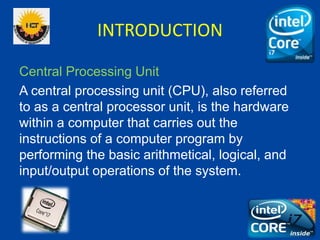
Central Processing Unit
A central processing unit (CPU), also referred
to as a central processor unit, is the hardware
within a computer that carries out the
instructions of a computer program by
performing the basic arithmetical, logical, and
input/output operations of the system.
INTRODUCTION
• A Central Processing Unit (CPU), or sometimes
just called processor, is a description of a class of
logic machines that can execute computer
programs.
• Intel Core i7 is a family of three Intel desktop
processors, the first processors released using the
Intel Nehalem micro architecture and the
successor to the Intel Core 2 family. All three
models are quad-core processors.
INTEL CORE
• Intel Core is a brand name used for various mid - range to
high-end consumer and business micro processors made by
Intel.
• Identical or more capable versions of Core processors are
also sold as Xeon processors for the server
 The current Core processors
 Intel core i7
 Intel core i5
 Intel core i3
 The old core processors include:
 Intel core 2 solo
 Intel core 2 Duo
 Intel core 2 Quad
 Intel core 2 extreme
INTEL CORE
Types of Intel core micro processors :
 Enhanced Pentium M based
 Core Duo
 Core Solo
 64 bit Core micro architecture based
 Core 2 Duo
 Core 2 Solo
 Core 2 Quad
 Core 2 Extreme
 Nehalem micro architecture based
 Core i3
 Core i5
 Core i7
INTEL CORE
Enhanced Pentium M based :
The original Core brand refers to Intel’s 32 bit mobile dual core x86 CPU s that
derived from the Pentium M branded processors.
Core Duo :
Intel Core Duo (product code 80539) consists of two cores on one
die, a 2 MB L2 cache shared by both cores, and an arbiter bus that controls
both L2 cache and FSB(Front side bus).
Core Solo :
Intel Core Solo (product code 80538) uses the same two-core die as
the Core Duo, but features only one active core. This allows Intel to sell dies
that have a manufacturing defect in one but not both of the cores.
INTEL CORE
64 bit micro architecture based :
The successor to Core is the mobile version of the Intel core 2 line of
processors using cores based upon the Intel Core micro architecture released
on July 27, 2006.
Core 2 Solo :
The Core 2 Solo introduced in September 2007, is the successor to
the Core Solo and is available only as an ultra-low-power mobile processor
with 5.5 Watt thermal design power.
Core 2 Duo :
The majority of the desktop and mobile Core 2 processor variants
are Core 2 Duo with two processor cores on a single Merom , Conroe ,
Allendale, Penryn or Wolfdale chip.
INTEL CORE
Core 2 Quad :
Core 2 Quad processors are multi chip modules consisting of two dies
similar to those used in Core 2 Duo, forming a quad-core processor. This
allows twice the performance of a dual-core processors at the same clock
frequency.
Core 2 Extreme :
Core 2 Extreme processors are enthusiast versions of Core 2
Duo and Core 2 Quad processors, usually with a higher clock frequency
and an unlocked clock multiplier.
INTEL CORE
Nehalem micro architecture based :
The Nehalem micro architecture Intel introduced a new naming scheme for it .
The Core i3 was intended to be the new low end of the performance
processor line from Intel
Core i3 :
The first Core i3 processors were launched on January 7, 2010. The first
Nehalem based Core i3 was Clarkdale based Core processors. There are
three variants, Core i3, Core i5, and Core i7.
Core i5 :
Core i5, like Core i7, is based on the Nehalem micro architecture. The first
Core i5 was introduced on September 8, 2009 and was a mainstream
variant of the earlier Core i7.
INTEL CORE
Core i7 :
The Core i7 brand remains the high-end for Intel's desktop and mobile
processors, featuring the Sandy Bridge models with the largest amount of
L3 cache and the highest clock frequency.
Processors :
• The initial Core i7 processors released were codenamed Bloomfield,
branded as Core i7-9xx along with their Xeon 3500-series counterparts.
• Lynnfield is the second processor sold under the Core i7 brand, while at
the same time being sold as Core i5
• The second mobile Core i7 processor family is Arrandale, sold as the Core
i7-6xx processors
• Sandy bridge is the second generation Intel Core i7 series processor, and is
based on micro architecture
FEATURES of i7
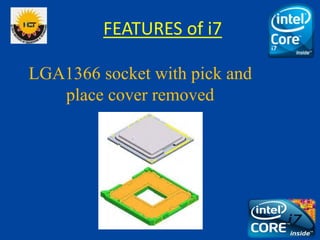
1. SOCKET: The Socket is a new LGA1366(Socket B) and is incompatible with
the previous versions:
 LGA refers to Land Grid Array, a new type of socket for the latest range of
processors. The LGA is used as a physical interface for microprocessors of
the Intel Pentium 4, Intel Xeon, Intel Core 2 and AMD Opteron families.
Unlike the pin grid array (PGA) interface found on most AMD and older
Intel processors, there are no pins on the chip; in place of the pins are pads
of bare gold-plated copper that touch pins on the motherboard.
 Intel supposedly decided to switch to an LGA socket because it provides a
larger contact point, allowing, for example, higher clock frequencies. The
LGA setup provides higher pin densities, allowing more power contacts and
thus a more stable power supply to the chip.
LGA1366 socket with pick and
place cover removed
FEATURES of i7
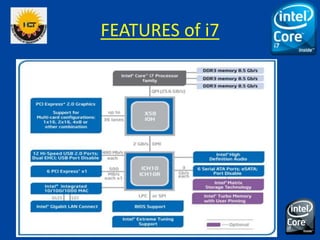
2. ON-DIE MEMORY CONTROLLER: The memory is directly connected to
the processor.
 Three channel memory: each channel can support one or two DDR3 RAM’s.
Motherboards for Core i7 have four or six RAM slots.
 Supports DDR3
• DDR3 RAM (double-data-rate three random access memory ) is a random
access memory technology used for high speed storage of the working data in
the computer.
• The benefit of DDR3 is the ability to run its I/O bus at four times the speed of
the memory cells it contains, thus enabling faster bus speeds and higher peak
throughput than earlier memory technologies.
• The DDR3 standard allows for chip capacities of 512 megabits to 8 gigabits,
effectively enabling a maximum memory module size of 16 gigabytes.
• There is a significant reduction in power consumption. It needs only 1.5V
compared to 1.8V for DDR2.
FEATURES of i7
FEATURES of i7
FEATURES of i7
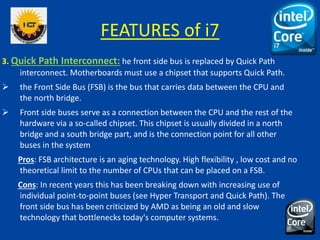
3. Quick Path Interconnect: he front side bus is replaced by Quick Path
interconnect. Motherboards must use a chipset that supports Quick Path.
 the Front Side Bus (FSB) is the bus that carries data between the CPU and
the north bridge.
 Front side buses serve as a connection between the CPU and the rest of the
hardware via a so-called chipset. This chipset is usually divided in a north
bridge and a south bridge part, and is the connection point for all other
buses in the system
Pros: FSB architecture is an aging technology. High flexibility , low cost and no
theoretical limit to the number of CPUs that can be placed on a FSB.
Cons: In recent years this has been breaking down with increasing use of
individual point-to-point buses (see Hyper Transport and Quick Path). The
front side bus has been criticized by AMD as being an old and slow
technology that bottlenecks today's computer systems.
FEATURES of i7
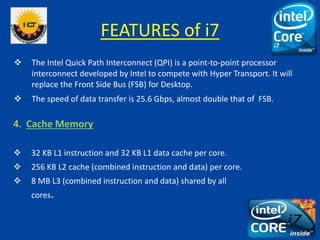
 The Intel Quick Path Interconnect (QPI) is a point-to-point processor
interconnect developed by Intel to compete with Hyper Transport. It will
replace the Front Side Bus (FSB) for Desktop.
 The speed of data transfer is 25.6 Gbps, almost double that of FSB.
4. Cache Memory
 32 KB L1 instruction and 32 KB L1 data cache per core.
 256 KB L2 cache (combined instruction and data) per core.
 8 MB L3 (combined instruction and data) shared by all
cores.
FEATURES of i7
(a). Re-implemented Hyper-threading.
 Each of the four cores can process up to two threads simultaneously, so the processor
appears to the OS as eight CPUs.
 Hyper-threading (officially termed Hyper-Threading Technology or HTT) is an Intel
technology used to improve parallelization of computations performed on PC
microprocessors.
(b). 781M transistors for the quad core version.
(c ). Sophisticated power management can place an unused core in a zero-power mode.
5. Support for SSE4.2 & SSE4.1 instruction sets.
 SSE4 is an instruction set used in the Intel Core microarchitecture and AMD.
 Intel SSE4 consists of 54 instructions. A subset consisting of 47 instructions, referred to as
SSE4.1. Additionally, SSE4.2, a second subset consisting of the 7 remaining instructions,
will first be available in Core i7.
FEATURES of i7
6. Overclocking : Overclocking is the process of forcing a computer
component to run at a higher clock rate (more clock cycles per
second) than it was designed for or was designated by the
manufacturer, usually practiced by personal computer enthusiasts in
order to increase the performance of their computers.
 The idea is simple by varying the electrical and physical characteristics
of computing systems.
 The first consideration is to ensure that the component is supplied
with adequate power to operate at the new speed. However,
supplying the power with improper settings or applying excessive
voltage can permanently damage a component.
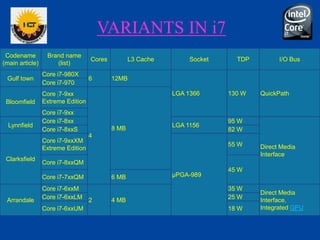
VARIANTS IN i7
Codename
(main article)
Brand name
(list)
Cores L3 Cache Socket TDP I/O Bus
Gulf town
Core i7-980X
6 12MB
LGA 1366 130 W QuickPath
Core i7-970
Bloomfield
Core i7-9xx
Extreme Edition
4
8 MB
Core i7-9xx
Lynnfield
Core i7-8xx
LGA 1156
95 W
Direct Media
Interface
Core i7-8xxS 82 W
Clarksfield
Core i7-9xxXM
Extreme Edition
µPGA-989
55 W
Core i7-8xxQM
45 W
Core i7-7xxQM 6 MB
Arrandale
Core i7-6xxM
2 4 MB
35 W
Direct Media
Interface,
Integrated GPU
Core i7-6xxLM 25 W
Core i7-6xxUM 18 W
VARIANTS IN i7
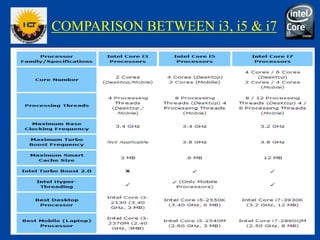
COMPARISON BETWEEN i3, i5 & i7
ADVANTAGES AND DISADVANTAGES
Advantages:
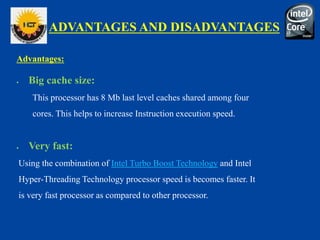
 Big cache size:
This processor has 8 Mb last level caches shared among four
cores. This helps to increase Instruction execution speed.
 Very fast:
Using the combination of Intel Turbo Boost Technology and Intel
Hyper-Threading Technology processor speed is becomes faster. It
is very fast processor as compared to other processor.
ADVANTAGES AND DISADVANTAGES
 Better cooling system:
A 4-pin connector is included for fan speed control to help minimize the
acoustic noise levels generated from running the fan at higher speeds for
thermal performance. For the cooling of processor it provides Cooler
running technology, less heat and less noise. Supplied with Intel
reference heat-sink & fan, as temperature increase speed of fan get
become increase.
ADVANTAGES AND DISADVANTAGES
Disadvantages
 Cost:
The main disadvantage of core i7 processor is its cost, It a expensive
processor as compared to previous processor. Its cost is over 15000 Rs.
 Power Consumption:
Power consumption of core i7 processor is not better as compared with the
core 2 duo processors.
CONCLUSION
 In a test performed on a leaked hardware, the core i7
outperformed the currently fastest core2 extreme processor.
 It has got the advantages of high performance, highly overclock
able, quite cooling and power efficient.
 Some of the disadvantages include the requirement of newer
motherboards, sensitive to higher voltage.
 The technology keeps on improving as the need for faster and
high end applications increases. The i9 core version is about to
be released soon.
Core i 7 processor

Core i 7 processor

  • 1.
    HI-TECH INSTITUTE OF ENGINEERINGAND TECHNOLOGY PRESENTATION ON “CORE i7 PROCESSOR” DEPARTMENT OF IT S U B M I T T E D B Y: N A M E - S U M I T K U M A R B I S W A S C O U R S E - B - T E C H B R A N C H - I T S E M - 6 T H Y E A R - 3 R D R O L L N O . - 1 1 2 2 0 1 3 0 2 3 S U B M I T T E D TO : M R . B H A S K E R S H A R M A
  • 2.
    CONTENT Introduction Intel Core Types ofIntel Core Features of Core i 7 Variants in i7 Comparison Between i3, i5 & i7 Advantage & Disadvantage Conclusion
  • 3.
    INTRODUCTION What is Processor? A processor is multipurpose, programmable device that read binary instructions from memory, accepts binary data as input and processes data according to that instruction, and provides results as output. It can be viewed as data processing unit of a computer. It has computing and decision-making capability.
  • 4.
    INTRODUCTION Central Processing Unit Acentral processing unit (CPU), also referred to as a central processor unit, is the hardware within a computer that carries out the instructions of a computer program by performing the basic arithmetical, logical, and input/output operations of the system.
  • 5.
    INTRODUCTION • A CentralProcessing Unit (CPU), or sometimes just called processor, is a description of a class of logic machines that can execute computer programs. • Intel Core i7 is a family of three Intel desktop processors, the first processors released using the Intel Nehalem micro architecture and the successor to the Intel Core 2 family. All three models are quad-core processors.
  • 6.
    INTEL CORE • IntelCore is a brand name used for various mid - range to high-end consumer and business micro processors made by Intel. • Identical or more capable versions of Core processors are also sold as Xeon processors for the server  The current Core processors  Intel core i7  Intel core i5  Intel core i3  The old core processors include:  Intel core 2 solo  Intel core 2 Duo  Intel core 2 Quad  Intel core 2 extreme
  • 7.
    INTEL CORE Types ofIntel core micro processors :  Enhanced Pentium M based  Core Duo  Core Solo  64 bit Core micro architecture based  Core 2 Duo  Core 2 Solo  Core 2 Quad  Core 2 Extreme  Nehalem micro architecture based  Core i3  Core i5  Core i7
  • 8.
    INTEL CORE Enhanced PentiumM based : The original Core brand refers to Intel’s 32 bit mobile dual core x86 CPU s that derived from the Pentium M branded processors. Core Duo : Intel Core Duo (product code 80539) consists of two cores on one die, a 2 MB L2 cache shared by both cores, and an arbiter bus that controls both L2 cache and FSB(Front side bus). Core Solo : Intel Core Solo (product code 80538) uses the same two-core die as the Core Duo, but features only one active core. This allows Intel to sell dies that have a manufacturing defect in one but not both of the cores.
  • 9.
    INTEL CORE 64 bitmicro architecture based : The successor to Core is the mobile version of the Intel core 2 line of processors using cores based upon the Intel Core micro architecture released on July 27, 2006. Core 2 Solo : The Core 2 Solo introduced in September 2007, is the successor to the Core Solo and is available only as an ultra-low-power mobile processor with 5.5 Watt thermal design power. Core 2 Duo : The majority of the desktop and mobile Core 2 processor variants are Core 2 Duo with two processor cores on a single Merom , Conroe , Allendale, Penryn or Wolfdale chip.
  • 10.
    INTEL CORE Core 2Quad : Core 2 Quad processors are multi chip modules consisting of two dies similar to those used in Core 2 Duo, forming a quad-core processor. This allows twice the performance of a dual-core processors at the same clock frequency. Core 2 Extreme : Core 2 Extreme processors are enthusiast versions of Core 2 Duo and Core 2 Quad processors, usually with a higher clock frequency and an unlocked clock multiplier.
  • 11.
    INTEL CORE Nehalem microarchitecture based : The Nehalem micro architecture Intel introduced a new naming scheme for it . The Core i3 was intended to be the new low end of the performance processor line from Intel Core i3 : The first Core i3 processors were launched on January 7, 2010. The first Nehalem based Core i3 was Clarkdale based Core processors. There are three variants, Core i3, Core i5, and Core i7. Core i5 : Core i5, like Core i7, is based on the Nehalem micro architecture. The first Core i5 was introduced on September 8, 2009 and was a mainstream variant of the earlier Core i7.
  • 12.
    INTEL CORE Core i7: The Core i7 brand remains the high-end for Intel's desktop and mobile processors, featuring the Sandy Bridge models with the largest amount of L3 cache and the highest clock frequency. Processors : • The initial Core i7 processors released were codenamed Bloomfield, branded as Core i7-9xx along with their Xeon 3500-series counterparts. • Lynnfield is the second processor sold under the Core i7 brand, while at the same time being sold as Core i5 • The second mobile Core i7 processor family is Arrandale, sold as the Core i7-6xx processors • Sandy bridge is the second generation Intel Core i7 series processor, and is based on micro architecture
  • 13.
    FEATURES of i7 1.SOCKET: The Socket is a new LGA1366(Socket B) and is incompatible with the previous versions:  LGA refers to Land Grid Array, a new type of socket for the latest range of processors. The LGA is used as a physical interface for microprocessors of the Intel Pentium 4, Intel Xeon, Intel Core 2 and AMD Opteron families. Unlike the pin grid array (PGA) interface found on most AMD and older Intel processors, there are no pins on the chip; in place of the pins are pads of bare gold-plated copper that touch pins on the motherboard.  Intel supposedly decided to switch to an LGA socket because it provides a larger contact point, allowing, for example, higher clock frequencies. The LGA setup provides higher pin densities, allowing more power contacts and thus a more stable power supply to the chip.
  • 14.
    LGA1366 socket withpick and place cover removed FEATURES of i7
  • 15.
    2. ON-DIE MEMORYCONTROLLER: The memory is directly connected to the processor.  Three channel memory: each channel can support one or two DDR3 RAM’s. Motherboards for Core i7 have four or six RAM slots.  Supports DDR3 • DDR3 RAM (double-data-rate three random access memory ) is a random access memory technology used for high speed storage of the working data in the computer. • The benefit of DDR3 is the ability to run its I/O bus at four times the speed of the memory cells it contains, thus enabling faster bus speeds and higher peak throughput than earlier memory technologies. • The DDR3 standard allows for chip capacities of 512 megabits to 8 gigabits, effectively enabling a maximum memory module size of 16 gigabytes. • There is a significant reduction in power consumption. It needs only 1.5V compared to 1.8V for DDR2. FEATURES of i7
  • 16.
  • 17.
    FEATURES of i7 3.Quick Path Interconnect: he front side bus is replaced by Quick Path interconnect. Motherboards must use a chipset that supports Quick Path.  the Front Side Bus (FSB) is the bus that carries data between the CPU and the north bridge.  Front side buses serve as a connection between the CPU and the rest of the hardware via a so-called chipset. This chipset is usually divided in a north bridge and a south bridge part, and is the connection point for all other buses in the system Pros: FSB architecture is an aging technology. High flexibility , low cost and no theoretical limit to the number of CPUs that can be placed on a FSB. Cons: In recent years this has been breaking down with increasing use of individual point-to-point buses (see Hyper Transport and Quick Path). The front side bus has been criticized by AMD as being an old and slow technology that bottlenecks today's computer systems.
  • 18.
    FEATURES of i7 The Intel Quick Path Interconnect (QPI) is a point-to-point processor interconnect developed by Intel to compete with Hyper Transport. It will replace the Front Side Bus (FSB) for Desktop.  The speed of data transfer is 25.6 Gbps, almost double that of FSB. 4. Cache Memory  32 KB L1 instruction and 32 KB L1 data cache per core.  256 KB L2 cache (combined instruction and data) per core.  8 MB L3 (combined instruction and data) shared by all cores.
  • 19.
    FEATURES of i7 (a).Re-implemented Hyper-threading.  Each of the four cores can process up to two threads simultaneously, so the processor appears to the OS as eight CPUs.  Hyper-threading (officially termed Hyper-Threading Technology or HTT) is an Intel technology used to improve parallelization of computations performed on PC microprocessors. (b). 781M transistors for the quad core version. (c ). Sophisticated power management can place an unused core in a zero-power mode. 5. Support for SSE4.2 & SSE4.1 instruction sets.  SSE4 is an instruction set used in the Intel Core microarchitecture and AMD.  Intel SSE4 consists of 54 instructions. A subset consisting of 47 instructions, referred to as SSE4.1. Additionally, SSE4.2, a second subset consisting of the 7 remaining instructions, will first be available in Core i7.
  • 20.
    FEATURES of i7 6.Overclocking : Overclocking is the process of forcing a computer component to run at a higher clock rate (more clock cycles per second) than it was designed for or was designated by the manufacturer, usually practiced by personal computer enthusiasts in order to increase the performance of their computers.  The idea is simple by varying the electrical and physical characteristics of computing systems.  The first consideration is to ensure that the component is supplied with adequate power to operate at the new speed. However, supplying the power with improper settings or applying excessive voltage can permanently damage a component.
  • 21.
  • 22.
    Codename (main article) Brand name (list) CoresL3 Cache Socket TDP I/O Bus Gulf town Core i7-980X 6 12MB LGA 1366 130 W QuickPath Core i7-970 Bloomfield Core i7-9xx Extreme Edition 4 8 MB Core i7-9xx Lynnfield Core i7-8xx LGA 1156 95 W Direct Media Interface Core i7-8xxS 82 W Clarksfield Core i7-9xxXM Extreme Edition µPGA-989 55 W Core i7-8xxQM 45 W Core i7-7xxQM 6 MB Arrandale Core i7-6xxM 2 4 MB 35 W Direct Media Interface, Integrated GPU Core i7-6xxLM 25 W Core i7-6xxUM 18 W VARIANTS IN i7
  • 23.
  • 24.
  • 25.
    ADVANTAGES AND DISADVANTAGES Advantages: Big cache size: This processor has 8 Mb last level caches shared among four cores. This helps to increase Instruction execution speed.  Very fast: Using the combination of Intel Turbo Boost Technology and Intel Hyper-Threading Technology processor speed is becomes faster. It is very fast processor as compared to other processor.
  • 26.
    ADVANTAGES AND DISADVANTAGES Better cooling system: A 4-pin connector is included for fan speed control to help minimize the acoustic noise levels generated from running the fan at higher speeds for thermal performance. For the cooling of processor it provides Cooler running technology, less heat and less noise. Supplied with Intel reference heat-sink & fan, as temperature increase speed of fan get become increase.
  • 27.
    ADVANTAGES AND DISADVANTAGES Disadvantages Cost: The main disadvantage of core i7 processor is its cost, It a expensive processor as compared to previous processor. Its cost is over 15000 Rs.  Power Consumption: Power consumption of core i7 processor is not better as compared with the core 2 duo processors.
  • 28.
    CONCLUSION  In atest performed on a leaked hardware, the core i7 outperformed the currently fastest core2 extreme processor.  It has got the advantages of high performance, highly overclock able, quite cooling and power efficient.  Some of the disadvantages include the requirement of newer motherboards, sensitive to higher voltage.  The technology keeps on improving as the need for faster and high end applications increases. The i9 core version is about to be released soon.