Core Data with Swift 3
Capital One Engineering Tech Talks
Korhan Bircan
Senior Engineering Manager, Capital One
Roadmap
• Persistent Store Types
• What is Core Data?
• Demos
• App Architecture
• Core Data setup and common operations
• Concurrency
• Migration
• Faults and Failures
• Core Data vs Realm
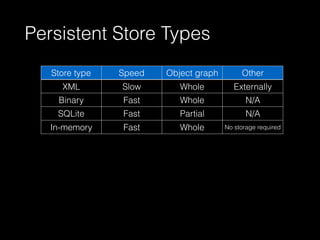
Persistent Store Types
Store type Speed Object graph
in memory
Other
XML Slow Whole Externally
parsableBinary Fast Whole N/A
SQLite Fast Partial N/A
In-memory Fast Whole No storage required
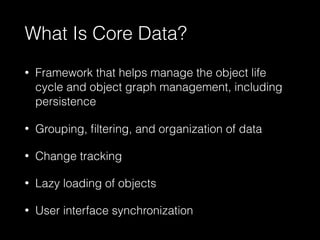
What Is Core Data?
• Framework that helps manage the object life
cycle and object graph management, including
persistence
• Grouping, filtering, and organization of data
• Change tracking
• Lazy loading of objects
• User interface synchronization
Demo - No Persistence
Demo - Core Data
Demo - Realm
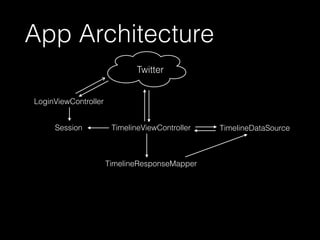
LoginViewController
TimelineDataSourceSession TimelineViewController
Twitter
TimelineResponseMapper
App Architecture
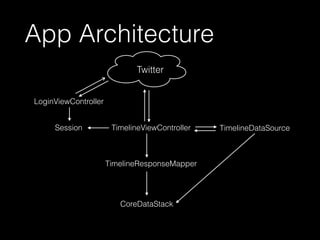
LoginViewController
TimelineDataSourceSession TimelineViewController
CoreDataStack
Twitter
TimelineResponseMapper
App Architecture
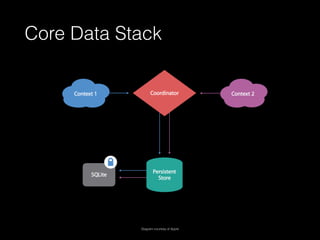
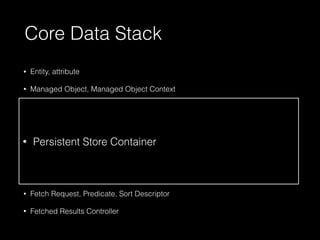
Core Data Stack
Diagram courtesy of Apple
• Entity, attribute
• Managed Object, Managed Object Context
• Managed Object Model
• Persistent Store: NSQLiteStoreType (non-atomic), NSXMLStoreType (macOS,
atomic), NSBinaryStoreType (atomic), NSInMemoryStoreType (atomic),
NSIncrementalStore (JSON, CSV?)
• Persistent Store Coordinator
• Relationships
• Fetch Request, Predicate, Sort Descriptor
• Fetched Results Controller
Core Data Stack
• Persistent Store Container
Setup (Swift 2.3)
lazy var applicationDocumentsDirectory: NSURL = {
// The directory the application uses to store the Core Data store file. This code uses a directory named "CapitalOne.Delete" in the application's documents Application Support directory.
let urls = NSFileManager.defaultManager().URLsForDirectory(.DocumentDirectory, inDomains: .UserDomainMask)
return urls[urls.count-1]
}()
lazy var managedObjectModel: NSManagedObjectModel = {
// The managed object model for the application. This property is not optional. It is a fatal error for the application not to be able to find and load its model.
let modelURL = NSBundle.mainBundle().URLForResource("Delete", withExtension: "momd")!
return NSManagedObjectModel(contentsOfURL: modelURL)!
}()
lazy var persistentStoreCoordinator: NSPersistentStoreCoordinator = {
// The persistent store coordinator for the application. This implementation creates and returns a coordinator, having added the store for the application to it. This property is optional
since there are legitimate error conditions that could cause the creation of the store to fail.
// Create the coordinator and store
let coordinator = NSPersistentStoreCoordinator(managedObjectModel: self.managedObjectModel)
let url = self.applicationDocumentsDirectory.URLByAppendingPathComponent("SingleViewCoreData.sqlite")
var failureReason = "There was an error creating or loading the application's saved data."
do {
try coordinator.addPersistentStoreWithType(NSSQLiteStoreType, configuration: nil, URL: url, options: nil)
} catch {
// Report any error we got.
var dict = [String: AnyObject]()
dict[NSLocalizedDescriptionKey] = "Failed to initialize the application's saved data"
dict[NSLocalizedFailureReasonErrorKey] = failureReason
dict[NSUnderlyingErrorKey] = error as NSError
let wrappedError = NSError(domain: "YOUR_ERROR_DOMAIN", code: 9999, userInfo: dict)
// Replace this with code to handle the error appropriately.
// abort() causes the application to generate a crash log and terminate. You should not use this function in a shipping application, although it may be useful during development.
NSLog("Unresolved error (wrappedError), (wrappedError.userInfo)")
abort()
}
return coordinator
}()
lazy var managedObjectContext: NSManagedObjectContext = {
// Returns the managed object context for the application (which is already bound to the persistent store coordinator for the application.) This property is optional since there are
legitimate error conditions that could cause the creation of the context to fail.
let coordinator = self.persistentStoreCoordinator
var managedObjectContext = NSManagedObjectContext(concurrencyType: .MainQueueConcurrencyType)
managedObjectContext.persistentStoreCoordinator = coordinator
return managedObjectContext
}()
// MARK: - Core Data Saving support
func saveContext () {
if managedObjectContext.hasChanges {
do {
try managedObjectContext.save()
} catch {
// Replace this implementation with code to handle the error appropriately.
// abort() causes the application to generate a crash log and terminate. You should not use this function in a shipping application, although it may be useful during development.
let nserror = error as NSError
NSLog("Unresolved error (nserror), (nserror.userInfo)")
abort()
}
}
}
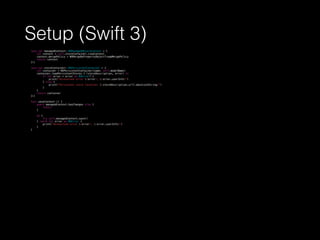
Setup (Swift 3)
lazy var managedContext: NSManagedObjectContext = {
let context = self.storeContainer.viewContext
context.mergePolicy = NSMergeByPropertyObjectTrumpMergePolicy
return context
}()
lazy var storeContainer: NSPersistentContainer = {
let container = NSPersistentContainer(name: self.modelName)
container.loadPersistentStores { (storeDescription, error) in
if let error = error as NSError? {
print("Unresolved error (error), (error.userInfo)")
} else {
print("Persistent store location: (storeDescription.url?.absoluteString)")
}
}
return container
}()
func saveContext () {
guard managedContext.hasChanges else {
return
}
do {
try self.managedContext.save()
} catch let error as NSError {
print("Unresolved error (error), (error.userInfo)")
}
}
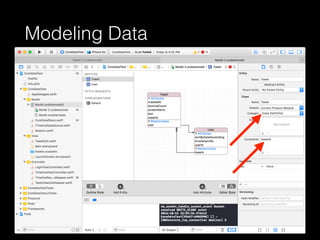
Modeling Data
Saving and Retrieving Objects
Save
let tweet = Tweet(context: context)
try! managedObjectContext.save()
Retrieve
let request: NSFetchRequest<Tweet> = Tweet.fetchRequest()
let allTweets = try! context.fetch(request)
Delete
try! managedObjectContext.delete(tweet)
try! managedObjectContext.save()
Filter
let fetchRequest = Tweet.fetchRequest()
fetchRequest.predicate = NSPredicate(format: "text contains[c]
%@", keyword)
fetchRequest.sortDescriptors = [NSSortDescriptor(key:
#keyPath(Tweet.createdAt), ascending: false)]
try! fetchedResultsController?.performFetch()
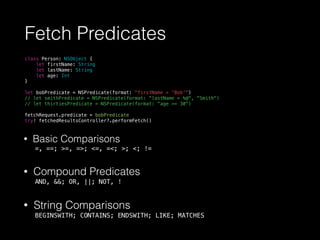
Fetch Predicates
class Person: NSObject {
let firstName: String
let lastName: String
let age: Int
}
let bobPredicate = NSPredicate(format: "firstName = 'Bob'")
// let smithPredicate = NSPredicate(format: "lastName = %@", "Smith")
// let thirtiesPredicate = NSPredicate(format: "age >= 30")
fetchRequest.predicate = bobPredicate
try! fetchedResultsController?.performFetch()
• Basic Comparisons
=, ==; >=, =>; <=, =<; >; <; !=
• Compound Predicates
AND, &&; OR, ||; NOT, !
• String Comparisons
BEGINSWITH; CONTAINS; ENDSWITH; LIKE; MATCHES
Fetched Results Controller
let fetchRequest.predicate = keyword.isEmpty ? nil : NSPredicate(format: "text contains[c] %@",
keyword)
fetchRequest.sortDescriptors = [NSSortDescriptor(key: #keyPath(Tweet.createdAt), ascending: false)]
let fetchedResultsController = NSFetchedResultsController(fetchRequest: fetchRequest,
managedObjectContext: CoreDataStack.sharedInstance.managedContext,
sectionNameKeyPath: nil,
cacheName: nil)
do {
try fetchedResultsController?.performFetch()
} catch let error as NSError {
print("Fetching error: (error), (error.userInfo)")
}
Wiring Model to UI
override func numberOfSections(in tableView: UITableView) -> Int {
return fetchedResultsController.sections
}
override func tableView(_ tableView: UITableView, numberOfRowsInSection section: Int) -> Int {
return fetchedResultsController.sections?[section].numberOfObjects
}
override func tableView(_ tableView: UITableView, cellForRowAt indexPath: IndexPath) ->
UITableViewCell {
let cell = tableView.dequeueReusableCell(withIdentifier: TweetCell.identifier, for: indexPath)
if let tweet = fetchedResultsController.object(at: indexPath) {
TimelineViewCellAdapter.configure(cell as? TweetCell, tweet: tweet)
}
return cell
}
override func tableView(_ tableView: UITableView, titleForHeaderInSection section: Int) -> String? {
let sectionInfo = fetchedResultsController.sections[section]
return sectionInfo?.name
}
Communicating Data Changes
func controllerWillChangeContent(controller: NSFetchedResultsController) {
tableView.beginUpdates()
}
func controller(controller: NSFetchedResultsController, didChangeSection sectionInfo:
NSFetchedResultsSectionInfo, atIndex sectionIndex: Int, forChangeType type: NSFetchedResultsChangeType) {
switch type {
case .Insert:
tableView.insertSections(NSIndexSet(index: sectionIndex), withRowAnimation: .Fade)
case .Delete:
tableView.deleteSections(NSIndexSet(index: sectionIndex), withRowAnimation: .Fade)
case .Move:
break
case .Update:
break
}
}
func controller(controller: NSFetchedResultsController, didChangeObject anObject: AnyObject, atIndexPath
indexPath: NSIndexPath?, forChangeType type: NSFetchedResultsChangeType, newIndexPath: NSIndexPath?) {
switch type {
case .Insert:
tableView.insertRowsAtIndexPaths([newIndexPath!], withRowAnimation: .Fade)
case .Delete:
tableView.deleteRowsAtIndexPaths([indexPath!], withRowAnimation: .Fade)
case .Update:
configureCell(tableView.cellForRowAtIndexPath(indexPath!)!, indexPath: indexPath!)
case .Move:
tableView.moveRowAtIndexPath(indexPath!, toIndexPath: newIndexPath!)
}
}
func controllerDidChangeContent(controller: NSFetchedResultsController) {
tableView.endUpdates()
}
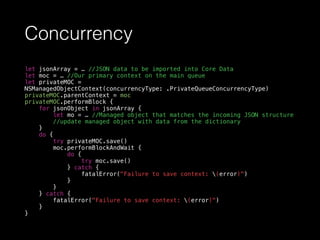
Concurrency
let jsonArray = … //JSON data to be imported into Core Data
let moc = … //Our primary context on the main queue
let privateMOC =
NSManagedObjectContext(concurrencyType: .PrivateQueueConcurrencyType)
privateMOC.parentContext = moc
privateMOC.performBlock {
for jsonObject in jsonArray {
let mo = … //Managed object that matches the incoming JSON structure
//update managed object with data from the dictionary
}
do {
try privateMOC.save()
moc.performBlockAndWait {
do {
try moc.save()
} catch {
fatalError("Failure to save context: (error)")
}
}
} catch {
fatalError("Failure to save context: (error)")
}
}
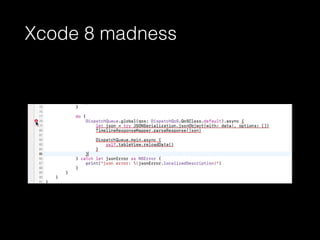
Xcode 8 madness
Swift 2.3 vs Swift 3
dispatch_async(dispatch_get_global_queue(DISPATCH_QUEUE_PRIORITY_DEFAULT, 0), {
do {
let json = try NSJSONSerialization.JSONObjectWithData(data!, options: [])
TimelineResponseMapper.parseResponse(json)
dispatch_async(dispatch_get_main_queue(), {
self.tableView.reloadData()
})
} catch let jsonError as NSError {
print("json error: (jsonError.localizedDescription)")
}
})
// vs
DispatchQueue.global(qos: DispatchQoS.QoSClass.default).async {
do {
let json = try JSONSerialization.jsonObject(with: data!, options: [])
TimelineResponseMapper.parseResponse(json)
DispatchQueue.main.async {
self.tableView.reloadData()
}
} catch let jsonError as NSError {
print("json error: (jsonError.localizedDescription)")
}
}
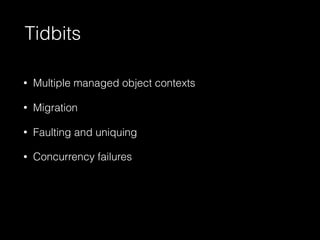
Tidbits
• Multiple managed object contexts
• Migration
• Faulting and uniquing
• Concurrency failures
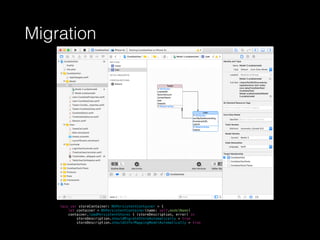
Migration
lazy var storeContainer: NSPersistentContainer = {
let container = NSPersistentContainer(name: self.modelName)
container.loadPersistentStores { (storeDescription, error) in
storeDescription.shouldMigrateStoreAutomatically = true
storeDescription.shouldInferMappingModelAutomatically = true
Why faults?
• Dictionary definition:
1. (noun) an unattractive or unsatisfactory feature, esp. in a piece of
work or in a person’s character.
2. (noun) responsibility for an accident or misfortune.
3. (noun) an extended break in a body of rock, marked by the
relative displacement and discontinuity of strata on either side of a
particular surface.
• Apple’s definition:
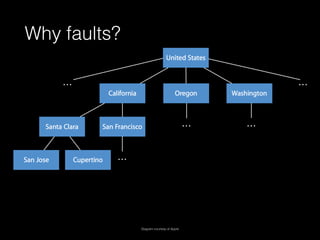
• A fault is a placeholder object that represents a managed object that
has not yet been fully realized, or a collection object that represents
a relationship.
Why faults?
Diagram courtesy of Apple
Why Faults May Fail
2016-10-11 22:20:24.530 CoreDataTest[24222:60b] * Assertion failure in
-[AppDelegate save], .../AppDelegate.swift:28 2016-10-11 22:20:24.530
CoreDataTest[24222:60b] * Terminating app due to uncaught exception
'NSInternalInconsistencyException', reason: 'Save failed {type =
immutable dict, count = 2, entries => 1 : {contents =
"NSAffectedObjectsErrorKey"} = ( " (entity: Tweet; id: 0x6b8bf10 ;
data: )" ) 2 : {contents = "NSUnderlyingException"} = CoreData could
not fulfill a fault for '0x6b8bf10 ' }
Handling Fault Failures
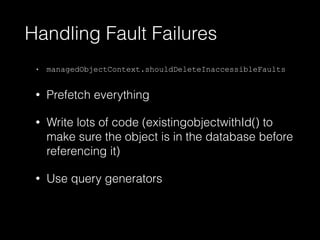
• managedObjectContext.shouldDeleteInaccessibleFaults
• Prefetch everything
• Write lots of code (existingobjectwithId() to
make sure the object is in the database before
referencing it)
• Use query generators
Concurrency Failures
let firstTweet = Tweet(context: managedContext)
// Synchronously performs the block on the context's queue.
//May safely be called reentrantly.
managedContext.performAndWait {
do {
firstTweet.text = "Something interesting happened today..."
try self.managedContext.save()
} catch let error as NSError {
print("Unresolved error (error), (error.userInfo)")
}
}
managedContext2.performAndWait {
let text = firstTweet.text
print(text)
}
2016-10-11 22:20:24.530 CoreDataTest[24222:60b]
CoreData concurrency failure
Realm
CoreData Realm
Save
let tweet = Tweet(context: context)
try! managedObjectContext.save()
let realm = try! Realm()
let tweet = Tweet()
try! realm.write {
realm.add(tweet)
}
Retrieve
let request: NSFetchRequest<Tweet> =
Tweet.fetchRequest()
let allTweets = try! context.fetch(request)
let tweets = realm.objects(Tweet.self)
Delete
try! managedObjectContext.delete(tweet)
try! managedObjectContext.save()
try! realm.write {
realm.delete(tweet)
}
Filter
let fetchRequest = Tweet.fetchRequest()
fetchRequest.predicate = NSPredicate(format: "text contains[c] %@",
keyword)
fetchRequest.sortDescriptors = [NSSortDescriptor(key:
#keyPath(Tweet.createdAt), ascending: false)]
try! fetchedResultsController?.performFetch()
let predicate = NSPredicate(format: "text contains[c] %@", keyword)
let tweets = realm.objects(Tweet.self).filter(predicate)
let sortedTweets = tweets.sorted("createdAt", ascending: ascending)
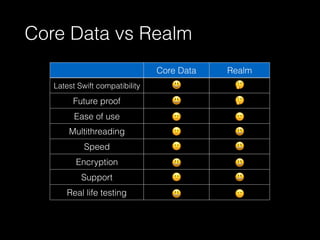
Core Data vs Realm
Core Data Realm
Latest Swift compatibility
Future proof
Ease of use
Multithreading
Speed
Encryption
Support
Real life testing
Next Time
• Persisting Data in the Cloud

Core Data with Swift 3.0

  • 1.
    Core Data withSwift 3 Capital One Engineering Tech Talks Korhan Bircan Senior Engineering Manager, Capital One
  • 2.
    Roadmap • Persistent StoreTypes • What is Core Data? • Demos • App Architecture • Core Data setup and common operations • Concurrency • Migration • Faults and Failures • Core Data vs Realm
  • 3.
    Persistent Store Types Storetype Speed Object graph in memory Other XML Slow Whole Externally parsableBinary Fast Whole N/A SQLite Fast Partial N/A In-memory Fast Whole No storage required
  • 4.
    What Is CoreData? • Framework that helps manage the object life cycle and object graph management, including persistence • Grouping, filtering, and organization of data • Change tracking • Lazy loading of objects • User interface synchronization
  • 5.
    Demo - NoPersistence
  • 6.
  • 7.
  • 8.
  • 9.
  • 10.
    Core Data Stack Diagramcourtesy of Apple
  • 11.
    • Entity, attribute •Managed Object, Managed Object Context • Managed Object Model • Persistent Store: NSQLiteStoreType (non-atomic), NSXMLStoreType (macOS, atomic), NSBinaryStoreType (atomic), NSInMemoryStoreType (atomic), NSIncrementalStore (JSON, CSV?) • Persistent Store Coordinator • Relationships • Fetch Request, Predicate, Sort Descriptor • Fetched Results Controller Core Data Stack • Persistent Store Container
  • 12.
    Setup (Swift 2.3) lazyvar applicationDocumentsDirectory: NSURL = { // The directory the application uses to store the Core Data store file. This code uses a directory named "CapitalOne.Delete" in the application's documents Application Support directory. let urls = NSFileManager.defaultManager().URLsForDirectory(.DocumentDirectory, inDomains: .UserDomainMask) return urls[urls.count-1] }() lazy var managedObjectModel: NSManagedObjectModel = { // The managed object model for the application. This property is not optional. It is a fatal error for the application not to be able to find and load its model. let modelURL = NSBundle.mainBundle().URLForResource("Delete", withExtension: "momd")! return NSManagedObjectModel(contentsOfURL: modelURL)! }() lazy var persistentStoreCoordinator: NSPersistentStoreCoordinator = { // The persistent store coordinator for the application. This implementation creates and returns a coordinator, having added the store for the application to it. This property is optional since there are legitimate error conditions that could cause the creation of the store to fail. // Create the coordinator and store let coordinator = NSPersistentStoreCoordinator(managedObjectModel: self.managedObjectModel) let url = self.applicationDocumentsDirectory.URLByAppendingPathComponent("SingleViewCoreData.sqlite") var failureReason = "There was an error creating or loading the application's saved data." do { try coordinator.addPersistentStoreWithType(NSSQLiteStoreType, configuration: nil, URL: url, options: nil) } catch { // Report any error we got. var dict = [String: AnyObject]() dict[NSLocalizedDescriptionKey] = "Failed to initialize the application's saved data" dict[NSLocalizedFailureReasonErrorKey] = failureReason dict[NSUnderlyingErrorKey] = error as NSError let wrappedError = NSError(domain: "YOUR_ERROR_DOMAIN", code: 9999, userInfo: dict) // Replace this with code to handle the error appropriately. // abort() causes the application to generate a crash log and terminate. You should not use this function in a shipping application, although it may be useful during development. NSLog("Unresolved error (wrappedError), (wrappedError.userInfo)") abort() } return coordinator }() lazy var managedObjectContext: NSManagedObjectContext = { // Returns the managed object context for the application (which is already bound to the persistent store coordinator for the application.) This property is optional since there are legitimate error conditions that could cause the creation of the context to fail. let coordinator = self.persistentStoreCoordinator var managedObjectContext = NSManagedObjectContext(concurrencyType: .MainQueueConcurrencyType) managedObjectContext.persistentStoreCoordinator = coordinator return managedObjectContext }() // MARK: - Core Data Saving support func saveContext () { if managedObjectContext.hasChanges { do { try managedObjectContext.save() } catch { // Replace this implementation with code to handle the error appropriately. // abort() causes the application to generate a crash log and terminate. You should not use this function in a shipping application, although it may be useful during development. let nserror = error as NSError NSLog("Unresolved error (nserror), (nserror.userInfo)") abort() } } }
  • 13.
    Setup (Swift 3) lazyvar managedContext: NSManagedObjectContext = { let context = self.storeContainer.viewContext context.mergePolicy = NSMergeByPropertyObjectTrumpMergePolicy return context }() lazy var storeContainer: NSPersistentContainer = { let container = NSPersistentContainer(name: self.modelName) container.loadPersistentStores { (storeDescription, error) in if let error = error as NSError? { print("Unresolved error (error), (error.userInfo)") } else { print("Persistent store location: (storeDescription.url?.absoluteString)") } } return container }() func saveContext () { guard managedContext.hasChanges else { return } do { try self.managedContext.save() } catch let error as NSError { print("Unresolved error (error), (error.userInfo)") } }
  • 14.
  • 15.
    Saving and RetrievingObjects Save let tweet = Tweet(context: context) try! managedObjectContext.save() Retrieve let request: NSFetchRequest<Tweet> = Tweet.fetchRequest() let allTweets = try! context.fetch(request) Delete try! managedObjectContext.delete(tweet) try! managedObjectContext.save() Filter let fetchRequest = Tweet.fetchRequest() fetchRequest.predicate = NSPredicate(format: "text contains[c] %@", keyword) fetchRequest.sortDescriptors = [NSSortDescriptor(key: #keyPath(Tweet.createdAt), ascending: false)] try! fetchedResultsController?.performFetch()
  • 16.
    Fetch Predicates class Person:NSObject { let firstName: String let lastName: String let age: Int } let bobPredicate = NSPredicate(format: "firstName = 'Bob'") // let smithPredicate = NSPredicate(format: "lastName = %@", "Smith") // let thirtiesPredicate = NSPredicate(format: "age >= 30") fetchRequest.predicate = bobPredicate try! fetchedResultsController?.performFetch() • Basic Comparisons =, ==; >=, =>; <=, =<; >; <; != • Compound Predicates AND, &&; OR, ||; NOT, ! • String Comparisons BEGINSWITH; CONTAINS; ENDSWITH; LIKE; MATCHES
  • 17.
    Fetched Results Controller letfetchRequest.predicate = keyword.isEmpty ? nil : NSPredicate(format: "text contains[c] %@", keyword) fetchRequest.sortDescriptors = [NSSortDescriptor(key: #keyPath(Tweet.createdAt), ascending: false)] let fetchedResultsController = NSFetchedResultsController(fetchRequest: fetchRequest, managedObjectContext: CoreDataStack.sharedInstance.managedContext, sectionNameKeyPath: nil, cacheName: nil) do { try fetchedResultsController?.performFetch() } catch let error as NSError { print("Fetching error: (error), (error.userInfo)") }
  • 18.
    Wiring Model toUI override func numberOfSections(in tableView: UITableView) -> Int { return fetchedResultsController.sections } override func tableView(_ tableView: UITableView, numberOfRowsInSection section: Int) -> Int { return fetchedResultsController.sections?[section].numberOfObjects } override func tableView(_ tableView: UITableView, cellForRowAt indexPath: IndexPath) -> UITableViewCell { let cell = tableView.dequeueReusableCell(withIdentifier: TweetCell.identifier, for: indexPath) if let tweet = fetchedResultsController.object(at: indexPath) { TimelineViewCellAdapter.configure(cell as? TweetCell, tweet: tweet) } return cell } override func tableView(_ tableView: UITableView, titleForHeaderInSection section: Int) -> String? { let sectionInfo = fetchedResultsController.sections[section] return sectionInfo?.name }
  • 19.
    Communicating Data Changes funccontrollerWillChangeContent(controller: NSFetchedResultsController) { tableView.beginUpdates() } func controller(controller: NSFetchedResultsController, didChangeSection sectionInfo: NSFetchedResultsSectionInfo, atIndex sectionIndex: Int, forChangeType type: NSFetchedResultsChangeType) { switch type { case .Insert: tableView.insertSections(NSIndexSet(index: sectionIndex), withRowAnimation: .Fade) case .Delete: tableView.deleteSections(NSIndexSet(index: sectionIndex), withRowAnimation: .Fade) case .Move: break case .Update: break } } func controller(controller: NSFetchedResultsController, didChangeObject anObject: AnyObject, atIndexPath indexPath: NSIndexPath?, forChangeType type: NSFetchedResultsChangeType, newIndexPath: NSIndexPath?) { switch type { case .Insert: tableView.insertRowsAtIndexPaths([newIndexPath!], withRowAnimation: .Fade) case .Delete: tableView.deleteRowsAtIndexPaths([indexPath!], withRowAnimation: .Fade) case .Update: configureCell(tableView.cellForRowAtIndexPath(indexPath!)!, indexPath: indexPath!) case .Move: tableView.moveRowAtIndexPath(indexPath!, toIndexPath: newIndexPath!) } } func controllerDidChangeContent(controller: NSFetchedResultsController) { tableView.endUpdates() }
  • 20.
    Concurrency let jsonArray =… //JSON data to be imported into Core Data let moc = … //Our primary context on the main queue let privateMOC = NSManagedObjectContext(concurrencyType: .PrivateQueueConcurrencyType) privateMOC.parentContext = moc privateMOC.performBlock { for jsonObject in jsonArray { let mo = … //Managed object that matches the incoming JSON structure //update managed object with data from the dictionary } do { try privateMOC.save() moc.performBlockAndWait { do { try moc.save() } catch { fatalError("Failure to save context: (error)") } } } catch { fatalError("Failure to save context: (error)") } }
  • 21.
  • 22.
    Swift 2.3 vsSwift 3 dispatch_async(dispatch_get_global_queue(DISPATCH_QUEUE_PRIORITY_DEFAULT, 0), { do { let json = try NSJSONSerialization.JSONObjectWithData(data!, options: []) TimelineResponseMapper.parseResponse(json) dispatch_async(dispatch_get_main_queue(), { self.tableView.reloadData() }) } catch let jsonError as NSError { print("json error: (jsonError.localizedDescription)") } }) // vs DispatchQueue.global(qos: DispatchQoS.QoSClass.default).async { do { let json = try JSONSerialization.jsonObject(with: data!, options: []) TimelineResponseMapper.parseResponse(json) DispatchQueue.main.async { self.tableView.reloadData() } } catch let jsonError as NSError { print("json error: (jsonError.localizedDescription)") } }
  • 23.
    Tidbits • Multiple managedobject contexts • Migration • Faulting and uniquing • Concurrency failures
  • 24.
    Migration lazy var storeContainer:NSPersistentContainer = { let container = NSPersistentContainer(name: self.modelName) container.loadPersistentStores { (storeDescription, error) in storeDescription.shouldMigrateStoreAutomatically = true storeDescription.shouldInferMappingModelAutomatically = true
  • 25.
    Why faults? • Dictionarydefinition: 1. (noun) an unattractive or unsatisfactory feature, esp. in a piece of work or in a person’s character. 2. (noun) responsibility for an accident or misfortune. 3. (noun) an extended break in a body of rock, marked by the relative displacement and discontinuity of strata on either side of a particular surface. • Apple’s definition: • A fault is a placeholder object that represents a managed object that has not yet been fully realized, or a collection object that represents a relationship.
  • 26.
  • 27.
    Why Faults MayFail 2016-10-11 22:20:24.530 CoreDataTest[24222:60b] * Assertion failure in -[AppDelegate save], .../AppDelegate.swift:28 2016-10-11 22:20:24.530 CoreDataTest[24222:60b] * Terminating app due to uncaught exception 'NSInternalInconsistencyException', reason: 'Save failed {type = immutable dict, count = 2, entries => 1 : {contents = "NSAffectedObjectsErrorKey"} = ( " (entity: Tweet; id: 0x6b8bf10 ; data: )" ) 2 : {contents = "NSUnderlyingException"} = CoreData could not fulfill a fault for '0x6b8bf10 ' }
  • 28.
    Handling Fault Failures •managedObjectContext.shouldDeleteInaccessibleFaults • Prefetch everything • Write lots of code (existingobjectwithId() to make sure the object is in the database before referencing it) • Use query generators
  • 29.
    Concurrency Failures let firstTweet= Tweet(context: managedContext) // Synchronously performs the block on the context's queue. //May safely be called reentrantly. managedContext.performAndWait { do { firstTweet.text = "Something interesting happened today..." try self.managedContext.save() } catch let error as NSError { print("Unresolved error (error), (error.userInfo)") } } managedContext2.performAndWait { let text = firstTweet.text print(text) } 2016-10-11 22:20:24.530 CoreDataTest[24222:60b] CoreData concurrency failure
  • 30.
    Realm CoreData Realm Save let tweet= Tweet(context: context) try! managedObjectContext.save() let realm = try! Realm() let tweet = Tweet() try! realm.write { realm.add(tweet) } Retrieve let request: NSFetchRequest<Tweet> = Tweet.fetchRequest() let allTweets = try! context.fetch(request) let tweets = realm.objects(Tweet.self) Delete try! managedObjectContext.delete(tweet) try! managedObjectContext.save() try! realm.write { realm.delete(tweet) } Filter let fetchRequest = Tweet.fetchRequest() fetchRequest.predicate = NSPredicate(format: "text contains[c] %@", keyword) fetchRequest.sortDescriptors = [NSSortDescriptor(key: #keyPath(Tweet.createdAt), ascending: false)] try! fetchedResultsController?.performFetch() let predicate = NSPredicate(format: "text contains[c] %@", keyword) let tweets = realm.objects(Tweet.self).filter(predicate) let sortedTweets = tweets.sorted("createdAt", ascending: ascending)
  • 31.
    Core Data vsRealm Core Data Realm Latest Swift compatibility Future proof Ease of use Multithreading Speed Encryption Support Real life testing
  • 32.
    Next Time • PersistingData in the Cloud