JOE JACOB
   Hibernate is a free, open source Java package that
    makes it easy to work with relational databases.

   Hibernate makes it seem as if your database
    contains plain Java objects like you use every day,
    without having to worry about how to get them out
    of (or back into) mysterious database tables.

    Hibernate liberates you to focus on the objects and
    features of your application, without having to
    worry about how to store them or find them later.
   Cost effective.

   Learning is very easy compare to EJB.

   High Performance than EJB

   No more need for JDBC API for Result set handling.

   Switching to other SQL database requires few
    changes in Hibernate configuration file
   Database independent application

   Avoid writing queries

   Avoid JDBC API completely

   Hibernate uses connection pooling technique

   Automatic Key Generation

   Develop the Application in short Period of time
   DB2
   MySQL
   PostgreSQL
   Oracle (any version)
   Microsoft SQL Server
   HypersonicSQL
   Informix
   Ingres
   Interbase
   Pointbase
   Mckoi SQL
   Progress
   FrontBase
   SAP DB
   Sybase
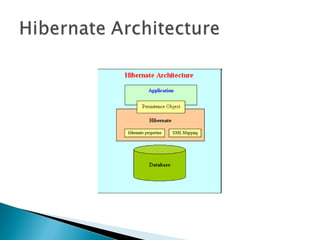
   Hibernate architecture has three main components:
   Connection Management
         Hibernate Connection management service provide efficient
    management of the database connections. Database connection is
    the most expensive part of interacting with the database as it
    requires a lot of resources of open and close the database
    connection.
      
   Transaction management:
         Transaction management service provide the ability to the user
    to execute more than one database statements at a time.
      
   Object relational mapping:
         Object relational mapping is technique of mapping the data
    representation from an object model to a relational data model. This
    part of the hibernate is used to select, insert, update and delete the
    records form the underlying table. When we pass an object to a
    Session.save() method, Hibernate reads the state of the variables
    of that object and executes the necessary query.
   Hibernate is very good tool as far as object
    relational mapping is concern but in terms
    of
    ◦ connection management and
    ◦ transaction management,
    it is lacking in performance and capabilities. So
      usually hibernate is being used with other
      connection management and transaction
      management tools. For example apache DBCP is
      used for connection pooling with the Hibernate.
   Hibernate 3.0 provides three full-featured
    query facilities:
   Hibernate Query Language
   Hibernate Criteria Query API
   Hibernate Native Query
   The Criteria interface allows to create and
    execute object-oriented queries. It is
    powerful alternative to the HQL but has own
    limitations. Criteria Query is used mostly in
    case of multi criteria search screens, where
    HQL is not very effective. 
   Native SQL is handwritten SQL for all
    database operations like create, update,
    delete and select. Hibernate Native Query
    also supports stored procedures. Hibernate
    allows you to run Native SQL Query for all the
    database operations, so you can use your
    existing handwritten sql with Hibernate, this
    also helps you in migrating your SQL/JDBC
    based application to Hibernate.
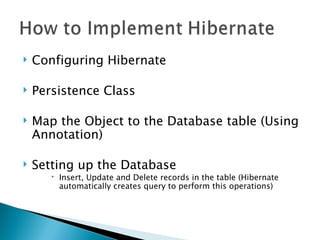
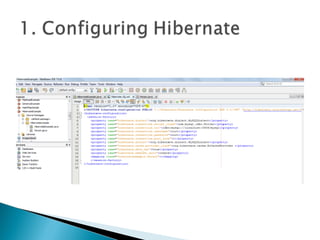
   Configuring Hibernate

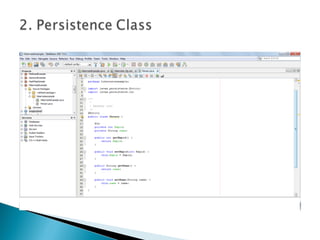
   Persistence Class

   Map the Object to the Database table (Using
    Annotation)

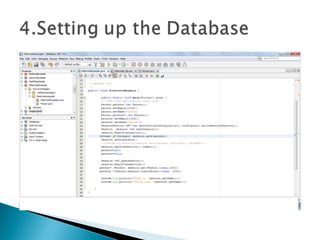
   Setting up the Database
        Insert, Update and Delete records in the table (Hibernate
         automatically creates query to perform this operations)
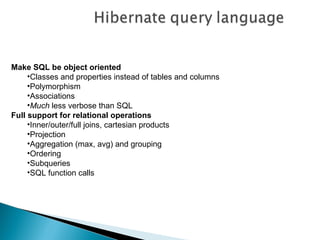
Make SQL be object oriented
     •Classes and properties instead of tables and columns
     •Polymorphism
     •Associations
     •Much less verbose than SQL
Full support for relational operations
     •Inner/outer/full joins, cartesian products
     •Projection
     •Aggregation (max, avg) and grouping
     •Ordering
     •Subqueries
     •SQL function calls
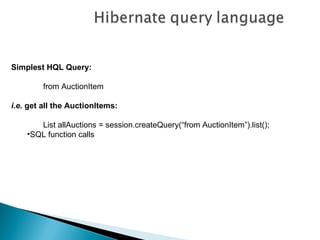
Simplest HQL Query:

         from AuctionItem

i.e. get all the AuctionItems:

       List allAuctions = session.createQuery(“from AuctionItem”).list();
    •SQL function calls
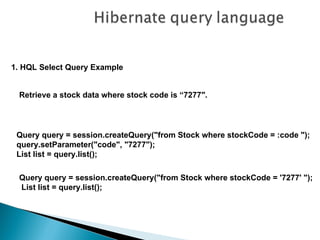
1. HQL Select Query Example


 Retrieve a stock data where stock code is “7277″.


 Query query = session.createQuery("from Stock where stockCode = :code ");
 query.setParameter("code", "7277");
 List list = query.list();

 Query query = session.createQuery("from Stock where stockCode = '7277' ");
 List list = query.list();
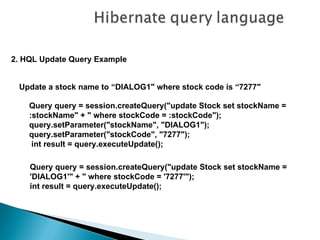
2. HQL Update Query Example


 Update a stock name to “DIALOG1″ where stock code is “7277″

    Query query = session.createQuery("update Stock set stockName =
    :stockName" + " where stockCode = :stockCode");
    query.setParameter("stockName", "DIALOG1");
    query.setParameter("stockCode", "7277");
     int result = query.executeUpdate();

    Query query = session.createQuery("update Stock set stockName =
    'DIALOG1'" + " where stockCode = '7277'");
    int result = query.executeUpdate();
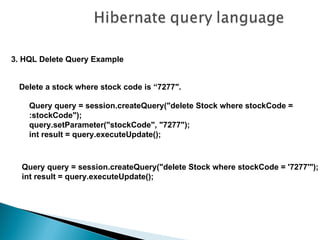
3. HQL Delete Query Example


 Delete a stock where stock code is “7277″.

    Query query = session.createQuery("delete Stock where stockCode =
    :stockCode");
    query.setParameter("stockCode", "7277");
    int result = query.executeUpdate();


  Query query = session.createQuery("delete Stock where stockCode = '7277'");
  int result = query.executeUpdate();
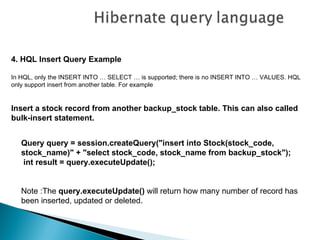
4. HQL Insert Query Example

In HQL, only the INSERT INTO … SELECT … is supported; there is no INSERT INTO … VALUES. HQL
only support insert from another table. For example


Insert a stock record from another backup_stock table. This can also called
bulk-insert statement.


   Query query = session.createQuery("insert into Stock(stock_code,
   stock_name)" + "select stock_code, stock_name from backup_stock");
    int result = query.executeUpdate();


   Note :The query.executeUpdate() will return how many number of record has
   been inserted, updated or deleted.
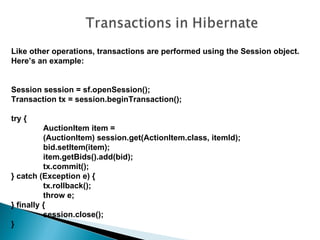
Like other operations, transactions are performed using the Session object.
Here’s an example:


Session session = sf.openSession();
Transaction tx = session.beginTransaction();

try {
          AuctionItem item =
          (AuctionItem) session.get(ActionItem.class, itemId);
          bid.setItem(item);
          item.getBids().add(bid);
          tx.commit();
} catch (Exception e) {
          tx.rollback();
          throw e;
} finally {
          session.close();
}
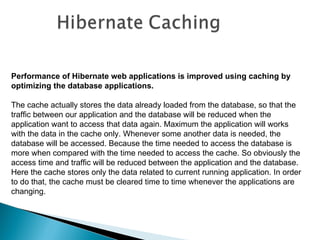
Performance of Hibernate web applications is improved using caching by
optimizing the database applications.

The cache actually stores the data already loaded from the database, so that the
traffic between our application and the database will be reduced when the
application want to access that data again. Maximum the application will works
with the data in the cache only. Whenever some another data is needed, the
database will be accessed. Because the time needed to access the database is
more when compared with the time needed to access the cache. So obviously the
access time and traffic will be reduced between the application and the database.
Here the cache stores only the data related to current running application. In order
to do that, the cache must be cleared time to time whenever the applications are
changing.
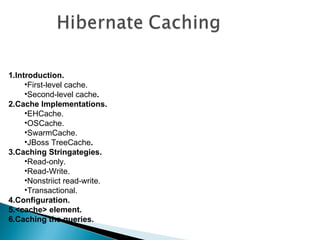
1.Introduction.
     •First-level cache.
     •Second-level cache.
2.Cache Implementations.
     •EHCache.
     •OSCache.
     •SwarmCache.
     •JBoss TreeCache.
3.Caching Stringategies.
     •Read-only.
     •Read-Write.
     •Nonstriict read-write.
     •Transactional.
4.Configuration.
5.<cache> element.
6.Caching the queries.
First-level cache.

First-level cache always Associates with the Session object. Hibernate uses
this cache by default. Here, it processes one transaction after another one,
means wont process one transaction many times. Mainly it reduces the
number of SQL queries it needs to generate within a given transaction. That is
instead of updating after every modification done in the transaction, it updates
the transaction only at the end of the transaction.
Second-level cache


Second-level cache always associates with the Session Factory object.
While running the transactions, in between it loads the objects at the Session
Factory level, so that those objects will available to the entire application,
don’t bounds to single user. Since the objects are already loaded in the
cache, whenever an object is returned by the query, at that time no need to go
for a database transaction. In this way the second level cache works. Here we
can use query level cache also. Later we will discuss about it.
Cache Implementations


Hibernate supports four open-source cache implementations named
EHCache (Easy Hibernate Cache), OSCache (Open Symphony Cache),
Swarm Cache, and JBoss Tree Cache. Each cache has different
performance, memory use, and configuration possibilities. .
EHCache (Easy Hibernate Cache)
       (org.hibernate.cache.EhCacheProvider)

•   It is fast.
                   • lightweight.
           •      Easy-to-use.
           •      Supports read-only and read/write caching.
           •      Supports memory-based and disk-based caching.
           •      Does not support clustering.
OSCache (Open Symphony Cache)
  (org.hibernate.cache.OSCacheProvider)


•   It is a powerful .
•   flexible package
•   supports read-only and read/write caching.
•   Supports memory- based and disk-based caching.
•   Provides basic support for clustering via either JavaGroups or JMS
SwarmCache (org.hibernate.cache.SwarmCacheProvider)

•   is a cluster-based caching.
•   supports read-only or nonstrict read/write caching .
•   appropriate for applications those have more read operations than write
    operations.
Boss TreeCache (org.hibernate.cache.TreeCacheProvider)

•   is a powerful replicated and transactional cache.
•   useful when we need a true transaction-capable caching architecture .

Hibernate jj

  • 1.
  • 2.
    Hibernate is a free, open source Java package that makes it easy to work with relational databases.  Hibernate makes it seem as if your database contains plain Java objects like you use every day, without having to worry about how to get them out of (or back into) mysterious database tables.  Hibernate liberates you to focus on the objects and features of your application, without having to worry about how to store them or find them later.
  • 3.
    Cost effective.  Learning is very easy compare to EJB.  High Performance than EJB  No more need for JDBC API for Result set handling.  Switching to other SQL database requires few changes in Hibernate configuration file
  • 4.
    Database independent application  Avoid writing queries  Avoid JDBC API completely  Hibernate uses connection pooling technique  Automatic Key Generation  Develop the Application in short Period of time
  • 5.
    DB2  MySQL  PostgreSQL  Oracle (any version)  Microsoft SQL Server  HypersonicSQL  Informix  Ingres  Interbase  Pointbase  Mckoi SQL  Progress  FrontBase  SAP DB  Sybase
  • 7.
    Hibernate architecture has three main components:  Connection Management Hibernate Connection management service provide efficient management of the database connections. Database connection is the most expensive part of interacting with the database as it requires a lot of resources of open and close the database connection.     Transaction management: Transaction management service provide the ability to the user to execute more than one database statements at a time.     Object relational mapping: Object relational mapping is technique of mapping the data representation from an object model to a relational data model. This part of the hibernate is used to select, insert, update and delete the records form the underlying table. When we pass an object to a Session.save() method, Hibernate reads the state of the variables of that object and executes the necessary query.
  • 8.
    Hibernate is very good tool as far as object relational mapping is concern but in terms of ◦ connection management and ◦ transaction management, it is lacking in performance and capabilities. So usually hibernate is being used with other connection management and transaction management tools. For example apache DBCP is used for connection pooling with the Hibernate.
  • 9.
    Hibernate 3.0 provides three full-featured query facilities:  Hibernate Query Language  Hibernate Criteria Query API  Hibernate Native Query
  • 10.
    The Criteria interface allows to create and execute object-oriented queries. It is powerful alternative to the HQL but has own limitations. Criteria Query is used mostly in case of multi criteria search screens, where HQL is not very effective. 
  • 11.
    Native SQL is handwritten SQL for all database operations like create, update, delete and select. Hibernate Native Query also supports stored procedures. Hibernate allows you to run Native SQL Query for all the database operations, so you can use your existing handwritten sql with Hibernate, this also helps you in migrating your SQL/JDBC based application to Hibernate.
  • 12.
    Configuring Hibernate  Persistence Class  Map the Object to the Database table (Using Annotation)  Setting up the Database  Insert, Update and Delete records in the table (Hibernate automatically creates query to perform this operations)
  • 17.
    Make SQL beobject oriented •Classes and properties instead of tables and columns •Polymorphism •Associations •Much less verbose than SQL Full support for relational operations •Inner/outer/full joins, cartesian products •Projection •Aggregation (max, avg) and grouping •Ordering •Subqueries •SQL function calls
  • 18.
    Simplest HQL Query: from AuctionItem i.e. get all the AuctionItems: List allAuctions = session.createQuery(“from AuctionItem”).list(); •SQL function calls
  • 19.
    1. HQL SelectQuery Example Retrieve a stock data where stock code is “7277″. Query query = session.createQuery("from Stock where stockCode = :code "); query.setParameter("code", "7277"); List list = query.list(); Query query = session.createQuery("from Stock where stockCode = '7277' "); List list = query.list();
  • 20.
    2. HQL UpdateQuery Example Update a stock name to “DIALOG1″ where stock code is “7277″ Query query = session.createQuery("update Stock set stockName = :stockName" + " where stockCode = :stockCode"); query.setParameter("stockName", "DIALOG1"); query.setParameter("stockCode", "7277"); int result = query.executeUpdate(); Query query = session.createQuery("update Stock set stockName = 'DIALOG1'" + " where stockCode = '7277'"); int result = query.executeUpdate();
  • 21.
    3. HQL DeleteQuery Example Delete a stock where stock code is “7277″. Query query = session.createQuery("delete Stock where stockCode = :stockCode"); query.setParameter("stockCode", "7277"); int result = query.executeUpdate(); Query query = session.createQuery("delete Stock where stockCode = '7277'"); int result = query.executeUpdate();
  • 22.
    4. HQL InsertQuery Example In HQL, only the INSERT INTO … SELECT … is supported; there is no INSERT INTO … VALUES. HQL only support insert from another table. For example Insert a stock record from another backup_stock table. This can also called bulk-insert statement. Query query = session.createQuery("insert into Stock(stock_code, stock_name)" + "select stock_code, stock_name from backup_stock"); int result = query.executeUpdate(); Note :The query.executeUpdate() will return how many number of record has been inserted, updated or deleted.
  • 24.
    Like other operations,transactions are performed using the Session object. Here’s an example: Session session = sf.openSession(); Transaction tx = session.beginTransaction(); try { AuctionItem item = (AuctionItem) session.get(ActionItem.class, itemId); bid.setItem(item); item.getBids().add(bid); tx.commit(); } catch (Exception e) { tx.rollback(); throw e; } finally { session.close(); }
  • 26.
    Performance of Hibernateweb applications is improved using caching by optimizing the database applications. The cache actually stores the data already loaded from the database, so that the traffic between our application and the database will be reduced when the application want to access that data again. Maximum the application will works with the data in the cache only. Whenever some another data is needed, the database will be accessed. Because the time needed to access the database is more when compared with the time needed to access the cache. So obviously the access time and traffic will be reduced between the application and the database. Here the cache stores only the data related to current running application. In order to do that, the cache must be cleared time to time whenever the applications are changing.
  • 27.
    1.Introduction. •First-level cache. •Second-level cache. 2.Cache Implementations. •EHCache. •OSCache. •SwarmCache. •JBoss TreeCache. 3.Caching Stringategies. •Read-only. •Read-Write. •Nonstriict read-write. •Transactional. 4.Configuration. 5.<cache> element. 6.Caching the queries.
  • 28.
    First-level cache. First-level cachealways Associates with the Session object. Hibernate uses this cache by default. Here, it processes one transaction after another one, means wont process one transaction many times. Mainly it reduces the number of SQL queries it needs to generate within a given transaction. That is instead of updating after every modification done in the transaction, it updates the transaction only at the end of the transaction.
  • 29.
    Second-level cache Second-level cachealways associates with the Session Factory object. While running the transactions, in between it loads the objects at the Session Factory level, so that those objects will available to the entire application, don’t bounds to single user. Since the objects are already loaded in the cache, whenever an object is returned by the query, at that time no need to go for a database transaction. In this way the second level cache works. Here we can use query level cache also. Later we will discuss about it.
  • 30.
    Cache Implementations Hibernate supportsfour open-source cache implementations named EHCache (Easy Hibernate Cache), OSCache (Open Symphony Cache), Swarm Cache, and JBoss Tree Cache. Each cache has different performance, memory use, and configuration possibilities. .
  • 31.
    EHCache (Easy HibernateCache) (org.hibernate.cache.EhCacheProvider) • It is fast. • lightweight. • Easy-to-use. • Supports read-only and read/write caching. • Supports memory-based and disk-based caching. • Does not support clustering.
  • 32.
    OSCache (Open SymphonyCache) (org.hibernate.cache.OSCacheProvider) • It is a powerful . • flexible package • supports read-only and read/write caching. • Supports memory- based and disk-based caching. • Provides basic support for clustering via either JavaGroups or JMS
  • 33.
    SwarmCache (org.hibernate.cache.SwarmCacheProvider) • is a cluster-based caching. • supports read-only or nonstrict read/write caching . • appropriate for applications those have more read operations than write operations.
  • 34.
    Boss TreeCache (org.hibernate.cache.TreeCacheProvider) • is a powerful replicated and transactional cache. • useful when we need a true transaction-capable caching architecture .

Editor's Notes

  • #13 To use Hibernate, it is required to create Java classes that represents the table in the database and then map the instance variable in the class with the columns in the database. Then Hibernate can be used to perform operations on the database like select, insert, update and delete the records in the table. Hibernate automatically creates the query to perform these operations.