
ASP.NET 4.0
Julie Iskander
MSC. Communication and Electronics
Lecture Outlines
 Data Binding
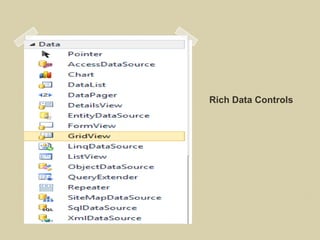
 Rich Data Controls
 n-tier architecture
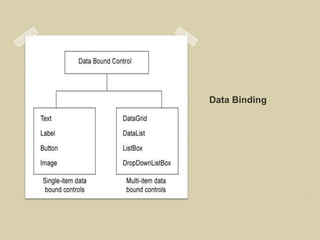
Data Binding
Programatic DataBinding
   Using Control Properties
    ◦ DataSource  a collection (a
      list, reader, dataset)
    ◦ DataTextField
    ◦ DataValueField
   Don’t forget to DataBind();
Declarative Data Binding
 Single-value Binding
 Repeated-value Binding
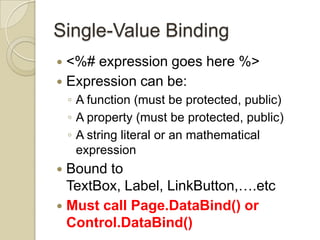
Single-Value Binding
 <%# expression goes here %>
 Expression can be:
    ◦ A function (must be protected, public)
    ◦ A property (must be protected, public)
    ◦ A string literal or an mathematical
      expression
 Bound to
  TextBox, Label, LinkButton,….etc
 Must call Page.DataBind() or
  Control.DataBind()
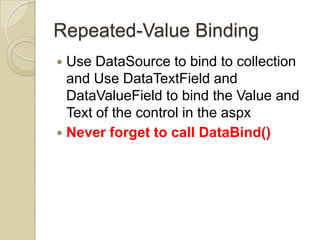
Repeated-Value Binding
 Use DataSource to bind to collection
  and Use DataTextField and
  DataValueField to bind the Value and
  Text of the control in the aspx
 Never forget to call DataBind()
Convert from an HTML to an aspx page
Rich Data Controls
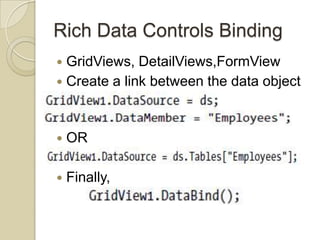
Rich Data Controls Binding
 GridViews, DetailViews,FormView
 Create a link between the data object
  and the data cotrol

   OR

   Finally,
Convert from an HTML to an aspx page
Data Source Controls
 Directly connect to a database, execute
  a query, loop through the records in the
  result set, and display them on a page.
 Designer Support
 No data access code. 
 Includes:
    ◦   SqlDataSource
    ◦   ObjectDataSource
    ◦   AccessDataSource
    ◦   XmlDataSource
    ◦   SiteMapDataSource
Data Source Controls
 Displaying
 Inserting
 Updating
 Deleting
Data Source Binding in the Page
Life Cycle
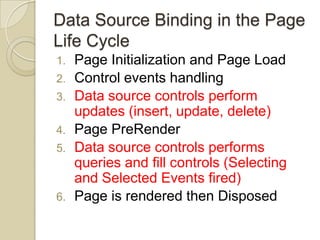
1.   Page Initialization and Page Load
2.   Control events handling
3.   Data source controls perform
     updates (insert, update, delete)
4.   Page PreRender
5.   Data source controls performs
     queries and fill controls (Selecting
     and Selected Events fired)
6.   Page is rendered then Disposed
Convert from an HTML to an aspx page
N-tier architecture
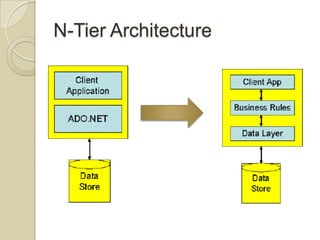
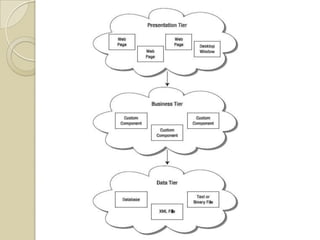
N-Tier Architecture
N-Tier Architecture
 Database code MUST NOT be directly in
  the client, but encapsulated in classes.
 Easier maintenance and extension
 Appropriate for all types of applications
  (small/medium/large and desktop/Web)
  applications.
 Implementation:
    ◦ Create the front-end user interface (Windows
      Forms or Web Forms)
    ◦ Create the business rule component class
      library
    ◦ Create a data layer component class library to
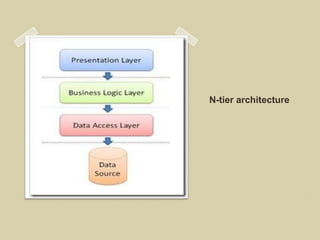
N-tier layers
 User Interface
 Business Access Layer (BAL) to wrap
  the business rules and logic (if
  needed)
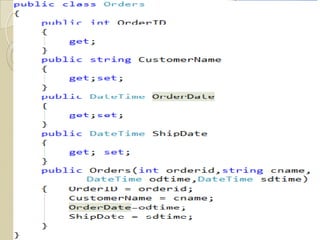
 Business Object Layer (BOL) to wraps
  each database table or business
  object
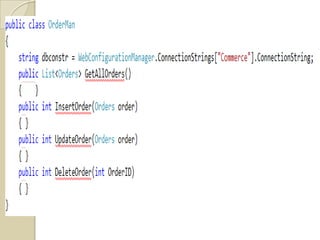
 Data Access Layer (DAL) to perform
  database operations
ObjectDataSource Controls
 Use ObjectDataSource is used with
  the DAL classes
 Instead of SQLDataSource Controls
    ◦ Maintenance nightmare
    ◦ Lack of flexibility
Convert from an HTML to an aspx page
Reading Assignment #4
 Using Stored Procedures
 Designing layered .NET Applications
http://msdn.microsoft.com/en-
us/library/ms973829.aspx
Lab #4
 Bind Categories in regiter.aspx to
  Categories table through
  SQLdatasource control
 Add a new Customer through the
  registeration Page by using a data
  component
 Create Page to see and edit all
  Customer Data using DetailsView or
  FormView
Bonus
   Add a page to see, edit , insert new
    books and upload images
REFERENCES

 [1] Beginning ASP.NET 4 In C# 2010, Matthew
  Macdonald, Apress
 [2] Web Application Architecture
  Principles, Protocols And Practices, Leon Shklar
  And Richard Rosen, Wiley
 [3] Professional AS P.NE T 4 In C# And VB, Bill
  Evjen, Scott Hanselman And Devin Rader, Wiley
 [4] Pro ASP.NET In C# 2010, Fourth
  Edition,matthew Macdonald, Adam Freeman, And
  Mario Szpuszta, Apress

ASP.NET Lecture 4

  • 1.
    ASP.NET 4.0 Julie Iskander MSC.Communication and Electronics
  • 2.
    Lecture Outlines  DataBinding  Rich Data Controls  n-tier architecture
  • 3.
  • 4.
    Programatic DataBinding  Using Control Properties ◦ DataSource  a collection (a list, reader, dataset) ◦ DataTextField ◦ DataValueField  Don’t forget to DataBind();
  • 5.
    Declarative Data Binding Single-value Binding  Repeated-value Binding
  • 6.
    Single-Value Binding  <%#expression goes here %>  Expression can be: ◦ A function (must be protected, public) ◦ A property (must be protected, public) ◦ A string literal or an mathematical expression  Bound to TextBox, Label, LinkButton,….etc  Must call Page.DataBind() or Control.DataBind()
  • 7.
    Repeated-Value Binding  UseDataSource to bind to collection and Use DataTextField and DataValueField to bind the Value and Text of the control in the aspx  Never forget to call DataBind()
  • 8.
    Convert from anHTML to an aspx page
  • 9.
  • 10.
    Rich Data ControlsBinding  GridViews, DetailViews,FormView  Create a link between the data object and the data cotrol  OR  Finally,
  • 11.
    Convert from anHTML to an aspx page
  • 12.
    Data Source Controls Directly connect to a database, execute a query, loop through the records in the result set, and display them on a page.  Designer Support  No data access code.   Includes: ◦ SqlDataSource ◦ ObjectDataSource ◦ AccessDataSource ◦ XmlDataSource ◦ SiteMapDataSource
  • 13.
    Data Source Controls Displaying  Inserting  Updating  Deleting
  • 14.
    Data Source Bindingin the Page Life Cycle 1. Page Initialization and Page Load 2. Control events handling 3. Data source controls perform updates (insert, update, delete) 4. Page PreRender 5. Data source controls performs queries and fill controls (Selecting and Selected Events fired) 6. Page is rendered then Disposed
  • 15.
    Convert from anHTML to an aspx page
  • 16.
  • 17.
  • 19.
    N-Tier Architecture  Databasecode MUST NOT be directly in the client, but encapsulated in classes.  Easier maintenance and extension  Appropriate for all types of applications (small/medium/large and desktop/Web) applications.  Implementation: ◦ Create the front-end user interface (Windows Forms or Web Forms) ◦ Create the business rule component class library ◦ Create a data layer component class library to
  • 20.
    N-tier layers  UserInterface  Business Access Layer (BAL) to wrap the business rules and logic (if needed)  Business Object Layer (BOL) to wraps each database table or business object  Data Access Layer (DAL) to perform database operations
  • 23.
    ObjectDataSource Controls  UseObjectDataSource is used with the DAL classes  Instead of SQLDataSource Controls ◦ Maintenance nightmare ◦ Lack of flexibility
  • 24.
    Convert from anHTML to an aspx page
  • 25.
    Reading Assignment #4 Using Stored Procedures  Designing layered .NET Applications http://msdn.microsoft.com/en- us/library/ms973829.aspx
  • 26.
    Lab #4  BindCategories in regiter.aspx to Categories table through SQLdatasource control  Add a new Customer through the registeration Page by using a data component  Create Page to see and edit all Customer Data using DetailsView or FormView
  • 27.
    Bonus  Add a page to see, edit , insert new books and upload images
  • 28.
    REFERENCES  [1] BeginningASP.NET 4 In C# 2010, Matthew Macdonald, Apress  [2] Web Application Architecture Principles, Protocols And Practices, Leon Shklar And Richard Rosen, Wiley  [3] Professional AS P.NE T 4 In C# And VB, Bill Evjen, Scott Hanselman And Devin Rader, Wiley  [4] Pro ASP.NET In C# 2010, Fourth Edition,matthew Macdonald, Adam Freeman, And Mario Szpuszta, Apress

Editor's Notes

  • #9 DataBindingpageDataSourcePage pageError Bonus
  • #12 RichControlspage
  • #16 DataSourceControlpageEditing, Deleting , InsertingMaster, Detail View.
  • #18 This is not the only available architecture
  • #19 Components of the 2nd and 3rd tier can be put in a class library project (.dll)
  • #25 page