
Continuous Integration
By Ike Ellis
@ike_ellis
www.ikeellis.com
Blog.ikeellis.com
http://www.linkedin.com/in/ikeellis
The Integration/Deployment
Process
• We do it when we feel like it
• We do it daily
• We do it on a schedule
• We do it at every check-in to source control
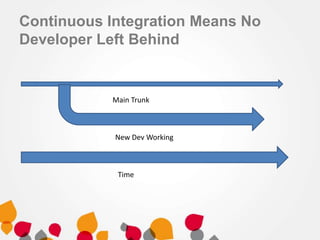
Continuous Integration Means No
Developer Left Behind
Time
Main Trunk
New Dev Working
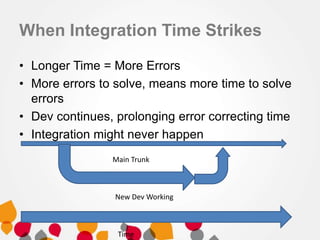
When Integration Time Strikes
• Longer Time = More Errors
• More errors to solve, means more time to solve
errors
• Dev continues, prolonging error correcting time
• Integration might never happen
Time
Main Trunk
New Dev Working
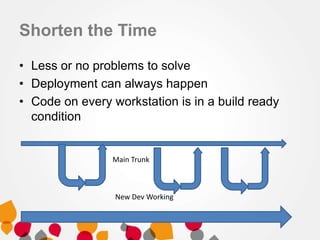
Shorten the Time
• Less or no problems to solve
• Deployment can always happen
• Code on every workstation is in a build ready
condition
Main Trunk
New Dev Working
CI Benefits
• Avoids the “Works on My PC” syndrome
• All developers can get their work deployed and not
be left behind
• Tests can be run constantly, and breaking tests can
generate emails, thus inspiring code confidence
• Higher quality in code
• Automatically build documentation, remove
unneeded files, include dependencies
• Increased visibility of project
• Deployment can be separate from developers
• Easier to deploy dev environment to new developers
Working with Legacy Code
• First thing we do is deploy
• Can we deploy
• Is source control accurate?
CI Fundamentals
• Source Control
CI Fundamentals
• Build Steps = Automatically Build Stuff = Scripts
• Build Triggers = What makes us build?
• Build Agents = What can we do in the CI
process?
• Build Notifications = Who gets told what and
when?
• Build Correction = What went wrong and who
will solve it?
CI Products
• CruiseControl
• JetBrains = TeamCity
• MSBuild/TFS
• Jenkins
• RedGate CI for databases
CI Disadvantages
• Takes time to setup
• You actually have to write tests
• Build time should be short. This can take a lot of
effort
• Wounded pride
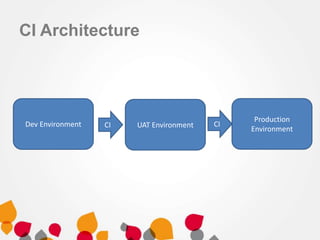
CI Architecture
Dev Environment UAT Environment
Production
EnvironmentCI CI
CI Process (An Example)
• Step 1: Check in from source control
• Step 2: Build Trigger begins a build, CI takes
over
• Step 3: CI builds the solution
• Step 4: CI runs all the tests
• Step 5: CI copies data to a UAT server
• Step 6: CI notifies everyone a new build is ready
to test
CI Best Practices
• Check-in several times a day
• Merge changes at every check-in
• Don’t break the build (Get
latest, merge, build, check-in)
• If you broke the build, tell everyone, so they can
stop getting latest from source control
• Don’t check-in until the build is fixed
• Notify everyone once the build is fixed
– So they can get latest
Problems with the database
• Source control has been spotty
• Willingness to bug fix in production
• Thoughts that indexes are not business logic, and thus don’t
need to be replicated
– So dev/test is not the same as production
• Change management has been very difficult
– Products often have it wrong
• Writing stored procedure/function/SQL tests have not been
the easiest thing to write
– Think about comparing values from separate stored
procedures
– Test the weather
• Basically, you have to want it and fight for it
Demo
• TeamCity
• Red Gate CI/Team City Integration
• Red Gate database source control
Ike Ellis
• http://blog.ikeellis.com
• http://www.ikeellis.com
• YouTube
– http://www.youtube.com/user/IkeEllisData
• SQL Pass Book Readers
– http://bookreaders.sqlpass.org/
• San Diego Tech Immersion Group
• Twitter: @ike_ellis
• 619.922.9801
• Email address is just my first name @ikeellis.com

Continuous integration sql in the city

  • 1.
    Continuous Integration By IkeEllis @ike_ellis www.ikeellis.com Blog.ikeellis.com http://www.linkedin.com/in/ikeellis
  • 2.
    The Integration/Deployment Process • Wedo it when we feel like it • We do it daily • We do it on a schedule • We do it at every check-in to source control
  • 3.
    Continuous Integration MeansNo Developer Left Behind Time Main Trunk New Dev Working
  • 4.
    When Integration TimeStrikes • Longer Time = More Errors • More errors to solve, means more time to solve errors • Dev continues, prolonging error correcting time • Integration might never happen Time Main Trunk New Dev Working
  • 5.
    Shorten the Time •Less or no problems to solve • Deployment can always happen • Code on every workstation is in a build ready condition Main Trunk New Dev Working
  • 6.
    CI Benefits • Avoidsthe “Works on My PC” syndrome • All developers can get their work deployed and not be left behind • Tests can be run constantly, and breaking tests can generate emails, thus inspiring code confidence • Higher quality in code • Automatically build documentation, remove unneeded files, include dependencies • Increased visibility of project • Deployment can be separate from developers • Easier to deploy dev environment to new developers
  • 7.
    Working with LegacyCode • First thing we do is deploy • Can we deploy • Is source control accurate?
  • 8.
  • 9.
    CI Fundamentals • BuildSteps = Automatically Build Stuff = Scripts • Build Triggers = What makes us build? • Build Agents = What can we do in the CI process? • Build Notifications = Who gets told what and when? • Build Correction = What went wrong and who will solve it?
  • 10.
    CI Products • CruiseControl •JetBrains = TeamCity • MSBuild/TFS • Jenkins • RedGate CI for databases
  • 11.
    CI Disadvantages • Takestime to setup • You actually have to write tests • Build time should be short. This can take a lot of effort • Wounded pride
  • 12.
    CI Architecture Dev EnvironmentUAT Environment Production EnvironmentCI CI
  • 13.
    CI Process (AnExample) • Step 1: Check in from source control • Step 2: Build Trigger begins a build, CI takes over • Step 3: CI builds the solution • Step 4: CI runs all the tests • Step 5: CI copies data to a UAT server • Step 6: CI notifies everyone a new build is ready to test
  • 14.
    CI Best Practices •Check-in several times a day • Merge changes at every check-in • Don’t break the build (Get latest, merge, build, check-in) • If you broke the build, tell everyone, so they can stop getting latest from source control • Don’t check-in until the build is fixed • Notify everyone once the build is fixed – So they can get latest
  • 15.
    Problems with thedatabase • Source control has been spotty • Willingness to bug fix in production • Thoughts that indexes are not business logic, and thus don’t need to be replicated – So dev/test is not the same as production • Change management has been very difficult – Products often have it wrong • Writing stored procedure/function/SQL tests have not been the easiest thing to write – Think about comparing values from separate stored procedures – Test the weather • Basically, you have to want it and fight for it
  • 16.
    Demo • TeamCity • RedGate CI/Team City Integration • Red Gate database source control
  • 17.
    Ike Ellis • http://blog.ikeellis.com •http://www.ikeellis.com • YouTube – http://www.youtube.com/user/IkeEllisData • SQL Pass Book Readers – http://bookreaders.sqlpass.org/ • San Diego Tech Immersion Group • Twitter: @ike_ellis • 619.922.9801 • Email address is just my first name @ikeellis.com