Continuous Integration
& Deployments
Continuous Integration (CI)
Continuous Integration is a software development practice where members of a team integrate
their work frequently, usually each person integrates at least daily - leading to multiple
integrations per day. Each integration is verified by an automated build (including test) to detect
integration errors as quickly as possible. Many teams find that this approach leads to
significantly reduced integration problems and allows a team to develop cohesive software more
rapidly
- Martin Fowler
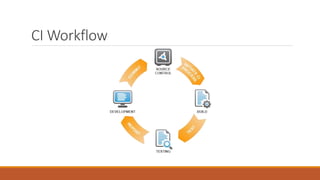
CI Workflow
CI Features
Continuous Building
Continuous Testing
Continuous Inspection
Continuous Building
Automate builds
Perform single command builds
Run fast builds
Build for any environment
Build against every commit
Continuous Testing
Automate Unit Tests, Integration tests, End to end tests
Write tests for defects
Make component tests repeatable
Limit test cases to one assert
Continuous Inspection
Reduce code complexity
Perform design review continuously
Maintain organizational standards with code audits
Reduce duplicate code
Assess code coverage
Engage static code reviews tools (PMD, Sonar)
Practices of CI
Version Control System – GIT
Automated build process – Jenkins
Make your build self testable - JUnit
Everyone commits code to repo everyday
Every commits build code on an Integration machine
Fix broken build immediately
Keep the builds fast
Inspect code frequently
Continuous Deployment (CD)
According to Martin Fowler, CD is when
The software is deployable through out its lifecycle
Software deployment is prioritized over working on new features
Anyone can get fast automated feedback on the production readiness of their systems anytime
a change is made
Push button deployments of any version of the software on any environment on demand
How does CD matters?
To Developers
 They can check in code and see it deployed immediately so that they can improvise or change on certain
aspects as and when they want
 Feedback is important in keeping code neat and less complex
 Ability to provision themselves with production like stacks and push-button deployments so that they can run
automated tests
To System Admins
 Keep things running smoothly while giving software developers the ability to test code in an environment that
closely resembles production
 Automated configuration (a part of CI) makes it possible for sysadmins to provide developers with the ability
to turn own their own testing environments
To Business
 Face lower risks from deployment
 Respond to market quickly
 Happier and more productive workforce
Enabling CI on Hybris
Install SCM
Create SCM space, accounts and proper access permissions for every users
Define a SCM folder structure
Define a SCM branching strategy
Install continuous integration server and services
Define and set static code analyzers
Scripts to compile, package, deployment and testing
Create integration tests (smoke tests, performance tests etc)
Software's
GIT – SCM
GitLab – SCM tool for managing project, users etc
Jenkins – CI platform
Sonar – Static code analyzer
Selenium – Integration test runner
Jmeter – Performance test runner
Ant, Groovy – Scripting languages
Emma, PMD, Findbugs – Eclipse plugins
Workflow
Cycle 1 – Build
1. Run after each commit
2. Checkout/Update source
3. Compilation is validated
4. Unit tests are executed
5. Process halts on error
Cycle 2 – Deploy
1. Run once at night (Full Build)
2. Create the installer package
3. Package is deployed
4. Run integration tests
Cycle 2 – Deploy
1. Run after each build
(Incremental Build)
2. Create the installer package
3. Package is deployed
Cycle 3 – Validate
1. Run once in a week
2. Run code audit (Sonar)
3. Perform Stress test
4. Release candidate is tagged and
saved in repository
Tooling platform
Benefits of CI-CD (Source Target account)
Functional test automation reduces regression test effort by 93%
One click deployment reduced deployment effort by 75%
Build on every commit – reduces the defect fix time by 90%, since the defect will be localized
within the delta source code
Automated unit tests and focus on code coverage reduced unit level issues by 90%
Automated static code inspection reduces the manual review effort for each story by 50%
Reference
http://www.martinfowler.com/tags/continuous%20integration.html
https://wiki.hybris.com/display/~joris.quenee@hybris.com/A+Continous+Integration+strategy

Continuous Integrations & Deployments

  • 1.
  • 2.
    Continuous Integration (CI) ContinuousIntegration is a software development practice where members of a team integrate their work frequently, usually each person integrates at least daily - leading to multiple integrations per day. Each integration is verified by an automated build (including test) to detect integration errors as quickly as possible. Many teams find that this approach leads to significantly reduced integration problems and allows a team to develop cohesive software more rapidly - Martin Fowler
  • 3.
  • 4.
    CI Features Continuous Building ContinuousTesting Continuous Inspection
  • 5.
    Continuous Building Automate builds Performsingle command builds Run fast builds Build for any environment Build against every commit
  • 6.
    Continuous Testing Automate UnitTests, Integration tests, End to end tests Write tests for defects Make component tests repeatable Limit test cases to one assert
  • 7.
    Continuous Inspection Reduce codecomplexity Perform design review continuously Maintain organizational standards with code audits Reduce duplicate code Assess code coverage Engage static code reviews tools (PMD, Sonar)
  • 8.
    Practices of CI VersionControl System – GIT Automated build process – Jenkins Make your build self testable - JUnit Everyone commits code to repo everyday Every commits build code on an Integration machine Fix broken build immediately Keep the builds fast Inspect code frequently
  • 9.
    Continuous Deployment (CD) Accordingto Martin Fowler, CD is when The software is deployable through out its lifecycle Software deployment is prioritized over working on new features Anyone can get fast automated feedback on the production readiness of their systems anytime a change is made Push button deployments of any version of the software on any environment on demand
  • 10.
    How does CDmatters? To Developers  They can check in code and see it deployed immediately so that they can improvise or change on certain aspects as and when they want  Feedback is important in keeping code neat and less complex  Ability to provision themselves with production like stacks and push-button deployments so that they can run automated tests To System Admins  Keep things running smoothly while giving software developers the ability to test code in an environment that closely resembles production  Automated configuration (a part of CI) makes it possible for sysadmins to provide developers with the ability to turn own their own testing environments To Business  Face lower risks from deployment  Respond to market quickly  Happier and more productive workforce
  • 11.
    Enabling CI onHybris Install SCM Create SCM space, accounts and proper access permissions for every users Define a SCM folder structure Define a SCM branching strategy Install continuous integration server and services Define and set static code analyzers Scripts to compile, package, deployment and testing Create integration tests (smoke tests, performance tests etc)
  • 12.
    Software's GIT – SCM GitLab– SCM tool for managing project, users etc Jenkins – CI platform Sonar – Static code analyzer Selenium – Integration test runner Jmeter – Performance test runner Ant, Groovy – Scripting languages Emma, PMD, Findbugs – Eclipse plugins
  • 13.
    Workflow Cycle 1 –Build 1. Run after each commit 2. Checkout/Update source 3. Compilation is validated 4. Unit tests are executed 5. Process halts on error Cycle 2 – Deploy 1. Run once at night (Full Build) 2. Create the installer package 3. Package is deployed 4. Run integration tests Cycle 2 – Deploy 1. Run after each build (Incremental Build) 2. Create the installer package 3. Package is deployed Cycle 3 – Validate 1. Run once in a week 2. Run code audit (Sonar) 3. Perform Stress test 4. Release candidate is tagged and saved in repository
  • 14.
  • 15.
    Benefits of CI-CD(Source Target account) Functional test automation reduces regression test effort by 93% One click deployment reduced deployment effort by 75% Build on every commit – reduces the defect fix time by 90%, since the defect will be localized within the delta source code Automated unit tests and focus on code coverage reduced unit level issues by 90% Automated static code inspection reduces the manual review effort for each story by 50%
  • 16.