Continuous Integration and
Kamailio
Automating builds, deployments and tests for fast-moving projects
1Giacomo Vacca, Kamailio World 2016
About me
• 15 years “in the trenches cubicles”
• Developer of RTC (VoIP, IM, WebRTC) solutions
• Often dealing with DevOps topics
• Founder of RTCSoft in 2015
• Working with Orange Libon Voice Team
@giavac
https://github.com/giavac
gv@rtcsoft.net
2Giacomo Vacca, Kamailio World 2016
Material for the Workshop
• https://github.com/giavac/kamailio_ci
• rtpengine_build
• kamailio_testing
• (You can start preparing the base Docker images)
3Giacomo Vacca, Kamailio World 2016
Kamailio and the need for CI
• Several developers working on the same code base
• Not everybody uses stock packages (in-house builds)
• Save time (test continuously, so that the uncertainty on QA is low)
• Save money (reduce costs of building/testing machines)
• Release more often, with lower risks
4Giacomo Vacca, Kamailio World 2016
CI servers
• Most used CI platforms are OSS: Jenkins, Travis
• Automation of Build, Test, Deployment
• Integration with git and other tools
• Jenkins: typical for private CI infrastructures
• Travis: designed for Open Source projects
5Giacomo Vacca, Kamailio World 2016
Build automation
6Giacomo Vacca, Kamailio World 2016
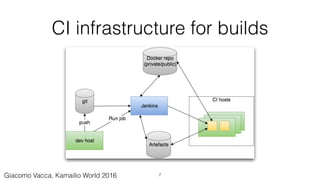
CI infrastructure for builds
7Giacomo Vacca, Kamailio World 2016
Build environments
• Personal VM/Dedicated dev machine
• Jenkins with dedicated build machine (slave)
• Jenkins with Docker-based slaves
• Docker plugin
• Mesos cluster management
8Giacomo Vacca, Kamailio World 2016
Artefacts
• Packages, tarballs, Docker images, other files to be uploaded
• Private and public repos
• Use existing artefacts to reduce build time and improve consistency
• Build once, use many times
• Careful (and possibly unique) versioning
9Giacomo Vacca, Kamailio World 2016
How clean is your build environment?
• Full control of build requirements:
• Not sharing environments across apps
• Not reusing polluted environments (keep releases predictable)
• Clean up the build environment or…
• Create a new environment for each build
• Containers as light-weight “build machines”
• Build once, test until production (“non-event releases”)
10Giacomo Vacca, Kamailio World 2016
A huge opportunity: Docker
• Quick introduction to Docker
• Simulate a specific Linux distribution in seconds
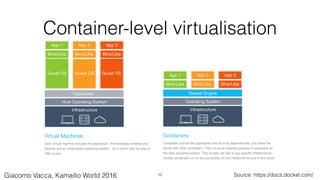
• Virtualise, while keeping the host performances
• “A few dedicated build machines” vs “Many disposable build
containers”
• Keep builds reproducible by always creating clean environments
11Giacomo Vacca, Kamailio World 2016
Container-level virtualisation
Source: https://docs.docker.com/12Giacomo Vacca, Kamailio World 2016
Base build images for kamailio
• Pre-requirements
• Keeping the images small
• Many different distributions
• (Beware of container re-use)
13Giacomo Vacca, Kamailio World 2016
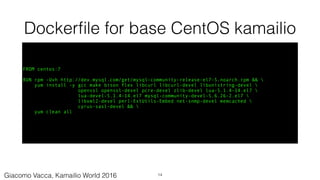
Dockerfile for base CentOS kamailio
FROM centos:7
RUN rpm -Uvh http://dev.mysql.com/get/mysql-community-release-el7-5.noarch.rpm && 
yum install -y gcc make bison flex libcurl libcurl-devel libunistring-devel 
openssl openssl-devel pcre-devel zlib-devel lua-5.1.4-14.el7 
lua-devel-5.1.4-14.el7 mysql-community-devel-5.6.26-2.el7 
libxml2-devel perl-ExtUtils-Embed net-snmp-devel memcached 
cyrus-sasl-devel && 
yum clean all
14Giacomo Vacca, Kamailio World 2016
Dockerfile step by step
• Define base image (FROM)
• Change this to the distribution needed, or to other base images
• Install dependencies packages (RUN - rpm/yum)
• Clean up yum configuration (limit image size)
15Giacomo Vacca, Kamailio World 2016
Build base image
$ cd kamailio_async_centos7/
$ docker build -t gvacca/kamailio_async:centos -f Dockerfile.centos7 .
$ docker images |grep kamailio_async
gvacca/kamailio_async centos7 3fa45a9c3c1e 3 days ago 393.8 MB
($ docker build -t USER/IMAGE:TAG [-f DOCKERFILE] .)
16
This base image will be used later as build host for kamailio
Giacomo Vacca, Kamailio World 2016
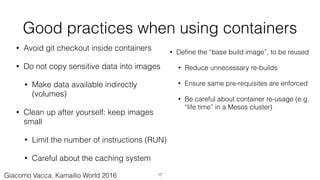
Good practices when using containers
• Avoid git checkout inside containers
• Do not copy sensitive data into images
• Make data available indirectly
(volumes)
• Clean up after yourself: keep images
small
• Limit the number of instructions (RUN)
• Careful about the caching system
• Define the “base build image”, to be reused
• Reduce unnecessary re-builds
• Ensure same pre-requisites are enforced
• Be careful about container re-usage (e.g.
“life time” in a Mesos cluster)
17Giacomo Vacca, Kamailio World 2016
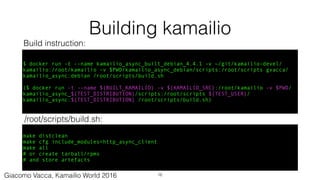
Building kamailio
$ docker run -t --name kamailio_async_built_debian_4.4.1 -v ~/git/kamailio-devel/
kamailio:/root/kamailio -v $PWD/kamailio_async_debian/scripts:/root/scripts gvacca/
kamailio_async:debian /root/scripts/build.sh
($ docker run -t --name ${BUILT_KAMAILIO} -v ${KAMAILIO_SRC}:/root/kamailio -v $PWD/
kamailio_async_${TEST_DISTRIBUTION}/scripts:/root/scripts ${TEST_USER}/
kamailio_async:${TEST_DISTRIBUTION} /root/scripts/build.sh)
make distclean
make cfg include_modules=http_async_client
make all
# or create tarball/rpms
# and store artefacts
Build instruction:
/root/scripts/build.sh:
18Giacomo Vacca, Kamailio World 2016
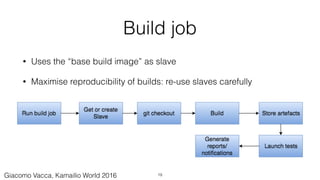
Build job
• Uses the “base build image” as slave
• Maximise reproducibility of builds: re-use slaves carefully
19Giacomo Vacca, Kamailio World 2016
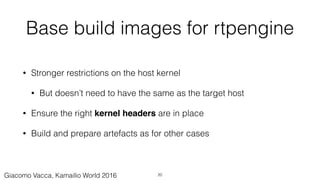
Base build images for rtpengine
• Stronger restrictions on the host kernel
• But doesn’t need to have the same as the target host
• Ensure the right kernel headers are in place
• Build and prepare artefacts as for other cases
20Giacomo Vacca, Kamailio World 2016
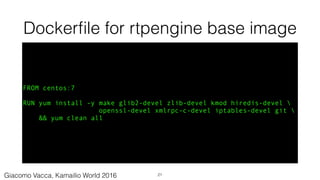
Dockerfile for rtpengine base image
FROM centos:7
RUN yum install -y make glib2-devel zlib-devel kmod hiredis-devel 
openssl-devel xmlrpc-c-devel iptables-devel git 
&& yum clean all
21Giacomo Vacca, Kamailio World 2016
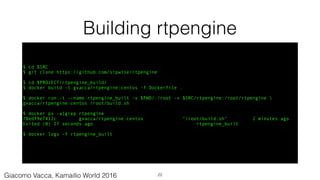
Building rtpengine
$ cd $SRC
$ git clone https://github.com/sipwise/rtpengine
$ cd $PROJECT/rtpengine_build/
$ docker build -t gvacca/rtpengine:centos -f Dockerfile .
$ docker run -t --name rtpengine_built -v $PWD/:/root -v $SRC/rtpengine:/root/rtpengine 
gvacca/rtpengine:centos /root/build.sh
$ docker ps -a|grep rtpengine
78edf9e7412c gvacca/rtpengine:centos "/root/build.sh" 2 minutes ago
Exited (0) 27 seconds ago rtpengine_built
$ docker logs -f rtpengine_built
22Giacomo Vacca, Kamailio World 2016
Deployment automation
23Giacomo Vacca, Kamailio World 2016
Deploying from a CI platform
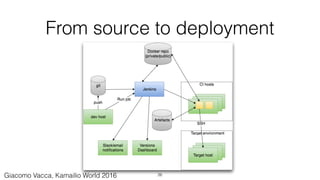
• Deploy on Production or other environments (dev, staging, etc)
• Deploy on test beds for the specific purpose of testing
• Validate release candidates with automatic tests after deployments
24Giacomo Vacca, Kamailio World 2016
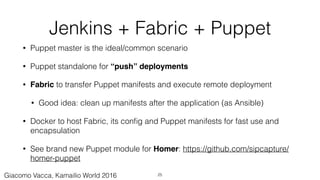
Jenkins + Fabric + Puppet
• Puppet master is the ideal/common scenario
• Puppet standalone for “push” deployments
• Fabric to transfer Puppet manifests and execute remote deployment
• Good idea: clean up manifests after the application (as Ansible)
• Docker to host Fabric, its config and Puppet manifests for fast use and
encapsulation
• See brand new Puppet module for Homer: https://github.com/sipcapture/
homer-puppet
25Giacomo Vacca, Kamailio World 2016
From source to deployment
26Giacomo Vacca, Kamailio World 2016
Test automation
27Giacomo Vacca, Kamailio World 2016
A CI inftrastucture comes handy for…
• Unit testing
• Component testing
• Integration testing
• Load testing
We’ll see an example later of component/integration testing
28Giacomo Vacca, Kamailio World 2016
Putting it all together
29Giacomo Vacca, Kamailio World 2016
Case study: testing http_async_client
Asynchronous HTTP client for Kamailio, http://www.kamailio.org/docs/
modules/devel/modules/http_async_client.html
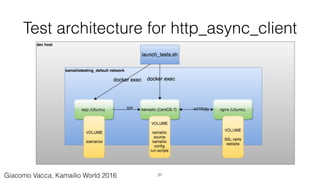
• Dockerise all the components (can be run anywhere)
• Test on multiple distributions
• Simulate web servers
• Trigger tests with sipp
30Giacomo Vacca, Kamailio World 2016
Test architecture for http_async_client
31Giacomo Vacca, Kamailio World 2016
Docker Compose to abstract the test architecture
• Docker Compose helps you defining a multi-container architecture
• Containers are “services”
• YAML to define base images, volumes, ports, commands, etc
• Internal naming system: no need to use IP addresses (like e.g.
‘docker network’), just use the service name
• docker-compose.yml supports natively environment variables
32Giacomo Vacca, Kamailio World 2016
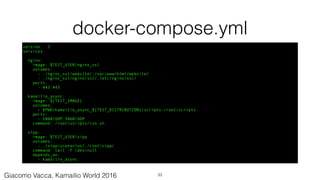
docker-compose.yml
version: '2'
services:
nginx:
image: $TEST_USER/nginx_ssl
volumes:
- ./nginx_ssl/website/:/var/www/html/website/
- ./nginx_ssl/nginx/ssl/:/etc/nginx/ssl/
ports:
- 443:443
kamailio_async:
image: ${TEST_IMAGE}
volumes:
- $PWD/kamailio_async_${TEST_DISTRIBUTION}/scripts:/root/scripts
ports:
- 5060/UDP:5060/UDP
command: /root/scripts/run.sh
sipp:
image: $TEST_USER/sipp
volumes:
- ./sipp/scenarios/:/root/sipp/
command: tail -f /dev/null
depends_on:
- kamailio_async
33Giacomo Vacca, Kamailio World 2016
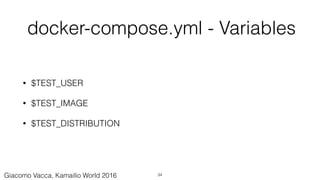
docker-compose.yml - Variables
• $TEST_USER
• $TEST_IMAGE
• $TEST_DISTRIBUTION
34Giacomo Vacca, Kamailio World 2016
kamailio.cfg under test
#!KAMAILIO
mpath="/usr/local/lib64/kamailio/modules/"
loadmodule "pv.so"
loadmodule "tm.so"
loadmodule "tmx.so"
loadmodule "textops.so"
loadmodule "xlog.so"
loadmodule "http_async_client.so"
modparam("http_async_client", "connection_timeout", 10000)
modparam("http_async_client", "tls_verify_host", 0)
modparam("http_async_client", "tls_verify_peer", 0)
debug=2
log_stderror=no
pv_buffer_size=4096
request_route {
xlog("L_ALERT", "Processing request...n");
if ($rm eq "MESSAGE") {
if(t_newtran()) {
xlog("L_ALERT", "$ci: requesting $hdr(P-Url)n");
http_async_query("$hdr(P-Url)", "http_reply");
}
}
}
route[http_reply] {
if ($http_ok) {
xlog("L_INFO", "route[HTTP_REPLY]: status $http_rsn");
xlog("L_INFO", "route[HTTP_REPLY]: body $http_rbn");
set_reply_body("$http_rb", "text/plain");
append_to_reply("P-Http-Status: $http_rsrn");
xlog("L_ALERT", "received response $http_rs <$http_rb> for trans $T(id_index):$T(id_label)n");
t_reply("200", "Ok");
} else {
xlog("L_INFO", "route[HTTP_REPLY]: error $http_err)n");
t_reply("500", "Something is wrong");
}
}
35Giacomo Vacca, Kamailio World 2016
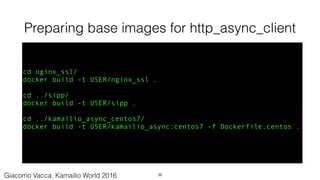
Preparing base images for http_async_client
cd nginx_ssl/
docker build -t USER/nginx_ssl .
cd ../sipp/
docker build -t USER/sipp .
cd ../kamailio_async_centos7/
docker build -t USER/kamailio_async:centos7 -f Dockerfile.centos .
36Giacomo Vacca, Kamailio World 2016
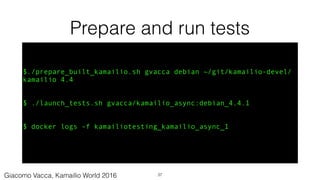
Prepare and run tests
$./prepare_built_kamailio.sh gvacca debian ~/git/kamailio-devel/
kamailio 4.4
$ ./launch_tests.sh gvacca/kamailio_async:debian_4.4.1
$ docker logs -f kamailiotesting_kamailio_async_1
37Giacomo Vacca, Kamailio World 2016
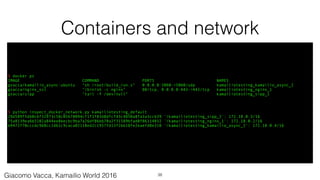
Containers and network
$ docker ps
IMAGE COMMAND PORTS NAMES
gvacca/kamailio_async:ubuntu "sh /root/build_run.s" 0.0.0.0:5060->5060/udp kamailiotesting_kamailio_async_1
gvacca/nginx_ssl "/bin/sh -c nginx" 80/tcp, 0.0.0.0:443->443/tcp kamailiotesting_nginx_1
gvacca/sipp "tail -f /dev/null" kamailiotesting_sipp_1
$ python inspect_docker_network.py kamailiotesting_default
29d589f5db0c6f32973c58c05678094cf1f1f83d8dfcf43c4850a8fa3a3ccb39 '/kamailiotesting_sipp_1': 172.18.0.3/16
75a8139ea6b3102a844ee8becbc9ba7a26df86bb70a2f31589bfad8f86114032 '/kamailiotesting_nginx_1': 172.18.0.2/16
b9472f70cccdc968cc1d61c9caca02118ed2c1957fd13f2bb18fe2eaefd0e310 '/kamailiotesting_kamailio_async_1': 172.18.0.4/16
38Giacomo Vacca, Kamailio World 2016
Conclusions/future
• kamailio, as other apps, will run inside containers
• “Service Discovery” tools will be key
• Emulation of entire infrastructures on top of container-based platforms
• Lightweight distributions as simple containers infrastructure
• Continuous Integration/Delivery will be the norm
39Giacomo Vacca, Kamailio World 2016
Q&A
40Giacomo Vacca, Kamailio World 2016
References and useful sources
• https://www.kamailio.org/w/2015/11/building-kamailio-in-docker/
• “The Docker book”, J. Turnbull, http://www.amazon.co.uk/Docker-Book-Containerization-
new-virtualization-ebook/dp/B00LRROTI4
• “Using Docker”, A. Mouat,https://www.amazon.co.uk/Using-Docker-Adrian-Mouat/dp/
1491915765
• “Continuous Delivery”, J. Humble, http://www.amazon.com/Continuous-Delivery-
Deployment-Automation-Addison-Wesley/dp/0321601912
• “Building Microservices”, S. Newman, http://shop.oreilly.com/product/0636920033158.do
• "Docker Networking and Service Discovery", https://www.nginx.com/resources/library/
docker-networking/
41Giacomo Vacca, Kamailio World 2016
More presentations on this topic
• “Docker and Puppet for CI”, http://www.slideshare.net/GiacomoVacca/
docker-and-puppet-for-continuous-integration
• “Automatic Kamailio Deployments with Puppet”, Kamailio World 2014,
http://www.slideshare.net/GiacomoVacca/automatic-
kamailiodeploymentswithpuppet-33085423
42Giacomo Vacca, Kamailio World 2016
Thanks!
• Federico Cabiddu
• Camille Oudot
• Victor Seva
43Giacomo Vacca, Kamailio World 2016
Additional slides
44Giacomo Vacca, Kamailio World 2016
Docker inside docker
• Manage an environment of containers inside a container
• Powerful
• With disadvantages
• Consider the “sibling” approach, rather than the nested one
• Build networks of containers and command some of them via the
socket API
45Giacomo Vacca, Kamailio World 2016

Continuous Integration and Kamailio

  • 1.
    Continuous Integration and Kamailio Automatingbuilds, deployments and tests for fast-moving projects 1Giacomo Vacca, Kamailio World 2016
  • 2.
    About me • 15years “in the trenches cubicles” • Developer of RTC (VoIP, IM, WebRTC) solutions • Often dealing with DevOps topics • Founder of RTCSoft in 2015 • Working with Orange Libon Voice Team @giavac https://github.com/giavac gv@rtcsoft.net 2Giacomo Vacca, Kamailio World 2016
  • 3.
    Material for theWorkshop • https://github.com/giavac/kamailio_ci • rtpengine_build • kamailio_testing • (You can start preparing the base Docker images) 3Giacomo Vacca, Kamailio World 2016
  • 4.
    Kamailio and theneed for CI • Several developers working on the same code base • Not everybody uses stock packages (in-house builds) • Save time (test continuously, so that the uncertainty on QA is low) • Save money (reduce costs of building/testing machines) • Release more often, with lower risks 4Giacomo Vacca, Kamailio World 2016
  • 5.
    CI servers • Mostused CI platforms are OSS: Jenkins, Travis • Automation of Build, Test, Deployment • Integration with git and other tools • Jenkins: typical for private CI infrastructures • Travis: designed for Open Source projects 5Giacomo Vacca, Kamailio World 2016
  • 6.
  • 7.
    CI infrastructure forbuilds 7Giacomo Vacca, Kamailio World 2016
  • 8.
    Build environments • PersonalVM/Dedicated dev machine • Jenkins with dedicated build machine (slave) • Jenkins with Docker-based slaves • Docker plugin • Mesos cluster management 8Giacomo Vacca, Kamailio World 2016
  • 9.
    Artefacts • Packages, tarballs,Docker images, other files to be uploaded • Private and public repos • Use existing artefacts to reduce build time and improve consistency • Build once, use many times • Careful (and possibly unique) versioning 9Giacomo Vacca, Kamailio World 2016
  • 10.
    How clean isyour build environment? • Full control of build requirements: • Not sharing environments across apps • Not reusing polluted environments (keep releases predictable) • Clean up the build environment or… • Create a new environment for each build • Containers as light-weight “build machines” • Build once, test until production (“non-event releases”) 10Giacomo Vacca, Kamailio World 2016
  • 11.
    A huge opportunity:Docker • Quick introduction to Docker • Simulate a specific Linux distribution in seconds • Virtualise, while keeping the host performances • “A few dedicated build machines” vs “Many disposable build containers” • Keep builds reproducible by always creating clean environments 11Giacomo Vacca, Kamailio World 2016
  • 12.
  • 13.
    Base build imagesfor kamailio • Pre-requirements • Keeping the images small • Many different distributions • (Beware of container re-use) 13Giacomo Vacca, Kamailio World 2016
  • 14.
    Dockerfile for baseCentOS kamailio FROM centos:7 RUN rpm -Uvh http://dev.mysql.com/get/mysql-community-release-el7-5.noarch.rpm && yum install -y gcc make bison flex libcurl libcurl-devel libunistring-devel openssl openssl-devel pcre-devel zlib-devel lua-5.1.4-14.el7 lua-devel-5.1.4-14.el7 mysql-community-devel-5.6.26-2.el7 libxml2-devel perl-ExtUtils-Embed net-snmp-devel memcached cyrus-sasl-devel && yum clean all 14Giacomo Vacca, Kamailio World 2016
  • 15.
    Dockerfile step bystep • Define base image (FROM) • Change this to the distribution needed, or to other base images • Install dependencies packages (RUN - rpm/yum) • Clean up yum configuration (limit image size) 15Giacomo Vacca, Kamailio World 2016
  • 16.
    Build base image $cd kamailio_async_centos7/ $ docker build -t gvacca/kamailio_async:centos -f Dockerfile.centos7 . $ docker images |grep kamailio_async gvacca/kamailio_async centos7 3fa45a9c3c1e 3 days ago 393.8 MB ($ docker build -t USER/IMAGE:TAG [-f DOCKERFILE] .) 16 This base image will be used later as build host for kamailio Giacomo Vacca, Kamailio World 2016
  • 17.
    Good practices whenusing containers • Avoid git checkout inside containers • Do not copy sensitive data into images • Make data available indirectly (volumes) • Clean up after yourself: keep images small • Limit the number of instructions (RUN) • Careful about the caching system • Define the “base build image”, to be reused • Reduce unnecessary re-builds • Ensure same pre-requisites are enforced • Be careful about container re-usage (e.g. “life time” in a Mesos cluster) 17Giacomo Vacca, Kamailio World 2016
  • 18.
    Building kamailio $ dockerrun -t --name kamailio_async_built_debian_4.4.1 -v ~/git/kamailio-devel/ kamailio:/root/kamailio -v $PWD/kamailio_async_debian/scripts:/root/scripts gvacca/ kamailio_async:debian /root/scripts/build.sh ($ docker run -t --name ${BUILT_KAMAILIO} -v ${KAMAILIO_SRC}:/root/kamailio -v $PWD/ kamailio_async_${TEST_DISTRIBUTION}/scripts:/root/scripts ${TEST_USER}/ kamailio_async:${TEST_DISTRIBUTION} /root/scripts/build.sh) make distclean make cfg include_modules=http_async_client make all # or create tarball/rpms # and store artefacts Build instruction: /root/scripts/build.sh: 18Giacomo Vacca, Kamailio World 2016
  • 19.
    Build job • Usesthe “base build image” as slave • Maximise reproducibility of builds: re-use slaves carefully 19Giacomo Vacca, Kamailio World 2016
  • 20.
    Base build imagesfor rtpengine • Stronger restrictions on the host kernel • But doesn’t need to have the same as the target host • Ensure the right kernel headers are in place • Build and prepare artefacts as for other cases 20Giacomo Vacca, Kamailio World 2016
  • 21.
    Dockerfile for rtpenginebase image FROM centos:7 RUN yum install -y make glib2-devel zlib-devel kmod hiredis-devel openssl-devel xmlrpc-c-devel iptables-devel git && yum clean all 21Giacomo Vacca, Kamailio World 2016
  • 22.
    Building rtpengine $ cd$SRC $ git clone https://github.com/sipwise/rtpengine $ cd $PROJECT/rtpengine_build/ $ docker build -t gvacca/rtpengine:centos -f Dockerfile . $ docker run -t --name rtpengine_built -v $PWD/:/root -v $SRC/rtpengine:/root/rtpengine gvacca/rtpengine:centos /root/build.sh $ docker ps -a|grep rtpengine 78edf9e7412c gvacca/rtpengine:centos "/root/build.sh" 2 minutes ago Exited (0) 27 seconds ago rtpengine_built $ docker logs -f rtpengine_built 22Giacomo Vacca, Kamailio World 2016
  • 23.
  • 24.
    Deploying from aCI platform • Deploy on Production or other environments (dev, staging, etc) • Deploy on test beds for the specific purpose of testing • Validate release candidates with automatic tests after deployments 24Giacomo Vacca, Kamailio World 2016
  • 25.
    Jenkins + Fabric+ Puppet • Puppet master is the ideal/common scenario • Puppet standalone for “push” deployments • Fabric to transfer Puppet manifests and execute remote deployment • Good idea: clean up manifests after the application (as Ansible) • Docker to host Fabric, its config and Puppet manifests for fast use and encapsulation • See brand new Puppet module for Homer: https://github.com/sipcapture/ homer-puppet 25Giacomo Vacca, Kamailio World 2016
  • 26.
    From source todeployment 26Giacomo Vacca, Kamailio World 2016
  • 27.
  • 28.
    A CI inftrastucturecomes handy for… • Unit testing • Component testing • Integration testing • Load testing We’ll see an example later of component/integration testing 28Giacomo Vacca, Kamailio World 2016
  • 29.
    Putting it alltogether 29Giacomo Vacca, Kamailio World 2016
  • 30.
    Case study: testinghttp_async_client Asynchronous HTTP client for Kamailio, http://www.kamailio.org/docs/ modules/devel/modules/http_async_client.html • Dockerise all the components (can be run anywhere) • Test on multiple distributions • Simulate web servers • Trigger tests with sipp 30Giacomo Vacca, Kamailio World 2016
  • 31.
    Test architecture forhttp_async_client 31Giacomo Vacca, Kamailio World 2016
  • 32.
    Docker Compose toabstract the test architecture • Docker Compose helps you defining a multi-container architecture • Containers are “services” • YAML to define base images, volumes, ports, commands, etc • Internal naming system: no need to use IP addresses (like e.g. ‘docker network’), just use the service name • docker-compose.yml supports natively environment variables 32Giacomo Vacca, Kamailio World 2016
  • 33.
    docker-compose.yml version: '2' services: nginx: image: $TEST_USER/nginx_ssl volumes: -./nginx_ssl/website/:/var/www/html/website/ - ./nginx_ssl/nginx/ssl/:/etc/nginx/ssl/ ports: - 443:443 kamailio_async: image: ${TEST_IMAGE} volumes: - $PWD/kamailio_async_${TEST_DISTRIBUTION}/scripts:/root/scripts ports: - 5060/UDP:5060/UDP command: /root/scripts/run.sh sipp: image: $TEST_USER/sipp volumes: - ./sipp/scenarios/:/root/sipp/ command: tail -f /dev/null depends_on: - kamailio_async 33Giacomo Vacca, Kamailio World 2016
  • 34.
    docker-compose.yml - Variables •$TEST_USER • $TEST_IMAGE • $TEST_DISTRIBUTION 34Giacomo Vacca, Kamailio World 2016
  • 35.
    kamailio.cfg under test #!KAMAILIO mpath="/usr/local/lib64/kamailio/modules/" loadmodule"pv.so" loadmodule "tm.so" loadmodule "tmx.so" loadmodule "textops.so" loadmodule "xlog.so" loadmodule "http_async_client.so" modparam("http_async_client", "connection_timeout", 10000) modparam("http_async_client", "tls_verify_host", 0) modparam("http_async_client", "tls_verify_peer", 0) debug=2 log_stderror=no pv_buffer_size=4096 request_route { xlog("L_ALERT", "Processing request...n"); if ($rm eq "MESSAGE") { if(t_newtran()) { xlog("L_ALERT", "$ci: requesting $hdr(P-Url)n"); http_async_query("$hdr(P-Url)", "http_reply"); } } } route[http_reply] { if ($http_ok) { xlog("L_INFO", "route[HTTP_REPLY]: status $http_rsn"); xlog("L_INFO", "route[HTTP_REPLY]: body $http_rbn"); set_reply_body("$http_rb", "text/plain"); append_to_reply("P-Http-Status: $http_rsrn"); xlog("L_ALERT", "received response $http_rs <$http_rb> for trans $T(id_index):$T(id_label)n"); t_reply("200", "Ok"); } else { xlog("L_INFO", "route[HTTP_REPLY]: error $http_err)n"); t_reply("500", "Something is wrong"); } } 35Giacomo Vacca, Kamailio World 2016
  • 36.
    Preparing base imagesfor http_async_client cd nginx_ssl/ docker build -t USER/nginx_ssl . cd ../sipp/ docker build -t USER/sipp . cd ../kamailio_async_centos7/ docker build -t USER/kamailio_async:centos7 -f Dockerfile.centos . 36Giacomo Vacca, Kamailio World 2016
  • 37.
    Prepare and runtests $./prepare_built_kamailio.sh gvacca debian ~/git/kamailio-devel/ kamailio 4.4 $ ./launch_tests.sh gvacca/kamailio_async:debian_4.4.1 $ docker logs -f kamailiotesting_kamailio_async_1 37Giacomo Vacca, Kamailio World 2016
  • 38.
    Containers and network $docker ps IMAGE COMMAND PORTS NAMES gvacca/kamailio_async:ubuntu "sh /root/build_run.s" 0.0.0.0:5060->5060/udp kamailiotesting_kamailio_async_1 gvacca/nginx_ssl "/bin/sh -c nginx" 80/tcp, 0.0.0.0:443->443/tcp kamailiotesting_nginx_1 gvacca/sipp "tail -f /dev/null" kamailiotesting_sipp_1 $ python inspect_docker_network.py kamailiotesting_default 29d589f5db0c6f32973c58c05678094cf1f1f83d8dfcf43c4850a8fa3a3ccb39 '/kamailiotesting_sipp_1': 172.18.0.3/16 75a8139ea6b3102a844ee8becbc9ba7a26df86bb70a2f31589bfad8f86114032 '/kamailiotesting_nginx_1': 172.18.0.2/16 b9472f70cccdc968cc1d61c9caca02118ed2c1957fd13f2bb18fe2eaefd0e310 '/kamailiotesting_kamailio_async_1': 172.18.0.4/16 38Giacomo Vacca, Kamailio World 2016
  • 39.
    Conclusions/future • kamailio, asother apps, will run inside containers • “Service Discovery” tools will be key • Emulation of entire infrastructures on top of container-based platforms • Lightweight distributions as simple containers infrastructure • Continuous Integration/Delivery will be the norm 39Giacomo Vacca, Kamailio World 2016
  • 40.
  • 41.
    References and usefulsources • https://www.kamailio.org/w/2015/11/building-kamailio-in-docker/ • “The Docker book”, J. Turnbull, http://www.amazon.co.uk/Docker-Book-Containerization- new-virtualization-ebook/dp/B00LRROTI4 • “Using Docker”, A. Mouat,https://www.amazon.co.uk/Using-Docker-Adrian-Mouat/dp/ 1491915765 • “Continuous Delivery”, J. Humble, http://www.amazon.com/Continuous-Delivery- Deployment-Automation-Addison-Wesley/dp/0321601912 • “Building Microservices”, S. Newman, http://shop.oreilly.com/product/0636920033158.do • "Docker Networking and Service Discovery", https://www.nginx.com/resources/library/ docker-networking/ 41Giacomo Vacca, Kamailio World 2016
  • 42.
    More presentations onthis topic • “Docker and Puppet for CI”, http://www.slideshare.net/GiacomoVacca/ docker-and-puppet-for-continuous-integration • “Automatic Kamailio Deployments with Puppet”, Kamailio World 2014, http://www.slideshare.net/GiacomoVacca/automatic- kamailiodeploymentswithpuppet-33085423 42Giacomo Vacca, Kamailio World 2016
  • 43.
    Thanks! • Federico Cabiddu •Camille Oudot • Victor Seva 43Giacomo Vacca, Kamailio World 2016
  • 44.
  • 45.
    Docker inside docker •Manage an environment of containers inside a container • Powerful • With disadvantages • Consider the “sibling” approach, rather than the nested one • Build networks of containers and command some of them via the socket API 45Giacomo Vacca, Kamailio World 2016