This document discusses how to configure Kamailio as a session border controller (SBC) using Docker. It provides an introduction to Kamailio and explains how to install Kamailio from source on a CentOS Docker container. Specific steps are outlined to configure Kamailio to use MySQL, create the database schema, modify the configuration file to use the private and public IP addresses, and start the Kamailio server. The document also provides instructions for testing Kamailio by getting the error log, creating SIP user accounts, and registering a SIP softphone.
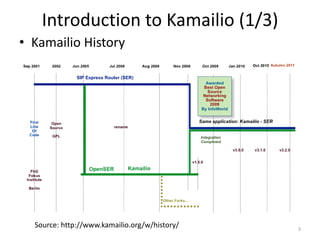
Overview of Kamailio's history as an Open-Source SIP Proxy, its functions as a Session Border Controller (SBC) including user authentication, and load balancing capabilities.
Details on setting up Kamailio with B2BUA, covering dialing configurations and network safety, including separation of internal and external traffic.
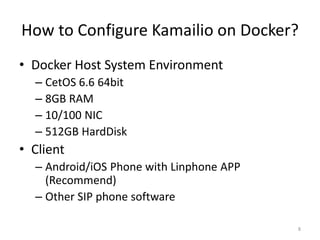
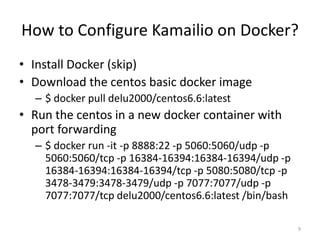
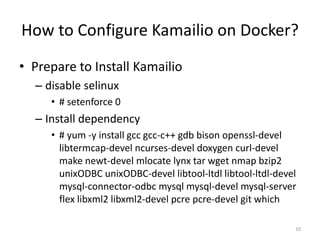
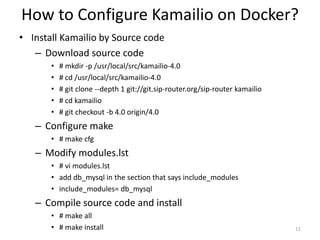
Step-by-step instructions for installing and configuring Kamailio on Docker, including system requirements, dependency installations, and database configurations.
Citations for further information including links to Kamailio, FreeSWITCH, and the Docker implementation.
Introduction to Kamailio(2/3)
• Kamailio is an Open-Source SIP Proxy (not
B2BUA)
• Kamailio can be configured as a Session
Border Controller (SBC)
– User authentication
– Blacklisting
– Brute-force attack protection
– Strip TLS
4
5.
Introduction to Kamailio(3/3)
• Put Kamailio in front of a B2BUA farm(such as
FreeSWITCH), to perform load balancing, failure
routing and high availability.
• Containers (such as Docker) make Kamailio easy
to prototype and test, but many see them as a
way to scale on demand
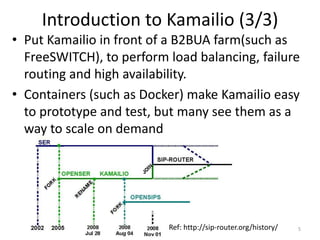
5Ref: http://sip-router.org/history/
6.
Make Kamailio asSBC with B2BUA (1/2)
• In this setup, the dialplan is detailed only for
inbound to outbound traffic, but it could be easily
extended for outbound to inbound traffic (or DID).
• The design is the following:
– FreeSWITCH is configured with an internal and an
external profile, each profile listening on a different
network interface.
– Kamailio is listening on the loopback interface, and is
not used by any other process than FreeSWITCH.
6
7.
Make Kamailio asSBC with B2BUA (2/2)
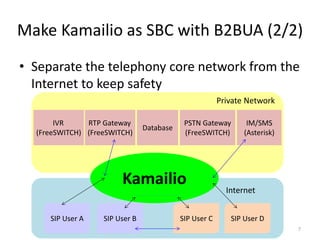
• Separate the telephony core network from the
Internet to keep safety
7
Private Network
Internet
Kamailio
IVR
(FreeSWITCH)
RTP Gateway
(FreeSWITCH)
Database
PSTN Gateway
(FreeSWITCH)
IM/SMS
(Asterisk)
SIP User A SIP User B SIP User C SIP User D
8.
How to ConfigureKamailio on Docker?
• Docker Host System Environment
– CetOS 6.6 64bit
– 8GB RAM
– 10/100 NIC
– 512GB HardDisk
• Client
– Android/iOS Phone with Linphone APP
(Recommend)
– Other SIP phone software
8
9.
How to ConfigureKamailio on Docker?
• Install Docker (skip)
• Download the centos basic docker image
– $ docker pull delu2000/centos6.6:latest
• Run the centos in a new docker container with
port forwarding
– $ docker run -it -p 8888:22 -p 5060:5060/udp -p
5060:5060/tcp -p 16384-16394:16384-16394/udp -p
16384-16394:16384-16394/tcp -p 5080:5080/tcp -p
3478-3479:3478-3479/udp -p 7077:7077/udp -p
7077:7077/tcp delu2000/centos6.6:latest /bin/bash
9
10.
How to ConfigureKamailio on Docker?
• Prepare to Install Kamailio
– disable selinux
• # setenforce 0
– Install dependency
• # yum -y install gcc gcc-c++ gdb bison openssl-devel
libtermcap-devel ncurses-devel doxygen curl-devel
make newt-devel mlocate lynx tar wget nmap bzip2
unixODBC unixODBC-devel libtool-ltdl libtool-ltdl-devel
mysql-connector-odbc mysql mysql-devel mysql-server
flex libxml2 libxml2-devel pcre pcre-devel git which
10
11.
How to ConfigureKamailio on Docker?
• Install Kamailio by Source code
– Download source code
• # mkdir -p /usr/local/src/kamailio-4.0
• # cd /usr/local/src/kamailio-4.0
• # git clone --depth 1 git://git.sip-router.org/sip-router kamailio
• # cd kamailio
• # git checkout -b 4.0 origin/4.0
– Configure make
• # make cfg
– Modify modules.lst
• # vi modules.lst
• add db_mysql in the section that says include_modules
• include_modules= db_mysql
– Compile source code and install
• # make all
• # make install 11
12.
How to ConfigureKamailio on Docker?
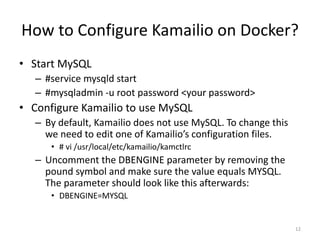
• Start MySQL
– #service mysqld start
– #mysqladmin -u root password <your password>
• Configure Kamailio to use MySQL
– By default, Kamailio does not use MySQL. To change this
we need to edit one of Kamailio’s configuration files.
• # vi /usr/local/etc/kamailio/kamctlrc
– Uncomment the DBENGINE parameter by removing the
pound symbol and make sure the value equals MYSQL.
The parameter should look like this afterwards:
• DBENGINE=MYSQL
12
13.
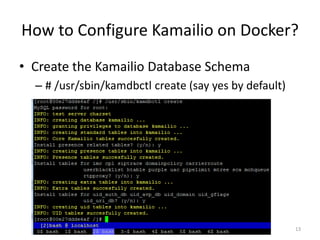
How to ConfigureKamailio on Docker?
• Create the Kamailio Database Schema
– # /usr/sbin/kamdbctl create (say yes by default)
13
14.
How to ConfigureKamailio on Docker?
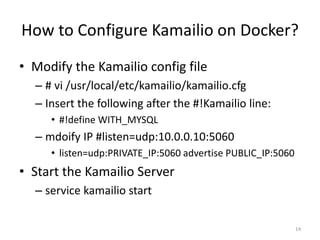
• Modify the Kamailio config file
– # vi /usr/local/etc/kamailio/kamailio.cfg
– Insert the following after the #!Kamailio line:
• #!define WITH_MYSQL
– mdoify IP #listen=udp:10.0.0.10:5060
• listen=udp:PRIVATE_IP:5060 advertise PUBLIC_IP:5060
• Start the Kamailio Server
– service kamailio start
14
15.
How to ConfigureKamailio on Docker?
• Test Kamailio
– Get Kamailio Error Log
• # kamailio -E -e –dd
– Creating SIP User Accounts
• # kamctl add <extension@domain> <password>
• e.g.=> kamctl add 1006@10.10.10.135 1234
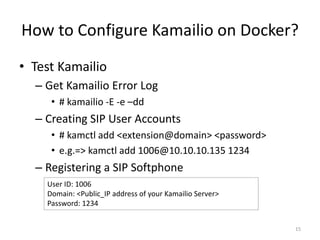
– Registering a SIP Softphone
15
User ID: 1006
Domain: <Public_IP address of your Kamailio Server>
Password: 1234