Quickstart for
CONTINUOUS
INTEGRATION
01
Introduction
What is CI?
Continuous Integration objectives 3
• Support team work integration:
• Component x Software x Infrastructure
• Anticipate integration phase
• Short & fast integration cycles
• Significantly reduce integration problems and
allows a team to be more productive.
• Accelerate software development and release
01
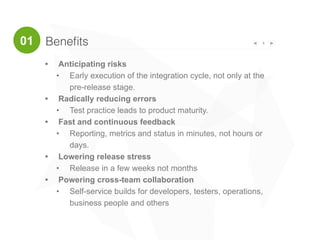
Benefits 4
• Anticipating risks
• Early execution of the integration cycle, not only at the
pre-release stage.
• Radically reducing errors
• Test practice leads to product maturity.
• Fast and continuous feedback
• Reporting, metrics and status in minutes, not hours or
days.
• Lowering release stress
• Release in a few weeks not months
• Powering cross-team collaboration
• Self-service builds for developers, testers, operations,
business people and others
01
501
“Continuous Integration has become a mainstream
technique for software development”
(Martin Fowler, 2006)
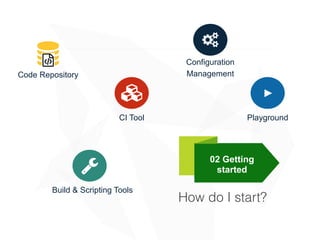
How do I start?
02 Getting
started!
Build & Scripting Tools
"
Configuration
Management
#
CI Tool
>
Playground
%
Code Repository
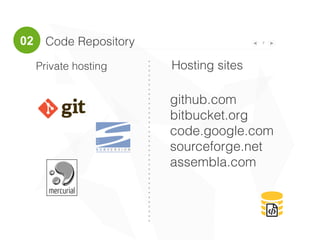
Code Repository 702
%
Private hosting Hosting sites
github.com
bitbucket.org
code.google.com
sourceforge.net
assembla.com
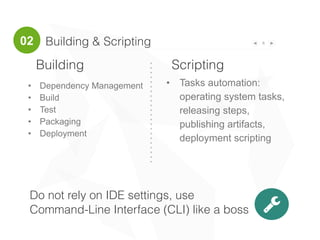
Building & Scripting 8
!
Building Scripting
• Tasks automation:
operating system tasks,
releasing steps,
publishing artifacts,
deployment scripting
• Dependency Management
• Build
• Test
• Packaging
• Deployment
02
Do not rely on IDE settings, use
Command-Line Interface (CLI) like a boss
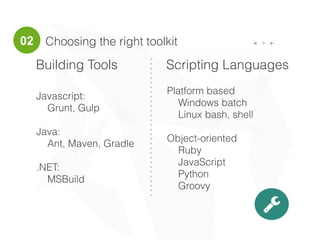
Choosing the right toolkit 9
Building Tools Scripting Languages
Platform based
Windows batch
Linux bash, shell
Object-oriented
Ruby
JavaScript
Python
Groovy
Javascript:
Grunt, Gulp
Java:
Ant, Maven, Gradle
.NET:
MSBuild
!
02
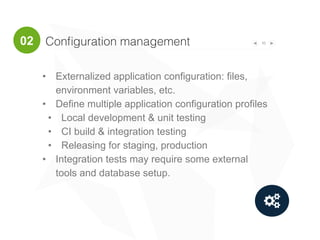
Configuration management 10
"
• Externalized application configuration: files,
environment variables, etc.
• Define multiple application configuration profiles
• Local development & unit testing
• CI build & integration testing
• Releasing for staging, production
• Integration tests may require some external
tools and database setup.
02
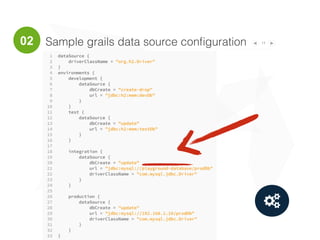
Sample grails data source configuration 11
"
02
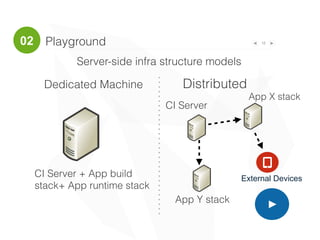
Playground 12
>
Dedicated Machine Distributed
CI Server + App build
stack+ App runtime stack
CI Server
App X stack
App Y stack
Server-side infra structure models
Q
External Devices
02
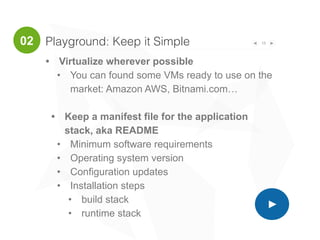
Playground: Keep it Simple 13
>
• Virtualize wherever possible
• You can found some VMs ready to use on the
market: Amazon AWS, Bitnami.com…
• Keep a manifest file for the application
stack, aka README
• Minimum software requirements
• Operating system version
• Configuration updates
• Installation steps
• build stack
• runtime stack
02
CI by Jenkins
03 Practice
Configuring a CI system with Jenkins 15
• Building/testing software projects continuously
• Monitoring executions of externally-run jobs
03
What is Jenkins?
jenkins-ci.org
Create a Job / Task 16
• Parameters
• Pre-conditions
• Source Code
• Triggers
• Build steps:
• No tricks here please
• Just call the scripts and tools
• Treat scripts as source code
• Post conditions
• Post build tasks
03
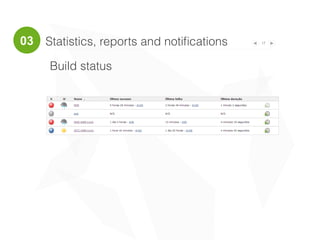
Statistics, reports and notifications 17
Build status
03
18
Code Coverage
Statistics, reports and notifications
Reference: [1] JaCoCO Plugin: https://wiki.jenkins-ci.org/display/JENKINS/JaCoCo+Plugin
03
19
Integration with Code Quality Management Tools
Statistics, reports and notifications
Reference: [1] Sonarqube: http://www.sonarqube.org
03
Comments 20
&
#ContinuousDelivery
#ContinuousDeployment
#Self-service
deployment
#ContinuousTesting
See more…
• Continuous Integration practices
• References:
[1] http://martinfowler.com/articles/continuousIntegration.html
[2] http://refcardz.dzone.com/refcardz/continuous-delivery-patterns
[3] http://guide.agilealliance.org/guide/ci.html
' fabricioepa.wordpress.com
Contact
FABRICIO EPAMINONDAS
( linkedin.com/in/fabricioepa
' fabricioepa.wordpress.com
) @fabricioepa

Quickstart for continuous integration

  • 1.
  • 2.
  • 3.
    Continuous Integration objectives3 • Support team work integration: • Component x Software x Infrastructure • Anticipate integration phase • Short & fast integration cycles • Significantly reduce integration problems and allows a team to be more productive. • Accelerate software development and release 01
  • 4.
    Benefits 4 • Anticipatingrisks • Early execution of the integration cycle, not only at the pre-release stage. • Radically reducing errors • Test practice leads to product maturity. • Fast and continuous feedback • Reporting, metrics and status in minutes, not hours or days. • Lowering release stress • Release in a few weeks not months • Powering cross-team collaboration • Self-service builds for developers, testers, operations, business people and others 01
  • 5.
    501 “Continuous Integration hasbecome a mainstream technique for software development” (Martin Fowler, 2006)
  • 6.
    How do Istart? 02 Getting started! Build & Scripting Tools " Configuration Management # CI Tool > Playground % Code Repository
  • 7.
    Code Repository 702 % Privatehosting Hosting sites github.com bitbucket.org code.google.com sourceforge.net assembla.com
  • 8.
    Building & Scripting8 ! Building Scripting • Tasks automation: operating system tasks, releasing steps, publishing artifacts, deployment scripting • Dependency Management • Build • Test • Packaging • Deployment 02 Do not rely on IDE settings, use Command-Line Interface (CLI) like a boss
  • 9.
    Choosing the righttoolkit 9 Building Tools Scripting Languages Platform based Windows batch Linux bash, shell Object-oriented Ruby JavaScript Python Groovy Javascript: Grunt, Gulp Java: Ant, Maven, Gradle .NET: MSBuild ! 02
  • 10.
    Configuration management 10 " •Externalized application configuration: files, environment variables, etc. • Define multiple application configuration profiles • Local development & unit testing • CI build & integration testing • Releasing for staging, production • Integration tests may require some external tools and database setup. 02
  • 11.
    Sample grails datasource configuration 11 " 02
  • 12.
    Playground 12 > Dedicated MachineDistributed CI Server + App build stack+ App runtime stack CI Server App X stack App Y stack Server-side infra structure models Q External Devices 02
  • 13.
    Playground: Keep itSimple 13 > • Virtualize wherever possible • You can found some VMs ready to use on the market: Amazon AWS, Bitnami.com… • Keep a manifest file for the application stack, aka README • Minimum software requirements • Operating system version • Configuration updates • Installation steps • build stack • runtime stack 02
  • 14.
  • 15.
    Configuring a CIsystem with Jenkins 15 • Building/testing software projects continuously • Monitoring executions of externally-run jobs 03 What is Jenkins? jenkins-ci.org
  • 16.
    Create a Job/ Task 16 • Parameters • Pre-conditions • Source Code • Triggers • Build steps: • No tricks here please • Just call the scripts and tools • Treat scripts as source code • Post conditions • Post build tasks 03
  • 17.
    Statistics, reports andnotifications 17 Build status 03
  • 18.
    18 Code Coverage Statistics, reportsand notifications Reference: [1] JaCoCO Plugin: https://wiki.jenkins-ci.org/display/JENKINS/JaCoCo+Plugin 03
  • 19.
    19 Integration with CodeQuality Management Tools Statistics, reports and notifications Reference: [1] Sonarqube: http://www.sonarqube.org 03
  • 20.
  • 21.
    See more… • ContinuousIntegration practices • References: [1] http://martinfowler.com/articles/continuousIntegration.html [2] http://refcardz.dzone.com/refcardz/continuous-delivery-patterns [3] http://guide.agilealliance.org/guide/ci.html ' fabricioepa.wordpress.com
  • 22.
    Contact FABRICIO EPAMINONDAS ( linkedin.com/in/fabricioepa 'fabricioepa.wordpress.com ) @fabricioepa