Contents page colour choices
Contents page colour scheme - Pictures
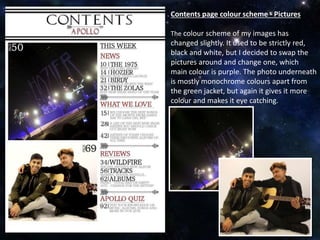
The colour scheme of my images has
changed slightly. It used to be strictly red,
black and white, but I decided to swap the
pictures around and change one, which
main colour is purple. The photo underneath
is mostly monochrome colours apart from
the green jacket, but again it gives it more
colour and makes it eye catching.
Contents page colour scheme -
Text
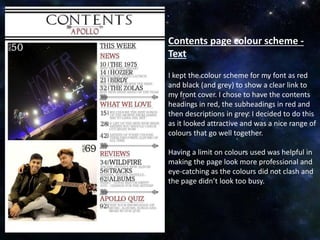
I kept the colour scheme for my font as red
and black (and grey) to show a clear link to
my front cover. I chose to have the contents
headings in red, the subheadings in red and
then descriptions in grey. I decided to do this
as it looked attractive and was a nice range of
colours that go well together.
Having a limit on colours used was helpful in
making the page look more professional and
eye-catching as the colours did not clash and
the page didn’t look too busy.

Contents page colour choices

  • 1.
  • 2.
    Contents page colourscheme - Pictures The colour scheme of my images has changed slightly. It used to be strictly red, black and white, but I decided to swap the pictures around and change one, which main colour is purple. The photo underneath is mostly monochrome colours apart from the green jacket, but again it gives it more colour and makes it eye catching.
  • 3.
    Contents page colourscheme - Text I kept the colour scheme for my font as red and black (and grey) to show a clear link to my front cover. I chose to have the contents headings in red, the subheadings in red and then descriptions in grey. I decided to do this as it looked attractive and was a nice range of colours that go well together. Having a limit on colours used was helpful in making the page look more professional and eye-catching as the colours did not clash and the page didn’t look too busy.