CONTEMPORARY SOFTWARE
PLATFORM TRENDS
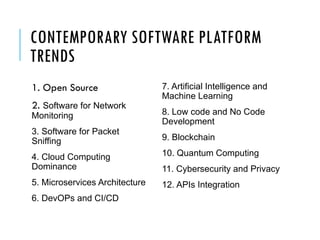
CONTEMPORARY SOFTWARE PLATFORM
TRENDS
1. Open Source
2. Software for Network
Monitoring
3. Software for Packet
Sniffing
4. Cloud Computing
Dominance
5. Microservices Architecture
6. DevOPs and CI/CD
7. Artificial Intelligence and
Machine Learning
8. Low code and No Code
Development
9. Blockchain
10. Quantum Computing
11. Cybersecurity and Privacy
12. APIs Integration
WHAT IS OPEN SOURCE ?
 In production and development, open source is a philosophy, or
a methodology that promotes free redistribution and access to
a product's design or ideas and implementation details.
 open as in free
 open as in access
 open as in over time
 open as in not closed
 open as in reuse and change
 open as in any place and for anyone
OPEN SOURCE VS. CLOSED
SOURCE
 View/Modify the source code of an application or software.
 Open source software is released to the development
community and undergoes a secondary phase of evolution,
but closed source software is developed in isolation with a
small team of developers.
 Developer support and large community to help.
 Open Source is more secure and bugs and vulnerabilities are
fixed often.
CRITERIA FOR OPEN SOURCE
 Source Code Availability
 Derived Works
 Free Redistribution
 Distribution of License
 Integrity of The Author's Source Code
 License Must Not Restrict Other Software
 No Discrimination Against Persons or Groups
 No Discrimination Against Fields of Endeavor
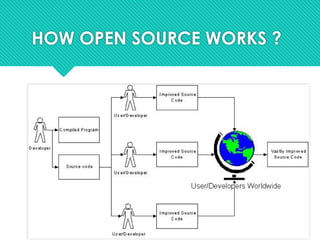
HOW OPEN SOURCE WORKS ?
ADVANTAGES OF OPEN SOURCE
 Availability of source code
 Source code to understand and learn from
 Do not have to re-invent the wheel
 Free as in “freedom”
 Does not depend on vendor
 Can choose additional support
 Can fix bugs and adapt to change in requirements as
well as technology
 Quality and Customizability in open source is better.
 Costs much less than proprietary counterparts.
SOME DISADVANTAGES OF OPEN SOURCE
 Not generally straightforward to use and requires a certain
learning curve to use and get accustomed.
 Incompatibility issue with software and hardware. (3rd
party
drivers)
 Bad Codes, and some unqualified people who uses it.
 Software quality assurance process is widely not transparent
 No financial incentive.
EXAMPLES OF OPEN SOURCE
Application software :
 7-Zip
 Eclipse
 GIMP
 Chromium
 Blender
 Mozilla Firefox
 Open Office
 LibreOffice
 VLC Media Player
Operating Systems:
 Android
 Linux
 FreeBSD
 ReactOS
 Haiku
 FreeDOS
Programming Language :
 Perl
 PHP
 Python
 Ruby
 PHDL
 Prolog
EXAMPLES OF OPEN SOURCE
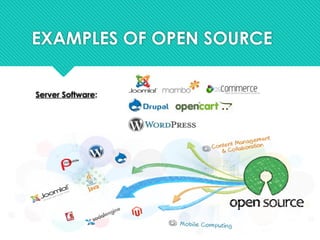
Server Software:
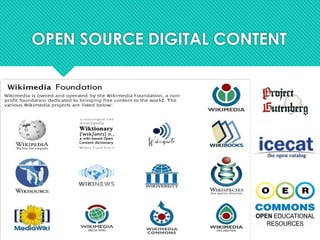
OPEN SOURCE DIGITAL CONTENT
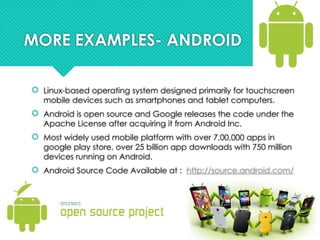
MORE EXAMPLES- ANDROID
 Linux-based operating system designed primarily for touchscreen
mobile devices such as smartphones and tablet computers.
 Android is open source and Google releases the code under the
Apache License after acquiring it from Android Inc.
 Most widely used mobile platform with over 7,00,000 apps in
google play store, over 25 billion app downloads with 750 million
devices running on Android.
 Android Source Code Available at : http://source.android.com/
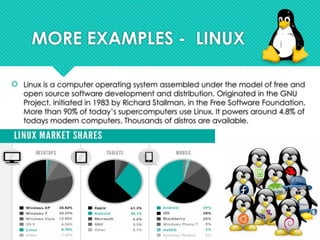
MORE EXAMPLES - LINUX
 Linux is a computer operating system assembled under the model of free and
open source software development and distribution. Originated in the GNU
Project, initiated in 1983 by Richard Stallman, in the Free Software Foundation.
More than 90% of today’s supercomputers use Linux. It powers around 4.8% of
todays modern computers. Thousands of distros are available.
OPEN SOURCE OFFICE SOFTWARES
 Open Office : Apache OpenOffice is an open-
source office productivity software suite with official
website OpenOffice.org, launched in 2002 under
the Apache License
 LibreOffice : Developed by The Document
Foundation, it is licensed under the GNU Lesser
General Public License (LGPL). It supports Windows,
Macintosh and GNU/Linux systems.
 NeoOffice : Primarily designed for Mac users and is
distributed under the GNU General Public License.
 Koffice : It is a open source office suite licensed
under the LGPL. It is available for Windows, Linux,
FreeBSD and Mac OS X systems.
LICENSE AND COPYRIGHTS
 There are hundreds of different licenses.
 Author chooses to license under a licence granting open
source freedoms. Some are easy to comply with like :
 “You can do anything you like with this software, as long as you
buy me a drink sometime if we meet”.
 Some licenses are more difficult to comply with :
 GNU GPL says that you can only use GPL code if
modified/distributed code is also released under the GPL
 “Copyleft”
LICENSE AND COPYRIGHTS
 About 55% of these projects use a copyleft licence.
 But the 6 most common licences cover about 90% of
open source projects.
 GNU General Public License (GPL)
 GNU "Lesser" General Public License (LGPL)
 Mozilla Public License 2.0
 Eclipse Public License
 Apache License 2.0
 BSD License
 MIT License
Software for Network
Monitoring
Solarwinds
 a powerful and inexpensive network monitoring software that lets IT
administrators detect, analyze, and resolve network performance
problems.
 Solarwinds is not free software
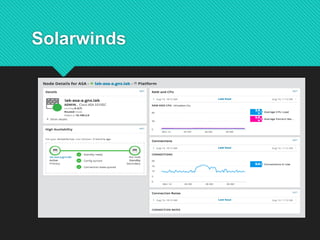
Solarwinds
Solarwinds can help an organization’s
network in terms of:
 Speeds troubleshooting by increases service levels and reduce
downtime.
 Monitors and displays response time, availability, and
performance of network devices.
 Improves operational efficiency with dashboards, alerts, and
reports.
 Discovers network devices automatically and can be typically
deployed in about an hour.
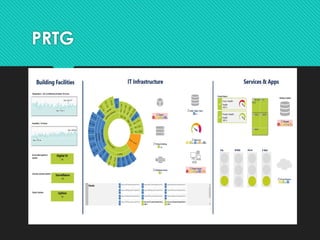
PRTG
 PRTG Network Monitor (Paessler Router Traffic Grapher) is a
“free” network monitoring software from Paessler AG.
 PRTG is free software but on a limited number of sensors.
 PRTG 100 is available for both personal and commercial use for
free, but is limited to monitoring 100 sensors.
PRTG
Comparison between PRTG and
Solarwinds
 Setup
 Network Discovery (and Autodiscovery)
 Alerts and Notifications
 Network Monitoring and Flow Support
 Network Maps
 Reports
 Pricing
Software for Packet Sniffing
Packet Sniffing
 Packet sniffing is the method of gathering,
collecting, and logging some or all packets that
pass through a computer network
Two main parts of packet sniffer
network adapter connects the sniffer to the
existing network
software that provides a way to log, see
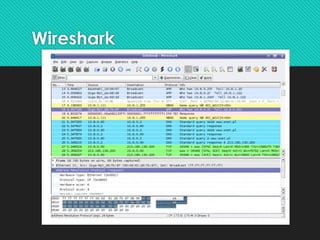
Wireshark
 a free network protocol analyzer; it is a must-have
software for any security professional or network
administrator. This free software lets you analyze
network traffic in real-time and is often the best tool
for troubleshooting your network issues.
Wireshark
Software for Network Security
Pfsense
 a free firewall computer software distribution based
on FreeBSD operating system. It can be installed
on a physical device or a virtual machine to make a
dedicated firewall/router for a network.
 It can be configured and upgraded through a web-
based graphical user interface and does not require
the FreeBSD system to manage.
PfSense is commonly used as:
1. LAN / WAN Router
2. Wireless Hotspot (Captive Portal)
3. Firewall
4. DHCP / DNS Server
5. Wireless Access Point
6. Transparent Squid Proxy Server
7. DNS Blacklist
8. Port Forwarding / NAT (Network Address Translation)
CLOUD COMPUTING
Key Trends:
•Public, Private, and Hybrid Clouds
•Serverless Computing (e.g., AWS Lambda)
•Edge Computing: Processing closer to data
sources (IoT)
Impact: Scalability, cost efficiency, and flexibility
Microservices Architecture
Key Trends:
• Microservices: Breaking applications into smaller,
independent services
• Containerization: Tools like Docker & Kubernetes
for consistency and scalability
Impact: Faster development, independent scaling,
better fault isolation
DevOps and CI/CD
Key Trends:
•DevOps: Bridging development and operations for
seamless workflows
•Continuous Integration/Continuous Deployment (CI/CD):
Faster, automated releases
•Infrastructure as Code (IaC): Tools like Terraform for
managing resources
Impact: Speed and reliability in software delivery
Artificial Intelligence (AI) and
Machine Learning (ML)
Key Trends:
•AI-Powered Development Tools (e.g., GitHub Copilot)
•AI and ML Platforms (e.g., TensorFlow, Amazon
SageMaker)
•Real-time data analytics, automation, and
personalization
Impact: Enhanced productivity, better decision-
making, smarter applications
Low-Code and No-Code
Development
Key Trends:
• Visual programming for non-technical users
• Platforms like Microsoft Power Apps & Appian
• Faster prototyping and deployment
Impact: Democratization of software
development, business agility
Blockchain and Decentralized
Applications (dApps)
Key Trends:
•Blockchain: Secure, transparent,
decentralized platforms
•Decentralized Applications (dApps) and
Smart Contracts
Impact: Enhanced security, removal of
intermediaries, transparent systems
What is Block Chain
 decentralized, distributed digital ledger
technology that records transactions across
multiple computers in a way that ensures the
security, transparency, and immutability of
data. It operates without the need for a central
authority, which makes it a fundamental
technology for applications like
cryptocurrencies, smart contracts, and more.
Key Characteristics of
Blockchain:
 Decentralization
 Immutability
 Transparency
 Security
 Consensus Mechanisms
 Proof of Work (PoW)
 Proof of Stake (PoS)
How Blockchain Works
Transaction
Vaidation
Block Creation
Block Added
Completion
Types of Blockchain
Public Blockchain
Private Blockchain
Consortium Blockchain
Hybrid Blockchain
Use Cases of Blockchain
Cryptocurrencies
Smart Contracts
Supply Chain Management
Voting Systems
Healthcare
Decentralized Finance (DeFi)
Benefits of Blockchain
Transparency and Trust
Security
Efficiency
Cost Reduction
Quantum Computing
Key Trends:
•Quantum Computing: Solving complex problems
beyond classical capabilities
•Emerging platforms from IBM, Google, Microsoft
Impact: Revolutionary potential in fields like
cryptography and simulations
Cybersecurity and Privacy
Key Trends:
•Zero Trust Security: Constant verification, no default
trust
•Privacy by Design: Ensuring compliance with GDPR
and other regulations
Impact: Increased security, data protection,
regulatory compliance
APIs (Application Programming
Interfaces) and Integration
Key Trends:
•API-First Development: Seamless integration
between platforms
•iPaaS (Integration Platforms as a Service): Tools
like MuleSoft and Zapier
Impact: Faster innovation, improved business
ecosystems, connected workflows

Contemporary software TRENDS SOFTWARE TRENDS

  • 1.
  • 2.
    CONTEMPORARY SOFTWARE PLATFORM TRENDS 1.Open Source 2. Software for Network Monitoring 3. Software for Packet Sniffing 4. Cloud Computing Dominance 5. Microservices Architecture 6. DevOPs and CI/CD 7. Artificial Intelligence and Machine Learning 8. Low code and No Code Development 9. Blockchain 10. Quantum Computing 11. Cybersecurity and Privacy 12. APIs Integration
  • 3.
    WHAT IS OPENSOURCE ?  In production and development, open source is a philosophy, or a methodology that promotes free redistribution and access to a product's design or ideas and implementation details.  open as in free  open as in access  open as in over time  open as in not closed  open as in reuse and change  open as in any place and for anyone
  • 4.
    OPEN SOURCE VS.CLOSED SOURCE  View/Modify the source code of an application or software.  Open source software is released to the development community and undergoes a secondary phase of evolution, but closed source software is developed in isolation with a small team of developers.  Developer support and large community to help.  Open Source is more secure and bugs and vulnerabilities are fixed often.
  • 5.
    CRITERIA FOR OPENSOURCE  Source Code Availability  Derived Works  Free Redistribution  Distribution of License  Integrity of The Author's Source Code  License Must Not Restrict Other Software  No Discrimination Against Persons or Groups  No Discrimination Against Fields of Endeavor
  • 6.
  • 7.
    ADVANTAGES OF OPENSOURCE  Availability of source code  Source code to understand and learn from  Do not have to re-invent the wheel  Free as in “freedom”  Does not depend on vendor  Can choose additional support  Can fix bugs and adapt to change in requirements as well as technology  Quality and Customizability in open source is better.  Costs much less than proprietary counterparts.
  • 8.
    SOME DISADVANTAGES OFOPEN SOURCE  Not generally straightforward to use and requires a certain learning curve to use and get accustomed.  Incompatibility issue with software and hardware. (3rd party drivers)  Bad Codes, and some unqualified people who uses it.  Software quality assurance process is widely not transparent  No financial incentive.
  • 9.
    EXAMPLES OF OPENSOURCE Application software :  7-Zip  Eclipse  GIMP  Chromium  Blender  Mozilla Firefox  Open Office  LibreOffice  VLC Media Player Operating Systems:  Android  Linux  FreeBSD  ReactOS  Haiku  FreeDOS Programming Language :  Perl  PHP  Python  Ruby  PHDL  Prolog
  • 10.
    EXAMPLES OF OPENSOURCE Server Software:
  • 11.
  • 12.
    MORE EXAMPLES- ANDROID Linux-based operating system designed primarily for touchscreen mobile devices such as smartphones and tablet computers.  Android is open source and Google releases the code under the Apache License after acquiring it from Android Inc.  Most widely used mobile platform with over 7,00,000 apps in google play store, over 25 billion app downloads with 750 million devices running on Android.  Android Source Code Available at : http://source.android.com/
  • 13.
    MORE EXAMPLES -LINUX  Linux is a computer operating system assembled under the model of free and open source software development and distribution. Originated in the GNU Project, initiated in 1983 by Richard Stallman, in the Free Software Foundation. More than 90% of today’s supercomputers use Linux. It powers around 4.8% of todays modern computers. Thousands of distros are available.
  • 14.
    OPEN SOURCE OFFICESOFTWARES  Open Office : Apache OpenOffice is an open- source office productivity software suite with official website OpenOffice.org, launched in 2002 under the Apache License  LibreOffice : Developed by The Document Foundation, it is licensed under the GNU Lesser General Public License (LGPL). It supports Windows, Macintosh and GNU/Linux systems.  NeoOffice : Primarily designed for Mac users and is distributed under the GNU General Public License.  Koffice : It is a open source office suite licensed under the LGPL. It is available for Windows, Linux, FreeBSD and Mac OS X systems.
  • 15.
    LICENSE AND COPYRIGHTS There are hundreds of different licenses.  Author chooses to license under a licence granting open source freedoms. Some are easy to comply with like :  “You can do anything you like with this software, as long as you buy me a drink sometime if we meet”.  Some licenses are more difficult to comply with :  GNU GPL says that you can only use GPL code if modified/distributed code is also released under the GPL  “Copyleft”
  • 16.
    LICENSE AND COPYRIGHTS About 55% of these projects use a copyleft licence.  But the 6 most common licences cover about 90% of open source projects.  GNU General Public License (GPL)  GNU "Lesser" General Public License (LGPL)  Mozilla Public License 2.0  Eclipse Public License  Apache License 2.0  BSD License  MIT License
  • 17.
  • 18.
    Solarwinds  a powerfuland inexpensive network monitoring software that lets IT administrators detect, analyze, and resolve network performance problems.  Solarwinds is not free software
  • 19.
  • 20.
    Solarwinds can helpan organization’s network in terms of:  Speeds troubleshooting by increases service levels and reduce downtime.  Monitors and displays response time, availability, and performance of network devices.  Improves operational efficiency with dashboards, alerts, and reports.  Discovers network devices automatically and can be typically deployed in about an hour.
  • 21.
    PRTG  PRTG NetworkMonitor (Paessler Router Traffic Grapher) is a “free” network monitoring software from Paessler AG.  PRTG is free software but on a limited number of sensors.  PRTG 100 is available for both personal and commercial use for free, but is limited to monitoring 100 sensors.
  • 22.
  • 23.
    Comparison between PRTGand Solarwinds  Setup  Network Discovery (and Autodiscovery)  Alerts and Notifications  Network Monitoring and Flow Support  Network Maps  Reports  Pricing
  • 24.
  • 25.
    Packet Sniffing  Packetsniffing is the method of gathering, collecting, and logging some or all packets that pass through a computer network
  • 26.
    Two main partsof packet sniffer network adapter connects the sniffer to the existing network software that provides a way to log, see
  • 27.
    Wireshark  a freenetwork protocol analyzer; it is a must-have software for any security professional or network administrator. This free software lets you analyze network traffic in real-time and is often the best tool for troubleshooting your network issues.
  • 28.
  • 29.
  • 30.
    Pfsense  a freefirewall computer software distribution based on FreeBSD operating system. It can be installed on a physical device or a virtual machine to make a dedicated firewall/router for a network.  It can be configured and upgraded through a web- based graphical user interface and does not require the FreeBSD system to manage.
  • 31.
    PfSense is commonlyused as: 1. LAN / WAN Router 2. Wireless Hotspot (Captive Portal) 3. Firewall 4. DHCP / DNS Server 5. Wireless Access Point 6. Transparent Squid Proxy Server 7. DNS Blacklist 8. Port Forwarding / NAT (Network Address Translation)
  • 32.
    CLOUD COMPUTING Key Trends: •Public,Private, and Hybrid Clouds •Serverless Computing (e.g., AWS Lambda) •Edge Computing: Processing closer to data sources (IoT) Impact: Scalability, cost efficiency, and flexibility
  • 33.
    Microservices Architecture Key Trends: •Microservices: Breaking applications into smaller, independent services • Containerization: Tools like Docker & Kubernetes for consistency and scalability Impact: Faster development, independent scaling, better fault isolation
  • 34.
    DevOps and CI/CD KeyTrends: •DevOps: Bridging development and operations for seamless workflows •Continuous Integration/Continuous Deployment (CI/CD): Faster, automated releases •Infrastructure as Code (IaC): Tools like Terraform for managing resources Impact: Speed and reliability in software delivery
  • 35.
    Artificial Intelligence (AI)and Machine Learning (ML) Key Trends: •AI-Powered Development Tools (e.g., GitHub Copilot) •AI and ML Platforms (e.g., TensorFlow, Amazon SageMaker) •Real-time data analytics, automation, and personalization Impact: Enhanced productivity, better decision- making, smarter applications
  • 36.
    Low-Code and No-Code Development KeyTrends: • Visual programming for non-technical users • Platforms like Microsoft Power Apps & Appian • Faster prototyping and deployment Impact: Democratization of software development, business agility
  • 37.
    Blockchain and Decentralized Applications(dApps) Key Trends: •Blockchain: Secure, transparent, decentralized platforms •Decentralized Applications (dApps) and Smart Contracts Impact: Enhanced security, removal of intermediaries, transparent systems
  • 38.
    What is BlockChain  decentralized, distributed digital ledger technology that records transactions across multiple computers in a way that ensures the security, transparency, and immutability of data. It operates without the need for a central authority, which makes it a fundamental technology for applications like cryptocurrencies, smart contracts, and more.
  • 39.
    Key Characteristics of Blockchain: Decentralization  Immutability  Transparency  Security  Consensus Mechanisms  Proof of Work (PoW)  Proof of Stake (PoS)
  • 40.
    How Blockchain Works Transaction Vaidation BlockCreation Block Added Completion
  • 41.
    Types of Blockchain PublicBlockchain Private Blockchain Consortium Blockchain Hybrid Blockchain
  • 42.
    Use Cases ofBlockchain Cryptocurrencies Smart Contracts Supply Chain Management Voting Systems Healthcare Decentralized Finance (DeFi)
  • 43.
    Benefits of Blockchain Transparencyand Trust Security Efficiency Cost Reduction
  • 44.
    Quantum Computing Key Trends: •QuantumComputing: Solving complex problems beyond classical capabilities •Emerging platforms from IBM, Google, Microsoft Impact: Revolutionary potential in fields like cryptography and simulations
  • 45.
    Cybersecurity and Privacy KeyTrends: •Zero Trust Security: Constant verification, no default trust •Privacy by Design: Ensuring compliance with GDPR and other regulations Impact: Increased security, data protection, regulatory compliance
  • 46.
    APIs (Application Programming Interfaces)and Integration Key Trends: •API-First Development: Seamless integration between platforms •iPaaS (Integration Platforms as a Service): Tools like MuleSoft and Zapier Impact: Faster innovation, improved business ecosystems, connected workflows

Editor's Notes

  • #9 ]
  • #13 GNU stands for Gnu's Not Unix, and it is pronounced as “g-noo”. It is a recursive acronym, and it stands for “Gnu's Not Unix”. GNU is a free and open-source operating system that was started in GNU is based on the Unix operating system, but it has been greatly modified over the years.
  • #15 GNU General Public License (GPL) Copyright and Copyleft are distinct concepts that fall under the umbrella of intellectual property rights. Copyright is a legal concept that provides exclusive rights to creators, while Copyleft is a licensing method that encourages the unrestricted sharing, modification, and utilisation .of creative works
  • #25 Also known as packet analyzer
  • #28 Wireshark can help troubleshoot some common problems like dropped packets, latency issues, and malicious activity on your network. It lets you put your network traffic under a “microscope” and let's filter and examine further that traffic, zooming in on the problem's root cause. Networks administrators use it to identify defective network devices that drop packets, latency issues, and data exfiltration or even hacking attempts against your company.
  • #30 FreeBSD is an open-source, Unix-like operating system derived from the Berkeley Software Distribution (BSD), which itself is based on Research Unix. FreeBSD is known for its stability, performance, and advanced networking features, making it popular for servers, embedded systems, and network devices. It is widely used in both academic research and industry due to its flexibility and robust security features.
  • #39 Decentralization: Blockchain operates on a peer-to-peer network of computers (also known as nodes), where each node maintains a copy of the entire ledger. This eliminates the need for a central authority or intermediary. Immutability: Once data (a transaction) is added to the blockchain, it cannot be changed or deleted. This is ensured through cryptographic hashing, which links blocks of transactions together, making tampering almost impossible. Transparency: Every transaction recorded on the blockchain is visible to all participants in the network. This ensures that everyone can verify the data and trust the system without the need for intermediaries. Security: Blockchain uses cryptography to secure transactions. Each block is cryptographically linked to the previous block, making it tamper-resistant. The decentralized nature of the network also adds to its security because there is no single point of failure. Consensus Mechanisms: Blockchain networks use consensus algorithms to agree on the validity of transactions. Common consensus mechanisms include: Proof of Work (PoW): Used by Bitcoin, where miners solve complex mathematical problems to add blocks to the chain. Proof of Stake (PoS): Validators are chosen to create new blocks based on their stake in the network, making it more energy-efficient than PoW.
  • #40 Transaction: A user requests a transaction, which is then broadcast to the network. Validation: The network of nodes validates the transaction using a consensus algorithm. Block Creation: Once validated, the transaction is grouped with other transactions to form a block. Block Added: The new block is added to the existing blockchain, forming a permanent, unchangeable record. Completion: The transaction is now completed, and the record is updated across all nodes in the network.
  • #41 Public Blockchain: Anyone can participate and validate transactions. Examples include Bitcoin and Ethereum. Private Blockchain: Access is restricted to certain participants, often used in enterprises where only authorized entities can participate. Example: Hyperledger. Consortium Blockchain: A hybrid where a group of organizations controls the blockchain, useful for collaboration between multiple entities (e.g., in banking). Hybrid Blockchain: Combines aspects of both public and private blockchains. It allows selective data access while maintaining some transparency.