The Internet startedin the 1960s as a
way for government researchers to
share information. Computers in the
'60s were large and immobile and in
order to make use of information stored
in any one computer, one had to either
travel to the site of the computer or
have magnetic computer tapes sent
through the conventional postal system.
5.
January 1, 1983is considered the official birthday of
the Internet. Prior to this, the various computer
networks did not have a standard way to
communicate with each other. A new
communications protocol was established called
Transfer Control Protocol/Internetwork Protocol
(TCP/IP). This allowed different kinds of computers
on different networks to "talk" to each other.
ARPANET and the Defense Data Network officially
changed to the TCP/IP standard on January 1, 1983,
hence the birth of the Internet. All networks could
now be connected by a universal language.
7.
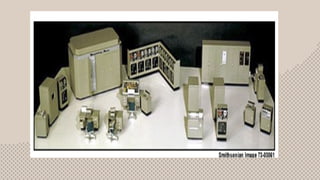
The image aboveis a scale model of the UNIVAC I
(the name stood for Universal Automatic Computer)
which was delivered to the Census Bureau in 1951. It
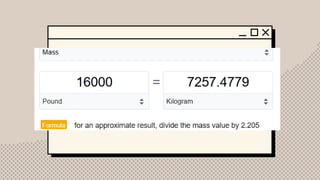
weighed some 16,000 pounds, used 5,000 vacuum
tubes, and could perform about 1,000 calculations
per second. It was the first American commercial
computer, as well as the first computer designed for
business use. (Business computers like the UNIVAC
processed data more slowly than the IAS-type
machines, but were designed for fast input and
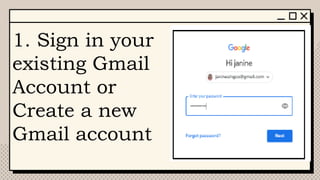
output.).
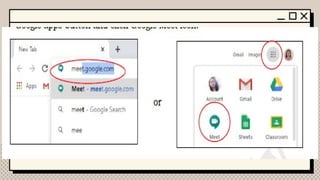
9.
What is theInternet?
The Internet is a globally connected
network system that facilitates
communication and data services through
a vast collection of private, public, business,
academic, and government networks. It
serves as a virtual infrastructure that links
millions of computers and electronic
devices worldwide, allowing users to
10.
What is Ethernet?
Ethernetis the traditional technology for
connecting devices in a wired local
area network (LAN) or wide area
network. It enables devices to
communicate with each other via a
protocol, which is a set of rules or
common network language
11.
Compared to wirelessLAN (WLAN)
technology, Ethernet is typically less
vulnerable to disruptions. It can also offer a
greater degree of network security and
control than wireless technology because
devices must connect using physical cabling.
This makes it difficult for outsiders to access
network data or hijack bandwidth for
unsanctioned devices.
What is GoogleMeet?
previously known as Google Hangouts Meet, a
videoconferencing and chatting software designed
by Google. It is built to let hundreds of people join
the same virtual meeting where businessmen,
colleagues, teachers and students can
communicate over video with each other from
anywhere with an internet connection. It is the
most popular video conferencing platform where
people can start a meeting in a single minute.
15.
When
Was launched in2017 as a video
conferencing platform by Google. It has
since evolved into a standalone product,
offering features for virtual meetings,
webinars, and online collaboration
16.
Features
● Ability towork on any devices
such as desktop/laptop, Android
or iPhone/iPad
● Ability to join into meetings
through a dial-in number
17.
● Ability tointegrate with Google
Calendar in scheduling a meeting
● Ability to share screen to present
documents, spreadsheets, or
presentations
18.
● Ability tomake live captions
based on speech recognition
● Automatically switches the
layout in a video meeting to
display the most active
content and participants
19.
● Allows thehost of the meeting
to pin, mute and remove the
participants
● Ability to invite up to hundreds
of participants in one meeting
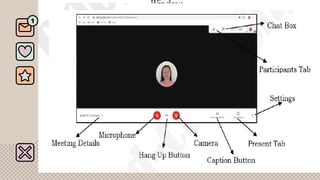
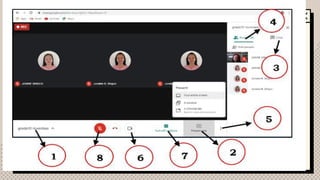
1. Meeting Details– it allows the
user to view and copy the meeting
title, time and date, link, code, and
attachment
2. Microphone – it allows the user to
mute and unmute to avoid noise
while the meeting is going on
23.
3. Hang UpButton – it is used to
press by the user who wants to leave
the meeting
4. Camera – it allows both host and
participants to turn on or off the
video while on the meeting to avoid
distraction
24.
5. Caption Button– it makes
captions whatever the
speaker or the participants is
talking about
6. Present Tab – it is used to
present any presentation from
the screen
25.
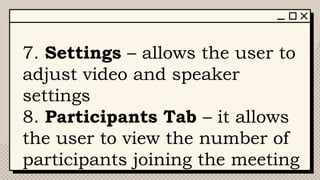
7. Settings –allows the user to
adjust video and speaker
settings
8. Participants Tab – it allows
the user to view the number of
participants joining the meeting
26.
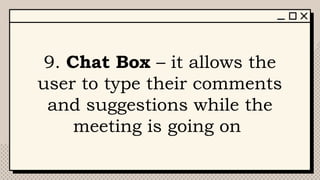
9. Chat Box– it allows the
user to type their comments
and suggestions while the
meeting is going on
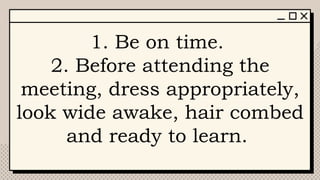
1. Be ontime.
2. Before attending the
meeting, dress appropriately,
look wide awake, hair combed
and ready to learn.
29.
3. Find asuitable quiet
environment so that you will
not be disturbed.
4. Turn off or mute the
microphone when you are not
speaking.
30.
5. If youwant to speak,
raise your hand or type on
the chat box before turning
on your microphone.
6. Listen attentively while
the teacher is talking.
31.
7. Avoid eatingwhile at the
meeting. If you are taking
your snacks, turn off the
camera to avoid
distraction.
32.
How to Joina
Meeting using
desktop/laptop
computers?
33.
1. Sign inyour
existing Gmail
Account or
Create a new
Gmail account
34.
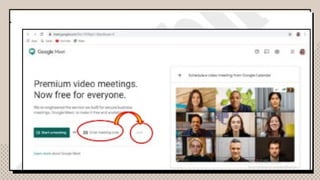
2. In theUniform Resource
Locator (URL) bar, type
meet.google.com or click
Google apps button and
click Google Meet icon.
36.
3. There areseveral ways to join the meeting such as:
a. typing the Meeting code;
b. dial a number;
c. clicking the link from the Google Calendar invitation
to your email, and
d. clicking the link sent to the email or messenger.
● Type the Meeting code provided by the teacher and click join.
38.
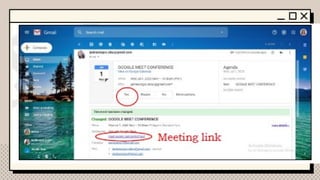
● Click Yesin responding to
the Google Calendar
invitation, and click the
link to join the meeting.
40.
4. Click Joinnow. Turn on your camera and
microphone if you want to speak.
5. During the meeting, if you want to present
outputs to your teacher from your desktop,
click the Present now tab to share your
screen. Select Present option layout and click
share.
41.
How to Joina
Meeting using
Android/IOS Phones
or Tablets?
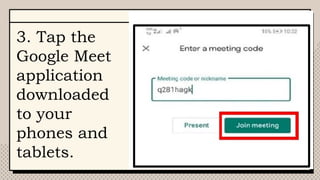
3. Tap the
GoogleMeet
application
downloaded
to your
phones and
tablets.
45.
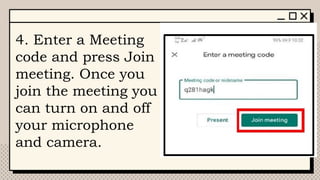
4. Enter aMeeting
code and press Join
meeting. Once you
join the meeting you
can turn on and off
your microphone
and camera.
46.
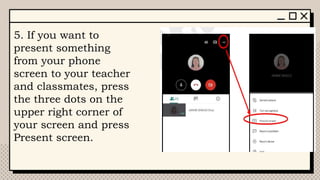
5. If youwant to
present something
from your phone
screen to your teacher
and classmates, press
the three dots on the
upper right corner of
your screen and press
Present screen.
47.
Instructions: In aseparate
sheet of paper, identify the
parts of the Google Meet and
explain their functions.
49.
Generalization.
I love touse Google Meet as a
videoconferencing tool for distance
learning
because_______________________
______________________________
______________
50.
Cite a situationin your life
when you were able to apply
Video Conference Etiquette
How important video
conferencing in your studies?
Editor's Notes
#7 March 29, 1994, 1:15 a.m.: Benjie Tan, who was working for ComNet, a company that supplied Cisco routers to the Philnet project, established the Philippines' first connection to the Internet at a PLDT network center in Makati City. Shortly thereafter, he posted a short message to the Usenet newsgroup soc
#8 Elephant adult size is 2000 kg
What Type of Network Adapter Do I Need?
Registered Jack-45
The eight-pin RJ45 connector is a standardised interface which often connects a computer to a Local Area Network (LAN). This type of connector was originally developed for telephone communications but is now used in a range of applications. The abbreviation, RJ45, stands for Registered Jack-45.
#9 The Internet is decentralized, which means there is no central authority governing its operations. To enable communication between devices, the Internet relies on protocols and standards that govern how small units of data are formatted, addressed, and transmitted
#13 Google was officially launched in 1998 by Larry Page and Sergey Brin to market Google Search, which has become the most used web-based search engine. Larry Page and Sergey Brin, students at Stanford University in California, developed a search algorithm first (1996) known as "BackRub", with the help of Scott Hassan and Alan Steremberg. The search engine soon proved successful and the expanding company moved several times, finally settling at Mountain View in 2003. This marked a phase of rapid growth, with the company making its initial public offering in 2004 and quickly becoming one of the world's largest media companies. The company launched Google News in 2002, Gmail in 2004, Google Maps in 2005, Google Chrome in 2008, and the social network known as Google+ in 2011 (which was shut down in April 2019), in addition to many other products. In 2015, Google became the main subsidiary of the holding company Alphabet Inc.
#14 Google Meet is a video conferencing service that enables you to join virtual meetings via audio, video, chat, and screen sharing with up to 100 people with no time limits.
#15 product that is marketed to end users separately from other products and is not a component or part of any other product or system