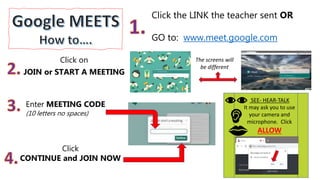
Click on
JOIN or START A MEETING
Click the LINK the teacher sent OR
GO to: www.meet.google.com
Enter MEETING CODE
(10 letters no spaces)
Click
CONTINUE and JOIN NOW
The screens will
be different
SEE- HEAR-TALK
It may ask you to use
your camera and
microphone. Click
ALLOW
TO TALK: Turn your microphone on (unmute) stay
close and speak clearly. Try not to move around.
TO LISTEN: Turn your microphone off (mute) stay
close and listen. A line across the microphone means
we can’t hear you-sometimes it might be other colors
depending on your phone/computer.
 Work in a quiet room
(NO MOVIES )
 Try not to move around
(NO VACUUMING )
 Use a microphone if you
have one.
We can’t hear you if your
microphone is red or if there is a
line through it. MUTE
TO TYPE: Click on the CHAT button and you can
type a message.

Google Meets steps and manners

  • 1.
    Click on JOIN orSTART A MEETING Click the LINK the teacher sent OR GO to: www.meet.google.com Enter MEETING CODE (10 letters no spaces) Click CONTINUE and JOIN NOW The screens will be different SEE- HEAR-TALK It may ask you to use your camera and microphone. Click ALLOW
  • 2.
    TO TALK: Turnyour microphone on (unmute) stay close and speak clearly. Try not to move around. TO LISTEN: Turn your microphone off (mute) stay close and listen. A line across the microphone means we can’t hear you-sometimes it might be other colors depending on your phone/computer.  Work in a quiet room (NO MOVIES )  Try not to move around (NO VACUUMING )  Use a microphone if you have one. We can’t hear you if your microphone is red or if there is a line through it. MUTE TO TYPE: Click on the CHAT button and you can type a message.