Communicating and Collaborating
using ICT
• Audio Conferencing – a meeting among three or more persons in
different locations that typically uses handheld wired telephones,
speakerphones or mobile phones. Since audio is used during this
conference, it is a must to have a clear transmission of everyone's
voice.
• Video Conferencing - a meeting among participants in different
locations that typically uses computer networks to transmit both
audio, text and video data. In order to participate in a video
conference, you must have a video camera, microphone, speakers
and video conferencing software along with your computer with
internet access.
Must haves in a video conferencing
• video camera
• Microphone
• Speakers
• Video conferencing software
• Internet connection
The main advantage of video conferencing over audio
conferencing is that participants can see each other which allows them
to develop a stronger sense of familiarity. Thus, video conferencing
has the ability to facilitate collaboration without requiring face-to-face
communication.
Video Conferencing
Software
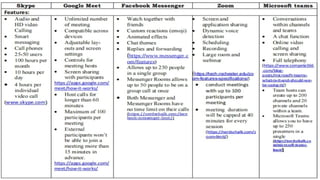
• Skype – a
telecommunications
application that specializes in
providing video chat and
voice calls between
computers, tablets, mobile
devices, and smart watches
over the Internet. Skype also
provides instant messaging
services. Users may transmit
text, video,
• Google Meet - a video
communication service
developed by Google. It is
one of two apps that
constitute the new version of
Google Hangouts, the other
being Google Chat.
This Photo by Unknown Author is licensed under CC BY-NC-ND
• Facebook Messenger - an
American messaging app and
platform developed by Facebook,
Inc. Originally developed as
Facebook Chat in 2008, the
company changed its messaging
service in 2010, and later released
standalone iOS and android apps
in August 2011 and standalone
Facebook Portal hardware for
Messengerbased calling in Q4
2018.
• Zoom - a full video conferencing
suite aimed at Enterprise-level
users, with an attractive free
option. Zoom allows participants
to join via the web, dedicated apps,
browser extensions, and mobile
devices using iPhone and Android
apps. Users can call in via phone if
needed to. Free users can also
record video or audio locally and
share screens with other
conference participants.
• Microsoft Teams - your hub for
teamwork, which brings
together everything a team
needs: chat and threaded
conversations, meetings & video
conferencing, calling, content
collaboration with the power of
Microsoft 365 applications, and
the ability to create and
integrate apps and workflows
that your business relies on.
Audio and Video Conferencing
Guidelines
Before the conference starts, consider the following:
• Look (for formal video conferencing) – be concerned about your appearance
especially if the conference is formal. Dark or neutral colors of clothing are
recommended.
• Equipment - Make sure to setup your equipment ahead of the scheduled
conference so you can do testing of your camera, headset and microphone.
Test also the connection early on.
• Preparations (for formal conferencing) - In case the conference is formal, you
must prepare for the agenda of the meeting as well as other materials needed
such as pictures, presentations, name tags and others for video conferencing.
• Venue (for formal conferencing) - In case the conference is formal, you must
ensure that the venue is quiet. For video conferencing, the overhead lights
and reflections must not be placed in the camera's view. Be aware of the
potential distractions.
Audio and Video Conferencing
Guidelines
During the conference, consider the following:
• Wait until the speaker is finished talking before you respond
since there will be a slight delay before you can hear what
the speaker is saying.
• Be courteous and respectful.
• Keep the microphone muted when you are not speaking.
• Avoid excessive movement during a video conference.
• Speak clearly.
Audio and Video Conferencing
Guidelines
After the conference, leave the venue the way it was setup
when you arrived.
Virtual Meeting Etiquette
Virtual Meeting Etiquette is defined as the unwritten formal
manners and rules that are followed in online social and
professional settings.
Seven simple virtual meeting etiquette
rules and tips
1. Leave the keyboard alone
2. Dress appropriately
3. Be aware of your surroundings
4. Mute your microphone when you’re not talking.
5. Speak up.
6. No food allowed
7. Stay seated and stay present
Online Assessment
https://forms.office.com/r/PCtvQYZXq5

Communicating and Collaborating using ICT.pptx

  • 1.
    Communicating and Collaborating usingICT • Audio Conferencing – a meeting among three or more persons in different locations that typically uses handheld wired telephones, speakerphones or mobile phones. Since audio is used during this conference, it is a must to have a clear transmission of everyone's voice. • Video Conferencing - a meeting among participants in different locations that typically uses computer networks to transmit both audio, text and video data. In order to participate in a video conference, you must have a video camera, microphone, speakers and video conferencing software along with your computer with internet access.
  • 2.
    Must haves ina video conferencing • video camera • Microphone • Speakers • Video conferencing software • Internet connection The main advantage of video conferencing over audio conferencing is that participants can see each other which allows them to develop a stronger sense of familiarity. Thus, video conferencing has the ability to facilitate collaboration without requiring face-to-face communication.
  • 3.
    Video Conferencing Software • Skype– a telecommunications application that specializes in providing video chat and voice calls between computers, tablets, mobile devices, and smart watches over the Internet. Skype also provides instant messaging services. Users may transmit text, video,
  • 4.
    • Google Meet- a video communication service developed by Google. It is one of two apps that constitute the new version of Google Hangouts, the other being Google Chat. This Photo by Unknown Author is licensed under CC BY-NC-ND
  • 5.
    • Facebook Messenger- an American messaging app and platform developed by Facebook, Inc. Originally developed as Facebook Chat in 2008, the company changed its messaging service in 2010, and later released standalone iOS and android apps in August 2011 and standalone Facebook Portal hardware for Messengerbased calling in Q4 2018.
  • 6.
    • Zoom -a full video conferencing suite aimed at Enterprise-level users, with an attractive free option. Zoom allows participants to join via the web, dedicated apps, browser extensions, and mobile devices using iPhone and Android apps. Users can call in via phone if needed to. Free users can also record video or audio locally and share screens with other conference participants.
  • 7.
    • Microsoft Teams- your hub for teamwork, which brings together everything a team needs: chat and threaded conversations, meetings & video conferencing, calling, content collaboration with the power of Microsoft 365 applications, and the ability to create and integrate apps and workflows that your business relies on.
  • 9.
    Audio and VideoConferencing Guidelines Before the conference starts, consider the following: • Look (for formal video conferencing) – be concerned about your appearance especially if the conference is formal. Dark or neutral colors of clothing are recommended. • Equipment - Make sure to setup your equipment ahead of the scheduled conference so you can do testing of your camera, headset and microphone. Test also the connection early on. • Preparations (for formal conferencing) - In case the conference is formal, you must prepare for the agenda of the meeting as well as other materials needed such as pictures, presentations, name tags and others for video conferencing. • Venue (for formal conferencing) - In case the conference is formal, you must ensure that the venue is quiet. For video conferencing, the overhead lights and reflections must not be placed in the camera's view. Be aware of the potential distractions.
  • 10.
    Audio and VideoConferencing Guidelines During the conference, consider the following: • Wait until the speaker is finished talking before you respond since there will be a slight delay before you can hear what the speaker is saying. • Be courteous and respectful. • Keep the microphone muted when you are not speaking. • Avoid excessive movement during a video conference. • Speak clearly.
  • 11.
    Audio and VideoConferencing Guidelines After the conference, leave the venue the way it was setup when you arrived.
  • 12.
    Virtual Meeting Etiquette VirtualMeeting Etiquette is defined as the unwritten formal manners and rules that are followed in online social and professional settings.
  • 13.
    Seven simple virtualmeeting etiquette rules and tips 1. Leave the keyboard alone 2. Dress appropriately 3. Be aware of your surroundings 4. Mute your microphone when you’re not talking. 5. Speak up. 6. No food allowed 7. Stay seated and stay present
  • 14.