Communicating and
Collaborating using ICT
Quarter 1 Week 4
TLE-ICT 5
D
A
Y
1
Let’s Think
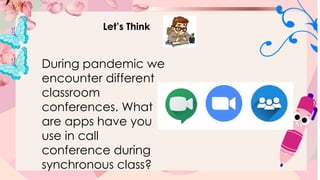
During pandemic we
encounter different
classroom
conferences. What
are apps have you
use in call
conference during
synchronous class?
Let’s Think
Technology has also
begun to change the
roles of teachers and
learners. How these
technologies helps
the learner and
teacher to
collaborate?
Discussion
Audio Conferencing is a
meeting among three or
more persons in
different locations that
typically uses handheld
wired telephones,
speakerphones or mobile
phones.
Discussion
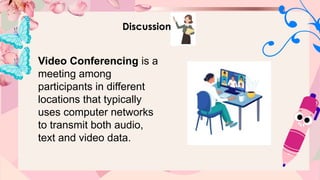
Video Conferencing is a
meeting among
participants in different
locations that typically
uses computer networks
to transmit both audio,
text and video data.
Discussion
Video Conferencing Software
Nowadays, making video calls is
not as expensive as before since
there are plenty of free video
conferencing software that are
available. Some of them are:
Discussion
 Skype – is a
telecommunications application
that specializes in providing video
chat and
voice calls between computers,
tablets, mobile devices, and
smart watches over the Internet.
Discussion
 Google Meet - is a video
communication
service developed by Google. It
is one of two
apps that constitute the new
version of Google Hangouts, the
other being Google
Chat.
Discussion
 Facebook Messenger is an American
messaging app and platform developed
by Facebook, Inc. Originally developed
as Facebook Chat in 2008, the
company changed its messaging service
in 2010, and later released standalone
iOS and android apps in August 2011
and standalone Facebook Portal hardware
for Messengerbased calling in Q4 2018.
Discussion
 Zoom is a full video
conferencing suite aimed at
Enterprise-level users, with an
attractive free option. Zoom
allows participants to join via
the web, dedicated apps,
browser extensions, and mobile
devices using iPhone and
Android apps.
Discussion
Microsoft Teams is your hub for
teamwork, which brings together
everything a team needs: chat and
threaded conversations, meetings &
video conferencing, calling, content
collaboration with the power of
Microsoft 365 applications, and the
ability to create and integrate apps
and workflows that your business
relies on.
Discussion
Google Meet, is built to let dozens of people join
the same virtual
meeting, and speak or share video with each
other from anywhere with internet access. A
Google Meet organizer can share whatever is
on their screen with everyone on a call, and any
participant can turn their own audio
and/or video feed off at any time, participating
however they want.
Google Meet is one of the most commonly use
software when it comes
to video conferencing.
Let’s Reflect
What application do you think
suit you the most?
How these video conferences
helps collaborate teacher and
students?
Activity
Instruction: Read the following statement carefully.
Encircle the letter of the correct answer.
1. Which of the following is an example
of an e-group?
a. eBay.com c. Smartphones
b. Netflix d. Skype
Activity
Instruction: Read the following statement carefully.
Encircle the letter of the correct answer.
2. An audio and video conferencing is a tool that
lets you _____.
a. record a video
b. use an audio and video conference even
without the internet
c. use an audio and video conference using an
internet
d. share pictures and music
Activity
Instruction: Read the following statement carefully.
Encircle the letter of the correct answer.
3. What are video and audio conferences?
a. Meeting of two or more persons over the
internet
b. Meeting of two or more persons over a cup of
coffee
c. Meeting of two persons
d. Meeting of two or more persons inside a library
Activity
Instruction: Read the following statement carefully.
Encircle the letter of the correct answer.
4. Below are the E-group members that can do the
following
from their own interest, EXCEPT one.
a. Create c. Comment
b. Make audio-video conference d. Post
Activity
Instruction: Read the following statement carefully.
Encircle the letter of the correct answer.
5. What does E stand for in the “E-group”?
a. Electronic c. Electricity
b. Energy d. Evernote
Communicating and
Collaborating using ICT
Quarter 1 Week 4
TLE - ICT 5
D
A
Y
2
Let’s Review
How technology
works in our daily life?
What do you thinks
the pros and cons of
these applications?
Independent Activity
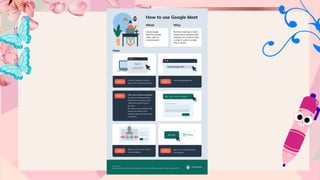
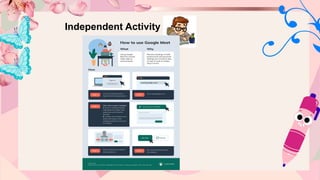
The following are the steps on how to
install and use Google Meet.
Independent Activity
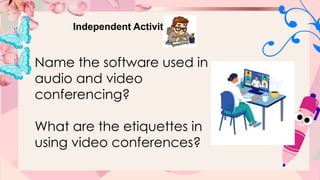
Name the software used in
audio and video
conferencing?
What are the etiquettes in
using video conferences?
Communicating and
Collaborating using ICT
Quarter 1 Week 4
MAPEH 5
D
A
Y
3
Let’s Review
Now that you know how to create your
own google meet. How will you use this
in your daily life? Or in you studying?
Let’s Review
Now that you know how to create your
own google meet. How will you use this
in your daily life? Or in you studying?
Let’s Review
Now that you know how to create your
own google meet. How will you use this
in your daily life? Or in you studying?
Let’s Review
Now that you know how to create your
own google meet. How will you use this
in your daily life? Or in you studying?
What are the things we need to avoid in
video conferencing?
Discussion
Audio and Video Conferencing Guidelines
Before the conference starts, consider the
following:
• Look (for formal video conferencing) – be
concerned about your
appearance especially if the conference is
formal. Dark or neutral colors of clothing are
recommended.
Discussion
Audio and Video Conferencing Guidelines
Before the conference starts, consider the
following:
• Equipment - Make sure to setup your
equipment ahead of the scheduled
conference so you can do testing of your
camera, headset and microphone. Test also
the connection early on.
Discussion
Audio and Video Conferencing Guidelines
Before the conference starts, consider the
following:
• Preparations (for formal conferencing) - In
case the conference is formal, you must
prepare for the agenda of the meeting as well
as other materials needed such as pictures,
presentations, name tags and others for video
conferencing.
Discussion
Audio and Video Conferencing Guidelines
Before the conference starts, consider the
following:
• Venue (for formal conferencing) - In case the
conference is formal, you must ensure that the
venue is quiet. For video conferencing, the
overhead lights and reflections must not be
placed in the camera's view. Be aware of the
potential distractions.
Discussion
Audio and Video Conferencing Guidelines
During the conference, consider the following:
• Wait until the speaker is finished talking
before you respond
since there will be a slight delay before you
can hear what the
speaker is saying.
Discussion
Audio and Video Conferencing Guidelines
During the conference, consider the following:
• Be courteous and respectful.
• Keep the microphone muted when you are
not speaking.
• Avoid excessive movement during a video
conference.
Discussion
Audio and Video Conferencing
Guidelines
After the conference, leave the venue
the way it was setup when you arrived.
Assignment
Give 5 importance of video
conferences.
Group Activity
Instruction: Start a New Meeting in
Google meet.
Discuss to your group on how to start a
new meet.
Activity
Instruction: Write the guidelines
before starting audio and video
conferencing, during, after. Write
your answer in a paper.
Communicating and
Collaborating using ICT
Quarter 1 Week 4
MAPEH 5
D
A
Y
4
Let’s review
From your assignment, what are the
5 importance of video conference?
Discussion
Virtual Meeting Etiquette
Virtual Meeting Etiquette is defined as
the unwritten formal manners
and rules that are followed in online
social and professional settings.
Discussion
Virtual Meeting Etiquette
1. Leave the keyboard alone
In attending virtual meeting, avoid
touching your keyboard so
as not to disrupt the flow of the meeting
thus, preventing you to have
a full attention of the proceedings.
Discussion
Virtual Meeting Etiquette
2. Dress appropriately
Virtual meeting/classes still call for an
appropriate attire. It will help you stay
focused and in “work” or “study” mode,
even if you are miles away from school.
Discussion
Virtual Meeting Etiquette
3. Be aware of your surroundings
Remove unnecessary objects / things
that might be captured in the
background during your virtual classes.
Unnecessary objects can disrupt the
attention of those in the platform.
Discussion
Virtual Meeting Etiquette
4. Mute your microphone when you’re
not talking
Mute your microphone when you are
not talking during virtual
classes/meeting. This will help eliminate
unnecessary background noise that
can be heard in your environment.
Discussion
Virtual Meeting Etiquette
5. Speak up
Identify yourself that you are joining the
virtual classes/meeting.
Ensure that you will be heard by
everybody.
Discussion
Virtual Meeting Etiquette
6. No food allowed
Just eat your snack before the start of
the virtual class / meeting or upon the
declaration of the break so as not to
distract others or the one discussing in
the platform.
Discussion
Virtual Meeting Etiquette
7. Stay seated and stay present
Stay focus during the entire duration of
the virtual class / meeting. Be attentive.
Discussion
Benefits of using audio and video conferencing
to learners and teachers:
Reduces travel
expenses
Increases
productivity
It’s effective
communication
Builds good
relationships with
your clients
Discussion
Benefits of using audio and video conferencing
to learners and teachers:
Keep connected to
your learners
Improves teamwork
Group Activity
Form a group of six members. Write a short five-
minute script and role play an audio-video
conference in the business arena. For example,
show a business owner communicating with a
supplier, or a manager communicating with the
sales force, etc. Set up an audio-video
conference with your group mates . You may
search for and use a free software such as
Messenger to conduct an online collaboration
and discuss your group work.
Let’s Reflect
What are the benefits of using audio and
video conferencing to learners and
teachers?
Why etiquette is important in video
conferences?
Weekly Test
Quarter 1 Week 4
TLE - ICT 5
D
A
Y
5

communicating and collaborating using ICT

  • 1.
    Communicating and Collaborating usingICT Quarter 1 Week 4 TLE-ICT 5 D A Y 1
  • 2.
    Let’s Think During pandemicwe encounter different classroom conferences. What are apps have you use in call conference during synchronous class?
  • 3.
    Let’s Think Technology hasalso begun to change the roles of teachers and learners. How these technologies helps the learner and teacher to collaborate?
  • 4.
    Discussion Audio Conferencing isa meeting among three or more persons in different locations that typically uses handheld wired telephones, speakerphones or mobile phones.
  • 5.
    Discussion Video Conferencing isa meeting among participants in different locations that typically uses computer networks to transmit both audio, text and video data.
  • 6.
    Discussion Video Conferencing Software Nowadays,making video calls is not as expensive as before since there are plenty of free video conferencing software that are available. Some of them are:
  • 7.
    Discussion  Skype –is a telecommunications application that specializes in providing video chat and voice calls between computers, tablets, mobile devices, and smart watches over the Internet.
  • 8.
    Discussion  Google Meet- is a video communication service developed by Google. It is one of two apps that constitute the new version of Google Hangouts, the other being Google Chat.
  • 9.
    Discussion  Facebook Messengeris an American messaging app and platform developed by Facebook, Inc. Originally developed as Facebook Chat in 2008, the company changed its messaging service in 2010, and later released standalone iOS and android apps in August 2011 and standalone Facebook Portal hardware for Messengerbased calling in Q4 2018.
  • 10.
    Discussion  Zoom isa full video conferencing suite aimed at Enterprise-level users, with an attractive free option. Zoom allows participants to join via the web, dedicated apps, browser extensions, and mobile devices using iPhone and Android apps.
  • 11.
    Discussion Microsoft Teams isyour hub for teamwork, which brings together everything a team needs: chat and threaded conversations, meetings & video conferencing, calling, content collaboration with the power of Microsoft 365 applications, and the ability to create and integrate apps and workflows that your business relies on.
  • 12.
    Discussion Google Meet, isbuilt to let dozens of people join the same virtual meeting, and speak or share video with each other from anywhere with internet access. A Google Meet organizer can share whatever is on their screen with everyone on a call, and any participant can turn their own audio and/or video feed off at any time, participating however they want. Google Meet is one of the most commonly use software when it comes to video conferencing.
  • 14.
    Let’s Reflect What applicationdo you think suit you the most? How these video conferences helps collaborate teacher and students?
  • 15.
    Activity Instruction: Read thefollowing statement carefully. Encircle the letter of the correct answer. 1. Which of the following is an example of an e-group? a. eBay.com c. Smartphones b. Netflix d. Skype
  • 16.
    Activity Instruction: Read thefollowing statement carefully. Encircle the letter of the correct answer. 2. An audio and video conferencing is a tool that lets you _____. a. record a video b. use an audio and video conference even without the internet c. use an audio and video conference using an internet d. share pictures and music
  • 17.
    Activity Instruction: Read thefollowing statement carefully. Encircle the letter of the correct answer. 3. What are video and audio conferences? a. Meeting of two or more persons over the internet b. Meeting of two or more persons over a cup of coffee c. Meeting of two persons d. Meeting of two or more persons inside a library
  • 18.
    Activity Instruction: Read thefollowing statement carefully. Encircle the letter of the correct answer. 4. Below are the E-group members that can do the following from their own interest, EXCEPT one. a. Create c. Comment b. Make audio-video conference d. Post
  • 19.
    Activity Instruction: Read thefollowing statement carefully. Encircle the letter of the correct answer. 5. What does E stand for in the “E-group”? a. Electronic c. Electricity b. Energy d. Evernote
  • 20.
    Communicating and Collaborating usingICT Quarter 1 Week 4 TLE - ICT 5 D A Y 2
  • 21.
    Let’s Review How technology worksin our daily life? What do you thinks the pros and cons of these applications?
  • 22.
    Independent Activity The followingare the steps on how to install and use Google Meet.
  • 23.
  • 24.
    Independent Activity Name thesoftware used in audio and video conferencing? What are the etiquettes in using video conferences?
  • 25.
    Communicating and Collaborating usingICT Quarter 1 Week 4 MAPEH 5 D A Y 3
  • 26.
    Let’s Review Now thatyou know how to create your own google meet. How will you use this in your daily life? Or in you studying?
  • 27.
    Let’s Review Now thatyou know how to create your own google meet. How will you use this in your daily life? Or in you studying?
  • 28.
    Let’s Review Now thatyou know how to create your own google meet. How will you use this in your daily life? Or in you studying?
  • 29.
    Let’s Review Now thatyou know how to create your own google meet. How will you use this in your daily life? Or in you studying? What are the things we need to avoid in video conferencing?
  • 30.
    Discussion Audio and VideoConferencing Guidelines Before the conference starts, consider the following: • Look (for formal video conferencing) – be concerned about your appearance especially if the conference is formal. Dark or neutral colors of clothing are recommended.
  • 31.
    Discussion Audio and VideoConferencing Guidelines Before the conference starts, consider the following: • Equipment - Make sure to setup your equipment ahead of the scheduled conference so you can do testing of your camera, headset and microphone. Test also the connection early on.
  • 32.
    Discussion Audio and VideoConferencing Guidelines Before the conference starts, consider the following: • Preparations (for formal conferencing) - In case the conference is formal, you must prepare for the agenda of the meeting as well as other materials needed such as pictures, presentations, name tags and others for video conferencing.
  • 33.
    Discussion Audio and VideoConferencing Guidelines Before the conference starts, consider the following: • Venue (for formal conferencing) - In case the conference is formal, you must ensure that the venue is quiet. For video conferencing, the overhead lights and reflections must not be placed in the camera's view. Be aware of the potential distractions.
  • 34.
    Discussion Audio and VideoConferencing Guidelines During the conference, consider the following: • Wait until the speaker is finished talking before you respond since there will be a slight delay before you can hear what the speaker is saying.
  • 35.
    Discussion Audio and VideoConferencing Guidelines During the conference, consider the following: • Be courteous and respectful. • Keep the microphone muted when you are not speaking. • Avoid excessive movement during a video conference.
  • 36.
    Discussion Audio and VideoConferencing Guidelines After the conference, leave the venue the way it was setup when you arrived.
  • 37.
    Assignment Give 5 importanceof video conferences.
  • 38.
    Group Activity Instruction: Starta New Meeting in Google meet. Discuss to your group on how to start a new meet.
  • 39.
    Activity Instruction: Write theguidelines before starting audio and video conferencing, during, after. Write your answer in a paper.
  • 40.
    Communicating and Collaborating usingICT Quarter 1 Week 4 MAPEH 5 D A Y 4
  • 41.
    Let’s review From yourassignment, what are the 5 importance of video conference?
  • 42.
    Discussion Virtual Meeting Etiquette VirtualMeeting Etiquette is defined as the unwritten formal manners and rules that are followed in online social and professional settings.
  • 43.
    Discussion Virtual Meeting Etiquette 1.Leave the keyboard alone In attending virtual meeting, avoid touching your keyboard so as not to disrupt the flow of the meeting thus, preventing you to have a full attention of the proceedings.
  • 44.
    Discussion Virtual Meeting Etiquette 2.Dress appropriately Virtual meeting/classes still call for an appropriate attire. It will help you stay focused and in “work” or “study” mode, even if you are miles away from school.
  • 45.
    Discussion Virtual Meeting Etiquette 3.Be aware of your surroundings Remove unnecessary objects / things that might be captured in the background during your virtual classes. Unnecessary objects can disrupt the attention of those in the platform.
  • 46.
    Discussion Virtual Meeting Etiquette 4.Mute your microphone when you’re not talking Mute your microphone when you are not talking during virtual classes/meeting. This will help eliminate unnecessary background noise that can be heard in your environment.
  • 47.
    Discussion Virtual Meeting Etiquette 5.Speak up Identify yourself that you are joining the virtual classes/meeting. Ensure that you will be heard by everybody.
  • 48.
    Discussion Virtual Meeting Etiquette 6.No food allowed Just eat your snack before the start of the virtual class / meeting or upon the declaration of the break so as not to distract others or the one discussing in the platform.
  • 49.
    Discussion Virtual Meeting Etiquette 7.Stay seated and stay present Stay focus during the entire duration of the virtual class / meeting. Be attentive.
  • 50.
    Discussion Benefits of usingaudio and video conferencing to learners and teachers: Reduces travel expenses Increases productivity It’s effective communication Builds good relationships with your clients
  • 51.
    Discussion Benefits of usingaudio and video conferencing to learners and teachers: Keep connected to your learners Improves teamwork
  • 52.
    Group Activity Form agroup of six members. Write a short five- minute script and role play an audio-video conference in the business arena. For example, show a business owner communicating with a supplier, or a manager communicating with the sales force, etc. Set up an audio-video conference with your group mates . You may search for and use a free software such as Messenger to conduct an online collaboration and discuss your group work.
  • 53.
    Let’s Reflect What arethe benefits of using audio and video conferencing to learners and teachers? Why etiquette is important in video conferences?
  • 54.
    Weekly Test Quarter 1Week 4 TLE - ICT 5 D A Y 5