Hardware Computer Systems Standard Grade Computing Studies Computing Department, Calderside Academy
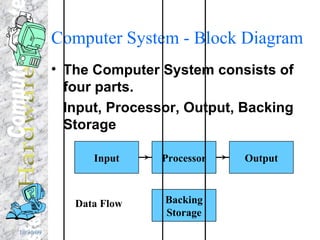
Computer System - Block Diagram The Computer System consists of four parts. Input, Processor, Output, Backing Storage Data Flow Processor Output Input Backing Storage
Advanced types of Input Voice Recognition  With voice recognition systems the computer can understand the words spoken to it and can carry out commands associated with the words.  Using voice recognition a letter can be dictated instead of being typed at the keyboard. Handwriting Recognition Handwriting can be  recognised  and the computer can convert the written text into typed text for storing. Scanner A scanner is used to take information stored on paper and read it into a computer system.  Scanners can be used to convert photographs, paintings etc. or even typed text into a form that can be stored on a computer.
Optical Character Recognition OCR Is used to convert paper typed documents into text files that can be edited and stored on a computer system. OCR software can search a scanned image for the shapes of letters, numbers etc.  When it finds shapes that match it converts them to the correct text and stores them in a file.
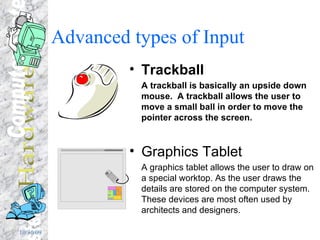
Advanced types of Input  Trackball A trackball is basically an upside down mouse.  A trackball allows the user to move a small ball in order to move the pointer across the screen. Graphics Tablet A graphics tablet allows the user to draw on a special worktop. As the user draws the details are stored on the computer system.  These devices are most often used by architects and designers.
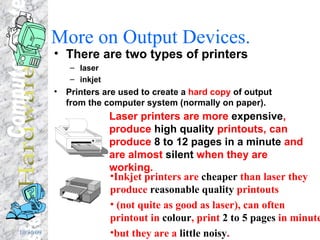
More on Output Devices. There are two types of printers  laser  inkjet Printers are used to create a  hard copy  of output from the computer system (normally on paper). Laser printers are more  expensive , produce  high quality  printouts, can produce  8 to 12 pages in a minute  and are almost  silent  when they are working. Inkjet printers are  cheaper  than laser they produce  reasonable quality  printouts (not quite as good as laser), can often printout in  colour , print  2 to 5 pages  in minute but they are a  little noisy .
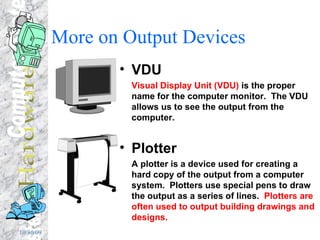
More on Output Devices VDU Visual Display Unit (VDU)  is the proper name for the computer monitor.  The VDU allows us to see the output from the computer. Plotter A plotter is a device used for creating a hard copy of the output from a computer system.  Plotters use special pens to draw the output as a series of lines.  Plotters are often used to output building drawings and designs.
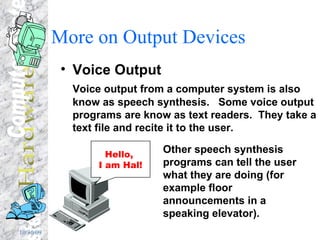
More on Output Devices Voice Output Voice output from a computer system is also know as speech synthesis.  Some voice output programs are know as text readers.  They take a text file and recite it to the user. Other speech synthesis programs can tell the user what they are doing (for example floor announcements in a speaking elevator). Hello,  I am Hal!
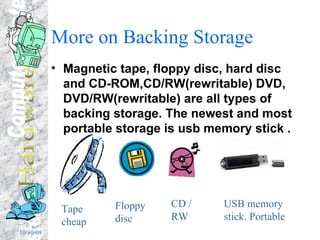
More on Backing Storage Magnetic tape, floppy disc, hard disc and CD-ROM,CD/RW(rewritable) DVD, DVD/RW(rewritable) are all types of backing storage. The newest and most portable storage is usb memory stick . Tape cheap Floppy disc CD / RW USB memory stick. Portable
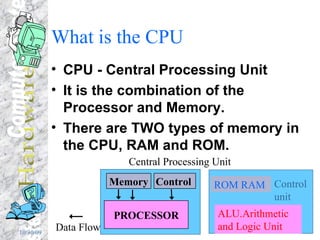
What is the CPU CPU - Central Processing Unit It is the combination of the Processor and Memory. There are TWO types of memory in the CPU, RAM and ROM. Memory Control  PROCESSOR Data Flow Central Processing Unit ALU.Arithmetic and Logic Unit ROM RAM Control unit
RAM and ROM RAM is Random Access Memory It can be written to and read from.  It is where most programs and data are stored while the computer is being used. ROM is Read Only Memory Data stored in ROM can  only  be read, it can never be written over or deleted.  We normally store important programs in ROM to do with the computers Operating System (see later).
More about the Processor The processor is made up of two main parts. The  CONTROL UNIT   fetches  program instructions from the memory storage locations,  decodes  and then  executes  them. The  ALU (Arithmetic/Logic Unit)  carries out all the  calculations  as instructed by the control unit.
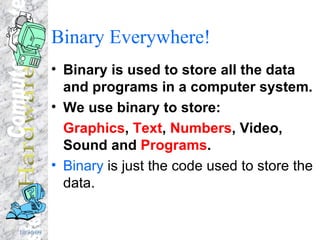
Binary Everywhere! Binary is used to store all the data and programs in a computer system. We use binary to store: Graphics ,  Text ,  Numbers , Video, Sound and  Programs . Binary  is just the code used to store the data.
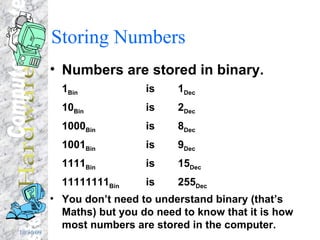
Storing Numbers Numbers are stored in binary. 1 Bin  is  1 Dec 10 Bin  is   2 Dec 1000 Bin  is  8 Dec 1001 Bin  is 9 Dec 1111 Bin is 15 Dec 11111111 Bin is 255 Dec You don’t need to understand binary (that’s Maths) but you do need to know that it is how most numbers are stored in the computer.
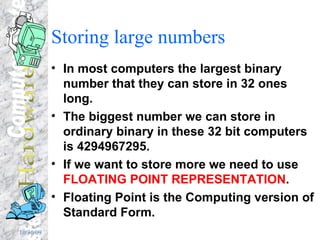
Storing large numbers In most computers the largest binary number that they can store in 32 ones long. The biggest number we can store in ordinary binary in these 32 bit computers is  4294967295. If we want to store more we need to use  FLOATING POINT REPRESENTATION . Floating Point is the Computing version of Standard Form.
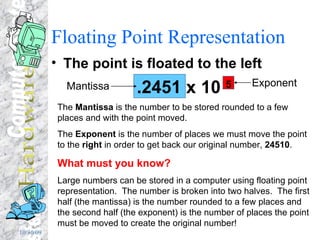
Floating Point Representation The point is floated to the left .2451 x 10  5 Mantissa Exponent The  Mantissa  is the number to be stored rounded to a few places and with the point moved. The  Exponent  is the number of places we must move the point to the  right  in order to get back our original number,  24510 . What must you know? Large numbers can be stored in a computer using floating point representation.  The number is broken into two halves.  The first half (the mantissa) is the number rounded to a few places and the second half (the exponent) is the number of places the point must be moved to create the original number!
Storing Text Text is stored using a special set of codes called ASCII. Each symbol (letter, number etc) has its own unique code e.g.  a  is 97,  A  is 65,  ?  is 63,  3  is 51 ASCII ( A merican  S tandard  C ode for  I nformation  I nterchange) One ASCII code is one byte long (eight bits).
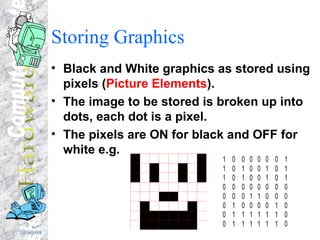
Storing Graphics Black and White graphics as stored using pixels ( Picture Elements ). The image to be stored is broken up into dots, each dot is a pixel. The pixels are ON for black and OFF for white e.g.
Character Set A character set is the set of characters that a device or a program uses. For example some printers use character sets that are different from the software that is printing to them. When the ASCII code for a symbol reaches the printer the printer substitutes the character from its character set with the same code.  A common problem created by non-standard character sets is £ being replaced by $ or @.
Control Characters The character set for all types of devices contains special  control characters . These control characters carry out special operations like switching a printer on or off, clearing the VDU or moving a robot arm. The ASCII control code 7 sounds makes the PC speaker beep.
More on Memory Computers store blocks of data called  ‘words’  in memory  (A 32 bit computer has words that are 32 bits long) . Each place that can store a word is called a  storage   location . Each storage location has a unique  address  that identifies it from all the other locations.
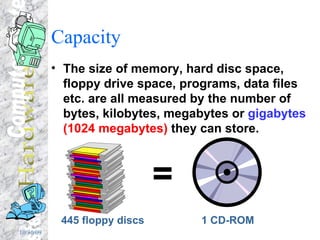
Capacity The size of memory, hard disc space, floppy drive space, programs, data files etc. are all measured by the number of bytes, kilobytes, megabytes or  gigabytes   (1024 megabytes)  they can store. 445 floppy discs = 1 CD-ROM
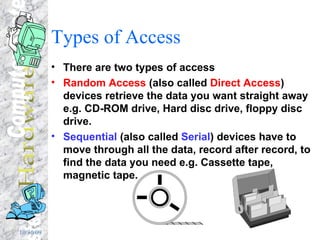
Types of Access There are two types of access Random Access  (also called  Direct Access ) devices retrieve the data you want straight away e.g. CD-ROM drive, Hard disc drive, floppy disc drive. Sequential  (also called  Serial ) devices have to move through all the data, record after record, to find the data you need e.g. Cassette tape, magnetic tape.
Non-magnetic storage Non-magnetic storage involves the use of media not coated in magnetic material. Examples of this are: CD-ROM, Video Disc, Digital Video Disc (DVD)  These use pits and bumps (lands) on the disc to store digital data and use laser light to write and read them.
Virtual Reality Virtual Reality involves the user entering a 3D world generated by the computer. To be immersed in a 3D VR world requires special hardware e.g. A  headset  (containing  goggles ,  headphones  and a  position tracker ) A  data glove  or  data suit  so that the users body can interact with the VR world.
Multimedia Multimedia systems combine  graphics ,  text ,  sound ,  video  and  animation  to provide a rich experience for the user. Many interactive multimedia software titles are available now. Often these are stored on CD-ROM e.g. Microsoft Encarta.
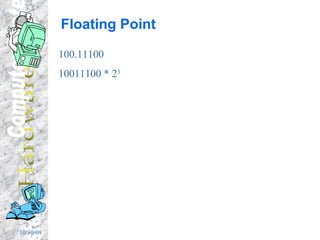
Floating Point 100.11100 10011100 * 2 3

Computer Systems Hardware

  • 1.
    Hardware Computer SystemsStandard Grade Computing Studies Computing Department, Calderside Academy
  • 2.
    Computer System -Block Diagram The Computer System consists of four parts. Input, Processor, Output, Backing Storage Data Flow Processor Output Input Backing Storage
  • 3.
    Advanced types ofInput Voice Recognition With voice recognition systems the computer can understand the words spoken to it and can carry out commands associated with the words. Using voice recognition a letter can be dictated instead of being typed at the keyboard. Handwriting Recognition Handwriting can be recognised and the computer can convert the written text into typed text for storing. Scanner A scanner is used to take information stored on paper and read it into a computer system. Scanners can be used to convert photographs, paintings etc. or even typed text into a form that can be stored on a computer.
  • 4.
    Optical Character RecognitionOCR Is used to convert paper typed documents into text files that can be edited and stored on a computer system. OCR software can search a scanned image for the shapes of letters, numbers etc. When it finds shapes that match it converts them to the correct text and stores them in a file.
  • 5.
    Advanced types ofInput Trackball A trackball is basically an upside down mouse. A trackball allows the user to move a small ball in order to move the pointer across the screen. Graphics Tablet A graphics tablet allows the user to draw on a special worktop. As the user draws the details are stored on the computer system. These devices are most often used by architects and designers.
  • 6.
    More on OutputDevices. There are two types of printers laser inkjet Printers are used to create a hard copy of output from the computer system (normally on paper). Laser printers are more expensive , produce high quality printouts, can produce 8 to 12 pages in a minute and are almost silent when they are working. Inkjet printers are cheaper than laser they produce reasonable quality printouts (not quite as good as laser), can often printout in colour , print 2 to 5 pages in minute but they are a little noisy .
  • 7.
    More on OutputDevices VDU Visual Display Unit (VDU) is the proper name for the computer monitor. The VDU allows us to see the output from the computer. Plotter A plotter is a device used for creating a hard copy of the output from a computer system. Plotters use special pens to draw the output as a series of lines. Plotters are often used to output building drawings and designs.
  • 8.
    More on OutputDevices Voice Output Voice output from a computer system is also know as speech synthesis. Some voice output programs are know as text readers. They take a text file and recite it to the user. Other speech synthesis programs can tell the user what they are doing (for example floor announcements in a speaking elevator). Hello, I am Hal!
  • 9.
    More on BackingStorage Magnetic tape, floppy disc, hard disc and CD-ROM,CD/RW(rewritable) DVD, DVD/RW(rewritable) are all types of backing storage. The newest and most portable storage is usb memory stick . Tape cheap Floppy disc CD / RW USB memory stick. Portable
  • 10.
    What is theCPU CPU - Central Processing Unit It is the combination of the Processor and Memory. There are TWO types of memory in the CPU, RAM and ROM. Memory Control PROCESSOR Data Flow Central Processing Unit ALU.Arithmetic and Logic Unit ROM RAM Control unit
  • 11.
    RAM and ROMRAM is Random Access Memory It can be written to and read from. It is where most programs and data are stored while the computer is being used. ROM is Read Only Memory Data stored in ROM can only be read, it can never be written over or deleted. We normally store important programs in ROM to do with the computers Operating System (see later).
  • 12.
    More about theProcessor The processor is made up of two main parts. The CONTROL UNIT fetches program instructions from the memory storage locations, decodes and then executes them. The ALU (Arithmetic/Logic Unit) carries out all the calculations as instructed by the control unit.
  • 13.
    Binary Everywhere! Binaryis used to store all the data and programs in a computer system. We use binary to store: Graphics , Text , Numbers , Video, Sound and Programs . Binary is just the code used to store the data.
  • 14.
    Storing Numbers Numbersare stored in binary. 1 Bin is 1 Dec 10 Bin is 2 Dec 1000 Bin is 8 Dec 1001 Bin is 9 Dec 1111 Bin is 15 Dec 11111111 Bin is 255 Dec You don’t need to understand binary (that’s Maths) but you do need to know that it is how most numbers are stored in the computer.
  • 15.
    Storing large numbersIn most computers the largest binary number that they can store in 32 ones long. The biggest number we can store in ordinary binary in these 32 bit computers is 4294967295. If we want to store more we need to use FLOATING POINT REPRESENTATION . Floating Point is the Computing version of Standard Form.
  • 16.
    Floating Point RepresentationThe point is floated to the left .2451 x 10 5 Mantissa Exponent The Mantissa is the number to be stored rounded to a few places and with the point moved. The Exponent is the number of places we must move the point to the right in order to get back our original number, 24510 . What must you know? Large numbers can be stored in a computer using floating point representation. The number is broken into two halves. The first half (the mantissa) is the number rounded to a few places and the second half (the exponent) is the number of places the point must be moved to create the original number!
  • 17.
    Storing Text Textis stored using a special set of codes called ASCII. Each symbol (letter, number etc) has its own unique code e.g. a is 97, A is 65, ? is 63, 3 is 51 ASCII ( A merican S tandard C ode for I nformation I nterchange) One ASCII code is one byte long (eight bits).
  • 18.
    Storing Graphics Blackand White graphics as stored using pixels ( Picture Elements ). The image to be stored is broken up into dots, each dot is a pixel. The pixels are ON for black and OFF for white e.g.
  • 19.
    Character Set Acharacter set is the set of characters that a device or a program uses. For example some printers use character sets that are different from the software that is printing to them. When the ASCII code for a symbol reaches the printer the printer substitutes the character from its character set with the same code. A common problem created by non-standard character sets is £ being replaced by $ or @.
  • 20.
    Control Characters Thecharacter set for all types of devices contains special control characters . These control characters carry out special operations like switching a printer on or off, clearing the VDU or moving a robot arm. The ASCII control code 7 sounds makes the PC speaker beep.
  • 21.
    More on MemoryComputers store blocks of data called ‘words’ in memory (A 32 bit computer has words that are 32 bits long) . Each place that can store a word is called a storage location . Each storage location has a unique address that identifies it from all the other locations.
  • 22.
    Capacity The sizeof memory, hard disc space, floppy drive space, programs, data files etc. are all measured by the number of bytes, kilobytes, megabytes or gigabytes (1024 megabytes) they can store. 445 floppy discs = 1 CD-ROM
  • 23.
    Types of AccessThere are two types of access Random Access (also called Direct Access ) devices retrieve the data you want straight away e.g. CD-ROM drive, Hard disc drive, floppy disc drive. Sequential (also called Serial ) devices have to move through all the data, record after record, to find the data you need e.g. Cassette tape, magnetic tape.
  • 24.
    Non-magnetic storage Non-magneticstorage involves the use of media not coated in magnetic material. Examples of this are: CD-ROM, Video Disc, Digital Video Disc (DVD) These use pits and bumps (lands) on the disc to store digital data and use laser light to write and read them.
  • 25.
    Virtual Reality VirtualReality involves the user entering a 3D world generated by the computer. To be immersed in a 3D VR world requires special hardware e.g. A headset (containing goggles , headphones and a position tracker ) A data glove or data suit so that the users body can interact with the VR world.
  • 26.
    Multimedia Multimedia systemscombine graphics , text , sound , video and animation to provide a rich experience for the user. Many interactive multimedia software titles are available now. Often these are stored on CD-ROM e.g. Microsoft Encarta.
  • 27.