Understanding how data
is presented to the
computer is essential in
getting a feel for the flow

Review input, output and
storage facilities in your
computer

Having an idea of
where the parts are
and how they work
helps the learning
process
Words To Define







Bit
Byte
CPU
Circuit board
Flash
Memory

 Monitor
 Mouse
 Port
 ROM – read only

memory
 USB – universal
serial bus
Bytes and Bits
Binary code is the language that computers speak. It is the basis for all
computations. Binary consists of 2 states: on and off = 0 and 1(And that’s about all
I know)
Bits are the smallest unit of data that a computer can comprehend, represented by
0’s and 1”s
Eight bits make up one byte
A file represents a collection of bytes that are responsible for any type of data
The CPU
Your guess is
as good as
mine, let’s
see what we
can come up
with
together.
Input Devices
Input devices are
any pieces of
equipment that
would be used to
input data into
the computer

Some of the common devices we're
all familiar with such as keyboards,
pointing and touch devices such as
the mouse. Scanners and readers
may be included.

More and more often things such as images,
videos, and various audio input are becoming
more common place.
The Unit Itself
 The package, so to speak, is what they call the housing unit. It

is that unit that houses all of the hardware. For a desktop PC
you may call it a tower.

 Some things you will find it include the power supply, memory,

expansion slots and cards, power supply sources, expansion
slots, cards, buses, ports and connectors.

 A popular term you may hear is plug-and-play. This means that

your computer will automatically configure new devices upon
installation and reboot.
Your Systems Storage
The storage system allows
for the possibility to save
multiple programs data and
processing results for use at
a later date

I'll storage systems
contain hardware in
which data is stored.
These storage units are
referred to as mediums

Hard drives, smart cards, optical disks,
storage servers, flash memory, remote
storage (including online and clouds)
just to name a few are examples of
storage devices
Output Devices
An output device gives the user the
ability to see and interpret data that has
been processed

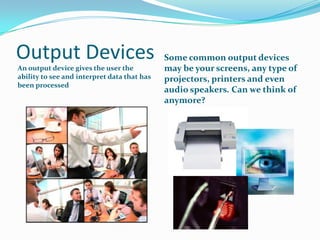
Some common output devices
may be your screens, any type of
projectors, printers and even
audio speakers. Can we think of
anymore?

Concepts in computer hardware

  • 1.
    Understanding how data ispresented to the computer is essential in getting a feel for the flow Review input, output and storage facilities in your computer Having an idea of where the parts are and how they work helps the learning process
  • 2.
    Words To Define       Bit Byte CPU Circuitboard Flash Memory  Monitor  Mouse  Port  ROM – read only memory  USB – universal serial bus
  • 3.
    Bytes and Bits Binarycode is the language that computers speak. It is the basis for all computations. Binary consists of 2 states: on and off = 0 and 1(And that’s about all I know) Bits are the smallest unit of data that a computer can comprehend, represented by 0’s and 1”s Eight bits make up one byte A file represents a collection of bytes that are responsible for any type of data
  • 4.
    The CPU Your guessis as good as mine, let’s see what we can come up with together.
  • 5.
    Input Devices Input devicesare any pieces of equipment that would be used to input data into the computer Some of the common devices we're all familiar with such as keyboards, pointing and touch devices such as the mouse. Scanners and readers may be included. More and more often things such as images, videos, and various audio input are becoming more common place.
  • 6.
    The Unit Itself The package, so to speak, is what they call the housing unit. It is that unit that houses all of the hardware. For a desktop PC you may call it a tower.  Some things you will find it include the power supply, memory, expansion slots and cards, power supply sources, expansion slots, cards, buses, ports and connectors.  A popular term you may hear is plug-and-play. This means that your computer will automatically configure new devices upon installation and reboot.
  • 7.
    Your Systems Storage Thestorage system allows for the possibility to save multiple programs data and processing results for use at a later date I'll storage systems contain hardware in which data is stored. These storage units are referred to as mediums Hard drives, smart cards, optical disks, storage servers, flash memory, remote storage (including online and clouds) just to name a few are examples of storage devices
  • 8.
    Output Devices An outputdevice gives the user the ability to see and interpret data that has been processed Some common output devices may be your screens, any type of projectors, printers and even audio speakers. Can we think of anymore?