Computer Systems
Fundamentals
Logic Gates
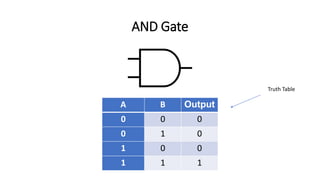
AND Gate
A B Output
0 0 0
0 1 0
1 0 0
1 1 1
Truth Table
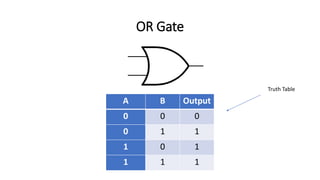
OR Gate
A B Output
0 0 0
0 1 1
1 0 1
1 1 1
Truth Table
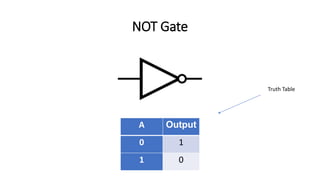
NOT Gate
A Output
0 1
1 0
Truth Table
Conversions
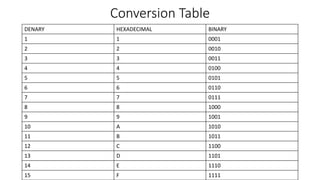
Conversion Table
DENARY HEXADECIMAL BINARY
1 1 0001
2 2 0010
3 3 0011
4 4 0100
5 5 0101
6 6 0110
7 7 0111
8 8 1000
9 9 1001
10 A 1010
11 B 1011
12 C 1100
13 D 1101
14 E 1110
15 F 1111
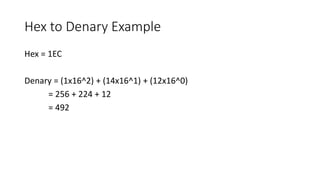
Hex to Denary Example
Hex = 1EC
Denary = (1x16^2) + (14x16^1) + (12x16^0)
= 256 + 224 + 12
= 492
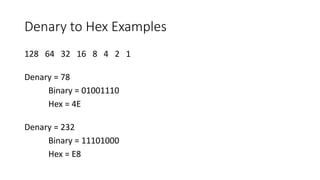
Denary to Hex Examples
128 64 32 16 8 4 2 1
Denary = 78
Binary = 01001110
Hex = 4E
Denary = 232
Binary = 11101000
Hex = E8
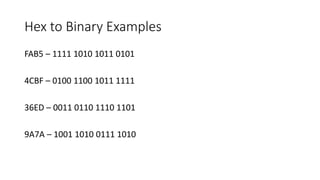
Hex to Binary Examples
FAB5 – 1111 1010 1011 0101
4CBF – 0100 1100 1011 1111
36ED – 0011 0110 1110 1101
9A7A – 1001 1010 0111 1010
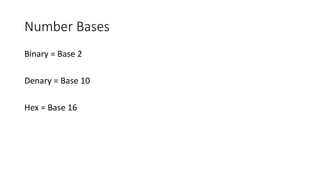
Number Bases
Binary = Base 2
Denary = Base 10
Hex = Base 16
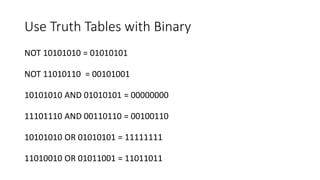
Use Truth Tables with Binary
NOT 10101010 = 01010101
NOT 11010110 = 00101001
10101010 AND 01010101 = 00000000
11101110 AND 00110110 = 00100110
10101010 OR 01010101 = 11111111
11010010 OR 01011001 = 11011011
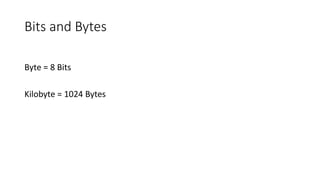
Bits and Bytes
Byte = 8 Bits
Kilobyte = 1024 Bytes
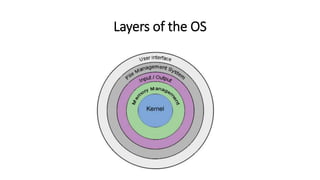
Layers of the OS
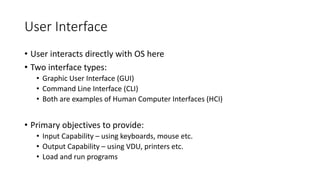
User Interface
• User interacts directly with OS here
• Two interface types:
• Graphic User Interface (GUI)
• Command Line Interface (CLI)
• Both are examples of Human Computer Interfaces (HCI)
• Primary objectives to provide:
• Input Capability – using keyboards, mouse etc.
• Output Capability – using VDU, printers etc.
• Load and run programs
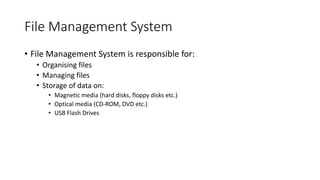
File Management System
• File Management System is responsible for:
• Organising files
• Managing files
• Storage of data on:
• Magnetic media (hard disks, floppy disks etc.)
• Optical media (CD-ROM, DVD etc.)
• USB Flash Drives
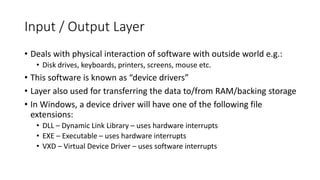
Input / Output Layer
• Deals with physical interaction of software with outside world e.g.:
• Disk drives, keyboards, printers, screens, mouse etc.
• This software is known as “device drivers”
• Layer also used for transferring the data to/from RAM/backing storage
• In Windows, a device driver will have one of the following file
extensions:
• DLL – Dynamic Link Library – uses hardware interrupts
• EXE – Executable – uses hardware interrupts
• VXD – Virtual Device Driver – uses software interrupts
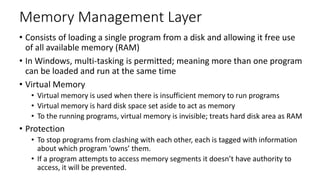
Memory Management Layer
• Consists of loading a single program from a disk and allowing it free use
of all available memory (RAM)
• In Windows, multi-tasking is permitted; meaning more than one program
can be loaded and run at the same time
• Virtual Memory
• Virtual memory is used when there is insufficient memory to run programs
• Virtual memory is hard disk space set aside to act as memory
• To the running programs, virtual memory is invisible; treats hard disk area as RAM
• Protection
• To stop programs from clashing with each other, each is tagged with information
about which program ‘owns’ them.
• If a program attempts to access memory segments it doesn’t have authority to
access, it will be prevented.
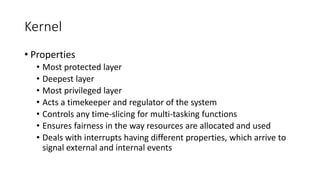
Kernel
• Properties
• Most protected layer
• Deepest layer
• Most privileged layer
• Acts a timekeeper and regulator of the system
• Controls any time-slicing for multi-tasking functions
• Ensures fairness in the way resources are allocated and used
• Deals with interrupts having different properties, which arrive to
signal external and internal events
API (Application Programming Interface)
• An application programming interface (API) is a set of subroutine
definitions, protocols, and tools for building application software.
• In general terms, it is a set of clearly defined methods of
communication between various software components.
ALU (Arithmetic Logic Unit) and Control Unit
• Where data is processed and manipulated
• ALU involves arithmetic operations and logical operations
• ALU uses temporary registers to hold data
• Accumulator is a main register which holds the results of calculations
• Control Unit
• Manages execution of instructions
• Sends control signals around the computer
Registers
• Memory Address Register (MAR) holds the address of a location in
main memory
• Memory Buffer Register (MBR) holds the data that has just been read
from main memory or is to be written to main memory
• Instruction Register (IR) holds the current instruction being executed
• Program Counter (PC) holds the address of the next instruction to be
fetched from memory
Buses
• Data is transferred between memory and processors by buses:
• Address Bus
• Pinpoints memory location
• One-Way Bus
• Data Bus
• Transfers the data
• Two-Way Bus
• Control Bus
• Initiates and controls operations
ASCII
• American Standard Code for Information Interchange
• Represents 128 digits (0-127) (all characters on the keyboard)
Open-Source and Proprietary Software
Open-Source – free to use, but training isn’t free
Proprietary – paid for i.e. license agreements
- Restrictions on use, not free to share

Computer Systems Fundamentals

  • 1.
  • 2.
  • 3.
    AND Gate A BOutput 0 0 0 0 1 0 1 0 0 1 1 1 Truth Table
  • 4.
    OR Gate A BOutput 0 0 0 0 1 1 1 0 1 1 1 1 Truth Table
  • 5.
    NOT Gate A Output 01 1 0 Truth Table
  • 6.
  • 7.
    Conversion Table DENARY HEXADECIMALBINARY 1 1 0001 2 2 0010 3 3 0011 4 4 0100 5 5 0101 6 6 0110 7 7 0111 8 8 1000 9 9 1001 10 A 1010 11 B 1011 12 C 1100 13 D 1101 14 E 1110 15 F 1111
  • 8.
    Hex to DenaryExample Hex = 1EC Denary = (1x16^2) + (14x16^1) + (12x16^0) = 256 + 224 + 12 = 492
  • 9.
    Denary to HexExamples 128 64 32 16 8 4 2 1 Denary = 78 Binary = 01001110 Hex = 4E Denary = 232 Binary = 11101000 Hex = E8
  • 10.
    Hex to BinaryExamples FAB5 – 1111 1010 1011 0101 4CBF – 0100 1100 1011 1111 36ED – 0011 0110 1110 1101 9A7A – 1001 1010 0111 1010
  • 11.
    Number Bases Binary =Base 2 Denary = Base 10 Hex = Base 16
  • 12.
    Use Truth Tableswith Binary NOT 10101010 = 01010101 NOT 11010110 = 00101001 10101010 AND 01010101 = 00000000 11101110 AND 00110110 = 00100110 10101010 OR 01010101 = 11111111 11010010 OR 01011001 = 11011011
  • 13.
    Bits and Bytes Byte= 8 Bits Kilobyte = 1024 Bytes
  • 14.
  • 15.
    User Interface • Userinteracts directly with OS here • Two interface types: • Graphic User Interface (GUI) • Command Line Interface (CLI) • Both are examples of Human Computer Interfaces (HCI) • Primary objectives to provide: • Input Capability – using keyboards, mouse etc. • Output Capability – using VDU, printers etc. • Load and run programs
  • 16.
    File Management System •File Management System is responsible for: • Organising files • Managing files • Storage of data on: • Magnetic media (hard disks, floppy disks etc.) • Optical media (CD-ROM, DVD etc.) • USB Flash Drives
  • 17.
    Input / OutputLayer • Deals with physical interaction of software with outside world e.g.: • Disk drives, keyboards, printers, screens, mouse etc. • This software is known as “device drivers” • Layer also used for transferring the data to/from RAM/backing storage • In Windows, a device driver will have one of the following file extensions: • DLL – Dynamic Link Library – uses hardware interrupts • EXE – Executable – uses hardware interrupts • VXD – Virtual Device Driver – uses software interrupts
  • 18.
    Memory Management Layer •Consists of loading a single program from a disk and allowing it free use of all available memory (RAM) • In Windows, multi-tasking is permitted; meaning more than one program can be loaded and run at the same time • Virtual Memory • Virtual memory is used when there is insufficient memory to run programs • Virtual memory is hard disk space set aside to act as memory • To the running programs, virtual memory is invisible; treats hard disk area as RAM • Protection • To stop programs from clashing with each other, each is tagged with information about which program ‘owns’ them. • If a program attempts to access memory segments it doesn’t have authority to access, it will be prevented.
  • 19.
    Kernel • Properties • Mostprotected layer • Deepest layer • Most privileged layer • Acts a timekeeper and regulator of the system • Controls any time-slicing for multi-tasking functions • Ensures fairness in the way resources are allocated and used • Deals with interrupts having different properties, which arrive to signal external and internal events
  • 20.
    API (Application ProgrammingInterface) • An application programming interface (API) is a set of subroutine definitions, protocols, and tools for building application software. • In general terms, it is a set of clearly defined methods of communication between various software components.
  • 21.
    ALU (Arithmetic LogicUnit) and Control Unit • Where data is processed and manipulated • ALU involves arithmetic operations and logical operations • ALU uses temporary registers to hold data • Accumulator is a main register which holds the results of calculations • Control Unit • Manages execution of instructions • Sends control signals around the computer
  • 22.
    Registers • Memory AddressRegister (MAR) holds the address of a location in main memory • Memory Buffer Register (MBR) holds the data that has just been read from main memory or is to be written to main memory • Instruction Register (IR) holds the current instruction being executed • Program Counter (PC) holds the address of the next instruction to be fetched from memory
  • 23.
    Buses • Data istransferred between memory and processors by buses: • Address Bus • Pinpoints memory location • One-Way Bus • Data Bus • Transfers the data • Two-Way Bus • Control Bus • Initiates and controls operations
  • 24.
    ASCII • American StandardCode for Information Interchange • Represents 128 digits (0-127) (all characters on the keyboard)
  • 25.
    Open-Source and ProprietarySoftware Open-Source – free to use, but training isn’t free Proprietary – paid for i.e. license agreements - Restrictions on use, not free to share