Welcome
Block Structure of
Computer
Outline
 Block diagram of computer
 Input Unit
 Storage Unit
 Output Unit
 Central Processing Unit
 References
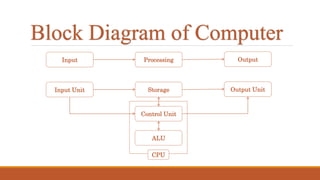
Block Diagram of Computer
Input OutputProcessing
Input Unit Output UnitStorage
Control Unit
ALU
CPU
Input Unit
 Accept data and information from user.
 Convert it to a form that the computer can
understand.
 Supply the converted data to the computer system
for further processing.
 Eg: keyboard, mouse, scanner, mic, etc…
Storage Unit
 The storage unit of the computer holds data and instructions,
before & after processing.
 Types: Primary Storage Unit & Secondary Storage Unit
1. Primary Storage
Temporary
 Faster
Expensive
Less storage capacity
Storage Unit (Cont…)
 Refers to RAM
2. Secondary Storage
Permanent
 Slower than primary
 Cheaper
High storage capacity
Refers to HDD
Output Unit
 The output unit is used to present soft and hardcopy of information
after processing.
 Output may be a text, audio, video, etc…
 Eg: Monitor, printer, speaker, etc…
Central Processing Unit
 The Control unit and Arithmetic logical unit(ALU) of the computer
are together known as the Central Processing Unit (CPU).
 It is known as the Brain of the computer.
 ALU controls all the arithmetic operations, while control unit
controls the other units of the computer.
 A PC may have CPU-IC such as Intel 8088, 80286, 80386, 80486,
Celeron, Pentium, Pentium Pro, Pentium II, Pentium III, Pentium IV,
Dual Core, and AMD etc.
References
 http://wikieducator.org/Block_diagram_of_computer
 http://ecomputernotes.com/fundamental/introduction-to-
computer/draw-the-block-diagram-of-computer-and-explain-its-
various-components
 http://successnotes4u.blogspot.com/2012/02/differentiate-between-
characteristics.html
Thank You
Computer Block Structure

Computer Block Structure