4.0 CENTRAL
PROCESSING UNIT
LEARNING OUTCOME:
At the end of this chapter, students able to:
 Understand The Central Processing Unit
 Understand Stack Organisation
 Understand Reduced Instruction Set
Computer
LEARNING OUTCOME:
1. Define the CPU
2. Draw the CPU Diagram
3. Describe types of instruction cycle: Fetch cycle, Decode
cycle and Execute cycle
4.1 UNDERSTAND THE CENTRAL
PROCESSING UNIT (CPU)
INTRODUCTION
• The central processing unit (CPU) is the unit, which
performs most of the processing inside a computer.
• To control instructions and data flow to and from other
parts of the computer, the CPU relies heavily on a chip set,
which is a group of microchips located on the motherboard.
• The CPU is the heart and brain of a computer. It receives
data input, executes instructions, and processes
information. It communicates with Input/output (I/O)
devices, which send and receive data to and from the CPU.
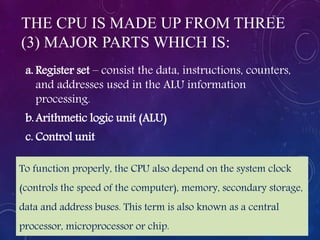
THE CPU IS MADE UP FROM THREE
(3) MAJOR PARTS WHICH IS:
a. Register set – consist the data, instructions, counters,
and addresses used in the ALU information
processing.
b.Arithmetic logic unit (ALU)
c. Control unit
To function properly, the CPU also depend on the system clock
(controls the speed of the computer), memory, secondary storage,
data and address buses. This term is also known as a central
processor, microprocessor or chip.
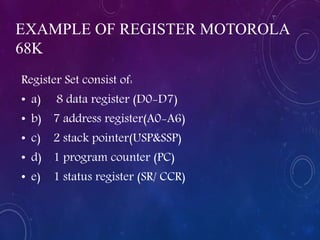
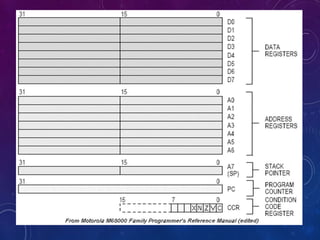
EXAMPLE OF REGISTER MOTOROLA
68K
Register Set consist of:
• a) 8 data register (D0-D7)
• b) 7 address register(A0-A6)
• c) 2 stack pointer(USP&SSP)
• d) 1 program counter (PC)
• e) 1 status register (SR/ CCR)
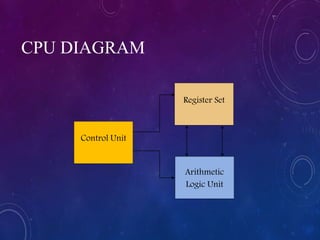
Control Unit
Register Set
Arithmetic
Logic Unit
CPU DIAGRAM
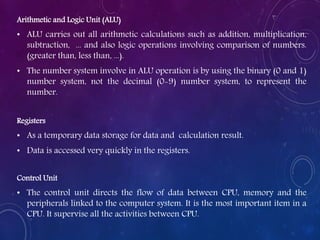
Arithmetic and Logic Unit (ALU)
• ALU carries out all arithmetic calculations such as addition, multiplication,
subtraction, ... and also logic operations involving comparison of numbers.
(greater than, less than, ...).
• The number system involve in ALU operation is by using the binary (0 and 1)
number system, not the decimal (0-9) number system, to represent the
number.
Registers
• As a temporary data storage for data and calculation result.
• Data is accessed very quickly in the registers.
Control Unit
• The control unit directs the flow of data between CPU, memory and the
peripherals linked to the computer system. It is the most important item in a
CPU. It supervise all the activities between CPU.
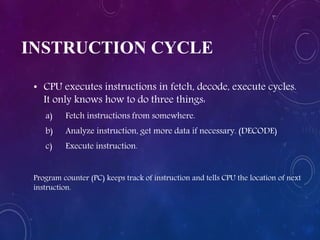
INSTRUCTION CYCLE
• CPU executes instructions in fetch, decode, execute cycles.
It only knows how to do three things:
a) Fetch instructions from somewhere.
b) Analyze instruction, get more data if necessary. (DECODE)
c) Execute instruction.
Program counter (PC) keeps track of instruction and tells CPU the location of next
instruction.
TYPES OF INSTRUCTION CYCLE
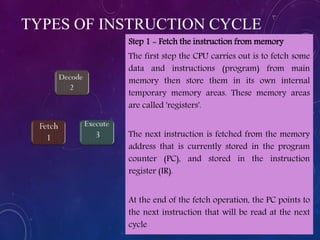
Step 1 - Fetch the instruction from memory
The first step the CPU carries out is to fetch some
data and instructions (program) from main
memory then store them in its own internal
temporary memory areas. These memory areas
are called 'registers'.
The next instruction is fetched from the memory
address that is currently stored in the program
counter (PC), and stored in the instruction
register (IR).
At the end of the fetch operation, the PC points to
the next instruction that will be read at the next
cycle
TYPES OF INSTRUCTION CYCLE
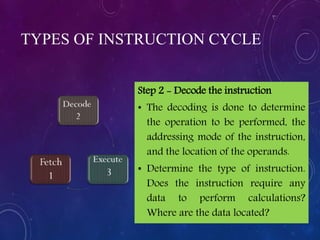
Step 2 - Decode the instruction
• The decoding is done to determine
the operation to be performed, the
addressing mode of the instruction,
and the location of the operands.
• Determine the type of instruction.
Does the instruction require any
data to perform calculations?
Where are the data located?
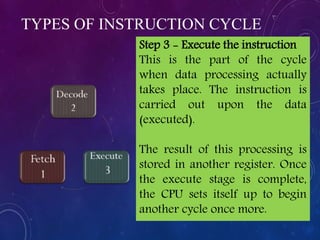
Step 3 - Execute the instruction
This is the part of the cycle
when data processing actually
takes place. The instruction is
carried out upon the data
(executed).
The result of this processing is
stored in another register. Once
the execute stage is complete,
the CPU sets itself up to begin
another cycle once more.
TYPES OF INSTRUCTION CYCLE
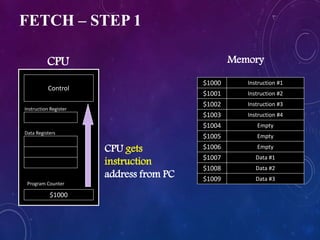
FETCH – STEP 1
Program Counter
Instruction #1
$1001
$1009
$1008
$1007
$1006
$1005
$1004
$1003
$1002
$1000
Instruction #2
Instruction #3
Instruction #4
Empty
Empty
Empty
Data #1
Data #2
Data #3
$1000
Control
CPU Memory
Instruction Register
Data Registers
CPU gets
instruction
address from PC
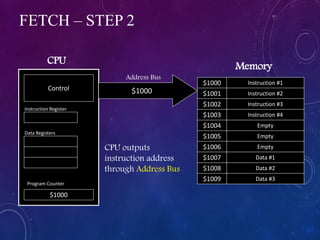
FETCH – STEP 2
Program Counter
Instruction #1
$1001
$1009
$1008
$1007
$1006
$1005
$1004
$1003
$1002
$1000
Instruction #2
Instruction #3
Instruction #4
Empty
Empty
Empty
Data #1
Data #2
Data #3
$1000
Control
CPU
Memory
Instruction Register
Data Registers
CPU outputs
instruction address
through Address Bus
$1000
Address Bus
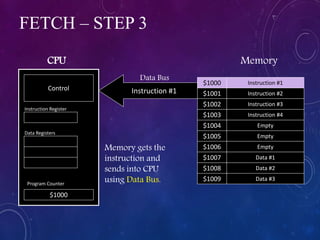
FETCH – STEP 3
Program Counter
Instruction #1
$1001
$1009
$1008
$1007
$1006
$1005
$1004
$1003
$1002
$1000
Instruction #2
Instruction #3
Instruction #4
Empty
Empty
Empty
Data #1
Data #2
Data #3
$1000
Control
CPU Memory
Instruction Register
Data Registers
Memory gets the
instruction and
sends into CPU
using Data Bus.
Instruction #1
Data Bus
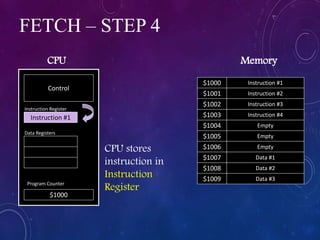
FETCH – STEP 4
Program Counter
Instruction #1
$1001
$1009
$1008
$1007
$1006
$1005
$1004
$1003
$1002
$1000
Instruction #2
Instruction #3
Instruction #4
Empty
Empty
Empty
Data #1
Data #2
Data #3
$1000
Control
CPU Memory
Instruction #1
Instruction Register
Data Registers
CPU stores
instruction in
Instruction
Register
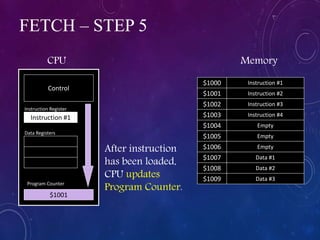
FETCH – STEP 5
Program Counter
Instruction #1
$1001
$1009
$1008
$1007
$1006
$1005
$1004
$1003
$1002
$1000
Instruction #2
Instruction #3
Instruction #4
Empty
Empty
Empty
Data #1
Data #2
Data #3
$1001
Control
CPU Memory
Instruction #1
Instruction Register
Data Registers
After instruction
has been loaded,
CPU updates
Program Counter.
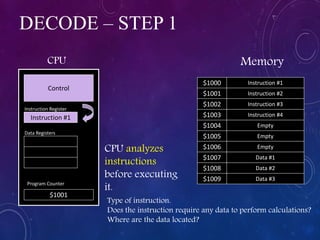
DECODE – STEP 1
Program Counter
Instruction #1
$1001
$1009
$1008
$1007
$1006
$1005
$1004
$1003
$1002
$1000
Instruction #2
Instruction #3
Instruction #4
Empty
Empty
Empty
Data #1
Data #2
Data #3
$1001
Control
CPU Memory
Instruction #1
Instruction Register
Data Registers
CPU analyzes
instructions
before executing
it.
Type of instruction.
Does the instruction require any data to perform calculations?
Where are the data located?
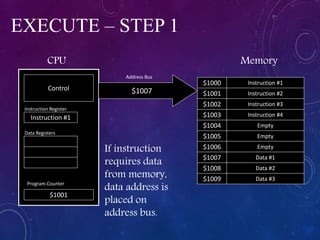
EXECUTE – STEP 1
Program Counter
Instruction #1
$1001
$1009
$1008
$1007
$1006
$1005
$1004
$1003
$1002
$1000
Instruction #2
Instruction #3
Instruction #4
Empty
Empty
Empty
Data #1
Data #2
Data #3
$1001
Control
CPU Memory
Instruction #1
Instruction Register
Data Registers
If instruction
requires data
from memory,
data address is
placed on
address bus.
$1007
Address Bus
EXECUTE – STEP 2
Program Counter
Instruction #1
$1001
$1009
$1008
$1007
$1006
$1005
$1004
$1003
$1002
$1000
Instruction #2
Instruction #3
Instruction #4
Empty
Empty
Empty
Data #1
Data #2
Data #3
$1001
Control
CPU Memory
Instruction #1
Instruction Register
Data Registers
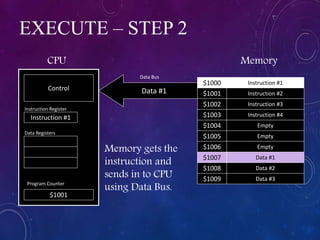
Memory gets the
instruction and
sends in to CPU
using Data Bus.
Data #1
Data Bus
EXECUTE – STEP 3
Program Counter
Instruction #1
$1001
$1009
$1008
$1007
$1006
$1005
$1004
$1003
$1002
$1000
Instruction #2
Instruction #3
Instruction #4
Empty
Empty
Empty
Data #1
Data #2
Data #3
$1001
Control
CPU Memory
Instruction #1
Data #1
Instruction Register
Data Registers
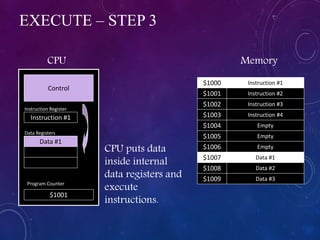
CPU puts data
inside internal
data registers and
execute
instructions.
EXECUTE – STEP 4
Program Counter
Instruction #1
$1001
$1009
$1008
$1007
$1006
$1005
$1004
$1003
$1002
$1000
Instruction #2
Instruction #3
Instruction #4
Empty
Empty
Empty
Data #1
Data #2
Data #3
$1001
Control
CPU Memory
Instruction #1
Data #1
Result #1
Instruction Register
Data Registers
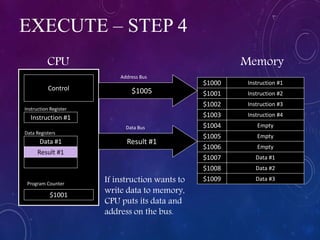
If instruction wants to
write data to memory,
CPU puts its data and
address on the bus.
$1005
Address Bus
Result #1
Data Bus
EXECUTE – STEP 5
Program Counter
Instruction #1
$1001
$1009
$1008
$1007
$1006
$1005
$1004
$1003
$1002
$1000
Instruction #2
Instruction #3
Instruction #4
Empty
Result #1
Empty
Data #1
Data #2
Data #3
$1001
Control
CPU Memory
Instruction #1
Data #1
Result #1
Instruction Register
Data Registers
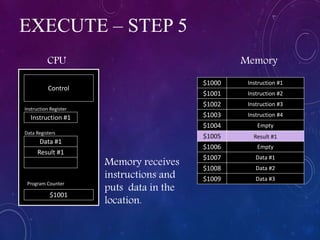
Memory receives
instructions and
puts data in the
location.
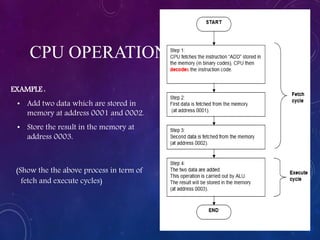
EXAMPLE :
• Add two data which are stored in
memory at address 0001 and 0002.
• Store the result in the memory at
address 0003.
(Show the the above process in term of
fetch and execute cycles)
CPU OPERATION
4.2 UNDERSTAND STACK
ORGANISATION
Learning Outcome:
• Describe the basic organisation of the stack in computer
system.
• Describe the function of register stack and memory stack
• Describe the use of Reverse Polish Notation
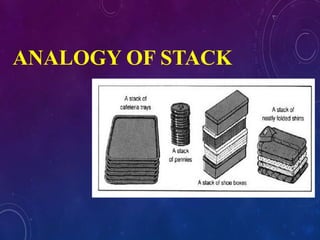
STACK
• Stack is a storage structure that stores information in such a way that
the last item stored is the first item retrieved.
• It also is an ordered set of elements, only one of which can be accessed
at a time.
• The point of access is called the top of the stack. The number of
elements in the stack, or length of the stack, is variable. The last element
in the stack is the base of the stack.
• Items may only be added to or deleted from the top of the stack. For this
reason, a stack is also known as a last-in-first-out (LIFO) list.
• A LIFO (last-in first-out) storage structure.
• The first thing you put in is the last thing you take out.
• The last thing you put in is the first thing you take out.
• The stack in digital computers is a group of memory locations
with a register that holds the address of top of element.
• This register that holds the address of top of element of the stack
is called Stack Pointer.
ANALOGY OF STACK
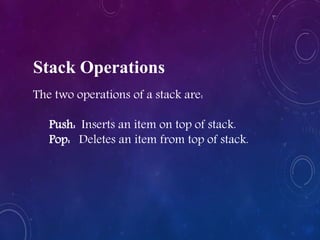
Stack Operations
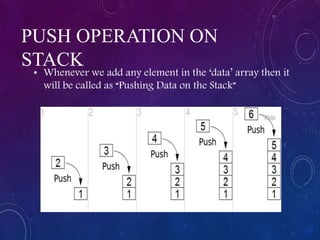
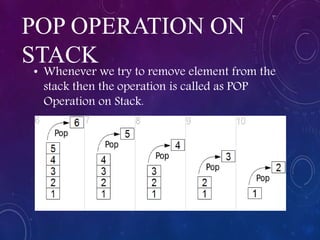
The two operations of a stack are:
Push: Inserts an item on top of stack.
Pop: Deletes an item from top of stack.
PUSH OPERATION ON
STACK
• Whenever we add any element in the ‘data’ array then it
will be called as “Pushing Data on the Stack”
POP OPERATION ON
STACK
• Whenever we try to remove element from the
stack then the operation is called as POP
Operation on Stack.
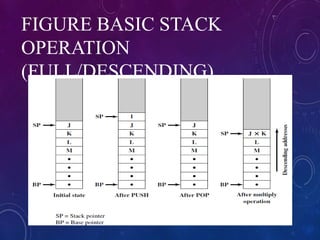
FIGURE BASIC STACK
OPERATION
(FULL/DESCENDING)
IMPLEMENTATION OF
STACK
• In digital computers, stack can be implemented
in two ways:
• Register Stack
• Memory Stack
REGISTER STACK
• A stack can be organized as a collection of finite number of
registers that are used to store temporary information
during the execution of a program.
• The stack pointer (SP) is a register that holds the address of
top of element of the stack.
• A stack can be placed in a portion of a large memory or it
can be organized as a collection of a finite number of
memory words or registers.
• The stack pointer register (SP) contains a binary number
whose value is equal to the address of the word/register
that is currently on top of the stack.
MEMORY STACK
• A stack can be implemented in a random access
memory (RAM) attached to a CPU.
• The implementation of a stack in the CPU is done
by assigning a portion of memory to a stack
operation and using a processor register as a
stack pointer.
• The starting memory location of the stack is
specified by the processor register as stack
pointer.
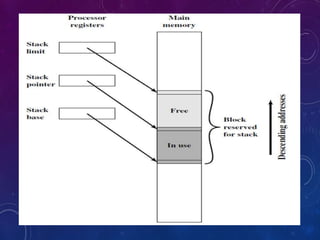
Three addresses are needed for proper operation, and these
are often stored in processor registers:
a) Stack pointer (SP): Contains the address of the top of the
stack. If an item is added to or deleted from the stack, the
pointer is incremented or decremented to contain the
address of the new top of the stack.
b) Stack base: Contains the address of the bottom location in
the reserved block. If an attempt is made to POP when the
stack is empty, an error is reported.
c) Stack limit: Contains the address of the other end of the
reserved block. If an attempt is made to PUSH when the block
is fully utilized for the stack, an error is reported.
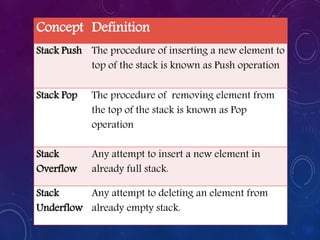
Concept Definition
Stack Push The procedure of inserting a new element to
top of the stack is known as Push operation
Stack Pop The procedure of removing element from
the top of the stack is known as Pop
operation
Stack
Overflow
Any attempt to insert a new element in
already full stack.
Stack
Underflow
Any attempt to deleting an element from
already empty stack.
DESCRIBE THE USE OF
REVERSE POLISH NOTATION
• The Polish mathematician Lukasiewicz show that
arithmetic expression can be represented in prefix
notation.
• This representation often referred to as Polish
notation; place the operator before the operand.
• The postfix notation, referred to as reverse Polish
notation (RPN), places the operator after the
operand.
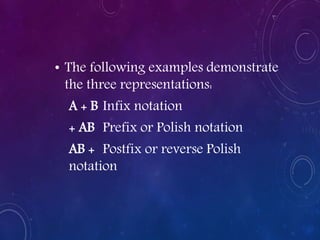
• The following examples demonstrate
the three representations:
A + B Infix notation
+ AB Prefix or Polish notation
AB + Postfix or reverse Polish
notation
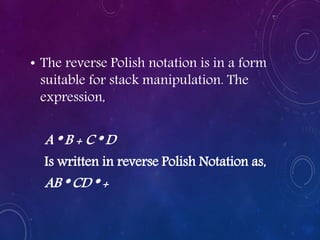
• The reverse Polish notation is in a form
suitable for stack manipulation. The
expression,
A * B + C * D
Is written in reverse Polish Notation as,
AB * CD * +
CONVERSION TO RPN (REVERSE
POLISH NOTATION)
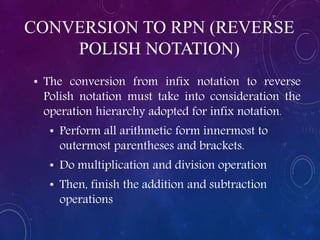
• The conversion from infix notation to reverse
Polish notation must take into consideration the
operation hierarchy adopted for infix notation.
• Perform all arithmetic form innermost to
outermost parentheses and brackets.
• Do multiplication and division operation
• Then, finish the addition and subtraction
operations
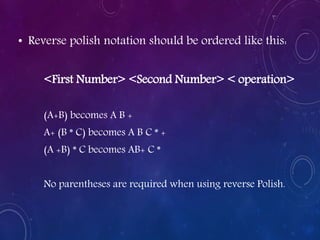
• Reverse polish notation should be ordered like this:
<First Number> <Second Number> < operation>
(A+B) becomes A B +
A+ (B * C) becomes A B C * +
(A +B) * C becomes AB+ C *
No parentheses are required when using reverse Polish.
• Consider the expression
(A + B) * [C * (D + E) + F]
• The expression can be converted to reverse Polish
notation, without the use of parentheses, by taking
the consideration of operation hierarchy.
• The converted expression is:
AB + DE + C * F + *
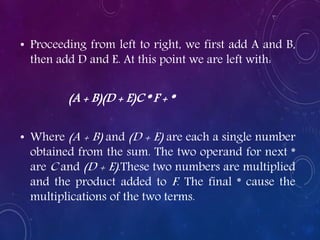
• Proceeding from left to right, we first add A and B,
then add D and E. At this point we are left with:
(A + B)(D + E)C * F + *
• Where (A + B) and (D + E) are each a single number
obtained from the sum. The two operand for next *
are C and (D + E).These two numbers are multiplied
and the product added to F. The final * cause the
multiplications of the two terms.
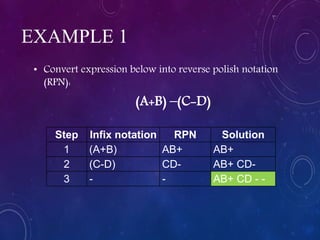
EXAMPLE 1
• Convert expression below into reverse polish notation
(RPN):
(A+B) –(C-D)
Step Infix notation RPN Solution
1 (A+B) AB+ AB+
2 (C-D) CD- AB+ CD-
3 - - AB+ CD - -
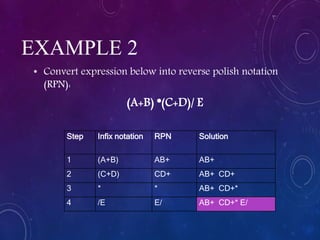
EXAMPLE 2
• Convert expression below into reverse polish notation
(RPN):
(A+B) *(C+D)/ E
Step Infix notation RPN Solution
1 (A+B) AB+ AB+
2 (C+D) CD+ AB+ CD+
3 * * AB+ CD+*
4 /E E/ AB+ CD+* E/
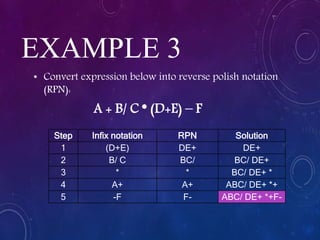
EXAMPLE 3
• Convert expression below into reverse polish notation
(RPN):
A + B/ C * (D+E) – F
Step Infix notation RPN Solution
1 (D+E) DE+ DE+
2 B/ C BC/ BC/ DE+
3 * * BC/ DE+ *
4 A+ A+ ABC/ DE+ *+
5 -F F- ABC/ DE+ *+F-
EXAMPLE 4
• Convert expression below into reverse polish notation
(RPN):
(3 + 5) * [4 * (6 + 2) + 1]
Step Infix notation RPN Solution
1 (6 + 2) 6 2 + 6 2 +
2 4 * 4 * 6 2 + 4 *
3 + 1 1+ 6 2 + 4 *1+
4 (3 + 5) 3 5 + 3 5 + 6 2 + 4 *1+
5 * * 3 5 + 6 2 + 4 *1+*
EXERCISE
• Convert expression below to reverse polish
notation. Show all steps
1. (A + B) * [C * (D + E) + F]
2. A * B + C / D
3. A * (B + C) / D
4. A * (B + C / D)
5. ( (A * B) + (C / D) )
6. ((A * (B + C) ) / D)
7. (A * (B + (C / D) ) )
ANSWER
1.A B + DE + C *F+*
2.A B * C D / +
3.A B C + * D /
4.A B C D / + *
5.A B * C D / +
6.A B C + * D /
7.A B C D / + *
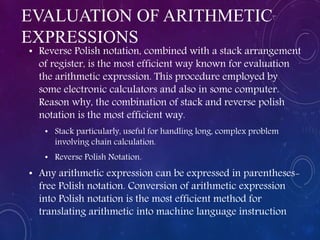
EVALUATION OF ARITHMETIC
EXPRESSIONS
• Reverse Polish notation, combined with a stack arrangement
of register, is the most efficient way known for evaluation
the arithmetic expression. This procedure employed by
some electronic calculators and also in some computer.
Reason why, the combination of stack and reverse polish
notation is the most efficient way.
• Stack particularly, useful for handling long, complex problem
involving chain calculation.
• Reverse Polish Notation.
• Any arithmetic expression can be expressed in parentheses-
free Polish notation. Conversion of arithmetic expression
into Polish notation is the most efficient method for
translating arithmetic into machine language instruction
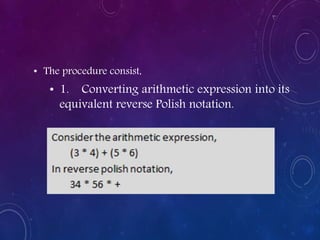
• The procedure consist,
• 1. Converting arithmetic expression into its
equivalent reverse Polish notation.
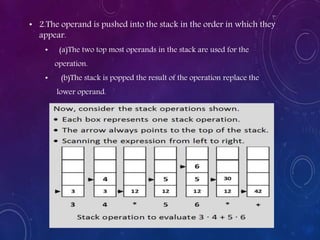
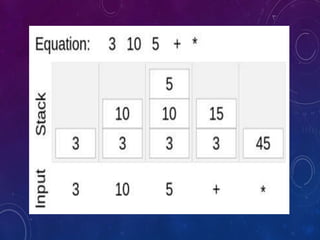
• 2.The operand is pushed into the stack in the order in which they
appear.
• (a)The two top most operands in the stack are used for the
operation.
• (b)The stack is popped the result of the operation replace the
lower operand.
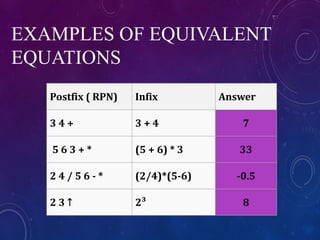
EXAMPLES OF EQUIVALENT
EQUATIONS
Postfix ( RPN) Infix Answer
3 4 + 3 + 4 7
5 6 3 + * (5 + 6) * 3 33
2 4 / 5 6 - * (2/4)*(5-6) -0.5
2 3 ↑ 2³ 8
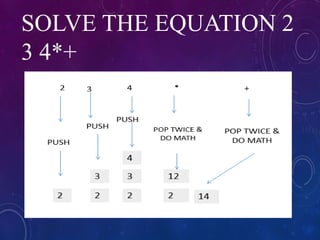
SOLVE THE EQUATION 2
3 4*+
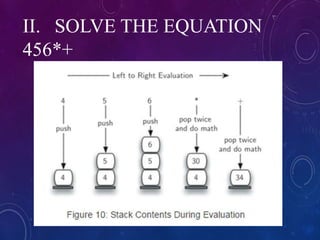
II. SOLVE THE EQUATION
456*+
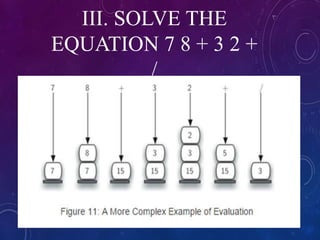
III. SOLVE THE
EQUATION 7 8 + 3 2 +
/
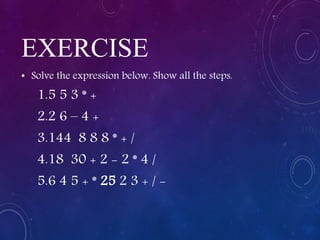
EXERCISE
• Solve the expression below. Show all the steps.
1.5 5 3 * +
2.2 6 – 4 +
3.144 8 8 8 * + /
4.18 30 + 2 - 2 * 4 /
5.6 4 5 + * 25 2 3 + / -
ANSWER:
1.20
2.0
3.2
4.23
5.49
4.3 UNDERSTAND REDUCED
INSTRUCTION SET COMPUTER
Complex Instruction Set Computers (CISC)
• Complex Instruction Set Computer (or CISC) is a computer with a
larger number of instruction.
• The major characteristic of CISC:
• Large number of instruction from 100 to 250 instructions.
• Some instruction that perform specialized task and are used
infrequently.
• Larger variety of addressing modes – typically from 5 to 20
different modes.
• Variable-length instruction formats
• Instruction that manipulates operands in memory.
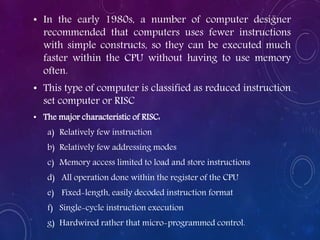
• In the early 1980s, a number of computer designer
recommended that computers uses fewer instructions
with simple constructs, so they can be executed much
faster within the CPU without having to use memory
often.
• This type of computer is classified as reduced instruction
set computer or RISC
• The major characteristic of RISC:
a) Relatively few instruction
b) Relatively few addressing modes
c) Memory access limited to load and store instructions
d) All operation done within the register of the CPU
e) Fixed-length, easily decoded instruction format
f) Single-cycle instruction execution
g) Hardwired rather that micro-programmed control.
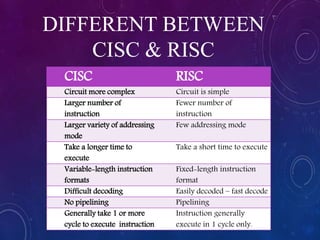
DIFFERENT BETWEEN
CISC & RISC
CISC RISC
Circuit more complex Circuit is simple
Larger number of
instruction
Fewer number of
instruction
Larger variety of addressing
mode
Few addressing mode
Take a longer time to
execute
Take a short time to execute
Variable-length instruction
formats
Fixed-length instruction
format
Difficult decoding Easily decoded – fast decode
No pipelining Pipelining
Generally take 1 or more
cycle to execute instruction
Instruction generally
execute in 1 cycle only.
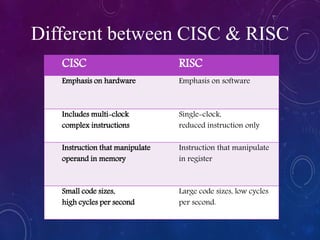
CISC RISC
Emphasis on hardware Emphasis on software
Includes multi-clock
complex instructions
Single-clock,
reduced instruction only
Instruction that manipulate
operand in memory
Instruction that manipulate
in register
Small code sizes,
high cycles per second
Large code sizes, low cycles
per second.
Different between CISC & RISC

Central Processing Unit

  • 1.
  • 2.
    LEARNING OUTCOME: At theend of this chapter, students able to:  Understand The Central Processing Unit  Understand Stack Organisation  Understand Reduced Instruction Set Computer
  • 3.
    LEARNING OUTCOME: 1. Definethe CPU 2. Draw the CPU Diagram 3. Describe types of instruction cycle: Fetch cycle, Decode cycle and Execute cycle 4.1 UNDERSTAND THE CENTRAL PROCESSING UNIT (CPU)
  • 4.
    INTRODUCTION • The centralprocessing unit (CPU) is the unit, which performs most of the processing inside a computer. • To control instructions and data flow to and from other parts of the computer, the CPU relies heavily on a chip set, which is a group of microchips located on the motherboard. • The CPU is the heart and brain of a computer. It receives data input, executes instructions, and processes information. It communicates with Input/output (I/O) devices, which send and receive data to and from the CPU.
  • 5.
    THE CPU ISMADE UP FROM THREE (3) MAJOR PARTS WHICH IS: a. Register set – consist the data, instructions, counters, and addresses used in the ALU information processing. b.Arithmetic logic unit (ALU) c. Control unit To function properly, the CPU also depend on the system clock (controls the speed of the computer), memory, secondary storage, data and address buses. This term is also known as a central processor, microprocessor or chip.
  • 6.
    EXAMPLE OF REGISTERMOTOROLA 68K Register Set consist of: • a) 8 data register (D0-D7) • b) 7 address register(A0-A6) • c) 2 stack pointer(USP&SSP) • d) 1 program counter (PC) • e) 1 status register (SR/ CCR)
  • 8.
  • 9.
    Arithmetic and LogicUnit (ALU) • ALU carries out all arithmetic calculations such as addition, multiplication, subtraction, ... and also logic operations involving comparison of numbers. (greater than, less than, ...). • The number system involve in ALU operation is by using the binary (0 and 1) number system, not the decimal (0-9) number system, to represent the number. Registers • As a temporary data storage for data and calculation result. • Data is accessed very quickly in the registers. Control Unit • The control unit directs the flow of data between CPU, memory and the peripherals linked to the computer system. It is the most important item in a CPU. It supervise all the activities between CPU.
  • 10.
    INSTRUCTION CYCLE • CPUexecutes instructions in fetch, decode, execute cycles. It only knows how to do three things: a) Fetch instructions from somewhere. b) Analyze instruction, get more data if necessary. (DECODE) c) Execute instruction. Program counter (PC) keeps track of instruction and tells CPU the location of next instruction.
  • 11.
    TYPES OF INSTRUCTIONCYCLE Step 1 - Fetch the instruction from memory The first step the CPU carries out is to fetch some data and instructions (program) from main memory then store them in its own internal temporary memory areas. These memory areas are called 'registers'. The next instruction is fetched from the memory address that is currently stored in the program counter (PC), and stored in the instruction register (IR). At the end of the fetch operation, the PC points to the next instruction that will be read at the next cycle
  • 12.
    TYPES OF INSTRUCTIONCYCLE Step 2 - Decode the instruction • The decoding is done to determine the operation to be performed, the addressing mode of the instruction, and the location of the operands. • Determine the type of instruction. Does the instruction require any data to perform calculations? Where are the data located?
  • 13.
    Step 3 -Execute the instruction This is the part of the cycle when data processing actually takes place. The instruction is carried out upon the data (executed). The result of this processing is stored in another register. Once the execute stage is complete, the CPU sets itself up to begin another cycle once more. TYPES OF INSTRUCTION CYCLE
  • 14.
    FETCH – STEP1 Program Counter Instruction #1 $1001 $1009 $1008 $1007 $1006 $1005 $1004 $1003 $1002 $1000 Instruction #2 Instruction #3 Instruction #4 Empty Empty Empty Data #1 Data #2 Data #3 $1000 Control CPU Memory Instruction Register Data Registers CPU gets instruction address from PC
  • 15.
    FETCH – STEP2 Program Counter Instruction #1 $1001 $1009 $1008 $1007 $1006 $1005 $1004 $1003 $1002 $1000 Instruction #2 Instruction #3 Instruction #4 Empty Empty Empty Data #1 Data #2 Data #3 $1000 Control CPU Memory Instruction Register Data Registers CPU outputs instruction address through Address Bus $1000 Address Bus
  • 16.
    FETCH – STEP3 Program Counter Instruction #1 $1001 $1009 $1008 $1007 $1006 $1005 $1004 $1003 $1002 $1000 Instruction #2 Instruction #3 Instruction #4 Empty Empty Empty Data #1 Data #2 Data #3 $1000 Control CPU Memory Instruction Register Data Registers Memory gets the instruction and sends into CPU using Data Bus. Instruction #1 Data Bus
  • 17.
    FETCH – STEP4 Program Counter Instruction #1 $1001 $1009 $1008 $1007 $1006 $1005 $1004 $1003 $1002 $1000 Instruction #2 Instruction #3 Instruction #4 Empty Empty Empty Data #1 Data #2 Data #3 $1000 Control CPU Memory Instruction #1 Instruction Register Data Registers CPU stores instruction in Instruction Register
  • 18.
    FETCH – STEP5 Program Counter Instruction #1 $1001 $1009 $1008 $1007 $1006 $1005 $1004 $1003 $1002 $1000 Instruction #2 Instruction #3 Instruction #4 Empty Empty Empty Data #1 Data #2 Data #3 $1001 Control CPU Memory Instruction #1 Instruction Register Data Registers After instruction has been loaded, CPU updates Program Counter.
  • 19.
    DECODE – STEP1 Program Counter Instruction #1 $1001 $1009 $1008 $1007 $1006 $1005 $1004 $1003 $1002 $1000 Instruction #2 Instruction #3 Instruction #4 Empty Empty Empty Data #1 Data #2 Data #3 $1001 Control CPU Memory Instruction #1 Instruction Register Data Registers CPU analyzes instructions before executing it. Type of instruction. Does the instruction require any data to perform calculations? Where are the data located?
  • 20.
    EXECUTE – STEP1 Program Counter Instruction #1 $1001 $1009 $1008 $1007 $1006 $1005 $1004 $1003 $1002 $1000 Instruction #2 Instruction #3 Instruction #4 Empty Empty Empty Data #1 Data #2 Data #3 $1001 Control CPU Memory Instruction #1 Instruction Register Data Registers If instruction requires data from memory, data address is placed on address bus. $1007 Address Bus
  • 21.
    EXECUTE – STEP2 Program Counter Instruction #1 $1001 $1009 $1008 $1007 $1006 $1005 $1004 $1003 $1002 $1000 Instruction #2 Instruction #3 Instruction #4 Empty Empty Empty Data #1 Data #2 Data #3 $1001 Control CPU Memory Instruction #1 Instruction Register Data Registers Memory gets the instruction and sends in to CPU using Data Bus. Data #1 Data Bus
  • 22.
    EXECUTE – STEP3 Program Counter Instruction #1 $1001 $1009 $1008 $1007 $1006 $1005 $1004 $1003 $1002 $1000 Instruction #2 Instruction #3 Instruction #4 Empty Empty Empty Data #1 Data #2 Data #3 $1001 Control CPU Memory Instruction #1 Data #1 Instruction Register Data Registers CPU puts data inside internal data registers and execute instructions.
  • 23.
    EXECUTE – STEP4 Program Counter Instruction #1 $1001 $1009 $1008 $1007 $1006 $1005 $1004 $1003 $1002 $1000 Instruction #2 Instruction #3 Instruction #4 Empty Empty Empty Data #1 Data #2 Data #3 $1001 Control CPU Memory Instruction #1 Data #1 Result #1 Instruction Register Data Registers If instruction wants to write data to memory, CPU puts its data and address on the bus. $1005 Address Bus Result #1 Data Bus
  • 24.
    EXECUTE – STEP5 Program Counter Instruction #1 $1001 $1009 $1008 $1007 $1006 $1005 $1004 $1003 $1002 $1000 Instruction #2 Instruction #3 Instruction #4 Empty Result #1 Empty Data #1 Data #2 Data #3 $1001 Control CPU Memory Instruction #1 Data #1 Result #1 Instruction Register Data Registers Memory receives instructions and puts data in the location.
  • 25.
    EXAMPLE : • Addtwo data which are stored in memory at address 0001 and 0002. • Store the result in the memory at address 0003. (Show the the above process in term of fetch and execute cycles) CPU OPERATION
  • 26.
    4.2 UNDERSTAND STACK ORGANISATION LearningOutcome: • Describe the basic organisation of the stack in computer system. • Describe the function of register stack and memory stack • Describe the use of Reverse Polish Notation
  • 27.
    STACK • Stack isa storage structure that stores information in such a way that the last item stored is the first item retrieved. • It also is an ordered set of elements, only one of which can be accessed at a time. • The point of access is called the top of the stack. The number of elements in the stack, or length of the stack, is variable. The last element in the stack is the base of the stack. • Items may only be added to or deleted from the top of the stack. For this reason, a stack is also known as a last-in-first-out (LIFO) list.
  • 28.
    • A LIFO(last-in first-out) storage structure. • The first thing you put in is the last thing you take out. • The last thing you put in is the first thing you take out. • The stack in digital computers is a group of memory locations with a register that holds the address of top of element. • This register that holds the address of top of element of the stack is called Stack Pointer.
  • 29.
  • 30.
    Stack Operations The twooperations of a stack are: Push: Inserts an item on top of stack. Pop: Deletes an item from top of stack.
  • 31.
    PUSH OPERATION ON STACK •Whenever we add any element in the ‘data’ array then it will be called as “Pushing Data on the Stack”
  • 32.
    POP OPERATION ON STACK •Whenever we try to remove element from the stack then the operation is called as POP Operation on Stack.
  • 33.
  • 34.
    IMPLEMENTATION OF STACK • Indigital computers, stack can be implemented in two ways: • Register Stack • Memory Stack
  • 35.
    REGISTER STACK • Astack can be organized as a collection of finite number of registers that are used to store temporary information during the execution of a program. • The stack pointer (SP) is a register that holds the address of top of element of the stack. • A stack can be placed in a portion of a large memory or it can be organized as a collection of a finite number of memory words or registers. • The stack pointer register (SP) contains a binary number whose value is equal to the address of the word/register that is currently on top of the stack.
  • 36.
    MEMORY STACK • Astack can be implemented in a random access memory (RAM) attached to a CPU. • The implementation of a stack in the CPU is done by assigning a portion of memory to a stack operation and using a processor register as a stack pointer. • The starting memory location of the stack is specified by the processor register as stack pointer.
  • 37.
    Three addresses areneeded for proper operation, and these are often stored in processor registers: a) Stack pointer (SP): Contains the address of the top of the stack. If an item is added to or deleted from the stack, the pointer is incremented or decremented to contain the address of the new top of the stack. b) Stack base: Contains the address of the bottom location in the reserved block. If an attempt is made to POP when the stack is empty, an error is reported. c) Stack limit: Contains the address of the other end of the reserved block. If an attempt is made to PUSH when the block is fully utilized for the stack, an error is reported.
  • 39.
    Concept Definition Stack PushThe procedure of inserting a new element to top of the stack is known as Push operation Stack Pop The procedure of removing element from the top of the stack is known as Pop operation Stack Overflow Any attempt to insert a new element in already full stack. Stack Underflow Any attempt to deleting an element from already empty stack.
  • 40.
    DESCRIBE THE USEOF REVERSE POLISH NOTATION • The Polish mathematician Lukasiewicz show that arithmetic expression can be represented in prefix notation. • This representation often referred to as Polish notation; place the operator before the operand. • The postfix notation, referred to as reverse Polish notation (RPN), places the operator after the operand.
  • 41.
    • The followingexamples demonstrate the three representations: A + B Infix notation + AB Prefix or Polish notation AB + Postfix or reverse Polish notation
  • 42.
    • The reversePolish notation is in a form suitable for stack manipulation. The expression, A * B + C * D Is written in reverse Polish Notation as, AB * CD * +
  • 43.
    CONVERSION TO RPN(REVERSE POLISH NOTATION) • The conversion from infix notation to reverse Polish notation must take into consideration the operation hierarchy adopted for infix notation. • Perform all arithmetic form innermost to outermost parentheses and brackets. • Do multiplication and division operation • Then, finish the addition and subtraction operations
  • 44.
    • Reverse polishnotation should be ordered like this: <First Number> <Second Number> < operation> (A+B) becomes A B + A+ (B * C) becomes A B C * + (A +B) * C becomes AB+ C * No parentheses are required when using reverse Polish.
  • 45.
    • Consider theexpression (A + B) * [C * (D + E) + F] • The expression can be converted to reverse Polish notation, without the use of parentheses, by taking the consideration of operation hierarchy. • The converted expression is: AB + DE + C * F + *
  • 46.
    • Proceeding fromleft to right, we first add A and B, then add D and E. At this point we are left with: (A + B)(D + E)C * F + * • Where (A + B) and (D + E) are each a single number obtained from the sum. The two operand for next * are C and (D + E).These two numbers are multiplied and the product added to F. The final * cause the multiplications of the two terms.
  • 47.
    EXAMPLE 1 • Convertexpression below into reverse polish notation (RPN): (A+B) –(C-D) Step Infix notation RPN Solution 1 (A+B) AB+ AB+ 2 (C-D) CD- AB+ CD- 3 - - AB+ CD - -
  • 48.
    EXAMPLE 2 • Convertexpression below into reverse polish notation (RPN): (A+B) *(C+D)/ E Step Infix notation RPN Solution 1 (A+B) AB+ AB+ 2 (C+D) CD+ AB+ CD+ 3 * * AB+ CD+* 4 /E E/ AB+ CD+* E/
  • 49.
    EXAMPLE 3 • Convertexpression below into reverse polish notation (RPN): A + B/ C * (D+E) – F Step Infix notation RPN Solution 1 (D+E) DE+ DE+ 2 B/ C BC/ BC/ DE+ 3 * * BC/ DE+ * 4 A+ A+ ABC/ DE+ *+ 5 -F F- ABC/ DE+ *+F-
  • 50.
    EXAMPLE 4 • Convertexpression below into reverse polish notation (RPN): (3 + 5) * [4 * (6 + 2) + 1] Step Infix notation RPN Solution 1 (6 + 2) 6 2 + 6 2 + 2 4 * 4 * 6 2 + 4 * 3 + 1 1+ 6 2 + 4 *1+ 4 (3 + 5) 3 5 + 3 5 + 6 2 + 4 *1+ 5 * * 3 5 + 6 2 + 4 *1+*
  • 51.
    EXERCISE • Convert expressionbelow to reverse polish notation. Show all steps 1. (A + B) * [C * (D + E) + F] 2. A * B + C / D 3. A * (B + C) / D 4. A * (B + C / D) 5. ( (A * B) + (C / D) ) 6. ((A * (B + C) ) / D) 7. (A * (B + (C / D) ) )
  • 52.
    ANSWER 1.A B +DE + C *F+* 2.A B * C D / + 3.A B C + * D / 4.A B C D / + * 5.A B * C D / + 6.A B C + * D / 7.A B C D / + *
  • 53.
    EVALUATION OF ARITHMETIC EXPRESSIONS •Reverse Polish notation, combined with a stack arrangement of register, is the most efficient way known for evaluation the arithmetic expression. This procedure employed by some electronic calculators and also in some computer. Reason why, the combination of stack and reverse polish notation is the most efficient way. • Stack particularly, useful for handling long, complex problem involving chain calculation. • Reverse Polish Notation. • Any arithmetic expression can be expressed in parentheses- free Polish notation. Conversion of arithmetic expression into Polish notation is the most efficient method for translating arithmetic into machine language instruction
  • 54.
    • The procedureconsist, • 1. Converting arithmetic expression into its equivalent reverse Polish notation.
  • 55.
    • 2.The operandis pushed into the stack in the order in which they appear. • (a)The two top most operands in the stack are used for the operation. • (b)The stack is popped the result of the operation replace the lower operand.
  • 56.
    EXAMPLES OF EQUIVALENT EQUATIONS Postfix( RPN) Infix Answer 3 4 + 3 + 4 7 5 6 3 + * (5 + 6) * 3 33 2 4 / 5 6 - * (2/4)*(5-6) -0.5 2 3 ↑ 2³ 8
  • 58.
  • 59.
    II. SOLVE THEEQUATION 456*+
  • 60.
  • 61.
    EXERCISE • Solve theexpression below. Show all the steps. 1.5 5 3 * + 2.2 6 – 4 + 3.144 8 8 8 * + / 4.18 30 + 2 - 2 * 4 / 5.6 4 5 + * 25 2 3 + / -
  • 62.
  • 63.
    4.3 UNDERSTAND REDUCED INSTRUCTIONSET COMPUTER Complex Instruction Set Computers (CISC) • Complex Instruction Set Computer (or CISC) is a computer with a larger number of instruction. • The major characteristic of CISC: • Large number of instruction from 100 to 250 instructions. • Some instruction that perform specialized task and are used infrequently. • Larger variety of addressing modes – typically from 5 to 20 different modes. • Variable-length instruction formats • Instruction that manipulates operands in memory.
  • 64.
    • In theearly 1980s, a number of computer designer recommended that computers uses fewer instructions with simple constructs, so they can be executed much faster within the CPU without having to use memory often. • This type of computer is classified as reduced instruction set computer or RISC • The major characteristic of RISC: a) Relatively few instruction b) Relatively few addressing modes c) Memory access limited to load and store instructions d) All operation done within the register of the CPU e) Fixed-length, easily decoded instruction format f) Single-cycle instruction execution g) Hardwired rather that micro-programmed control.
  • 65.
    DIFFERENT BETWEEN CISC &RISC CISC RISC Circuit more complex Circuit is simple Larger number of instruction Fewer number of instruction Larger variety of addressing mode Few addressing mode Take a longer time to execute Take a short time to execute Variable-length instruction formats Fixed-length instruction format Difficult decoding Easily decoded – fast decode No pipelining Pipelining Generally take 1 or more cycle to execute instruction Instruction generally execute in 1 cycle only.
  • 66.
    CISC RISC Emphasis onhardware Emphasis on software Includes multi-clock complex instructions Single-clock, reduced instruction only Instruction that manipulate operand in memory Instruction that manipulate in register Small code sizes, high cycles per second Large code sizes, low cycles per second. Different between CISC & RISC