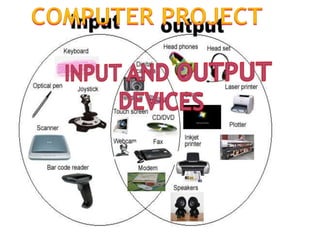
INPUT DEVICE AND OUTPUT DEVICE
In computing, an input device is any peripheral (piece of computer
hardware equipment) used to provide data and control signals to an
information processing system such as a computer or other information
appliance. Examples of input devices include keyboard, mouse cameras
and joysticks.
Many input devices can be classified according to:
modality of input (e.g. mechanical motion, audio, visual, etc.)
the input is discrete (e.g. key presses) or continuous (e.g. a mouse's
position, though digitized into a discrete quantity, is fast enough to be
considered continuous)
the number of degrees of freedom involved (e.g. two-dimensional
traditional mice, or three-dimensional navigators designed for CAD
applications)
Pointing devices, which are input devices used to specify a position in
space, can further be classified according to:
Whether the input is direct or indirect. With direct input, the input
space coincides with the display space, i.e. pointing is done in the
space where visual feedback or the pointer appears. Touch screens and
light pens involve direct input. Examples involving indirect input
include the mouse and track ball
Whether the positional information is absolute (e.g. on a touch screen)
or relative (e.g. with a mouse that can be lifted and repositioned)
In computing, a mouse is a pointing device
that functions by detecting two dimensional
motion relative to its supporting surface.
Physically, a mouse consists of an object held
under one of the user's hands, with one or
more buttons.
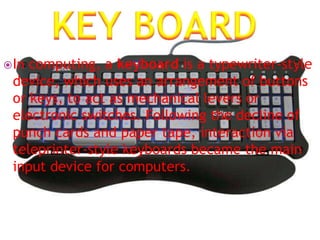
In computing, a keyboard is a typewriter-style
device, which uses an arrangement of buttons
or keys, to act as mechanical levers or
electronic switches. Following the decline of
punch cards and paper tape, interaction via
teleprinter-style keyboards became the main
input device for computers.
A webcam is a video camera that feeds its
image in real time to a computer or computer
network. Unlike an IP camera (which uses a
direct connection using Ethernet or Wi-Fi), a
webcam is generally connected by a USB
cable, FireWire cable, or similar cable.
A joystick is an input device consisting of a stick that pivots on a base
and reports its angle or direction to the device it is controlling. A
joystick, also known as the control column, is the principal control
device in the cockpit of many civilian and military aircraft, either as a
center stick or side-stick. It often has supplementary switches to
control various aspects of the aircraft's flight.
An output device is
any piece of computer
hardware equipment
used to communicate
the results of data
processing carried out
by an information
processing system
(such as a computer)
which converts the
electronically
generated information
into human-readable
form
An image projector is an optical device that projects an image (or
moving images) onto a surface, commonly a projection screen.
Most projectors creates an image by shining a light through a small
transparent image, but some newer types of projectors can project the
image directly, by using lasers. A virtual retinal display, or retinal
projector, is a projector that projects an image directly on the retina
instead of using an external projection screen.
In computing, a printer is a peripheral which produces a
representation of an electronic document on physical media
such as paper or transparency film. Many printers are local
peripherals connected directly to a nearby personal computer.
Individual printers are often designed to support both local and
network connected users at the same time. Some printers can
print documents stored on memory cards or from digital cameras
and scanners. Multifunction printers (MFPs) include a scanner
and can copy paper documents or send a fax; these are also
called multi-function devices (MFD), or all-in-one (AIO) printers.
Most MFPs include printing, scanning, and copying among their
many features.
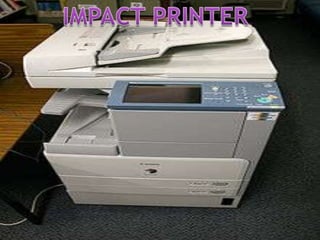
Impact printers rely on a forcible impact to transfer ink to
the media. The impact printer uses a print head that either hits the
surface of the ink ribbon, pressing the ink ribbon against the paper
(similar to the action of a typewriter), or hits the back of the paper,
pressing the paper against the ink ribbon (the IBM 1403 for example).
All but the dot matrix printer rely on the use of fully formed
characters, letterforms that represent each of the characters that the
printer was capable of printing. In addition, most of these printers
were limited to monochrome, or sometimes two-color, printing in a
single typeface at one time, although bolding and underlining of text
could be done by "over striking", that is, printing two or more
impressions in the same character position. Impact printers varieties
include, typewriter-derived printers, teletypewriter-derived printers,
daisy wheel printers, dot matrix printers and line printers. Dot matrix
printers remain in common use in businesses where multi-part forms
are printed, such as car rental services. An overview of impact
printing, contains a detailed description of many of the technologies
used.
NON IMPACT PRINTER
In these Printers, there is no mechanical contact
between the print head and A type of printer that does
not operate by striking a head against a ribbon.
Examples of nonimpact printers include laser and ink-
jet printers. The term nonimpact is important primarily
in that it distinguishes quiet printers from noisy
(impact) printers. paper. Most modern printers are
called non-impact printers since they do not operating
by striking a print head against an ink ribbon. Two
common types of non-impact printers include inkjet
printers, which spray small drops of ink onto each page,
and laser printers, which roll ink onto the paper using a
cylindrical drum.
Headphones are a pair of small loudspeakers that are
designed to be held in place close to a user's ears.
Headphones either have wires for connection to a
signal source such as an audio amplifier, radio, CD
player, portable media player or mobile phone, or have
a wireless receiver, which is used to pick up signal
without using a cable. They are sometimes known as
ear speakers or, colloquially, cans. The in-ear versions
are also known as earphones or ear buds. In the
context of telecommunication, a headset is a
combination of headphone and microphone.
Computer presentation subeesh and abin

Computer presentation subeesh and abin

  • 1.
    INPUT DEVICE ANDOUTPUT DEVICE
  • 2.
    In computing, aninput device is any peripheral (piece of computer hardware equipment) used to provide data and control signals to an information processing system such as a computer or other information appliance. Examples of input devices include keyboard, mouse cameras and joysticks.
  • 3.
    Many input devicescan be classified according to: modality of input (e.g. mechanical motion, audio, visual, etc.) the input is discrete (e.g. key presses) or continuous (e.g. a mouse's position, though digitized into a discrete quantity, is fast enough to be considered continuous) the number of degrees of freedom involved (e.g. two-dimensional traditional mice, or three-dimensional navigators designed for CAD applications) Pointing devices, which are input devices used to specify a position in space, can further be classified according to: Whether the input is direct or indirect. With direct input, the input space coincides with the display space, i.e. pointing is done in the space where visual feedback or the pointer appears. Touch screens and light pens involve direct input. Examples involving indirect input include the mouse and track ball Whether the positional information is absolute (e.g. on a touch screen) or relative (e.g. with a mouse that can be lifted and repositioned)
  • 5.
    In computing, amouse is a pointing device that functions by detecting two dimensional motion relative to its supporting surface. Physically, a mouse consists of an object held under one of the user's hands, with one or more buttons.
  • 6.
    In computing, akeyboard is a typewriter-style device, which uses an arrangement of buttons or keys, to act as mechanical levers or electronic switches. Following the decline of punch cards and paper tape, interaction via teleprinter-style keyboards became the main input device for computers.
  • 7.
    A webcam isa video camera that feeds its image in real time to a computer or computer network. Unlike an IP camera (which uses a direct connection using Ethernet or Wi-Fi), a webcam is generally connected by a USB cable, FireWire cable, or similar cable.
  • 10.
    A joystick isan input device consisting of a stick that pivots on a base and reports its angle or direction to the device it is controlling. A joystick, also known as the control column, is the principal control device in the cockpit of many civilian and military aircraft, either as a center stick or side-stick. It often has supplementary switches to control various aspects of the aircraft's flight.
  • 11.
    An output deviceis any piece of computer hardware equipment used to communicate the results of data processing carried out by an information processing system (such as a computer) which converts the electronically generated information into human-readable form
  • 14.
    An image projectoris an optical device that projects an image (or moving images) onto a surface, commonly a projection screen. Most projectors creates an image by shining a light through a small transparent image, but some newer types of projectors can project the image directly, by using lasers. A virtual retinal display, or retinal projector, is a projector that projects an image directly on the retina instead of using an external projection screen.
  • 15.
    In computing, aprinter is a peripheral which produces a representation of an electronic document on physical media such as paper or transparency film. Many printers are local peripherals connected directly to a nearby personal computer. Individual printers are often designed to support both local and network connected users at the same time. Some printers can print documents stored on memory cards or from digital cameras and scanners. Multifunction printers (MFPs) include a scanner and can copy paper documents or send a fax; these are also called multi-function devices (MFD), or all-in-one (AIO) printers. Most MFPs include printing, scanning, and copying among their many features.
  • 16.
    Impact printers relyon a forcible impact to transfer ink to the media. The impact printer uses a print head that either hits the surface of the ink ribbon, pressing the ink ribbon against the paper (similar to the action of a typewriter), or hits the back of the paper, pressing the paper against the ink ribbon (the IBM 1403 for example). All but the dot matrix printer rely on the use of fully formed characters, letterforms that represent each of the characters that the printer was capable of printing. In addition, most of these printers were limited to monochrome, or sometimes two-color, printing in a single typeface at one time, although bolding and underlining of text could be done by "over striking", that is, printing two or more impressions in the same character position. Impact printers varieties include, typewriter-derived printers, teletypewriter-derived printers, daisy wheel printers, dot matrix printers and line printers. Dot matrix printers remain in common use in businesses where multi-part forms are printed, such as car rental services. An overview of impact printing, contains a detailed description of many of the technologies used.
  • 18.
    NON IMPACT PRINTER Inthese Printers, there is no mechanical contact between the print head and A type of printer that does not operate by striking a head against a ribbon. Examples of nonimpact printers include laser and ink- jet printers. The term nonimpact is important primarily in that it distinguishes quiet printers from noisy (impact) printers. paper. Most modern printers are called non-impact printers since they do not operating by striking a print head against an ink ribbon. Two common types of non-impact printers include inkjet printers, which spray small drops of ink onto each page, and laser printers, which roll ink onto the paper using a cylindrical drum.
  • 20.
    Headphones are apair of small loudspeakers that are designed to be held in place close to a user's ears. Headphones either have wires for connection to a signal source such as an audio amplifier, radio, CD player, portable media player or mobile phone, or have a wireless receiver, which is used to pick up signal without using a cable. They are sometimes known as ear speakers or, colloquially, cans. The in-ear versions are also known as earphones or ear buds. In the context of telecommunication, a headset is a combination of headphone and microphone.