PERIPHERAL DEVICES
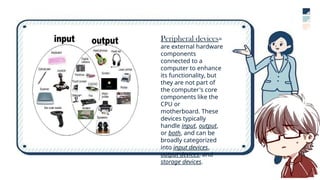
Peripheral devices=
are external hardware
components
connected to a
computer to enhance
its functionality, but
they are not part of
the computer's core
components like the
CPU or
motherboard. These
devices typically
handle input, output,
or both, and can be
broadly categorized
into input devices,
output devices, and
storage devices.
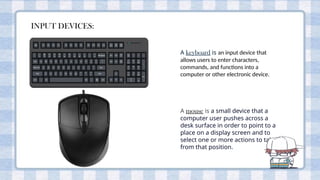
INPUT DEVICES:
A keyboard is an input device that
allows users to enter characters,
commands, and functions into a
computer or other electronic device.
A mouse is a small device that a
computer user pushes across a
desk surface in order to point to a
place on a display screen and to
select one or more actions to take
from that position.
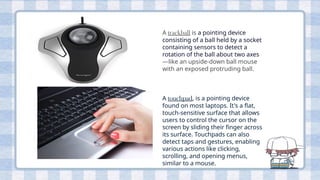
A trackball is a pointing device
consisting of a ball held by a socket
containing sensors to detect a
rotation of the ball about two axes
—like an upside-down ball mouse
with an exposed protruding ball.
A touchpad, is a pointing device
found on most laptops. It's a flat,
touch-sensitive surface that allows
users to control the cursor on the
screen by sliding their finger across
its surface. Touchpads can also
detect taps and gestures, enabling
various actions like clicking,
scrolling, and opening menus,
similar to a mouse.
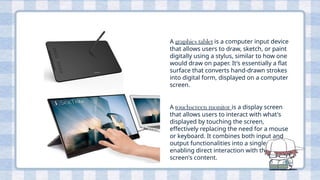
A graphics tablet is a computer input device
that allows users to draw, sketch, or paint
digitally using a stylus, similar to how one
would draw on paper. It's essentially a flat
surface that converts hand-drawn strokes
into digital form, displayed on a computer
screen.
A touchscreen monitor is a display screen
that allows users to interact with what's
displayed by touching the screen,
effectively replacing the need for a mouse
or keyboard. It combines both input and
output functionalities into a single device,
enabling direct interaction with the
screen's content.
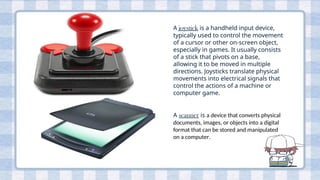
A joystick is a handheld input device,
typically used to control the movement
of a cursor or other on-screen object,
especially in games. It usually consists
of a stick that pivots on a base,
allowing it to be moved in multiple
directions. Joysticks translate physical
movements into electrical signals that
control the actions of a machine or
computer game.
A scanner is a device that converts physical
documents, images, or objects into a digital
format that can be stored and manipulated
on a computer.
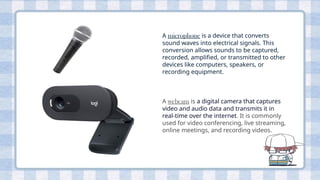
A microphone is a device that converts
sound waves into electrical signals. This
conversion allows sounds to be captured,
recorded, amplified, or transmitted to other
devices like computers, speakers, or
recording equipment.
A webcam is a digital camera that captures
video and audio data and transmits it in
real-time over the internet. It is commonly
used for video conferencing, live streaming,
online meetings, and recording videos.
OUTPUT DEVICES:
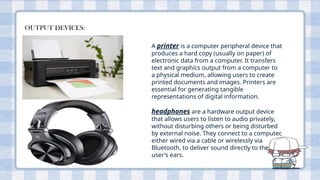
A printer is a computer peripheral device that
produces a hard copy (usually on paper) of
electronic data from a computer. It transfers
text and graphics output from a computer to
a physical medium, allowing users to create
printed documents and images. Printers are
essential for generating tangible
representations of digital information.
headphones are a hardware output device
that allows users to listen to audio privately,
without disturbing others or being disturbed
by external noise. They connect to a computer,
either wired via a cable or wirelessly via
Bluetooth, to deliver sound directly to the
user's ears.
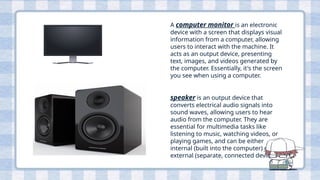
A computer monitor is an electronic
device with a screen that displays visual
information from a computer, allowing
users to interact with the machine. It
acts as an output device, presenting
text, images, and videos generated by
the computer. Essentially, it's the screen
you see when using a computer.
speaker is an output device that
converts electrical audio signals into
sound waves, allowing users to hear
audio from the computer. They are
essential for multimedia tasks like
listening to music, watching videos, or
playing games, and can be either
internal (built into the computer) or
external (separate, connected devices).
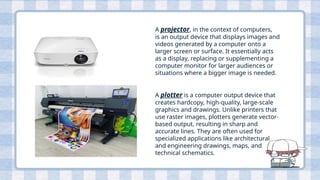
A projector, in the context of computers,
is an output device that displays images and
videos generated by a computer onto a
larger screen or surface. It essentially acts
as a display, replacing or supplementing a
computer monitor for larger audiences or
situations where a bigger image is needed.
A plotter is a computer output device that
creates hardcopy, high-quality, large-scale
graphics and drawings. Unlike printers that
use raster images, plotters generate vector-
based output, resulting in sharp and
accurate lines. They are often used for
specialized applications like architectural
and engineering drawings, maps, and
technical schematics.
WELL DONE!!!

css, peripheral devices, input devices for computers

  • 1.
  • 2.
    Peripheral devices= are externalhardware components connected to a computer to enhance its functionality, but they are not part of the computer's core components like the CPU or motherboard. These devices typically handle input, output, or both, and can be broadly categorized into input devices, output devices, and storage devices.
  • 3.
    INPUT DEVICES: A keyboardis an input device that allows users to enter characters, commands, and functions into a computer or other electronic device. A mouse is a small device that a computer user pushes across a desk surface in order to point to a place on a display screen and to select one or more actions to take from that position.
  • 4.
    A trackball isa pointing device consisting of a ball held by a socket containing sensors to detect a rotation of the ball about two axes —like an upside-down ball mouse with an exposed protruding ball. A touchpad, is a pointing device found on most laptops. It's a flat, touch-sensitive surface that allows users to control the cursor on the screen by sliding their finger across its surface. Touchpads can also detect taps and gestures, enabling various actions like clicking, scrolling, and opening menus, similar to a mouse.
  • 5.
    A graphics tabletis a computer input device that allows users to draw, sketch, or paint digitally using a stylus, similar to how one would draw on paper. It's essentially a flat surface that converts hand-drawn strokes into digital form, displayed on a computer screen. A touchscreen monitor is a display screen that allows users to interact with what's displayed by touching the screen, effectively replacing the need for a mouse or keyboard. It combines both input and output functionalities into a single device, enabling direct interaction with the screen's content.
  • 6.
    A joystick isa handheld input device, typically used to control the movement of a cursor or other on-screen object, especially in games. It usually consists of a stick that pivots on a base, allowing it to be moved in multiple directions. Joysticks translate physical movements into electrical signals that control the actions of a machine or computer game. A scanner is a device that converts physical documents, images, or objects into a digital format that can be stored and manipulated on a computer.
  • 7.
    A microphone isa device that converts sound waves into electrical signals. This conversion allows sounds to be captured, recorded, amplified, or transmitted to other devices like computers, speakers, or recording equipment. A webcam is a digital camera that captures video and audio data and transmits it in real-time over the internet. It is commonly used for video conferencing, live streaming, online meetings, and recording videos.
  • 8.
    OUTPUT DEVICES: A printeris a computer peripheral device that produces a hard copy (usually on paper) of electronic data from a computer. It transfers text and graphics output from a computer to a physical medium, allowing users to create printed documents and images. Printers are essential for generating tangible representations of digital information. headphones are a hardware output device that allows users to listen to audio privately, without disturbing others or being disturbed by external noise. They connect to a computer, either wired via a cable or wirelessly via Bluetooth, to deliver sound directly to the user's ears.
  • 9.
    A computer monitoris an electronic device with a screen that displays visual information from a computer, allowing users to interact with the machine. It acts as an output device, presenting text, images, and videos generated by the computer. Essentially, it's the screen you see when using a computer. speaker is an output device that converts electrical audio signals into sound waves, allowing users to hear audio from the computer. They are essential for multimedia tasks like listening to music, watching videos, or playing games, and can be either internal (built into the computer) or external (separate, connected devices).
  • 10.
    A projector, inthe context of computers, is an output device that displays images and videos generated by a computer onto a larger screen or surface. It essentially acts as a display, replacing or supplementing a computer monitor for larger audiences or situations where a bigger image is needed. A plotter is a computer output device that creates hardcopy, high-quality, large-scale graphics and drawings. Unlike printers that use raster images, plotters generate vector- based output, resulting in sharp and accurate lines. They are often used for specialized applications like architectural and engineering drawings, maps, and technical schematics.

  • 11.