ST.JOHN THE BAPTIST’S
COLLEGE OF EDUCATION
NEDUMKUNNAM
POWERPOINT PRESENTATION
Submitted to
Merin M.Thomas
Department of Education
Submitted by
Francis Benny
Physical Science
Roll No: 42
WELCOME
COMPUTER
INTRODUCTION
A device that computes, especially a
programmable electronic machine that
performs high-speed mathematical or
logical operations or that assembles, stores,
correlates, or otherwise processes
information.
PARTS OF THE COMPUTER
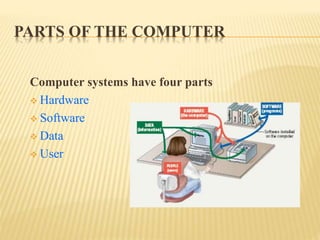
Computer systems have four parts
 Hardware
 Software
 Data
 User
Hardware
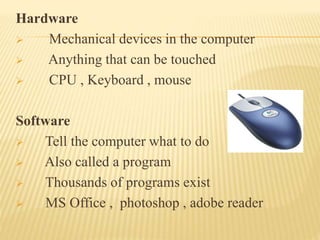
 Mechanical devices in the computer
 Anything that can be touched
 CPU , Keyboard , mouse
Software
 Tell the computer what to do
 Also called a program
 Thousands of programs exist
 MS Office , photoshop , adobe reader
 Data
 Pieces of information
 Computer organize and present data
 Users
 People operating the computer
 Most important part
 Tell the computer what to do
INFORMATION PROCESSING CYCLE
Steps followed to process data
 Input
 Processing
 Output
 Storage
ESSENTIAL COMPUTER HARDWARES
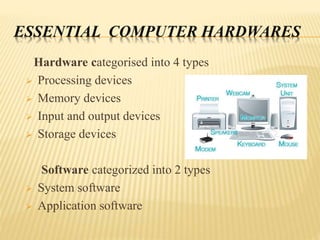
Hardware categorised into 4 types
 Processing devices
 Memory devices
 Input and output devices
 Storage devices
Software categorized into 2 types
 System software
 Application software
EDUCATIONAL IMPLICATIONS
The student is actively exploring phenomena ,instead
of being a passive recepient of information.
 Teacher and students can use computer –Based tools
such as, Text or Graphic editors, Databases,
Spreadsheets, or Presentation packages , to help in
processing information
THANKYOUTHANK YOU

Computer

  • 1.
    ST.JOHN THE BAPTIST’S COLLEGEOF EDUCATION NEDUMKUNNAM POWERPOINT PRESENTATION Submitted to Merin M.Thomas Department of Education Submitted by Francis Benny Physical Science Roll No: 42
  • 2.
  • 3.
  • 4.
    INTRODUCTION A device thatcomputes, especially a programmable electronic machine that performs high-speed mathematical or logical operations or that assembles, stores, correlates, or otherwise processes information.
  • 5.
    PARTS OF THECOMPUTER Computer systems have four parts  Hardware  Software  Data  User
  • 6.
    Hardware  Mechanical devicesin the computer  Anything that can be touched  CPU , Keyboard , mouse Software  Tell the computer what to do  Also called a program  Thousands of programs exist  MS Office , photoshop , adobe reader
  • 7.
     Data  Piecesof information  Computer organize and present data  Users  People operating the computer  Most important part  Tell the computer what to do
  • 8.
    INFORMATION PROCESSING CYCLE Stepsfollowed to process data  Input  Processing  Output  Storage
  • 9.
    ESSENTIAL COMPUTER HARDWARES Hardwarecategorised into 4 types  Processing devices  Memory devices  Input and output devices  Storage devices Software categorized into 2 types  System software  Application software
  • 10.
    EDUCATIONAL IMPLICATIONS The studentis actively exploring phenomena ,instead of being a passive recepient of information.  Teacher and students can use computer –Based tools such as, Text or Graphic editors, Databases, Spreadsheets, or Presentation packages , to help in processing information
  • 11.