INTRODUCTION TO COMPUTER
© Aviyal Presentations : https://aviyalpresentations.wordpress.com/
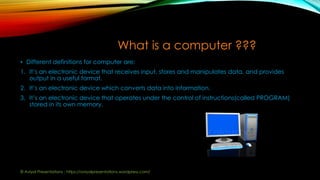
What is a computer ???
• Different definitions for computer are:
1. It’s an electronic device that receives input, stores and manipulates data, and provides
output in a useful format.
2. It’s an electronic device which converts data into information.
3. It’s an electronic device that operates under the control of instructions(called PROGRAM)
stored in its own memory.
© Aviyal Presentations : https://aviyalpresentations.wordpress.com/
Evolution of computer
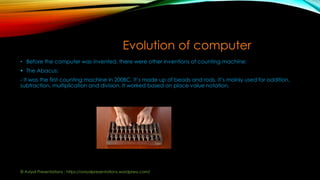
• Before the computer was invented, there were other inventions of counting machine:
 The Abacus:
- It was the first counting machine in 200BC. It’s made up of beads and rods. It’s mainly used for addition,
subtraction, multiplication and division. It worked based on place value notation.
© Aviyal Presentations : https://aviyalpresentations.wordpress.com/
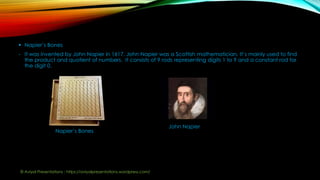
 Napier’s Bones
- It was invented by John Napier in 1617. John Napier was a Scottish mathematician. It’s mainly used to find
the product and quotient of numbers. It consists of 9 rods representing digits 1 to 9 and a constant rod for
the digit 0.
Napier’s Bones
John Napier
© Aviyal Presentations : https://aviyalpresentations.wordpress.com/
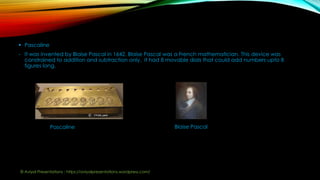
 Pascaline
- It was invented by Blaise Pascal in 1642. Blaise Pascal was a French mathematician. This device was
constrained to addition and subtraction only. It had 8 movable dials that could add numbers upto 8
figures long.
Pascaline Blaise Pascal
© Aviyal Presentations : https://aviyalpresentations.wordpress.com/
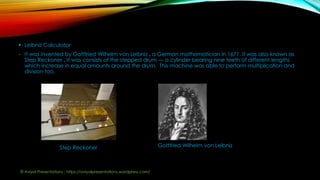
 Leibniz Calculator
- It was invented by Gottfried Wilhelm von Leibniz , a German mathematician in 1671. It was also known as
Step Reckoner . It was consists of the stepped drum — a cylinder bearing nine teeth of different lengths
which increase in equal amounts around the drum. This machine was able to perform multiplication and
division too.
Step Reckoner Gottfried Wilhelm von Leibniz
© Aviyal Presentations : https://aviyalpresentations.wordpress.com/
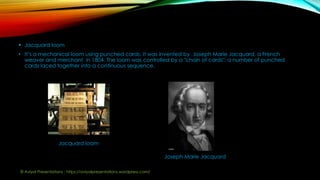
 Jacquard loom
• It’s a mechanical loom using punched cards. It was invented by Joseph Marie Jacquard, a French
weaver and merchant in 1804. The loom was controlled by a "chain of cards"; a number of punched
cards laced together into a continuous sequence.
Jacquard loam
Joseph Marie Jacquard
© Aviyal Presentations : https://aviyalpresentations.wordpress.com/
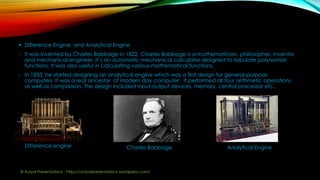
 Difference Engine and Analytical Engine
- It was invented by Charles Babbage in 1822. Charles Babbage is a mathematician, philosopher, inventor
and mechanical engineer .It’s an automatic mechanical calculator designed to tabulate polynomial
functions. It was also useful in calculating various mathematical functions.
- In 1833, he started designing an analytical engine which was a first design for general-purpose
computers. It was a real ancestor of modern day computer. It performed all four arithmetic operations
as well as comparison. The design included input-output devices, memory, central processor etc..
Difference engine Charles Babbage Analytical Engine
© Aviyal Presentations : https://aviyalpresentations.wordpress.com/
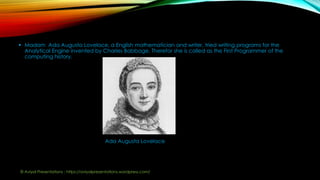
 Madam Ada Augusta Lovelace, a English mathematician and writer, tried writing programs for the
Analytical Engine invented by Charles Babbage. Therefor she is called as the First Programmer of the
computing history.
Ada Augusta Lovelace
© Aviyal Presentations : https://aviyalpresentations.wordpress.com/
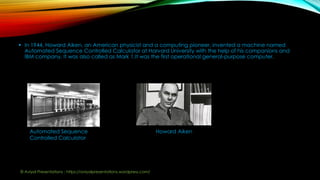
 In 1944, Howard Aiken, an American physicist and a computing pioneer, invented a machine named
Automated Sequence Controlled Calculator at Harvard University with the help of his companions and
IBM company. It was also called as Mark 1.It was the first operational general-purpose computer.
Automated Sequence
Controlled Calculator
Howard Aiken
© Aviyal Presentations : https://aviyalpresentations.wordpress.com/
Components of a computer
• A computer system consists of two main components :
 Hardware
 Software
• Theses two components together make up a computer system.
Hardware:
• Computer hardware are the physical parts or components of a computer.
• Hardware comprises of the below 4 components:
1. Input devices
2. CPU
3. Output devices
4. Storage devices
© Aviyal Presentations : https://aviyalpresentations.wordpress.com/
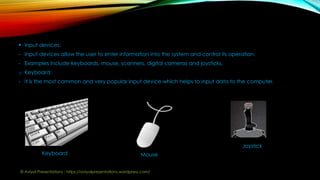
 Input devices:
- Input devices allow the user to enter information into the system and control its operation.
- Examples include keyboards, mouse, scanners, digital cameras and joysticks.
o Keyboard:
- It is the most common and very popular input device which helps to input data to the computer.
Keyboard Mouse
Joystick
© Aviyal Presentations : https://aviyalpresentations.wordpress.com/
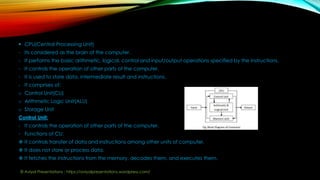
 CPU(Central Processing Unit)
- Its considered as the brain of the computer.
- It performs the basic arithmetic, logical, control and input/output operations specified by the instructions.
- It controls the operation of other parts of the computer.
- It is used to store data, intermediate result and instructions.
- It comprises of:
o Control Unit(CU)
o Arithmetic Logic Unit(ALU)
o Storage Unit
Control Unit:
- It controls the operation of other parts of the computer.
- Functions of CU:
 It controls transfer of data and instructions among other units of computer.
 It does not store or process data.
 It fetches the instructions from the memory, decodes them, and executes them.
© Aviyal Presentations : https://aviyalpresentations.wordpress.com/
Arithmetic Logic Unit(ALU)
- It performs the basic arithmetic, logical operations specified by the instructions.
- Arithmetic operations includes addition, subtraction, multiplication, and division.
- Logical operations includes comparison, selection and merging of data.
Storage Unit
- Its also known as the internal storage unit, primary storage or main memory or Random Access
Memory(RAM).
- It is used to store data, intermediate result and instructions.
- It supplies data to other parts of the computer when required.
- Its volatile, i.e. loses data if there is a break in the power supply.
- Primary memory and secondary memory are two types of memories in the computer.
© Aviyal Presentations : https://aviyalpresentations.wordpress.com/
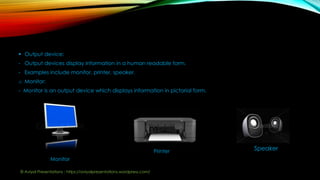
 Output device:
- Output devices display information in a human readable form.
- Examples include monitor, printer, speaker.
o Monitor:
- Monitor is an output device which displays information in pictorial form.
Monitor
Printer Speaker
© Aviyal Presentations : https://aviyalpresentations.wordpress.com/
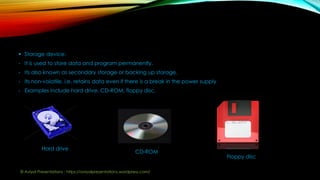
 Storage device:
- It is used to store data and program permanently.
- Its also known as secondary storage or backing up storage.
- Its non-volatile, i.e. retains data even if there is a break in the power supply
- Examples include hard drive, CD-ROM, floppy disc.
Hard drive
CD-ROM
Floppy disc
© Aviyal Presentations : https://aviyalpresentations.wordpress.com/
Software
• It’s a collection of computer programs, procedures and documentation that performs some task on the
computer system.
• It tells the hardware what to do.
• Example include websites, video games etc..
• Different types of software:
1. Application Software
2. System Software
3. Utility Software
 Application Software
- is a computer program designed to perform a group of coordinated functions, tasks, or activities for the
benefit of the user.
- Examples of an application include a word processor, a spreadsheet.
© Aviyal Presentations : https://aviyalpresentations.wordpress.com/
 System software
- System software, or systems software, is computer software designed to provide a platform to other
software.
- Example: Operating System
Operating System
o It’s the most important program that runs on the computer.
o An operating system (OS) is system software that manages computer hardware and software resources.
o Example : Microsoft Windows, Chrome OS, iOS, Linux
 Utility software
- Utility software is a system software designed to help analyze, configure, optimize or maintain a computer.
© Aviyal Presentations : https://aviyalpresentations.wordpress.com/
Operations of a computer
• 4 functions of a computer are:
1. Input
2. Processing
3. Storage
4. Output
Input
- This is the process of entering data and programs in to the computer system.
Processing
- The task of performing operations like arithmetic and logical operations is called processing.
Storage
- The process of saving data and instructions permanently is known as storage.
Output
- This is the process of producing results from the data for getting useful information.
© Aviyal Presentations : https://aviyalpresentations.wordpress.com/
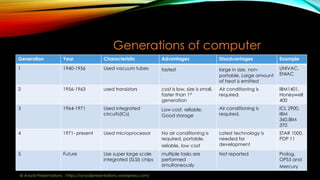
Generations of computer
Generation Year Characteristic Advantages Disadvantages Example
1 1940-1956 Used vacuum tubes fastest large in size, non-
portable, Large amount
of heat is emitted
UNIVAC,
ENIAC
2 1956-1963 used transistors cost is low, size is small,
faster than 1st
generation
Air conditioning is
required.
IBM1401,
Honeywell
400
3 1964-1971 Used integrated
circuits(ICs)
Low cost, reliable,
Good storage
Air conditioning is
required.
ICL 2900,
IBM
360,IBM
370
4 1971- present Used microprocessor No air conditioning is
required, portable,
reliable, low cost
Latest technology is
needed for
development
STAR 1000,
PDP 11
5 Future Use super large scale
integrated (SLSI) chips
multiple tasks are
performed
simultaneously
Not reported Prolog,
OPS5 and
Mercury
© Aviyal Presentations : https://aviyalpresentations.wordpress.com/
Types of computer
• Computer is classified into 4 types:
1. Supercomputer
2. Mainframe
3. Minicomputer
4. Workstation
5. Microcomputer
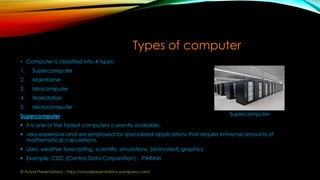
Supercomputer
 It is one of the fastest computers currently available.
 very expensive and are employed for specialized applications that require immense amounts of
mathematical calculations.
 Uses: weather forecasting, scientific simulations, (animated) graphics
 Example: CDC (Control Data Corporation) , PARAM
Supercomputer
© Aviyal Presentations : https://aviyalpresentations.wordpress.com/
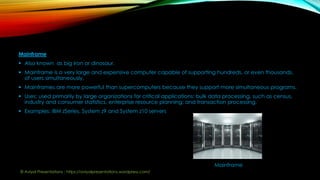
Mainframe
 Also known as big iron or dinosaur.
 Mainframe is a very large and expensive computer capable of supporting hundreds, or even thousands,
of users simultaneously.
 Mainframes are more powerful than supercomputers because they support more simultaneous programs.
 Uses: used primarily by large organizations for critical applications; bulk data processing, such as census,
industry and consumer statistics, enterprise resource planning; and transaction processing.
 Examples: IBM zSeries, System z9 and System z10 servers
Mainframe
© Aviyal Presentations : https://aviyalpresentations.wordpress.com/
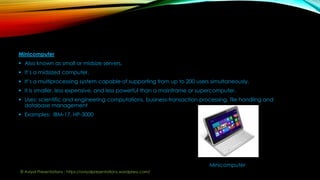
Minicomputer
 Also known as small or midsize servers.
 It’s a midsized computer.
 It’s a multiprocessing system capable of supporting from up to 200 users simultaneously.
 It is smaller, less expensive, and less powerful than a mainframe or supercomputer.
 Uses: scientific and engineering computations, business-transaction processing, file handling and
database management
 Examples: IBM-17, HP-3000
Minicomputer
© Aviyal Presentations : https://aviyalpresentations.wordpress.com/
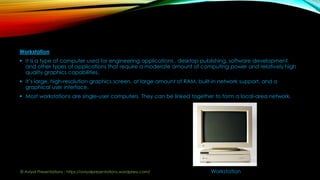
Workstation
 It is a type of computer used for engineering applications , desktop publishing, software development,
and other types of applications that require a moderate amount of computing power and relatively high
quality graphics capabilities.
 It’s large, high-resolution graphics screen, at large amount of RAM, built-in network support, and a
graphical user interface.
 Most workstations are single-user computers. They can be linked together to form a local-area network.
Workstation© Aviyal Presentations : https://aviyalpresentations.wordpress.com/
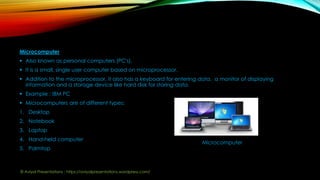
Microcomputer
 Also known as personal computers (PC's).
 It is a small, single user computer based on microprocessor.
 Addition to the microprocessor, it also has a keyboard for entering data, a monitor of displaying
information and a storage device like hard disk for storing data.
 Example : IBM PC
 Microcomputers are of different types:
1. Desktop
2. Notebook
3. Laptop
4. Hand-held computer
5. Palmtop
Microcomputer
© Aviyal Presentations : https://aviyalpresentations.wordpress.com/
Advantages
• Some of the advantages of computer are:
 High Speed: very fast device.
 Accuracy: very accurate, calculations are100% error free.
 Storage: stores large amount of data.
 Reliability: very reliable, electronic components have long life, maintenance is easy.
 Utility: It can be used to solve the problems related to various fields.
 Flexibility: A computer is very flexible in performing the jobs to be done.
 Cost: installing a computer is high but it substantially reduces the cost of each of its transaction.
 Paper Work: leads to reduction in paper work and results in speeding up a process.
 Automation: automatic machine i.e. it can perform given task automatically.
 Communication: allows people to communicate with each other. E.g. Email
© Aviyal Presentations : https://aviyalpresentations.wordpress.com/
Disadvantages
• Some of the disadvantages of computer are:
 Intelligence: no intelligence and no IQ.
 Dependent: its fully dependent on human, cannot take a decision on its own.
 Feeling: no feelings and emotions.
 Technology: technology keeps changing- it may even become obsolete, needs to be updated regularly-
which is a time consuming and costly process.
 Health issue: continued use of computer might lead to injuries of the wrist, neck, eyes and back.
© Aviyal Presentations : https://aviyalpresentations.wordpress.com/
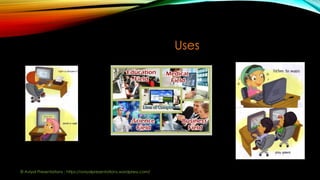
Uses
© Aviyal Presentations : https://aviyalpresentations.wordpress.com/
Thank You!

Computer

  • 1.
    INTRODUCTION TO COMPUTER ©Aviyal Presentations : https://aviyalpresentations.wordpress.com/
  • 2.
    What is acomputer ??? • Different definitions for computer are: 1. It’s an electronic device that receives input, stores and manipulates data, and provides output in a useful format. 2. It’s an electronic device which converts data into information. 3. It’s an electronic device that operates under the control of instructions(called PROGRAM) stored in its own memory. © Aviyal Presentations : https://aviyalpresentations.wordpress.com/
  • 3.
    Evolution of computer •Before the computer was invented, there were other inventions of counting machine:  The Abacus: - It was the first counting machine in 200BC. It’s made up of beads and rods. It’s mainly used for addition, subtraction, multiplication and division. It worked based on place value notation. © Aviyal Presentations : https://aviyalpresentations.wordpress.com/
  • 4.
     Napier’s Bones -It was invented by John Napier in 1617. John Napier was a Scottish mathematician. It’s mainly used to find the product and quotient of numbers. It consists of 9 rods representing digits 1 to 9 and a constant rod for the digit 0. Napier’s Bones John Napier © Aviyal Presentations : https://aviyalpresentations.wordpress.com/
  • 5.
     Pascaline - Itwas invented by Blaise Pascal in 1642. Blaise Pascal was a French mathematician. This device was constrained to addition and subtraction only. It had 8 movable dials that could add numbers upto 8 figures long. Pascaline Blaise Pascal © Aviyal Presentations : https://aviyalpresentations.wordpress.com/
  • 6.
     Leibniz Calculator -It was invented by Gottfried Wilhelm von Leibniz , a German mathematician in 1671. It was also known as Step Reckoner . It was consists of the stepped drum — a cylinder bearing nine teeth of different lengths which increase in equal amounts around the drum. This machine was able to perform multiplication and division too. Step Reckoner Gottfried Wilhelm von Leibniz © Aviyal Presentations : https://aviyalpresentations.wordpress.com/
  • 7.
     Jacquard loom •It’s a mechanical loom using punched cards. It was invented by Joseph Marie Jacquard, a French weaver and merchant in 1804. The loom was controlled by a "chain of cards"; a number of punched cards laced together into a continuous sequence. Jacquard loam Joseph Marie Jacquard © Aviyal Presentations : https://aviyalpresentations.wordpress.com/
  • 8.
     Difference Engineand Analytical Engine - It was invented by Charles Babbage in 1822. Charles Babbage is a mathematician, philosopher, inventor and mechanical engineer .It’s an automatic mechanical calculator designed to tabulate polynomial functions. It was also useful in calculating various mathematical functions. - In 1833, he started designing an analytical engine which was a first design for general-purpose computers. It was a real ancestor of modern day computer. It performed all four arithmetic operations as well as comparison. The design included input-output devices, memory, central processor etc.. Difference engine Charles Babbage Analytical Engine © Aviyal Presentations : https://aviyalpresentations.wordpress.com/
  • 9.
     Madam AdaAugusta Lovelace, a English mathematician and writer, tried writing programs for the Analytical Engine invented by Charles Babbage. Therefor she is called as the First Programmer of the computing history. Ada Augusta Lovelace © Aviyal Presentations : https://aviyalpresentations.wordpress.com/
  • 10.
     In 1944,Howard Aiken, an American physicist and a computing pioneer, invented a machine named Automated Sequence Controlled Calculator at Harvard University with the help of his companions and IBM company. It was also called as Mark 1.It was the first operational general-purpose computer. Automated Sequence Controlled Calculator Howard Aiken © Aviyal Presentations : https://aviyalpresentations.wordpress.com/
  • 11.
    Components of acomputer • A computer system consists of two main components :  Hardware  Software • Theses two components together make up a computer system. Hardware: • Computer hardware are the physical parts or components of a computer. • Hardware comprises of the below 4 components: 1. Input devices 2. CPU 3. Output devices 4. Storage devices © Aviyal Presentations : https://aviyalpresentations.wordpress.com/
  • 12.
     Input devices: -Input devices allow the user to enter information into the system and control its operation. - Examples include keyboards, mouse, scanners, digital cameras and joysticks. o Keyboard: - It is the most common and very popular input device which helps to input data to the computer. Keyboard Mouse Joystick © Aviyal Presentations : https://aviyalpresentations.wordpress.com/
  • 13.
     CPU(Central ProcessingUnit) - Its considered as the brain of the computer. - It performs the basic arithmetic, logical, control and input/output operations specified by the instructions. - It controls the operation of other parts of the computer. - It is used to store data, intermediate result and instructions. - It comprises of: o Control Unit(CU) o Arithmetic Logic Unit(ALU) o Storage Unit Control Unit: - It controls the operation of other parts of the computer. - Functions of CU:  It controls transfer of data and instructions among other units of computer.  It does not store or process data.  It fetches the instructions from the memory, decodes them, and executes them. © Aviyal Presentations : https://aviyalpresentations.wordpress.com/
  • 14.
    Arithmetic Logic Unit(ALU) -It performs the basic arithmetic, logical operations specified by the instructions. - Arithmetic operations includes addition, subtraction, multiplication, and division. - Logical operations includes comparison, selection and merging of data. Storage Unit - Its also known as the internal storage unit, primary storage or main memory or Random Access Memory(RAM). - It is used to store data, intermediate result and instructions. - It supplies data to other parts of the computer when required. - Its volatile, i.e. loses data if there is a break in the power supply. - Primary memory and secondary memory are two types of memories in the computer. © Aviyal Presentations : https://aviyalpresentations.wordpress.com/
  • 15.
     Output device: -Output devices display information in a human readable form. - Examples include monitor, printer, speaker. o Monitor: - Monitor is an output device which displays information in pictorial form. Monitor Printer Speaker © Aviyal Presentations : https://aviyalpresentations.wordpress.com/
  • 16.
     Storage device: -It is used to store data and program permanently. - Its also known as secondary storage or backing up storage. - Its non-volatile, i.e. retains data even if there is a break in the power supply - Examples include hard drive, CD-ROM, floppy disc. Hard drive CD-ROM Floppy disc © Aviyal Presentations : https://aviyalpresentations.wordpress.com/
  • 17.
    Software • It’s acollection of computer programs, procedures and documentation that performs some task on the computer system. • It tells the hardware what to do. • Example include websites, video games etc.. • Different types of software: 1. Application Software 2. System Software 3. Utility Software  Application Software - is a computer program designed to perform a group of coordinated functions, tasks, or activities for the benefit of the user. - Examples of an application include a word processor, a spreadsheet. © Aviyal Presentations : https://aviyalpresentations.wordpress.com/
  • 18.
     System software -System software, or systems software, is computer software designed to provide a platform to other software. - Example: Operating System Operating System o It’s the most important program that runs on the computer. o An operating system (OS) is system software that manages computer hardware and software resources. o Example : Microsoft Windows, Chrome OS, iOS, Linux  Utility software - Utility software is a system software designed to help analyze, configure, optimize or maintain a computer. © Aviyal Presentations : https://aviyalpresentations.wordpress.com/
  • 19.
    Operations of acomputer • 4 functions of a computer are: 1. Input 2. Processing 3. Storage 4. Output Input - This is the process of entering data and programs in to the computer system. Processing - The task of performing operations like arithmetic and logical operations is called processing. Storage - The process of saving data and instructions permanently is known as storage. Output - This is the process of producing results from the data for getting useful information. © Aviyal Presentations : https://aviyalpresentations.wordpress.com/
  • 20.
    Generations of computer GenerationYear Characteristic Advantages Disadvantages Example 1 1940-1956 Used vacuum tubes fastest large in size, non- portable, Large amount of heat is emitted UNIVAC, ENIAC 2 1956-1963 used transistors cost is low, size is small, faster than 1st generation Air conditioning is required. IBM1401, Honeywell 400 3 1964-1971 Used integrated circuits(ICs) Low cost, reliable, Good storage Air conditioning is required. ICL 2900, IBM 360,IBM 370 4 1971- present Used microprocessor No air conditioning is required, portable, reliable, low cost Latest technology is needed for development STAR 1000, PDP 11 5 Future Use super large scale integrated (SLSI) chips multiple tasks are performed simultaneously Not reported Prolog, OPS5 and Mercury © Aviyal Presentations : https://aviyalpresentations.wordpress.com/
  • 21.
    Types of computer •Computer is classified into 4 types: 1. Supercomputer 2. Mainframe 3. Minicomputer 4. Workstation 5. Microcomputer Supercomputer  It is one of the fastest computers currently available.  very expensive and are employed for specialized applications that require immense amounts of mathematical calculations.  Uses: weather forecasting, scientific simulations, (animated) graphics  Example: CDC (Control Data Corporation) , PARAM Supercomputer © Aviyal Presentations : https://aviyalpresentations.wordpress.com/
  • 22.
    Mainframe  Also knownas big iron or dinosaur.  Mainframe is a very large and expensive computer capable of supporting hundreds, or even thousands, of users simultaneously.  Mainframes are more powerful than supercomputers because they support more simultaneous programs.  Uses: used primarily by large organizations for critical applications; bulk data processing, such as census, industry and consumer statistics, enterprise resource planning; and transaction processing.  Examples: IBM zSeries, System z9 and System z10 servers Mainframe © Aviyal Presentations : https://aviyalpresentations.wordpress.com/
  • 23.
    Minicomputer  Also knownas small or midsize servers.  It’s a midsized computer.  It’s a multiprocessing system capable of supporting from up to 200 users simultaneously.  It is smaller, less expensive, and less powerful than a mainframe or supercomputer.  Uses: scientific and engineering computations, business-transaction processing, file handling and database management  Examples: IBM-17, HP-3000 Minicomputer © Aviyal Presentations : https://aviyalpresentations.wordpress.com/
  • 24.
    Workstation  It isa type of computer used for engineering applications , desktop publishing, software development, and other types of applications that require a moderate amount of computing power and relatively high quality graphics capabilities.  It’s large, high-resolution graphics screen, at large amount of RAM, built-in network support, and a graphical user interface.  Most workstations are single-user computers. They can be linked together to form a local-area network. Workstation© Aviyal Presentations : https://aviyalpresentations.wordpress.com/
  • 25.
    Microcomputer  Also knownas personal computers (PC's).  It is a small, single user computer based on microprocessor.  Addition to the microprocessor, it also has a keyboard for entering data, a monitor of displaying information and a storage device like hard disk for storing data.  Example : IBM PC  Microcomputers are of different types: 1. Desktop 2. Notebook 3. Laptop 4. Hand-held computer 5. Palmtop Microcomputer © Aviyal Presentations : https://aviyalpresentations.wordpress.com/
  • 26.
    Advantages • Some ofthe advantages of computer are:  High Speed: very fast device.  Accuracy: very accurate, calculations are100% error free.  Storage: stores large amount of data.  Reliability: very reliable, electronic components have long life, maintenance is easy.  Utility: It can be used to solve the problems related to various fields.  Flexibility: A computer is very flexible in performing the jobs to be done.  Cost: installing a computer is high but it substantially reduces the cost of each of its transaction.  Paper Work: leads to reduction in paper work and results in speeding up a process.  Automation: automatic machine i.e. it can perform given task automatically.  Communication: allows people to communicate with each other. E.g. Email © Aviyal Presentations : https://aviyalpresentations.wordpress.com/
  • 27.
    Disadvantages • Some ofthe disadvantages of computer are:  Intelligence: no intelligence and no IQ.  Dependent: its fully dependent on human, cannot take a decision on its own.  Feeling: no feelings and emotions.  Technology: technology keeps changing- it may even become obsolete, needs to be updated regularly- which is a time consuming and costly process.  Health issue: continued use of computer might lead to injuries of the wrist, neck, eyes and back. © Aviyal Presentations : https://aviyalpresentations.wordpress.com/
  • 28.
    Uses © Aviyal Presentations: https://aviyalpresentations.wordpress.com/
  • 29.
    © Aviyal Presentations: https://aviyalpresentations.wordpress.com/ Thank You!