Comparison Chart: Prezi & PowerPoint

                              Prezi                               PowerPoint

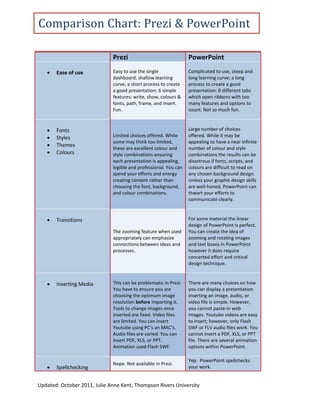
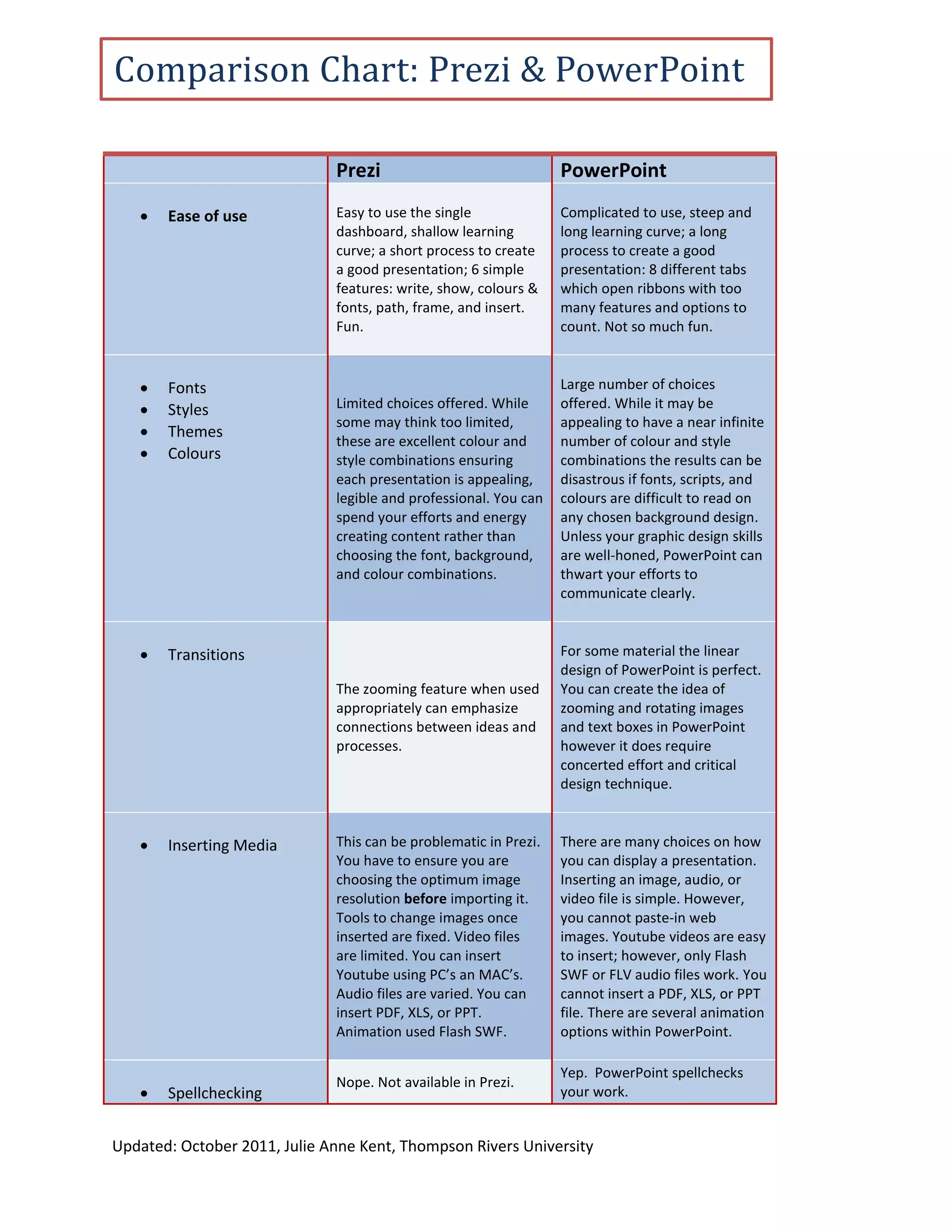
      Ease of use            Easy to use the single              Complicated to use, steep and
                              dashboard, shallow learning         long learning curve; a long
                              curve; a short process to create    process to create a good
                              a good presentation; 6 simple       presentation: 8 different tabs
                              features: write, show, colours &    which open ribbons with too
                              fonts, path, frame, and insert.     many features and options to
                              Fun.                                count. Not so much fun.


      Fonts                                                      Large number of choices
      Styles                 Limited choices offered. While      offered. While it may be
                              some may think too limited,         appealing to have a near infinite
      Themes
                              these are excellent colour and      number of colour and style
      Colours                style combinations ensuring         combinations the results can be
                              each presentation is appealing,     disastrous if fonts, scripts, and
                              legible and professional. You can   colours are difficult to read on
                              spend your efforts and energy       any chosen background design.
                              creating content rather than        Unless your graphic design skills
                              choosing the font, background,      are well-honed, PowerPoint can
                              and colour combinations.            thwart your efforts to
                                                                  communicate clearly.


      Transitions                                                For some material the linear
                                                                  design of PowerPoint is perfect.
                              The zooming feature when used       You can create the idea of
                              appropriately can emphasize         zooming and rotating images
                              connections between ideas and       and text boxes in PowerPoint
                              processes.                          however it does require
                                                                  concerted effort and critical
                                                                  design technique.


      Inserting Media        This can be problematic in Prezi.   There are many choices on how
                              You have to ensure you are          you can display a presentation.
                              choosing the optimum image          Inserting an image, audio, or
                              resolution before importing it.     video file is simple. However,
                              Tools to change images once         you cannot paste-in web
                              inserted are fixed. Video files     images. Youtube videos are easy
                              are limited. You can insert         to insert; however, only Flash
                              Youtube using PC’s an MAC’s.        SWF or FLV audio files work. You
                              Audio files are varied. You can     cannot insert a PDF, XLS, or PPT
                              insert PDF, XLS, or PPT.            file. There are several animation
                              Animation used Flash SWF.           options within PowerPoint.

                                                                  Yep. PowerPoint spellchecks
                              Nope. Not available in Prezi.
      Spellchecking                                              your work.


Updated: October 2011, Julie Anne Kent, Thompson Rivers University
Comparison Chart: Prezi & PowerPoint
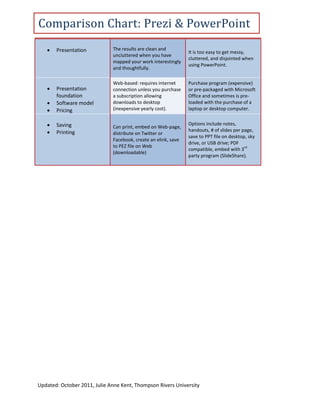
      Presentation           The results are clean and
                                                                It is too easy to get messy,
                              uncluttered when you have
                                                                cluttered, and disjointed when
                              mapped your work interestingly
                                                                using PowerPoint.
                              and thoughtfully.

                              Web-based: requires internet      Purchase program (expensive)
      Presentation           connection unless you purchase    or pre-packaged with Microsoft
       foundation             a subscription allowing           Office and sometimes is pre-
      Software model         downloads to desktop              loaded with the purchase of a
      Pricing                (inexpensive yearly cost).        laptop or desktop computer.


      Saving                 Can print, embed on Web-page,
                                                                Options include notes,
      Printing                                                 handouts, # of slides per page,
                              distribute on Twitter or
                                                                save to PPT file on desktop, sky
                              Facebook, create an elink, save
                                                                drive, or USB drive; PDF
                              to PEZ file on Web                                           rd
                                                                compatible, embed with 3
                              (downloadable)
                                                                party program (SlideShare).


Updated: October 2011, Julie Anne Kent, Thompson Rivers University

Comparison Chart: Prezi & PowerPoint

  • 1.
    Comparison Chart: Prezi& PowerPoint Prezi PowerPoint  Ease of use Easy to use the single Complicated to use, steep and dashboard, shallow learning long learning curve; a long curve; a short process to create process to create a good a good presentation; 6 simple presentation: 8 different tabs features: write, show, colours & which open ribbons with too fonts, path, frame, and insert. many features and options to Fun. count. Not so much fun.  Fonts Large number of choices  Styles Limited choices offered. While offered. While it may be some may think too limited, appealing to have a near infinite  Themes these are excellent colour and number of colour and style  Colours style combinations ensuring combinations the results can be each presentation is appealing, disastrous if fonts, scripts, and legible and professional. You can colours are difficult to read on spend your efforts and energy any chosen background design. creating content rather than Unless your graphic design skills choosing the font, background, are well-honed, PowerPoint can and colour combinations. thwart your efforts to communicate clearly.  Transitions For some material the linear design of PowerPoint is perfect. The zooming feature when used You can create the idea of appropriately can emphasize zooming and rotating images connections between ideas and and text boxes in PowerPoint processes. however it does require concerted effort and critical design technique.  Inserting Media This can be problematic in Prezi. There are many choices on how You have to ensure you are you can display a presentation. choosing the optimum image Inserting an image, audio, or resolution before importing it. video file is simple. However, Tools to change images once you cannot paste-in web inserted are fixed. Video files images. Youtube videos are easy are limited. You can insert to insert; however, only Flash Youtube using PC’s an MAC’s. SWF or FLV audio files work. You Audio files are varied. You can cannot insert a PDF, XLS, or PPT insert PDF, XLS, or PPT. file. There are several animation Animation used Flash SWF. options within PowerPoint. Yep. PowerPoint spellchecks Nope. Not available in Prezi.  Spellchecking your work. Updated: October 2011, Julie Anne Kent, Thompson Rivers University
  • 2.
    Comparison Chart: Prezi& PowerPoint  Presentation The results are clean and It is too easy to get messy, uncluttered when you have cluttered, and disjointed when mapped your work interestingly using PowerPoint. and thoughtfully. Web-based: requires internet Purchase program (expensive)  Presentation connection unless you purchase or pre-packaged with Microsoft foundation a subscription allowing Office and sometimes is pre-  Software model downloads to desktop loaded with the purchase of a  Pricing (inexpensive yearly cost). laptop or desktop computer.  Saving Can print, embed on Web-page, Options include notes,  Printing handouts, # of slides per page, distribute on Twitter or save to PPT file on desktop, sky Facebook, create an elink, save drive, or USB drive; PDF to PEZ file on Web rd compatible, embed with 3 (downloadable) party program (SlideShare). Updated: October 2011, Julie Anne Kent, Thompson Rivers University