« FLIPing » over Smartboards
          Sarah Sell
Contents
•   Smart Board Overview
•   SMARTnotebook
•   Smartboard experience
•   Flip Camera Overview
•   Flip Camera experience
•   Videos Recorded from FLIP
•   FLIP computer features
•   Flip Computer features experience
•   Putting it all together
•   Benefits of Technology in the classroom
Smartboard background
• interactive whiteboard
• Developed by SMARTtechnologies
• First developed in 1991
• uses touch detection for user input
  (similar to a computer mouses
  functions)
• Software is included with Smart
  Board whiteboards and Smart
  hardware products.
SMARTnotebook
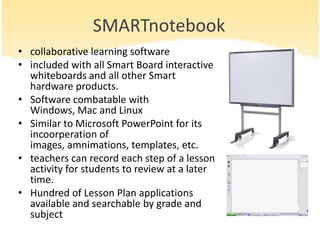
• collaborative learning software
• included with all Smart Board interactive
  whiteboards and all other Smart
  hardware products.
• Software combatable with
  Windows, Mac and Linux
• Similar to Microsoft PowerPoint for its
  incoorperation of
  images, amnimations, templates, etc.
• teachers can record each step of a lesson
  activity for students to review at a later
  time.
• Hundred of Lesson Plan applications
  available and searchable by grade and
  subject
Smartboard experience

The usage of smartboards has been rather entertaining
and interesting in class. I enjoy the smartboard for its
limitless adaptions and exporations of different subject
and curricula. SMARTnote book is very benefitial in
providing ready lesson plans and interactive games
that are perfect or every age clasroom. The smart
board itself is benefitial as it saves teachers time by not
having to rewire the proceedures and assessments
from Lesson plans to the board and allows the students
to focus more on what tis being taught rather than
assuring that they have everything recoded on the
board.
FLIP camera background
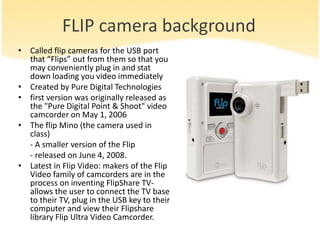
• Called flip cameras for the USB port
  that “Flips” out from them so that you
  may conveniently plug in and stat
  down loading you video immediately
• Created by Pure Digital Technologies
• first version was originally released as
  the "Pure Digital Point & Shoot" video
  camcorder on May 1, 2006
• The flip Mino (the camera used in
  class)
  - A smaller version of the Flip
  - released on June 4, 2008.
• Latest in Flip Video: makers of the Flip
  Video family of camcorders are in the
  process on inventing FlipShare TV-
  allows the user to connect the TV base
  to their TV, plug in the USB key to their
  computer and view their Flipshare
  library Flip Ultra Video Camcorder.
FLIP camera Experience
I had so much fun with the Flip Camera that I emailed Dr.
Curran later that day asking for the make and model of the
camera we used in class so that I may purchase it for future
uses in the classroom and current personal interests. I feel
that it is a innovative tool that every teacher should have in
their classroom. It provides students different opportunities for
creativity and give educators the option to self evaluate their
teaching practices if they choose to record themselves. I
would even use a flip camera as an undergraduate student in
my methods courses so as to place in my eportfolio so that
future employers can observe my teaching styles and
hopefully hire me for the job!
FLIP Camera Videos
•A journey through the Deans Suite
C:Documents and SettingsRider Computer LabsMy DocumentsMy
VideosFlipShare DataVideosVID00024.MP4

•Sarah’s weather report
http://sharing.theflip.com/greeting/30185811/sid/ebec28a102dffea7a6
1e4c73881163e1

•People Watching
C:Documents and SettingsRider Computer LabsMy DocumentsMy
VideosFlipShare DataVideosVID00023.MP4
FLIP computer features
• Email
• Make into a greeting card
• Flip Channel
• Sync to internet to share with scial
  networks (ie
  Twitter, Facebook, youtube, etc)
• Take snap shots from video
• Edit into a movie
• Burn video to DVD
FLIP computer features experience
I was amazed to view all of the functions the FLIP
camera had through the camera features on the
computer. I found it interesting to take a picture from any
shot of video and the face that you could easily send it to
another person via, email, facebook, or other socail
networkign site was very benefitial for teachers in hurry.
You can also edit your video itno a feature film which I
would certainly utilize as a project tool in my classroom.
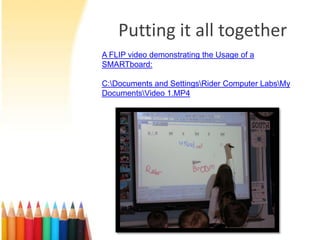
Putting it all together
A FLIP video demonstrating the Usage of a
SMARTboard:

C:Documents and SettingsRider Computer LabsMy
DocumentsVideo 1.MP4
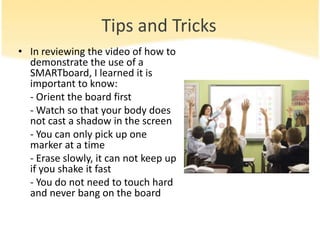
Tips and Tricks
• In reviewing the video of how to
  demonstrate the use of a
  SMARTboard, I learned it is
  important to know:
  - Orient the board first
  - Watch so that your body does
  not cast a shadow in the screen
  - You can only pick up one
  marker at a time
  - Erase slowly, it can not keep up
  if you shake it fast
  - You do not need to touch hard
  and never bang on the board

Assignment 15

  • 1.
    « FLIPing »over Smartboards Sarah Sell
  • 2.
    Contents • Smart Board Overview • SMARTnotebook • Smartboard experience • Flip Camera Overview • Flip Camera experience • Videos Recorded from FLIP • FLIP computer features • Flip Computer features experience • Putting it all together • Benefits of Technology in the classroom
  • 3.
    Smartboard background • interactivewhiteboard • Developed by SMARTtechnologies • First developed in 1991 • uses touch detection for user input (similar to a computer mouses functions) • Software is included with Smart Board whiteboards and Smart hardware products.
  • 4.
    SMARTnotebook • collaborative learningsoftware • included with all Smart Board interactive whiteboards and all other Smart hardware products. • Software combatable with Windows, Mac and Linux • Similar to Microsoft PowerPoint for its incoorperation of images, amnimations, templates, etc. • teachers can record each step of a lesson activity for students to review at a later time. • Hundred of Lesson Plan applications available and searchable by grade and subject
  • 5.
    Smartboard experience The usageof smartboards has been rather entertaining and interesting in class. I enjoy the smartboard for its limitless adaptions and exporations of different subject and curricula. SMARTnote book is very benefitial in providing ready lesson plans and interactive games that are perfect or every age clasroom. The smart board itself is benefitial as it saves teachers time by not having to rewire the proceedures and assessments from Lesson plans to the board and allows the students to focus more on what tis being taught rather than assuring that they have everything recoded on the board.
  • 6.
    FLIP camera background •Called flip cameras for the USB port that “Flips” out from them so that you may conveniently plug in and stat down loading you video immediately • Created by Pure Digital Technologies • first version was originally released as the "Pure Digital Point & Shoot" video camcorder on May 1, 2006 • The flip Mino (the camera used in class) - A smaller version of the Flip - released on June 4, 2008. • Latest in Flip Video: makers of the Flip Video family of camcorders are in the process on inventing FlipShare TV- allows the user to connect the TV base to their TV, plug in the USB key to their computer and view their Flipshare library Flip Ultra Video Camcorder.
  • 7.
    FLIP camera Experience Ihad so much fun with the Flip Camera that I emailed Dr. Curran later that day asking for the make and model of the camera we used in class so that I may purchase it for future uses in the classroom and current personal interests. I feel that it is a innovative tool that every teacher should have in their classroom. It provides students different opportunities for creativity and give educators the option to self evaluate their teaching practices if they choose to record themselves. I would even use a flip camera as an undergraduate student in my methods courses so as to place in my eportfolio so that future employers can observe my teaching styles and hopefully hire me for the job!
  • 8.
    FLIP Camera Videos •Ajourney through the Deans Suite C:Documents and SettingsRider Computer LabsMy DocumentsMy VideosFlipShare DataVideosVID00024.MP4 •Sarah’s weather report http://sharing.theflip.com/greeting/30185811/sid/ebec28a102dffea7a6 1e4c73881163e1 •People Watching C:Documents and SettingsRider Computer LabsMy DocumentsMy VideosFlipShare DataVideosVID00023.MP4
  • 9.
    FLIP computer features •Email • Make into a greeting card • Flip Channel • Sync to internet to share with scial networks (ie Twitter, Facebook, youtube, etc) • Take snap shots from video • Edit into a movie • Burn video to DVD
  • 10.
    FLIP computer featuresexperience I was amazed to view all of the functions the FLIP camera had through the camera features on the computer. I found it interesting to take a picture from any shot of video and the face that you could easily send it to another person via, email, facebook, or other socail networkign site was very benefitial for teachers in hurry. You can also edit your video itno a feature film which I would certainly utilize as a project tool in my classroom.
  • 11.
    Putting it alltogether A FLIP video demonstrating the Usage of a SMARTboard: C:Documents and SettingsRider Computer LabsMy DocumentsVideo 1.MP4
  • 12.
    Tips and Tricks •In reviewing the video of how to demonstrate the use of a SMARTboard, I learned it is important to know: - Orient the board first - Watch so that your body does not cast a shadow in the screen - You can only pick up one marker at a time - Erase slowly, it can not keep up if you shake it fast - You do not need to touch hard and never bang on the board