© 2014 IBM Corporation
IBM Security
1© 2014 IBM Corporation
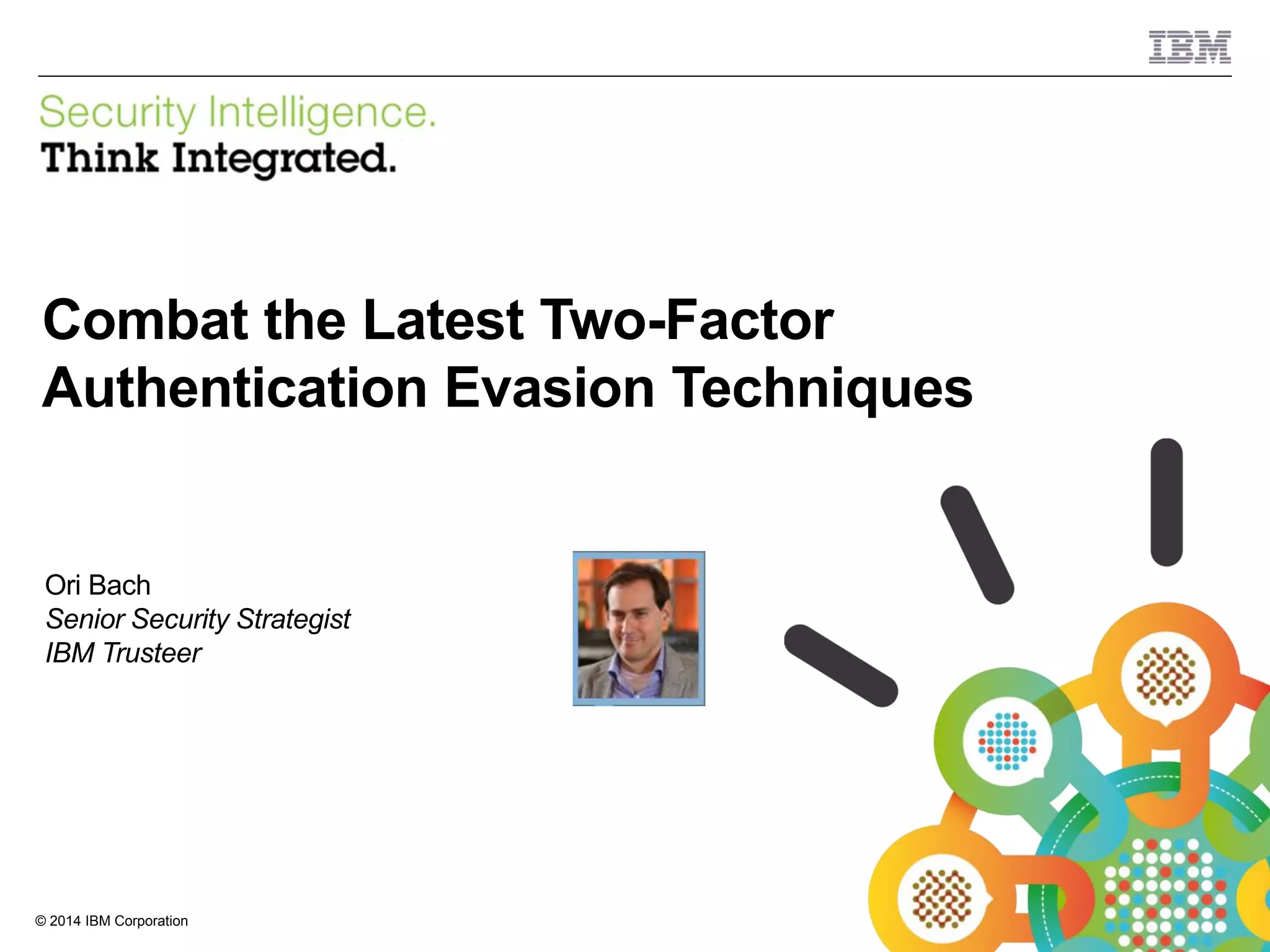
Combat the Latest Two-Factor
Authentication Evasion Techniques
Ori Bach
Senior Security Strategist
IBM Trusteer
© 2014 IBM Corporation
IBM Security
2
Agenda
 Background
 Second factor authentication bypass methods
 Mobile bypasses
 Biometric authentication
 Rebuilding trust in your authentication process
 Q&A
3 © 2014 IBM Corporation
Second factor authentication
overview
© 2014 IBM Corporation
IBM Security
4
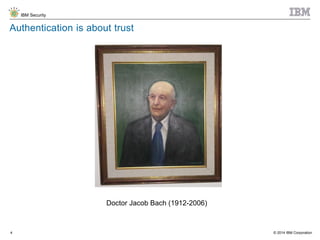
Authentication is about trust
Doctor Jacob Bach (1912-2006)
© 2014 IBM Corporation
IBM Security
5
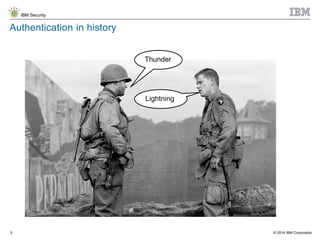
Authentication in history
Thunder
Lightning
© 2014 IBM Corporation
IBM Security
6
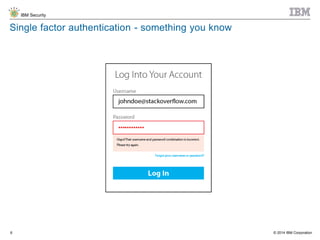
Single factor authentication - something you know
© 2014 IBM Corporation
IBM Security
7
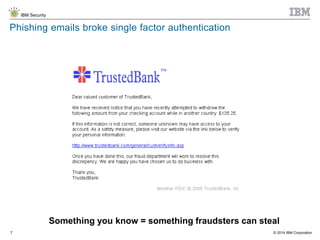
Phishing emails broke single factor authentication
Something you know = something fraudsters can steal
© 2014 IBM Corporation
IBM Security
8
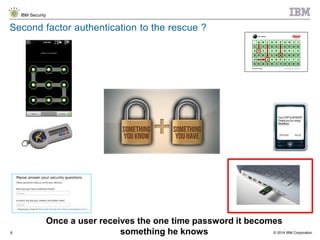
Second factor authentication to the rescue ?
Once a user receives the one time password it becomes
something he knows
© 2014 IBM Corporation
IBM Security
9
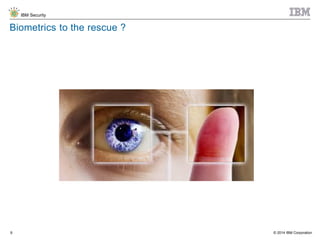
Biometrics to the rescue ?
© 2014 IBM Corporation
IBM Security
10
QUESTION
Which of the following 2FA methods does your institution use
1. Paper code / Bingo / Scratch card
2. One time SMS password / Authentication via Mobile
App
3. Physical Token / USB Token
4. Biometric authentication
5. Other
© 2014 IBM Corporation
IBM Security
11
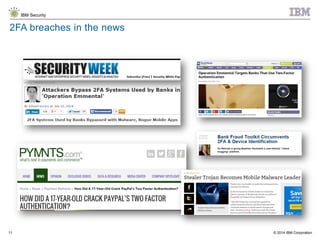
2FA breaches in the news
© 2014 IBM Corporation
IBM Security
12
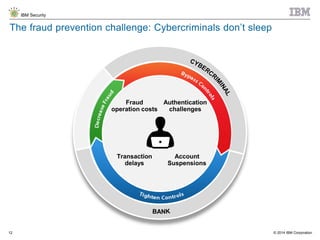
The fraud prevention challenge: Cybercriminals don’t sleep
Fraud
operation costs
Authentication
challenges
Transaction
delays
Account
Suspensions
© 2014 IBM Corporation
IBM Security
13
Compliance driven authentication requirements
14 © 2014 IBM Corporation
Bypass methods
© 2014 IBM Corporation
IBM Security
15
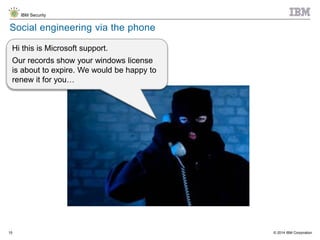
Social engineering via the phone
Hi this is Microsoft support.
Our records show your windows license
is about to expire. We would be happy to
renew it for you…
© 2014 IBM Corporation
IBM Security
16
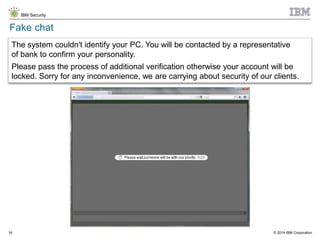
Fake chat
The system couldn't identify your PC. You will be contacted by a representative
of bank to confirm your personality.
Please pass the process of additional verification otherwise your account will be
locked. Sorry for any inconvenience, we are carrying about security of our clients.
© 2014 IBM Corporation
IBM Security
17
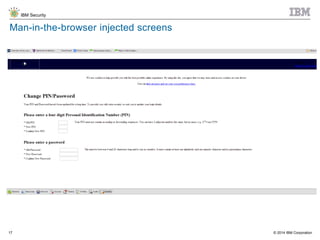
Man-in-the-browser injected screens
© 2014 IBM Corporation
IBM Security
18
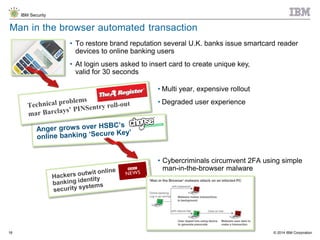
Man in the browser automated transaction
• To restore brand reputation several U.K. banks issue smartcard reader
devices to online banking users
• At login users asked to insert card to create unique key,
valid for 30 seconds
• Multi year, expensive rollout
• Degraded user experience
• Cybercriminals circumvent 2FA using simple
man-in-the-browser malware
© 2014 IBM Corporation
IBM Security
19
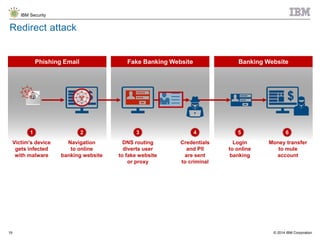
Fake Banking Website Banking WebsitePhishing Email
Redirect attack
1 2 3 4 5 6
Navigation
to online
banking website
Victim’s device
gets infected
with malware
Credentials
and PII
are sent
to criminal
DNS routing
diverts user
to fake website
or proxy
Money transfer
to mule
account
Login
to online
banking
© 2014 IBM Corporation
IBM Security
20
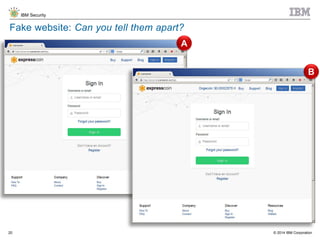
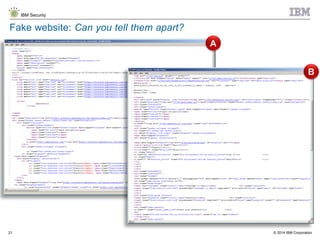
Fake website: Can you tell them apart?
A
B
© 2014 IBM Corporation
IBM Security
21
Fake website: Can you tell them apart?
A
B
© 2014 IBM Corporation
IBM Security
22
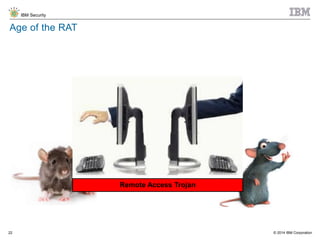
Age of the RAT
Remote Access Trojan
© 2014 IBM Corporation
IBM Security
23
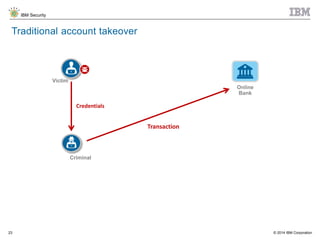
Traditional account takeover
Criminal
Victim
Credentials
Transaction
Online
Bank
© 2014 IBM Corporation
IBM Security
24
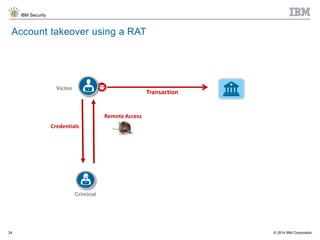
Account takeover using a RAT
Transaction
Criminal
Victim
Credentials
Remote Access
© 2014 IBM Corporation
IBM Security
25
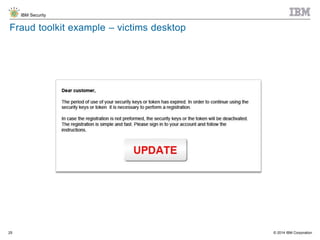
Fraud toolkit example – victims desktop
© 2014 IBM Corporation
IBM Security
26
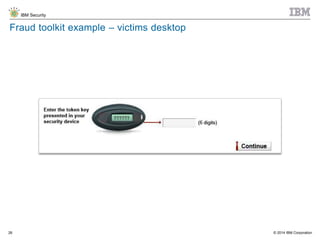
Fraud toolkit example – victims desktop
© 2014 IBM Corporation
IBM Security
27
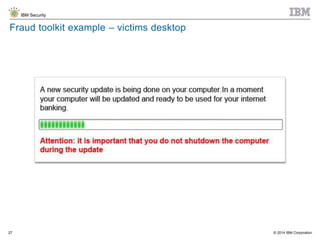
Fraud toolkit example – victims desktop
© 2014 IBM Corporation
IBM Security
28
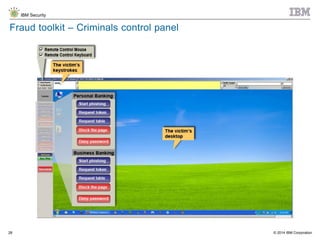
Fraud toolkit – Criminals control panel
© 2014 IBM Corporation
IBM Security
29
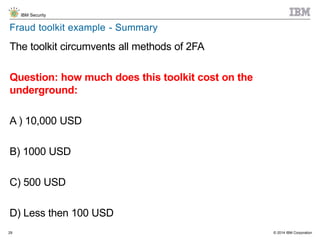
Fraud toolkit example - Summary
The toolkit circumvents all methods of 2FA
Question: how much does this toolkit cost on the
underground:
A ) 10,000 USD
B) 1000 USD
C) 500 USD
D) Less then 100 USD
© 2014 IBM Corporation
IBM Security
30
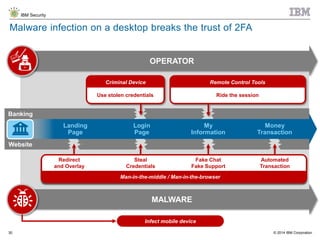
Malware infection on a desktop breaks the trust of 2FA
OPERATOR
MALWARE
Use stolen credentials
Criminal Device
Banking
Landing
Page
Login
Page
My
Information
Money
Transaction
Website
Remote Control Tools
Ride the session
Man-in-the-middle / Man-in-the-browser
Fake Chat
Fake Support
Steal
Credentials
Automated
Transaction
Redirect
and Overlay
Infect mobile device
31 © 2014 IBM Corporation
Mobile 2FA Bypasses
© 2014 IBM Corporation
IBM Security
32
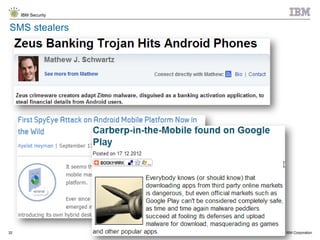
SMS stealers
© 2014 IBM Corporation
IBM Security
33
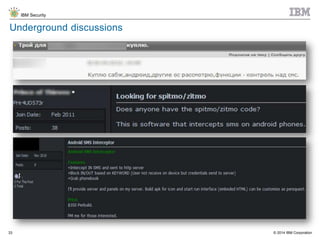
Underground discussions
© 2014 IBM Corporation
IBM Security
34
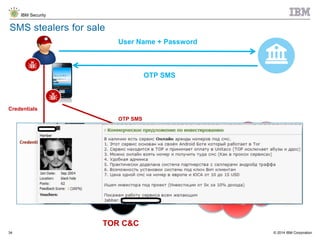
SMS stealers for sale
User Name + Password
OTP SMS
Credentials
OTP SMS
TOR C&C
© 2014 IBM Corporation
IBM Security
35
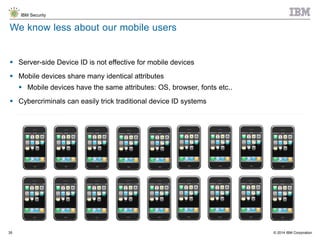
 Server-side Device ID is not effective for mobile devices
 Mobile devices share many identical attributes
 Mobile devices have the same attributes: OS, browser, fonts etc..
 Cybercriminals can easily trick traditional device ID systems
We know less about our mobile users
35
© 2014 IBM Corporation
IBM Security
36
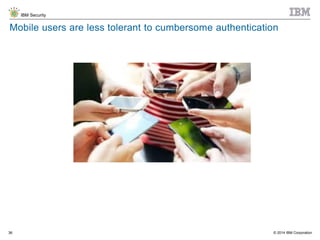
Mobile users are less tolerant to cumbersome authentication
© 2014 IBM Corporation
IBM Security
37
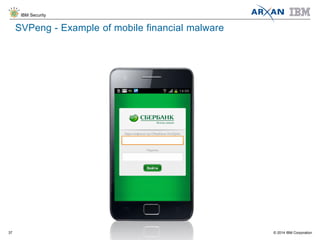
SVPeng - Example of mobile financial malware
© 2014 IBM Corporation
IBM Security
38
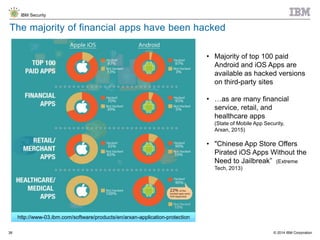
The majority of financial apps have been hacked
• Majority of top 100 paid
Android and iOS Apps are
available as hacked versions
on third-party sites
• …as are many financial
service, retail, and
healthcare apps
(State of Mobile App Security,
Arxan, 2015)
• "Chinese App Store Offers
Pirated iOS Apps Without the
Need to Jailbreak” (Extreme
Tech, 2013)
http://www-03.ibm.com/software/products/en/arxan-application-protection
© 2014 IBM Corporation
IBM Security
39
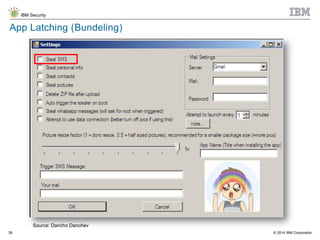
App Latching (Bundeling)
Source: Dancho Danchev
© 2014 IBM Corporation
IBM Security
40
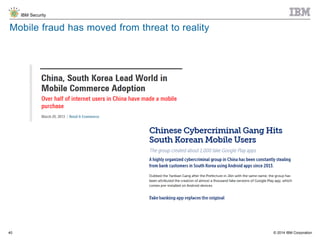
Mobile fraud has moved from threat to reality
© 2014 IBM Corporation
IBM Security
41
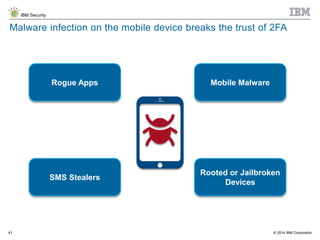
Malware infection on the mobile device breaks the trust of 2FA
Rogue Apps
SMS Stealers
Mobile Malware
Rooted or Jailbroken
Devices
42 © 2014 IBM Corporation
Biometrics
© 2014 IBM Corporation
IBM Security
43
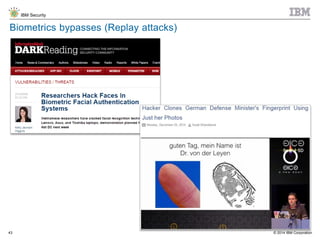
Biometrics bypasses (Replay attacks)
© 2014 IBM Corporation
IBM Security
44
Challenges with biometrics for authentication
How accurate is your biometric?
How secure is the enrollment ?
Compliance considerations
What happens when biometrics data is stolen
Riding authenticated sessions
© 2014 IBM Corporation
IBM Security
45
QUESTION
Which of the below authentication methods has not been
circumvented as of yet
1. Paper code / Bingo / Scratch card
2. One time SMS password / Authentication via Mobile
App
3. USB Token
4. Biometric authentication
5. All of the above have been bypassed
46 © 2014 IBM Corporation
Further risks of a compromised
environment
© 2014 IBM Corporation
IBM Security
47
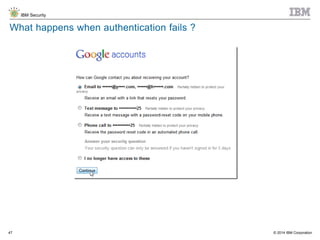
What happens when authentication fails ?
© 2014 IBM Corporation
IBM Security
48
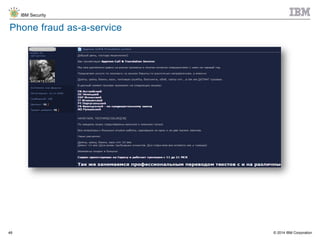
Phone fraud as-a-service
© 2014 IBM Corporation
IBM Security
49
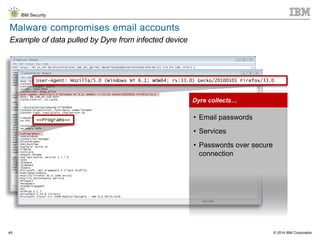
Malware compromises email accounts
Example of data pulled by Dyre from infected device
==Programs==
Dyre collects…
• Email passwords
• Services
• Passwords over secure
connection
User-Agent: Mozilla/5.0 (Windows NT 6.1; WOW64; rv:33.0) Gecko/20100101 Firefox/33.0
50 © 2014 IBM Corporation
Rebuilding Trust in Your
Authentication Process
© 2014 IBM Corporation
IBM Security
51
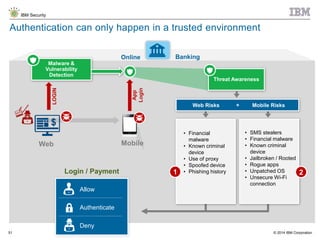
Online Banking
Authentication can only happen in a trusted environment
Malware &
Vulnerability
Detection
LOGIN
Threat Awareness
App
Login
• SMS stealers
• Financial malware
• Known criminal
device
• Jailbroken / Rooted
• Rogue apps
• Unpatched OS
• Unsecure Wi-Fi
connection
Web Risks Mobile Risks+
• Financial
malware
• Known criminal
device
• Use of proxy
• Spoofed device
• Phishing history1 2
Web Mobile
Login / Payment
Allow
Authenticate
Deny
© 2014 IBM Corporation
IBM Security
52
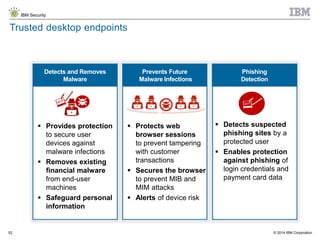
Prevents Future
Malware Infections
Phishing
Detection
Trusted desktop endpoints
Detects and Removes
Malware
 Provides protection
to secure user
devices against
malware infections
 Removes existing
financial malware
from end-user
machines
 Safeguard personal
information
 Protects web
browser sessions
to prevent tampering
with customer
transactions
 Secures the browser
to prevent MIB and
MIM attacks
 Alerts of device risk
 Detects suspected
phishing sites by a
protected user
 Enables protection
against phishing of
login credentials and
payment card data
© 2014 IBM Corporation
IBM Security
53
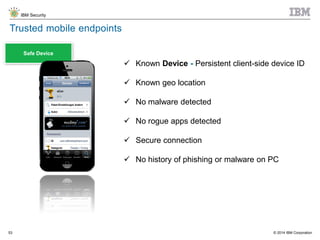
Safe Device
Trusted mobile endpoints
 Known Device - Persistent client-side device ID
 Known geo location
 No malware detected
 No rogue apps detected
 Secure connection
 No history of phishing or malware on PC
© 2014 IBM Corporation
IBM Security
54
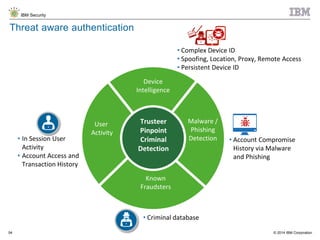
Threat aware authentication
Device
Intelligence
User
Activity
Known
Fraudsters
Malware /
Phishing
Detection • Account Compromise
History via Malware
and Phishing
Trusteer
Pinpoint
Criminal
Detection
• In Session User
Activity
• Account Access and
Transaction History
• Criminal database
• Complex Device ID
• Spoofing, Location, Proxy, Remote Access
• Persistent Device ID
55 © 2014 IBM Corporation
Q&A
55
© 2014 IBM Corporation
IBM Security
56
www.ibm.com/security
© Copyright IBM Corporation 2014. All rights reserved. The information contained in these materials is provided for informational purposes
only, and is provided AS IS without warranty of any kind, express or implied. IBM shall not be responsible for any damages arising out of the use
of, or otherwise related to, these materials. Nothing contained in these materials is intended to, nor shall have the effect of, creating any
warranties or representations from IBM or its suppliers or licensors, or altering the terms and conditions of the applicable license agreement
governing the use of IBM software. References in these materials to IBM products, programs, or services do not imply that they will be available in
all countries in which IBM operates. Product release dates and/or capabilities referenced in these materials may change at any time at IBM’s sole
discretion based on market opportunities or other factors, and are not intended to be a commitment to future product or feature availability in any
way. IBM, the IBM logo, and other IBM products and services are trademarks of the International Business Machines Corporation, in the United
States, other countries or both. Other company, product, or service names may be trademarks or service marks of others.
Statement of Good Security Practices: IT system security involves protecting systems and information through prevention, detection and
response to improper access from within and outside your enterprise. Improper access can result in information being altered, destroyed,
misappropriated or misused or can result in damage to or misuse of your systems, including for use in attacks on others. No IT system or product
should be considered completely secure and no single product, service or security measure can be completely effective in preventing improper use
or access. IBM systems, products and services are designed to be part of a lawful, comprehensive security approach, which will necessarily
involve additional operational procedures, and may require other systems, products or services to be most effective. IBM DOES NOT WARRANT
THAT ANY SYSTEMS, PRODUCTS OR SERVICES ARE IMMUNE FROM, OR WILL MAKE YOUR ENTERPRISE IMMUNE FROM, THE
MALICIOUS OR ILLEGAL CONDUCT OF ANY PARTY

Combat the Latest Two-Factor Authentication Evasion Techniques

  • 1.
    © 2014 IBMCorporation IBM Security 1© 2014 IBM Corporation Combat the Latest Two-Factor Authentication Evasion Techniques Ori Bach Senior Security Strategist IBM Trusteer
  • 2.
    © 2014 IBMCorporation IBM Security 2 Agenda  Background  Second factor authentication bypass methods  Mobile bypasses  Biometric authentication  Rebuilding trust in your authentication process  Q&A
  • 3.
    3 © 2014IBM Corporation Second factor authentication overview
  • 4.
    © 2014 IBMCorporation IBM Security 4 Authentication is about trust Doctor Jacob Bach (1912-2006)
  • 5.
    © 2014 IBMCorporation IBM Security 5 Authentication in history Thunder Lightning
  • 6.
    © 2014 IBMCorporation IBM Security 6 Single factor authentication - something you know
  • 7.
    © 2014 IBMCorporation IBM Security 7 Phishing emails broke single factor authentication Something you know = something fraudsters can steal
  • 8.
    © 2014 IBMCorporation IBM Security 8 Second factor authentication to the rescue ? Once a user receives the one time password it becomes something he knows
  • 9.
    © 2014 IBMCorporation IBM Security 9 Biometrics to the rescue ?
  • 10.
    © 2014 IBMCorporation IBM Security 10 QUESTION Which of the following 2FA methods does your institution use 1. Paper code / Bingo / Scratch card 2. One time SMS password / Authentication via Mobile App 3. Physical Token / USB Token 4. Biometric authentication 5. Other
  • 11.
    © 2014 IBMCorporation IBM Security 11 2FA breaches in the news
  • 12.
    © 2014 IBMCorporation IBM Security 12 The fraud prevention challenge: Cybercriminals don’t sleep Fraud operation costs Authentication challenges Transaction delays Account Suspensions
  • 13.
    © 2014 IBMCorporation IBM Security 13 Compliance driven authentication requirements
  • 14.
    14 © 2014IBM Corporation Bypass methods
  • 15.
    © 2014 IBMCorporation IBM Security 15 Social engineering via the phone Hi this is Microsoft support. Our records show your windows license is about to expire. We would be happy to renew it for you…
  • 16.
    © 2014 IBMCorporation IBM Security 16 Fake chat The system couldn't identify your PC. You will be contacted by a representative of bank to confirm your personality. Please pass the process of additional verification otherwise your account will be locked. Sorry for any inconvenience, we are carrying about security of our clients.
  • 17.
    © 2014 IBMCorporation IBM Security 17 Man-in-the-browser injected screens
  • 18.
    © 2014 IBMCorporation IBM Security 18 Man in the browser automated transaction • To restore brand reputation several U.K. banks issue smartcard reader devices to online banking users • At login users asked to insert card to create unique key, valid for 30 seconds • Multi year, expensive rollout • Degraded user experience • Cybercriminals circumvent 2FA using simple man-in-the-browser malware
  • 19.
    © 2014 IBMCorporation IBM Security 19 Fake Banking Website Banking WebsitePhishing Email Redirect attack 1 2 3 4 5 6 Navigation to online banking website Victim’s device gets infected with malware Credentials and PII are sent to criminal DNS routing diverts user to fake website or proxy Money transfer to mule account Login to online banking
  • 20.
    © 2014 IBMCorporation IBM Security 20 Fake website: Can you tell them apart? A B
  • 21.
    © 2014 IBMCorporation IBM Security 21 Fake website: Can you tell them apart? A B
  • 22.
    © 2014 IBMCorporation IBM Security 22 Age of the RAT Remote Access Trojan
  • 23.
    © 2014 IBMCorporation IBM Security 23 Traditional account takeover Criminal Victim Credentials Transaction Online Bank
  • 24.
    © 2014 IBMCorporation IBM Security 24 Account takeover using a RAT Transaction Criminal Victim Credentials Remote Access
  • 25.
    © 2014 IBMCorporation IBM Security 25 Fraud toolkit example – victims desktop
  • 26.
    © 2014 IBMCorporation IBM Security 26 Fraud toolkit example – victims desktop
  • 27.
    © 2014 IBMCorporation IBM Security 27 Fraud toolkit example – victims desktop
  • 28.
    © 2014 IBMCorporation IBM Security 28 Fraud toolkit – Criminals control panel
  • 29.
    © 2014 IBMCorporation IBM Security 29 Fraud toolkit example - Summary The toolkit circumvents all methods of 2FA Question: how much does this toolkit cost on the underground: A ) 10,000 USD B) 1000 USD C) 500 USD D) Less then 100 USD
  • 30.
    © 2014 IBMCorporation IBM Security 30 Malware infection on a desktop breaks the trust of 2FA OPERATOR MALWARE Use stolen credentials Criminal Device Banking Landing Page Login Page My Information Money Transaction Website Remote Control Tools Ride the session Man-in-the-middle / Man-in-the-browser Fake Chat Fake Support Steal Credentials Automated Transaction Redirect and Overlay Infect mobile device
  • 31.
    31 © 2014IBM Corporation Mobile 2FA Bypasses
  • 32.
    © 2014 IBMCorporation IBM Security 32 SMS stealers
  • 33.
    © 2014 IBMCorporation IBM Security 33 Underground discussions
  • 34.
    © 2014 IBMCorporation IBM Security 34 SMS stealers for sale User Name + Password OTP SMS Credentials OTP SMS TOR C&C
  • 35.
    © 2014 IBMCorporation IBM Security 35  Server-side Device ID is not effective for mobile devices  Mobile devices share many identical attributes  Mobile devices have the same attributes: OS, browser, fonts etc..  Cybercriminals can easily trick traditional device ID systems We know less about our mobile users 35
  • 36.
    © 2014 IBMCorporation IBM Security 36 Mobile users are less tolerant to cumbersome authentication
  • 37.
    © 2014 IBMCorporation IBM Security 37 SVPeng - Example of mobile financial malware
  • 38.
    © 2014 IBMCorporation IBM Security 38 The majority of financial apps have been hacked • Majority of top 100 paid Android and iOS Apps are available as hacked versions on third-party sites • …as are many financial service, retail, and healthcare apps (State of Mobile App Security, Arxan, 2015) • "Chinese App Store Offers Pirated iOS Apps Without the Need to Jailbreak” (Extreme Tech, 2013) http://www-03.ibm.com/software/products/en/arxan-application-protection
  • 39.
    © 2014 IBMCorporation IBM Security 39 App Latching (Bundeling) Source: Dancho Danchev
  • 40.
    © 2014 IBMCorporation IBM Security 40 Mobile fraud has moved from threat to reality
  • 41.
    © 2014 IBMCorporation IBM Security 41 Malware infection on the mobile device breaks the trust of 2FA Rogue Apps SMS Stealers Mobile Malware Rooted or Jailbroken Devices
  • 42.
    42 © 2014IBM Corporation Biometrics
  • 43.
    © 2014 IBMCorporation IBM Security 43 Biometrics bypasses (Replay attacks)
  • 44.
    © 2014 IBMCorporation IBM Security 44 Challenges with biometrics for authentication How accurate is your biometric? How secure is the enrollment ? Compliance considerations What happens when biometrics data is stolen Riding authenticated sessions
  • 45.
    © 2014 IBMCorporation IBM Security 45 QUESTION Which of the below authentication methods has not been circumvented as of yet 1. Paper code / Bingo / Scratch card 2. One time SMS password / Authentication via Mobile App 3. USB Token 4. Biometric authentication 5. All of the above have been bypassed
  • 46.
    46 © 2014IBM Corporation Further risks of a compromised environment
  • 47.
    © 2014 IBMCorporation IBM Security 47 What happens when authentication fails ?
  • 48.
    © 2014 IBMCorporation IBM Security 48 Phone fraud as-a-service
  • 49.
    © 2014 IBMCorporation IBM Security 49 Malware compromises email accounts Example of data pulled by Dyre from infected device ==Programs== Dyre collects… • Email passwords • Services • Passwords over secure connection User-Agent: Mozilla/5.0 (Windows NT 6.1; WOW64; rv:33.0) Gecko/20100101 Firefox/33.0
  • 50.
    50 © 2014IBM Corporation Rebuilding Trust in Your Authentication Process
  • 51.
    © 2014 IBMCorporation IBM Security 51 Online Banking Authentication can only happen in a trusted environment Malware & Vulnerability Detection LOGIN Threat Awareness App Login • SMS stealers • Financial malware • Known criminal device • Jailbroken / Rooted • Rogue apps • Unpatched OS • Unsecure Wi-Fi connection Web Risks Mobile Risks+ • Financial malware • Known criminal device • Use of proxy • Spoofed device • Phishing history1 2 Web Mobile Login / Payment Allow Authenticate Deny
  • 52.
    © 2014 IBMCorporation IBM Security 52 Prevents Future Malware Infections Phishing Detection Trusted desktop endpoints Detects and Removes Malware  Provides protection to secure user devices against malware infections  Removes existing financial malware from end-user machines  Safeguard personal information  Protects web browser sessions to prevent tampering with customer transactions  Secures the browser to prevent MIB and MIM attacks  Alerts of device risk  Detects suspected phishing sites by a protected user  Enables protection against phishing of login credentials and payment card data
  • 53.
    © 2014 IBMCorporation IBM Security 53 Safe Device Trusted mobile endpoints  Known Device - Persistent client-side device ID  Known geo location  No malware detected  No rogue apps detected  Secure connection  No history of phishing or malware on PC
  • 54.
    © 2014 IBMCorporation IBM Security 54 Threat aware authentication Device Intelligence User Activity Known Fraudsters Malware / Phishing Detection • Account Compromise History via Malware and Phishing Trusteer Pinpoint Criminal Detection • In Session User Activity • Account Access and Transaction History • Criminal database • Complex Device ID • Spoofing, Location, Proxy, Remote Access • Persistent Device ID
  • 55.
    55 © 2014IBM Corporation Q&A 55
  • 56.
    © 2014 IBMCorporation IBM Security 56 www.ibm.com/security © Copyright IBM Corporation 2014. All rights reserved. The information contained in these materials is provided for informational purposes only, and is provided AS IS without warranty of any kind, express or implied. IBM shall not be responsible for any damages arising out of the use of, or otherwise related to, these materials. Nothing contained in these materials is intended to, nor shall have the effect of, creating any warranties or representations from IBM or its suppliers or licensors, or altering the terms and conditions of the applicable license agreement governing the use of IBM software. References in these materials to IBM products, programs, or services do not imply that they will be available in all countries in which IBM operates. Product release dates and/or capabilities referenced in these materials may change at any time at IBM’s sole discretion based on market opportunities or other factors, and are not intended to be a commitment to future product or feature availability in any way. IBM, the IBM logo, and other IBM products and services are trademarks of the International Business Machines Corporation, in the United States, other countries or both. Other company, product, or service names may be trademarks or service marks of others. Statement of Good Security Practices: IT system security involves protecting systems and information through prevention, detection and response to improper access from within and outside your enterprise. Improper access can result in information being altered, destroyed, misappropriated or misused or can result in damage to or misuse of your systems, including for use in attacks on others. No IT system or product should be considered completely secure and no single product, service or security measure can be completely effective in preventing improper use or access. IBM systems, products and services are designed to be part of a lawful, comprehensive security approach, which will necessarily involve additional operational procedures, and may require other systems, products or services to be most effective. IBM DOES NOT WARRANT THAT ANY SYSTEMS, PRODUCTS OR SERVICES ARE IMMUNE FROM, OR WILL MAKE YOUR ENTERPRISE IMMUNE FROM, THE MALICIOUS OR ILLEGAL CONDUCT OF ANY PARTY