Data Sheet
IBM Security
IBM MaaS360 Mobile
Threat Management
Stop mobile malware on iOS and Android devices
Mobile malware – the next big security threat
Organizations are being transformed at an unprecedented pace with
mobility. The Bring Your Own Device (BYOD) trend continues to
spread in the enterprise. Mobile apps are creating new and efficient
workflows for employees. Seamless access to work data, emails and
content is growing in parallel, enhancing the productivity gains from
these trends.
As a result of the popularity and speed at which mobile devices have
become a mainstay of the enterprise, hackers and thieves are targeting
mobile devices with malware, creating the next big security threat.
Corporate data is especially vulnerable to rogue apps and malicious
websites.
• 138 billion apps were downloaded in 2014.1
• Mobile malware is growing. Malicious code is infecting more than 11.6
million mobile devices at any given time.2
• Recent WireLurker and Masque attacks threaten iOS devices.3,4
• Damage to a company’s brand is compounded by financial loss, with
the cost of a single breach estimated at more than $11 million.5
IT and Security leaders need a modern and robust security solution to
proactively detect, analyze and remediate mobile malware.
Stop mobile threats in your enterprise
IBM®
MaaS360®
Mobile Threat Management delivers a state-of-the-
art system to protect against malware on iOS and Android devices. You
can detect risks and manage threats before they compromise your
enterprise data.
Key benefits
• Safely support both BYOD and
corporate-owned devices
• Proactively manage mobile threats in
near real-time
• Reduce risk of sensitive data leakage of
corporate and personal information
• Take automated actions to remediate
mobile security risks
2
Through integration with IBM Trusteer®
, used by hundreds
of millions of users to protect organizations against fraud and
data breaches, MaaS360 provides a new layer of security to
Enterprise Mobility Management (EMM).
Don’t let malware derail your organization’s mobile
transformation. Balance your enterprise productivity
initiatives with security delivered by MaaS360.
Mobile malware detection and
remediation
• Detect and analyze iOS and Android apps with malware
signatures and malicious behavior from a continually updated
database
• Add app exceptions to customize acceptable app usage
• Set granular policy controls to take appropriate actions
• Use a near real-time compliance rules engine to automate
remediation
• Alert user and responsible parties when malware is detected
• View compromised devices in My Alert Center and detection
events in My Activity Feed dashboards
• Uninstall apps with malware automatically (for select
Android devices such as Samsung SAFE™
)
• Block access, selectively or fully wipe devices
• Restrict use of MaaS360 container solutions
• Collect and view device threat attributes including:
– Malware detected
– Suspicious system configurations found, such as an
unknown SMS listener or startup package
– Connection to an insecure Wi-Fi hot spot
– Installation of non-market apps allowed
– Operating system version
• Review audit history of malware detection events
IBM Security
Data Sheet
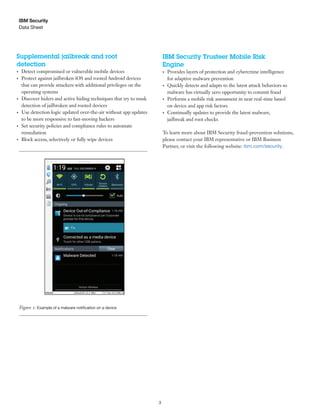
Figure 1: Examples of reported data about a protected device and policy settings in MaaS360 Mobile Threat Management
3
IBM Security
Data Sheet
Supplemental jailbreak and root
detection
• Detect compromised or vulnerable mobile devices
• Protect against jailbroken iOS and rooted Android devices
that can provide attackers with additional privileges on the
operating systems
• Discover hiders and active hiding techniques that try to mask
detection of jailbroken and rooted devices
• Use detection logic updated over-the-air without app updates
to be more responsive to fast-moving hackers
• Set security policies and compliance rules to automate
remediation
• Block access, selectively or fully wipe devices
IBM Security Trusteer Mobile Risk
Engine
• Provides layers of protection and cybercrime intelligence
for adaptive malware prevention
• Quickly detects and adapts to the latest attack behaviors so
malware has virtually zero opportunity to commit fraud
• Performs a mobile risk assessment in near real-time based
on device and app risk factors
• Continually updates to provide the latest malware,
jailbreak and root checks
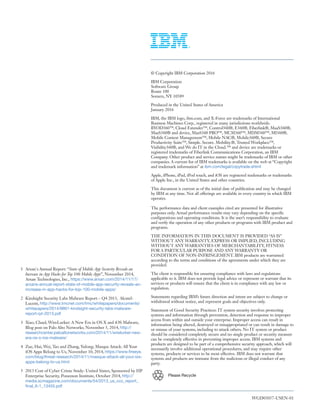
Figure 2: Example of a malware notification on a device
To learn more about IBM Security fraud-prevention solutions,
please contact your IBM representative or IBM Business
Partner, or visit the following website: ibm.com/security.
WGD03057-USEN-01
Please Recycle
1 Arxan's Annual Report: “State of Mobile App Security Reveals an
Increase in App Hacks for Top 100 Mobile Apps”, November 2014,
Arxan Technologies, Inc., https://www.arxan.com/2014/11/17/
arxans-annual-report-state-of-mobile-app-security-reveals-an-
increase-in-app-hacks-for-top-100-mobile-apps/
2 Kindsight Security Labs Malware Report – Q4 2013, Alcatel-
Lucent, http://www.tmcnet.com/tmc/whitepapers/documents/
whitepapers/2014/9861-kindsight-security-labs-malware-
report-q4-2013.pdf
3 Xiao, Claud, WireLurker: A New Era in OS X and iOS Malware,
Blog post on Palo Alto Networks; November 5, 2014, http://
researchcenter.paloaltonetworks.com/2014/11/wirelurker-new-
era-os-x-ios-malware/
4 Zue, Hui, Wei, Tao and Zhang, Yulong; Masque Attack: All Your
iOS Apps Belong to Us, November 10, 2014, https://www.fireeye.
com/blog/threat-research/2014/11/masque-attack-all-your-ios-
apps-belong-to-us.html
5 2013 Cost of Cyber Crime Study: United States, Sponsored by HP
Enterprise Security, Ponemon Institute, October 2014, http://
media.scmagazine.com/documents/54/2013_us_ccc_report_
final_6-1_13455.pdf
© Copyright IBM Corporation 2016
IBM Corporation
Software Group
Route 100
Somers, NY 10589
Produced in the United States of America
January 2016
IBM, the IBM logo, ibm.com, and X-Force are trademarks of International
Business Machines Corp., registered in many jurisdictions worldwide.
BYOD360™, Cloud Extender™, Control360®, E360®, Fiberlink®, MaaS360®,
MaaS360® and device, MaaS360 PRO™, MCM360™, MDM360™, MI360®,
Mobile Context Management™, Mobile NAC®, Mobile360®, Secure
Productivity Suite™, Simple. Secure. Mobility.®, Trusted Workplace™,
Visibility360®, and We do IT in the Cloud.™ and device are trademarks or
registered trademarks of Fiberlink Communications Corporation, an IBM
Company. Other product and service names might be trademarks of IBM or other
companies. A current list of IBM trademarks is available on the web at “Copyright
and trademark information” at ibm.com/legal/copytrade.shtml
Apple, iPhone, iPad, iPod touch, and iOS are registered trademarks or trademarks
of Apple Inc., in the United States and other countries.
This document is current as of the initial date of publication and may be changed
by IBM at any time. Not all offerings are available in every country in which IBM
operates.
The performance data and client examples cited are presented for illustrative
purposes only. Actual performance results may vary depending on the specific
configurations and operating conditions. It is the user’s responsibility to evaluate
and verify the operation of any other products or programs with IBM product and
programs.
THE INFORMATION IN THIS DOCUMENT IS PROVIDED “AS IS”
WITHOUT ANY WARRANTY, EXPRESS OR IMPLIED, INCLUDING
WITHOUT ANY WARRANTIES OF MERCHANTABILITY, FITNESS
FOR A PARTICULAR PURPOSE AND ANY WARRANTY OR
CONDITION OF NON-INFRINGEMENT. IBM products are warranted
according to the terms and conditions of the agreements under which they are
provided.
The client is responsible for ensuring compliance with laws and regulations
applicable to it. IBM does not provide legal advice or represent or warrant that its
services or products will ensure that the client is in compliance with any law or
regulation.
Statements regarding IBM’s future direction and intent are subject to change or
withdrawal without notice, and represent goals and objectives only.
Statement of Good Security Practices: IT system security involves protecting
systems and information through prevention, detection and response to improper
access from within and outside your enterprise. Improper access can result in
information being altered, destroyed or misappropriated or can result in damage to
or misuse of your systems, including to attack others. No IT system or product
should be considered completely secure and no single product or security measure
can be completely effective in preventing improper access. IBM systems and
products are designed to be part of a comprehensive security approach, which will
necessarily involve additional operational procedures, and may require other
systems, products or services to be most effective. IBM does not warrant that
systems and products are immune from the malicious or illegal conduct of any
party.

Mobile Threat Management

  • 1.
    Data Sheet IBM Security IBMMaaS360 Mobile Threat Management Stop mobile malware on iOS and Android devices Mobile malware – the next big security threat Organizations are being transformed at an unprecedented pace with mobility. The Bring Your Own Device (BYOD) trend continues to spread in the enterprise. Mobile apps are creating new and efficient workflows for employees. Seamless access to work data, emails and content is growing in parallel, enhancing the productivity gains from these trends. As a result of the popularity and speed at which mobile devices have become a mainstay of the enterprise, hackers and thieves are targeting mobile devices with malware, creating the next big security threat. Corporate data is especially vulnerable to rogue apps and malicious websites. • 138 billion apps were downloaded in 2014.1 • Mobile malware is growing. Malicious code is infecting more than 11.6 million mobile devices at any given time.2 • Recent WireLurker and Masque attacks threaten iOS devices.3,4 • Damage to a company’s brand is compounded by financial loss, with the cost of a single breach estimated at more than $11 million.5 IT and Security leaders need a modern and robust security solution to proactively detect, analyze and remediate mobile malware. Stop mobile threats in your enterprise IBM® MaaS360® Mobile Threat Management delivers a state-of-the- art system to protect against malware on iOS and Android devices. You can detect risks and manage threats before they compromise your enterprise data. Key benefits • Safely support both BYOD and corporate-owned devices • Proactively manage mobile threats in near real-time • Reduce risk of sensitive data leakage of corporate and personal information • Take automated actions to remediate mobile security risks
  • 2.
    2 Through integration withIBM Trusteer® , used by hundreds of millions of users to protect organizations against fraud and data breaches, MaaS360 provides a new layer of security to Enterprise Mobility Management (EMM). Don’t let malware derail your organization’s mobile transformation. Balance your enterprise productivity initiatives with security delivered by MaaS360. Mobile malware detection and remediation • Detect and analyze iOS and Android apps with malware signatures and malicious behavior from a continually updated database • Add app exceptions to customize acceptable app usage • Set granular policy controls to take appropriate actions • Use a near real-time compliance rules engine to automate remediation • Alert user and responsible parties when malware is detected • View compromised devices in My Alert Center and detection events in My Activity Feed dashboards • Uninstall apps with malware automatically (for select Android devices such as Samsung SAFE™ ) • Block access, selectively or fully wipe devices • Restrict use of MaaS360 container solutions • Collect and view device threat attributes including: – Malware detected – Suspicious system configurations found, such as an unknown SMS listener or startup package – Connection to an insecure Wi-Fi hot spot – Installation of non-market apps allowed – Operating system version • Review audit history of malware detection events IBM Security Data Sheet Figure 1: Examples of reported data about a protected device and policy settings in MaaS360 Mobile Threat Management
  • 3.
    3 IBM Security Data Sheet Supplementaljailbreak and root detection • Detect compromised or vulnerable mobile devices • Protect against jailbroken iOS and rooted Android devices that can provide attackers with additional privileges on the operating systems • Discover hiders and active hiding techniques that try to mask detection of jailbroken and rooted devices • Use detection logic updated over-the-air without app updates to be more responsive to fast-moving hackers • Set security policies and compliance rules to automate remediation • Block access, selectively or fully wipe devices IBM Security Trusteer Mobile Risk Engine • Provides layers of protection and cybercrime intelligence for adaptive malware prevention • Quickly detects and adapts to the latest attack behaviors so malware has virtually zero opportunity to commit fraud • Performs a mobile risk assessment in near real-time based on device and app risk factors • Continually updates to provide the latest malware, jailbreak and root checks Figure 2: Example of a malware notification on a device To learn more about IBM Security fraud-prevention solutions, please contact your IBM representative or IBM Business Partner, or visit the following website: ibm.com/security.
  • 4.
    WGD03057-USEN-01 Please Recycle 1 Arxan'sAnnual Report: “State of Mobile App Security Reveals an Increase in App Hacks for Top 100 Mobile Apps”, November 2014, Arxan Technologies, Inc., https://www.arxan.com/2014/11/17/ arxans-annual-report-state-of-mobile-app-security-reveals-an- increase-in-app-hacks-for-top-100-mobile-apps/ 2 Kindsight Security Labs Malware Report – Q4 2013, Alcatel- Lucent, http://www.tmcnet.com/tmc/whitepapers/documents/ whitepapers/2014/9861-kindsight-security-labs-malware- report-q4-2013.pdf 3 Xiao, Claud, WireLurker: A New Era in OS X and iOS Malware, Blog post on Palo Alto Networks; November 5, 2014, http:// researchcenter.paloaltonetworks.com/2014/11/wirelurker-new- era-os-x-ios-malware/ 4 Zue, Hui, Wei, Tao and Zhang, Yulong; Masque Attack: All Your iOS Apps Belong to Us, November 10, 2014, https://www.fireeye. com/blog/threat-research/2014/11/masque-attack-all-your-ios- apps-belong-to-us.html 5 2013 Cost of Cyber Crime Study: United States, Sponsored by HP Enterprise Security, Ponemon Institute, October 2014, http:// media.scmagazine.com/documents/54/2013_us_ccc_report_ final_6-1_13455.pdf © Copyright IBM Corporation 2016 IBM Corporation Software Group Route 100 Somers, NY 10589 Produced in the United States of America January 2016 IBM, the IBM logo, ibm.com, and X-Force are trademarks of International Business Machines Corp., registered in many jurisdictions worldwide. BYOD360™, Cloud Extender™, Control360®, E360®, Fiberlink®, MaaS360®, MaaS360® and device, MaaS360 PRO™, MCM360™, MDM360™, MI360®, Mobile Context Management™, Mobile NAC®, Mobile360®, Secure Productivity Suite™, Simple. Secure. Mobility.®, Trusted Workplace™, Visibility360®, and We do IT in the Cloud.™ and device are trademarks or registered trademarks of Fiberlink Communications Corporation, an IBM Company. Other product and service names might be trademarks of IBM or other companies. A current list of IBM trademarks is available on the web at “Copyright and trademark information” at ibm.com/legal/copytrade.shtml Apple, iPhone, iPad, iPod touch, and iOS are registered trademarks or trademarks of Apple Inc., in the United States and other countries. This document is current as of the initial date of publication and may be changed by IBM at any time. Not all offerings are available in every country in which IBM operates. The performance data and client examples cited are presented for illustrative purposes only. Actual performance results may vary depending on the specific configurations and operating conditions. It is the user’s responsibility to evaluate and verify the operation of any other products or programs with IBM product and programs. THE INFORMATION IN THIS DOCUMENT IS PROVIDED “AS IS” WITHOUT ANY WARRANTY, EXPRESS OR IMPLIED, INCLUDING WITHOUT ANY WARRANTIES OF MERCHANTABILITY, FITNESS FOR A PARTICULAR PURPOSE AND ANY WARRANTY OR CONDITION OF NON-INFRINGEMENT. IBM products are warranted according to the terms and conditions of the agreements under which they are provided. The client is responsible for ensuring compliance with laws and regulations applicable to it. IBM does not provide legal advice or represent or warrant that its services or products will ensure that the client is in compliance with any law or regulation. Statements regarding IBM’s future direction and intent are subject to change or withdrawal without notice, and represent goals and objectives only. Statement of Good Security Practices: IT system security involves protecting systems and information through prevention, detection and response to improper access from within and outside your enterprise. Improper access can result in information being altered, destroyed or misappropriated or can result in damage to or misuse of your systems, including to attack others. No IT system or product should be considered completely secure and no single product or security measure can be completely effective in preventing improper access. IBM systems and products are designed to be part of a comprehensive security approach, which will necessarily involve additional operational procedures, and may require other systems, products or services to be most effective. IBM does not warrant that systems and products are immune from the malicious or illegal conduct of any party.