Sharanbasaveshwara College of
Computer Application
Kalaburgi
Seminar presentation on
LINUX operating system
INTRODUTION TO
LINUX
• History of Linux
• Defination of Linux
• Operating system
based on LINUX
• Structure of LINUX
os
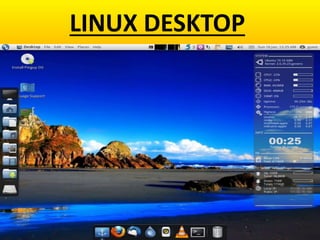
LINUX DESKTOP
History of LINUX
• It was developed by Linus Benedict Torvalds
in 1991 based on UNIX which was developed
using C
• Linux was supposed to be named as “FREAX”
• Because it was "free” open source operating
system and the letter X to indicate that it is a
Unix based OS
• Linux is available in Internet and in the form of
CD copy without cost
• Linux is a Free Operating System ,
which includes the set of
softwares and which enables the
computer applications and users
of the computer system
Operating System Based On
LINUX
• RED HAT
• DEBAIN
• UBUNTU
• GENTOO
• PACKMAN
• FEDORA
Structure of LINUX OS
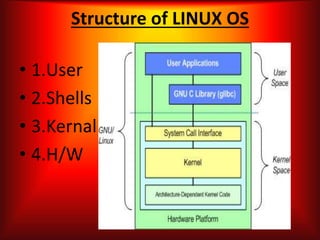
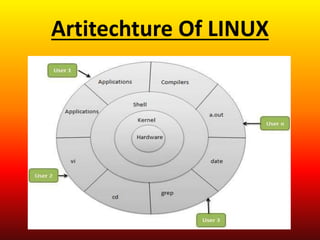
• 1.User
• 2.Shells
• 3.Kernal
• 4.H/W
Kernel
• Kernel is the core or nucleus of an
Linux OS. It is responsible for all
major activities of this operating
system. It is consists of various
modules and it interacts directly with
the underlying hardware.
Shells
Linux provides a special interpreter
program which can be used to
execute commands of the operating
system. It can be used to do various
types of operations, call application
programs etc.
System Library
• System libraries are special
functions or programs using
which application programs or
system utilities accesses Kernel's
features
Hardware
• Hardware is traeted as a file , it
may be a program , a directory or
a sub directory
• It ressembles the true structure
with its root at the top
Artitechture Of LINUX
Security
• Over the last few years, system security has
gained a lot of momentum and software
professionals are focusing heavily on this aspect.
Linux is often treated as a highly secure operating
system
• A very true statement of a UNIX/Linux system,
everything is a file; if something is not a file, it is a
process. Most files are just files, called regular
files; they contain normal data, for example text
files, executable files or programs, input to or
output from a program and so on.
Advantages
• Linux is Free
• No threat of viruses
• Freedom to study how the programs work. i.e source
code will be accessible
• We can make change as per our requirement
• Linux comes with most of the required software pre-
installed ( MODZILLA FIREFOX , OPENOFFICE.ORG for
word processing program and more)
• Linux never gets slow
• Can Perform MULTITASKING & MULTITHREADING.
Text editors of LINUX
Vi
Emacd
gEdit
kWrite
By
Nikhil Kumar
5th sem

College copy

  • 1.
  • 2.
  • 3.
    INTRODUTION TO LINUX • Historyof Linux • Defination of Linux • Operating system based on LINUX • Structure of LINUX os
  • 4.
  • 5.
    History of LINUX •It was developed by Linus Benedict Torvalds in 1991 based on UNIX which was developed using C • Linux was supposed to be named as “FREAX” • Because it was "free” open source operating system and the letter X to indicate that it is a Unix based OS • Linux is available in Internet and in the form of CD copy without cost
  • 6.
    • Linux isa Free Operating System , which includes the set of softwares and which enables the computer applications and users of the computer system
  • 7.
    Operating System BasedOn LINUX • RED HAT • DEBAIN • UBUNTU • GENTOO • PACKMAN • FEDORA
  • 8.
    Structure of LINUXOS • 1.User • 2.Shells • 3.Kernal • 4.H/W
  • 9.
    Kernel • Kernel isthe core or nucleus of an Linux OS. It is responsible for all major activities of this operating system. It is consists of various modules and it interacts directly with the underlying hardware.
  • 10.
    Shells Linux provides aspecial interpreter program which can be used to execute commands of the operating system. It can be used to do various types of operations, call application programs etc.
  • 11.
    System Library • Systemlibraries are special functions or programs using which application programs or system utilities accesses Kernel's features
  • 12.
    Hardware • Hardware istraeted as a file , it may be a program , a directory or a sub directory • It ressembles the true structure with its root at the top
  • 13.
  • 14.
    Security • Over thelast few years, system security has gained a lot of momentum and software professionals are focusing heavily on this aspect. Linux is often treated as a highly secure operating system • A very true statement of a UNIX/Linux system, everything is a file; if something is not a file, it is a process. Most files are just files, called regular files; they contain normal data, for example text files, executable files or programs, input to or output from a program and so on.
  • 15.
    Advantages • Linux isFree • No threat of viruses • Freedom to study how the programs work. i.e source code will be accessible • We can make change as per our requirement • Linux comes with most of the required software pre- installed ( MODZILLA FIREFOX , OPENOFFICE.ORG for word processing program and more) • Linux never gets slow • Can Perform MULTITASKING & MULTITHREADING.
  • 16.
    Text editors ofLINUX Vi Emacd gEdit kWrite
  • 17.

Editor's Notes

  • #5 Desktop Of LINUX