What to discuss
1. HISTORY OF LINUX
2. OVERVIEW
3. PROCESSES IN LINUX
4. MEMORY MANAGEMENT IN LINUX
5. INPUT AND OUTPUT IN LINUX
6. SECURITY
7. FILE SYSTEM
8. MERITS AND DEMERITS OF LINUX
 In 1987, Minix a Unix like system was made by Andrew s.
Tanenbaum for the teaching purpose.
 But Minix 16-bit design was not well adapted to the 32-bit
features on the intel 386 architecture for PC’s and also in
early 90’s the unix operating system was expensive for
private users.
 Because of this reasons and lack of widely adopted, free
kernel provided Linux Torvald an idea for starting a
project.
 In 1991 he started this project which is now know known as
the “Linux Operating System “.
Overview of linux
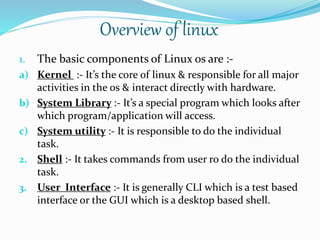
1. The basic components of Linux os are :-
a) Kernel :- It’s the core of linux & responsible for all major
activities in the os & interact directly with hardware.
b) System Library :- It’s a special program which looks after
which program/application will access.
c) System utility :- It is responsible to do the individual
task.
2. Shell :- It takes commands from user ro do the individual
task.
3. User Interface :- It is generally CLI which is a test based
interface or the GUI which is a desktop based shell.
Processes in Linux
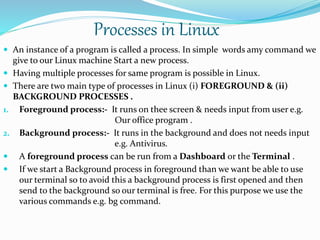
 An instance of a program is called a process. In simple words amy command we
give to our Linux machine Start a new process.
 Having multiple processes for same program is possible in Linux.
 There are two main type of processes in Linux (i) FOREGROUND & (ii)
BACKGROUND PROCESSES .
1. Foreground process:- It runs on thee screen & needs input from user e.g.
Our office program .
2. Background process:- It runs in the background and does not needs input
e.g. Antivirus.
 A foreground process can be run from a Dashboard or the Terminal .
 If we start a Background process in foreground than we want be able to use
our terminal so to avoid this a background process is first opened and then
send to the background so our terminal is free. For this purpose we use the
various commands e.g. bg command.
Memory ManageMent(MM)
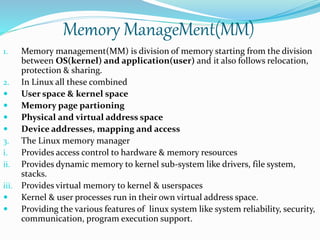
1. Memory management(MM) is division of memory starting from the division
between OS(kernel) and application(user) and it also follows relocation,
protection & sharing.
2. In Linux all these combined
 User space & kernel space
 Memory page partioning
 Physical and virtual address space
 Device addresses, mapping and access
3. The Linux memory manager
i. Provides access control to hardware & memory resources
ii. Provides dynamic memory to kernel sub-system like drivers, file system,
stacks.
iii. Provides virtual memory to kernel & userspaces
 Kernel & user processes run in their own virtual address space.
 Providing the various features of linux system like system reliability, security,
communication, program execution support.
Swapping in Mm
 Optimizes primary & secondary memory usage.
 Primary memory pages swapped out
when running out of memory.
 Secondary memory swapped in
when needed back
 Linux maintains page code in primary memory for
a) CODE : Reloadable
b) DATA : unchanged v/s changed
c) CHANGED DATA : Temporary(dynamic) vs
persistent(files)
 Linux uses swap(raw) partition on secondary memory.
 Related Commands : mkswap, swap on/off.
Input and output in linux
 Redirection is a feature in linux such that when execting a command you can
change the standard I/O devices. The basic workflow of any commad is that it
takes input and gives output .
The standard input(stdin) device is mainly keyboard.
The standard output(stdout) device is mainly screen.
With redirection, the above standards can be changed.
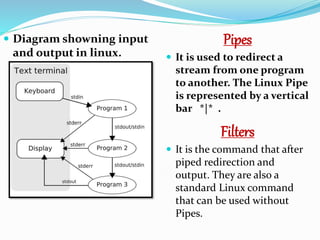
 The I/O in linux is distributed into 3 streams and collectively these streams are
reffered to as standard streams. These streams are as follows :
i. STANDARD INPUT(STDIN):- These stream typically carry data from a user
to a program. Standard input is terminated by reaching EOF(end-of-file). As
the name suggest EOF indicates that there is no more data to be read.
ii. STANDARD OUTPUT(STDOUT) :- It writes the data that is generated by a
program. When the standard output stram is not redirected, it will output
text to the terminal.
iii. STANDARD ERROR(STDERR):- It writes the errors generated by a program
that has failed at some point in its execution.
 Diagram showning input
and output in linux.
Pipes
 It is used to redirect a
stream from one program
to another. The Linux Pipe
is represented by a vertical
bar *|* .
Filters
 It is the command that after
piped redirection and
output. They are also a
standard Linux command
that can be used without
Pipes.
Linux file systems
 Linux file system or any file system generally is a layer which is under the OS
that handles the positioning of your data on the storage, without it; the system
cannot know which file starts from where and ends where. Even if you find any
unsupported file system type.
 When you try to install linux you will see that Linux offers many file system
like:- EXT, EXT2, EXt3, JFS, XFS, BTRFS and SWAP.
i. EXT : an old one in no longer used due to limitations.
ii. EXT2: 1st linux file system that allows 2 terabytes of data allowed.
iii. EXT3: came from ext2, but with upgrades & backward compatibility.
iv. EXT4: Faster and allows large files with significant speed.
v. XFS: old file system & works slowly with small files.
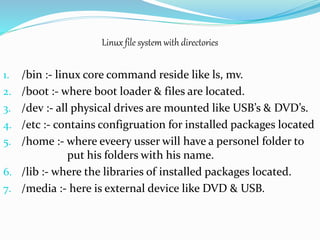
Linux file system with directories
1. /bin :- linux core command reside like ls, mv.
2. /boot :- where boot loader & files are located.
3. /dev :- all physical drives are mounted like USB’s & DVD’s.
4. /etc :- contains configruation for installed packages located
5. /home :- where eveery usser will have a personel folder to
put his folders with his name.
6. /lib :- where the libraries of installed packages located.
7. /media :- here is external device like DVD & USB.
Security in linux
1. User Security :- At the base level linux implements a user
security model that consists of user & groups. A user within
the OS has following characteristics:
i. USERNAME:- This is name that user enters at login
prompt.
ii. User id :- It is a unique numeric identifier to which OS
maps the username. It is the integral to the
functioning of file system.
iii. Primary group :- All the files created by the user will be
associated with thee group by default.
iv. Associated group :- These are additional groups that use
belongs to. The user will be able to access files owned by
the groups.
2. File-system security :-
i. READ :- This permission allow user to open a file & see its contents.
ii. WRITE :- This permission allows user to open and modify existing files & create new
file & also edit files.
iii. EXECUTE :- Allows user to execute a file.
3. ACCESS CONTROL LISTS :- To provide a more granular approach to file system
security. Linux support access control lists(ACL’s). With ACL you can define
individual user group permissions for a file, even if the user or group dosen,t
correspond the file’s owner.
“Linux is secure as you make it. However many says that Linux
is not safe but actually Linux is as safe as we make it. But
there are tools necessary to implement an appropriate
level of security for an implementation environment.e.g.
CLAM AV, SNORT, WIRE SHARK, etc.”
Merits and Demerits
 It Can be easily accessible to the old computers.
 It cannot be made for gaming purpose
 It is not easy to understand for those who are new to Linux
 It is used for both commercial and personal but for home
purposes, for this windows is mostly preffered.
 It is mainly used in android app development, OS for
routers/transmittoring device, Game designing,etc.
 Linux is only for programmers–based environment not for
the non-programmers becausse it is difficult to understand.
Linux Operating System

Linux Operating System

  • 2.
    What to discuss 1.HISTORY OF LINUX 2. OVERVIEW 3. PROCESSES IN LINUX 4. MEMORY MANAGEMENT IN LINUX 5. INPUT AND OUTPUT IN LINUX 6. SECURITY 7. FILE SYSTEM 8. MERITS AND DEMERITS OF LINUX
  • 3.
     In 1987,Minix a Unix like system was made by Andrew s. Tanenbaum for the teaching purpose.  But Minix 16-bit design was not well adapted to the 32-bit features on the intel 386 architecture for PC’s and also in early 90’s the unix operating system was expensive for private users.  Because of this reasons and lack of widely adopted, free kernel provided Linux Torvald an idea for starting a project.  In 1991 he started this project which is now know known as the “Linux Operating System “.
  • 4.
    Overview of linux 1.The basic components of Linux os are :- a) Kernel :- It’s the core of linux & responsible for all major activities in the os & interact directly with hardware. b) System Library :- It’s a special program which looks after which program/application will access. c) System utility :- It is responsible to do the individual task. 2. Shell :- It takes commands from user ro do the individual task. 3. User Interface :- It is generally CLI which is a test based interface or the GUI which is a desktop based shell.
  • 5.
    Processes in Linux An instance of a program is called a process. In simple words amy command we give to our Linux machine Start a new process.  Having multiple processes for same program is possible in Linux.  There are two main type of processes in Linux (i) FOREGROUND & (ii) BACKGROUND PROCESSES . 1. Foreground process:- It runs on thee screen & needs input from user e.g. Our office program . 2. Background process:- It runs in the background and does not needs input e.g. Antivirus.  A foreground process can be run from a Dashboard or the Terminal .  If we start a Background process in foreground than we want be able to use our terminal so to avoid this a background process is first opened and then send to the background so our terminal is free. For this purpose we use the various commands e.g. bg command.
  • 6.
    Memory ManageMent(MM) 1. Memorymanagement(MM) is division of memory starting from the division between OS(kernel) and application(user) and it also follows relocation, protection & sharing. 2. In Linux all these combined  User space & kernel space  Memory page partioning  Physical and virtual address space  Device addresses, mapping and access 3. The Linux memory manager i. Provides access control to hardware & memory resources ii. Provides dynamic memory to kernel sub-system like drivers, file system, stacks. iii. Provides virtual memory to kernel & userspaces  Kernel & user processes run in their own virtual address space.  Providing the various features of linux system like system reliability, security, communication, program execution support.
  • 7.
    Swapping in Mm Optimizes primary & secondary memory usage.  Primary memory pages swapped out when running out of memory.  Secondary memory swapped in when needed back  Linux maintains page code in primary memory for a) CODE : Reloadable b) DATA : unchanged v/s changed c) CHANGED DATA : Temporary(dynamic) vs persistent(files)  Linux uses swap(raw) partition on secondary memory.  Related Commands : mkswap, swap on/off.
  • 8.
    Input and outputin linux  Redirection is a feature in linux such that when execting a command you can change the standard I/O devices. The basic workflow of any commad is that it takes input and gives output . The standard input(stdin) device is mainly keyboard. The standard output(stdout) device is mainly screen. With redirection, the above standards can be changed.  The I/O in linux is distributed into 3 streams and collectively these streams are reffered to as standard streams. These streams are as follows : i. STANDARD INPUT(STDIN):- These stream typically carry data from a user to a program. Standard input is terminated by reaching EOF(end-of-file). As the name suggest EOF indicates that there is no more data to be read. ii. STANDARD OUTPUT(STDOUT) :- It writes the data that is generated by a program. When the standard output stram is not redirected, it will output text to the terminal. iii. STANDARD ERROR(STDERR):- It writes the errors generated by a program that has failed at some point in its execution.
  • 9.
     Diagram showninginput and output in linux. Pipes  It is used to redirect a stream from one program to another. The Linux Pipe is represented by a vertical bar *|* . Filters  It is the command that after piped redirection and output. They are also a standard Linux command that can be used without Pipes.
  • 10.
    Linux file systems Linux file system or any file system generally is a layer which is under the OS that handles the positioning of your data on the storage, without it; the system cannot know which file starts from where and ends where. Even if you find any unsupported file system type.  When you try to install linux you will see that Linux offers many file system like:- EXT, EXT2, EXt3, JFS, XFS, BTRFS and SWAP. i. EXT : an old one in no longer used due to limitations. ii. EXT2: 1st linux file system that allows 2 terabytes of data allowed. iii. EXT3: came from ext2, but with upgrades & backward compatibility. iv. EXT4: Faster and allows large files with significant speed. v. XFS: old file system & works slowly with small files.
  • 11.
    Linux file systemwith directories 1. /bin :- linux core command reside like ls, mv. 2. /boot :- where boot loader & files are located. 3. /dev :- all physical drives are mounted like USB’s & DVD’s. 4. /etc :- contains configruation for installed packages located 5. /home :- where eveery usser will have a personel folder to put his folders with his name. 6. /lib :- where the libraries of installed packages located. 7. /media :- here is external device like DVD & USB.
  • 12.
    Security in linux 1.User Security :- At the base level linux implements a user security model that consists of user & groups. A user within the OS has following characteristics: i. USERNAME:- This is name that user enters at login prompt. ii. User id :- It is a unique numeric identifier to which OS maps the username. It is the integral to the functioning of file system. iii. Primary group :- All the files created by the user will be associated with thee group by default. iv. Associated group :- These are additional groups that use belongs to. The user will be able to access files owned by the groups.
  • 13.
    2. File-system security:- i. READ :- This permission allow user to open a file & see its contents. ii. WRITE :- This permission allows user to open and modify existing files & create new file & also edit files. iii. EXECUTE :- Allows user to execute a file. 3. ACCESS CONTROL LISTS :- To provide a more granular approach to file system security. Linux support access control lists(ACL’s). With ACL you can define individual user group permissions for a file, even if the user or group dosen,t correspond the file’s owner. “Linux is secure as you make it. However many says that Linux is not safe but actually Linux is as safe as we make it. But there are tools necessary to implement an appropriate level of security for an implementation environment.e.g. CLAM AV, SNORT, WIRE SHARK, etc.”
  • 14.
    Merits and Demerits It Can be easily accessible to the old computers.  It cannot be made for gaming purpose  It is not easy to understand for those who are new to Linux  It is used for both commercial and personal but for home purposes, for this windows is mostly preffered.  It is mainly used in android app development, OS for routers/transmittoring device, Game designing,etc.  Linux is only for programmers–based environment not for the non-programmers becausse it is difficult to understand.