Information and Communication
Technologies(ICT)
Principles and Perspectives
Lecture 3
Cognition
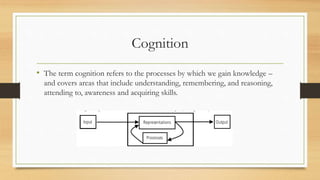
• The term cognition refers to the processes by which we gain knowledge –
and covers areas that include understanding, remembering, and reasoning,
attending to, awareness and acquiring skills.
Processes of Cognition
4 sequential stages
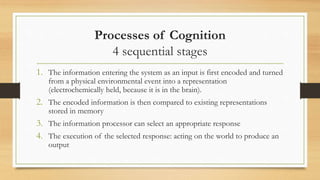
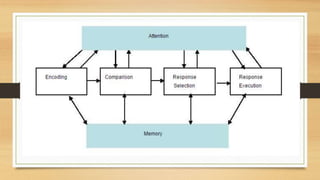
1. The information entering the system as an input is first encoded and turned
from a physical environmental event into a representation
(electrochemically held, because it is in the brain).
2. The encoded information is then compared to existing representations
stored in memory
3. The information processor can select an appropriate response
4. The execution of the selected response: acting on the world to produce an
output
Means end analysis
• Cognitive activity is goal oriented
• Brain knows when to stop
• Strategy is that given current state and a goal state , an action is chosen which
will reduce the difference between two. Action is performed on current state
to produce a new state , then it is recursively applied on new state
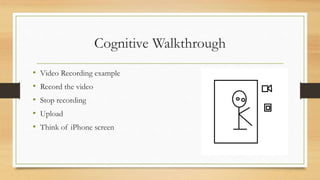
Cognitive Walkthrough
• Video Recording example
• Record the video
• Stop recording
• Upload
• Think of iPhone screen
Cognitive Walkthrough
1. Is effect of current action is same as user’s goal ( conceptual model)
2. Action visible ?
3. User recognize this as correct one ( or labeling required)
4. User understand the feedback
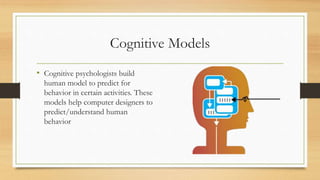
Cognitive Models
• Cognitive psychologists build
human model to predict for
behavior in certain activities. These
models help computer designers to
predict/understand human
behavior
Reasons for using cognitive models
1. Understand what is going on when users use system
2. Predict how users will behave
3. Identify & explain problems
4. Provide knowledge what use can or cannot be expected to do
5. Take advantage of particular aspects of user skills and abilities
Drawbacks of Cognitive Models
• Mood swings
• Motivation level
• Can take help from others
cognitive models of behavior should not be used alone in prediction, and more
detailed user testing should be employed
Cognition processes
• Attention
• Perception
• Memory
• Learning
• Reading, speaking and listening
• Problem solving, planning, reasoning and decision making
Attention
• Selecting things to concentrate at a certain point in time from different
possibilities
• Auditory and visual senses
• Our Goals
• Could be specific
• Not specific
• Information presentation
Multitasking and Attention
• Depends upon nature of tasks
• Music and math problem
Design implications
Attention
• Make information salient where it needs attending to
• Use animated graphics, colors, underlining , ordering, sequencing, spacing
• Avoid cluttering
• Clean interfaces are easier to use
Perception
• How information is acquired from environment
• Use sense organs like ears, eyes, fingers and transformed into experiences of
objects, events, sounds and tastes.
• Like grouping for attention, white spaces or borders for attention and
perception
Design Implications
Perception
• Icons and graphical objects should enable users to distinguish their meanings
• Bordering and spacing are effective for grouping information
• Sounds
• Speech
• Text
• Tactile feedback, where touch sensation being emulated
Perception an representation
• Direct mappings can be used where there is a correspondence between the
objects represented and the form of representation used
• Arbitrary mappings occur where there is no direct link between the screen
object and the represented feature
• Color perception and color blindness
Memory
• Recalling various kinds of knowledge that allow us to act appropriately
• Recognize Vs Recall
• Context specific memory
• Several techniques are used to focus attention
• Color Structure Alerts Screen location pop up
Design implications
Memory
• Don’t overload users with complicated procedures for carrying tasks
• Design interfaces that promote recognition than menus
• Provide variety of ways of encoding digital information. Use categories,
color, tagging , time stamps , icons etc.
Stage Theory Model
Memory
1. Sensory Memory
2. Short term Memory ( Working memory)
1. Speech system
2. Spatiovisual sketchpad ( some part of whole)
3. Central Executive
3. Long term memory
Memory
• Knowledge in head
• Knowledge in world
Designer guidelines
• 1. as internal representations (human memory)
• 2. from the world through external representations (memos, events)
• 3. Embodied in constraints from the world (the limits imposed on our
behavior from the environment).
• Grey menu example
• Exploit memory for meaningful relationship ( car indicators)
Class Activity
• Can you recall the menu options for your favorite word processing software?
Try to remember them and write them down in order.
• How many mistakes did you make? Probably several…
• Do your memory ‘failures’ stop you from using the software? Why do you
think this is so?

Cognition, information processing, perception and attention

  • 1.
  • 2.
    Cognition • The termcognition refers to the processes by which we gain knowledge – and covers areas that include understanding, remembering, and reasoning, attending to, awareness and acquiring skills.
  • 3.
    Processes of Cognition 4sequential stages 1. The information entering the system as an input is first encoded and turned from a physical environmental event into a representation (electrochemically held, because it is in the brain). 2. The encoded information is then compared to existing representations stored in memory 3. The information processor can select an appropriate response 4. The execution of the selected response: acting on the world to produce an output
  • 4.
    Means end analysis •Cognitive activity is goal oriented • Brain knows when to stop • Strategy is that given current state and a goal state , an action is chosen which will reduce the difference between two. Action is performed on current state to produce a new state , then it is recursively applied on new state
  • 5.
    Cognitive Walkthrough • VideoRecording example • Record the video • Stop recording • Upload • Think of iPhone screen
  • 6.
    Cognitive Walkthrough 1. Iseffect of current action is same as user’s goal ( conceptual model) 2. Action visible ? 3. User recognize this as correct one ( or labeling required) 4. User understand the feedback
  • 7.
    Cognitive Models • Cognitivepsychologists build human model to predict for behavior in certain activities. These models help computer designers to predict/understand human behavior
  • 8.
    Reasons for usingcognitive models 1. Understand what is going on when users use system 2. Predict how users will behave 3. Identify & explain problems 4. Provide knowledge what use can or cannot be expected to do 5. Take advantage of particular aspects of user skills and abilities
  • 9.
    Drawbacks of CognitiveModels • Mood swings • Motivation level • Can take help from others cognitive models of behavior should not be used alone in prediction, and more detailed user testing should be employed
  • 10.
    Cognition processes • Attention •Perception • Memory • Learning • Reading, speaking and listening • Problem solving, planning, reasoning and decision making
  • 11.
    Attention • Selecting thingsto concentrate at a certain point in time from different possibilities • Auditory and visual senses • Our Goals • Could be specific • Not specific • Information presentation
  • 14.
    Multitasking and Attention •Depends upon nature of tasks • Music and math problem
  • 15.
    Design implications Attention • Makeinformation salient where it needs attending to • Use animated graphics, colors, underlining , ordering, sequencing, spacing • Avoid cluttering • Clean interfaces are easier to use
  • 16.
    Perception • How informationis acquired from environment • Use sense organs like ears, eyes, fingers and transformed into experiences of objects, events, sounds and tastes. • Like grouping for attention, white spaces or borders for attention and perception
  • 17.
    Design Implications Perception • Iconsand graphical objects should enable users to distinguish their meanings • Bordering and spacing are effective for grouping information • Sounds • Speech • Text • Tactile feedback, where touch sensation being emulated
  • 18.
    Perception an representation •Direct mappings can be used where there is a correspondence between the objects represented and the form of representation used • Arbitrary mappings occur where there is no direct link between the screen object and the represented feature • Color perception and color blindness
  • 19.
    Memory • Recalling variouskinds of knowledge that allow us to act appropriately • Recognize Vs Recall • Context specific memory • Several techniques are used to focus attention • Color Structure Alerts Screen location pop up
  • 20.
    Design implications Memory • Don’toverload users with complicated procedures for carrying tasks • Design interfaces that promote recognition than menus • Provide variety of ways of encoding digital information. Use categories, color, tagging , time stamps , icons etc.
  • 21.
    Stage Theory Model Memory 1.Sensory Memory 2. Short term Memory ( Working memory) 1. Speech system 2. Spatiovisual sketchpad ( some part of whole) 3. Central Executive 3. Long term memory
  • 22.
    Memory • Knowledge inhead • Knowledge in world
  • 23.
    Designer guidelines • 1.as internal representations (human memory) • 2. from the world through external representations (memos, events) • 3. Embodied in constraints from the world (the limits imposed on our behavior from the environment). • Grey menu example • Exploit memory for meaningful relationship ( car indicators)
  • 24.
    Class Activity • Canyou recall the menu options for your favorite word processing software? Try to remember them and write them down in order. • How many mistakes did you make? Probably several… • Do your memory ‘failures’ stop you from using the software? Why do you think this is so?

Editor's Notes

  • #22 https://www.cs.umd.edu/class/fall2002/cmsc838s/tichi/infproctheory.html