Many kinds ofinteraction styles
available…
• Command
• Speech
• Data-entry
• Form fill-in
• Query
• Graphical
• Web
• Pen
3.
for Human–Computer Interaction
understandyour materials
• understand computers
– limitations, capacities, tools, platforms
• understand people
– psychological, social aspects
– human error
• and their interaction …
4.
Usability measures
• 5human factors central to interface
evaluation:
– Time to learn
• How long does it take for typical members of the community
to learn relevant task?
– Speed of performance
• How long does it take to perform relevant benchmarks?
– Rate of errors by users
• How many and what kinds of errors are made during
benchmark tasks?
– Retention over time
• Frequency of use and ease of learning
– Subjective satisfaction
• Allow for user feedback via interviews, free-form comments
and satisfaction scales
The human
• Informationi/o …
– visual, auditory, haptic, movement
• Information stored in memory
– sensory, short-term, long-term
• Information processed and applied
– reasoning, problem solving, skill, error
• Emotion influences human capabilities
• Each person is different
7.
Core cognitive aspects
•Attention
• Perception and recognition
• Memory
• Reading, speaking and listening
• Problem-solving, planning, reasoning and
decision-making, learning
8.
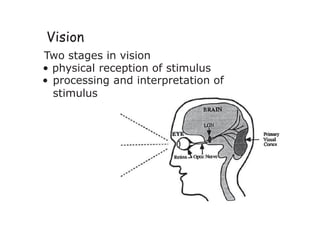
Vision
Two stages invision
• physical reception of stimulus
• processing and interpretation of
stimulus
9.
The Eye -physical reception
• mechanism for receiving light and
transforming it into electrical energy
• light reflects from objects
• images are focused upside-down on
retina
• retina contains rods for low light vision
and cones for color vision
• ganglion cells (brain!) detect pattern
and movement
10.
Interpreting the signal
•Size and depth
– visual angle indicates how much of view
object occupies
(relates to size and distance from eye)
– visual acuity is the ability to perceive detail
(limited)
– cues like overlapping help perception of
size and depth
11.
Interpreting the signal(cont)
• Brightness
– subjective reaction to levels of light
– affected by luminance of object
– measured by just noticeable difference
– visual acuity increases with luminance as does
flicker
• Color
– made up of hue, intensity, saturation
– cones sensitive to color wavelengths
– blue acuity is lowest
– 8% males and 1% females color blind
12.
color and 3D
•both often used very badly!
• color
–older monitors limited palette
– beware color blind!
– use sparingly to reinforce other information
• 3D effects
– good for physical information and some graphs
– but if over used …
e.g. text in perspective!! 3D pie charts
14.
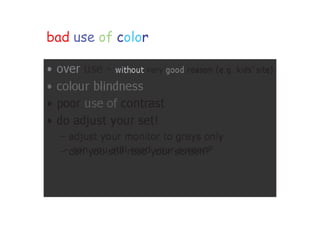
bad use ofcolor
• over use - without very good reason (e.g. kids’
site)
• colour blindness
• poor use of contrast
• do adjust your set!
– adjust your monitor to greys
only
– can you still read your screen?
15.
Interpreting the signal(cont)
• The visual system compensates for:
– movement
– changes in luminance.
• Optical illusions sometimes occur due to
over compensation
16.
Reading
• Several stages:
–visual pattern perceived
– decoded using internal representation of language
– interpreted using knowledge of syntax, semantics,
pragmatics
• Reading involves saccades and fixations
• Perception occurs during fixations
• Word shape is important to recognition
• Negative contrast improves reading from
computer screen
17.
Hearing
• Provides informationabout environment:
distances, directions, objects etc.
• Physical apparatus:
– outer ear – protects inner and amplifies sound
– middle ear – transmits sound waves as
vibrations to inner ear
– inner ear – chemical transmitters are released
and cause impulses in auditory nerve
• Sound
– pitch
– loudness
– timbre
– sound frequency
– amplitude
– type or quality
18.
Hearing (cont)
• Humanscan hear frequencies from 20Hz to
15kHz
– less accurate distinguishing high frequencies than
low.
• Auditory system filters sounds
– can attend to sounds over background noise.
19.
Touch
• Provides importantfeedback about environment.
• May be key sense for someone who is visually impaired.
• Stimulus received via receptors in the skin:
– thermoreceptors
– nociceptors
– heat and cold
– pain
– mechanoreceptors – pressure
(some instant, some continuous)
•Some areas more sensitive than others e.g. fingers.
20.
Attention
• Selecting thingsto concentrate on from the mass
around us, at a point in time
• Information at the interface should be structured to
capture users’ attention, e.g. use perceptual boundaries
(windows), color, video, sound and flashing lights
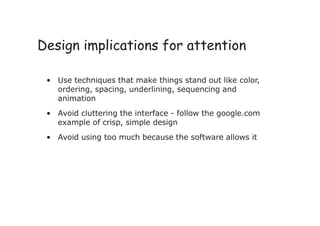
21.
• Use techniquesthat make things stand out like color,
ordering, spacing, underlining, sequencing and
animation
• Avoid cluttering the interface - follow the google.com
example of crisp, simple design
• Avoid using too much because the software allows it
Design implications for attention
22.
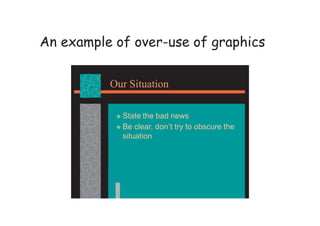
An example ofover-use of graphics
Our Situation
State the bad news
Be clear, don’t try to obscure the
situation
23.
Perception and recognition
•How information is acquired from the world
and transformed into experiences
• Obvious implication is to design
representations that are readily perceivable,
e.g.
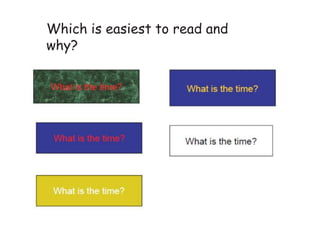
– Text should be legible
– Icons should be easy to distinguish and read
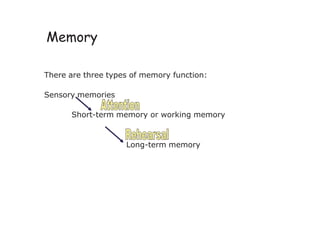
Memory
There are threetypes of memory function:
Sensory memories
Short-term memory or working memory
Long-term memory
26.
Memory
• Involves encodingand recalling knowledge and acting
Appropriately
• We don’t remember everything - involves filtering and
processing
• Context is important in affecting our memory
– The rise of the GUI over command-based interfaces
• Better at remembering images than words
– The use of icons rather than names
‘ ’
The problemwith the classic 72
• George Miller’s theory of how much information people
can remember
• People’s immediate memory capacity is very limited
• Many designers have been led to believe that this is
useful finding for interaction design
30.
What some designersget up to…
• Present only 7 options on a menu
• Display only 7 icons on a tool bar
• Have no more than 7 bullets in a list
• Place only 7 items on a pull down menu
• Place only 7 tabs on the top of a website page
– But this is wrong? Why?
31.
Why?
• People canscan lists of bullets, tabs, menu items till
they see the one they want
•Sometimes a small number of items is good design
32.
Long-term memory (LTM)
•Repository for all our knowledge
– slow access ~ 1/10 second
– slow decay, if any
– huge or unlimited capacity
33.
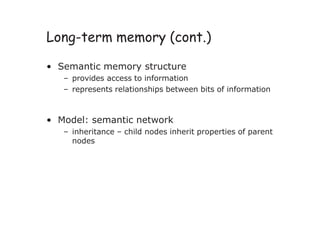
Long-term memory (cont.)
•Semantic memory structure
– provides access to information
– represents relationships between bits of information
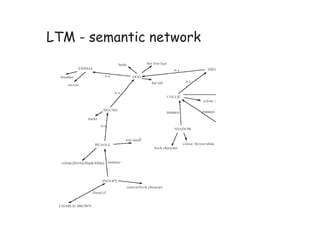
• Model: semantic network
– inheritance – child nodes inherit properties of parent
nodes
LTM - Storageof information
• rehearsal
– information moves from STM to LTM
• distribution of practice effect
– optimized by spreading learning over time
• structure, meaning and familiarity
– information easier to remember
36.
LTM - Forgetting
decay
–information is lost gradually but very slowly
interference
– new information replaces old: retroactive
interference
– old may interfere with new: proactive inhibition
37.
LTM - retrieval
recall
–information reproduced from memory can be
assisted by cues, e.g. categories, imagery
Deductive Reasoning
• Deduction:
–derive logically necessary conclusion from given
premises.
e.g. If it is Friday then she will go to work
It is Friday
Therefore she will go to work.
40.
Deduction (cont.)
• Whentruth and logical validity clash …
e.g. Some people are babies
Some babies cry
Inference - Some people cry
Correct?
41.
Inductive Reasoning
• Induction:
–generalize from cases seen to cases unseen
e.g. all elephants we have seen have trunks
therefore all elephants have trunks.
• Unreliable:
– can only prove false not true
42.
Abductive reasoning
• reasoningfrom event to cause
e.g. Sam drives fast when drunk.
If I see Sam driving fast, assume drunk.
• Unreliable:
– can lead to false explanations
Problem solving (cont.)
Problemspace theory
– problem space comprises problem states
– problem solving involves generating states using legal
operators
– operates within human information processing system
e.g. STM limits etc.
45.
Problem solving (cont.)
•Analogy
– analogical mapping:
• novel problems in new domain?
• use knowledge of similar problem from similar
domain
– analogical mapping difficult if domains are
semantically different
46.
Errors and mentalmodels
Types of error
• slips
– right intention, but failed to do it right
– causes: poor physical skill,inattention etc.
• mistakes
– wrong intention
– cause: incorrect understanding
humans create mental models to explain behaviour.
if wrong (different from actual system) errors can occur
47.
Mental models
• Usersdevelop an understanding of a system
through learning & using it
• Knowledge is often described as a mental model
– How to use the system (what to do next)
– What to do with unfamiliar systems or unexpected
situations (how the system works)
48.
Everyday reasoning &mental model
(a) You arrive home on a cold winter’s night to a cold house.
How do you get the house to warm up as quickly as
possible? Set the thermostat to be at its highest or to the
desired temperature?
(b) You arrive home starving hungry. You look in the fridge and
find all that is left is an uncooked pizza. You have an electric
oven. Do you warm it up to 175 degrees first and then put it
in (as specified by the instructions) or turn the oven up in
higher to try to warm it up quicker?
49.
Heating up aroom or oven that is
thermostat-controlled
• Many people have erroneous mental models
(Kempton, 1996)
• Why?
– General valve theory, where ‘more is more’ principle
is generalised to different settings (e.g. gas pedal,
gas cooker, tap, radio volume)
– Thermostats based on model of on-off switch model
50.
Heating up aroom or oven that is
thermostat-controlled
• Same is often true for understanding how
interactive devices and computers work:
– e.g. frozen cursor/screen - most people will bash all
manner of keys
51.
External cognition
• Concernedwith explaining how we interact
with external representations (e.g. maps,
notes, diagrams)
• What computer-based representations can we
develop to help even more?
52.
Externalizing to reducememory
load
• Diaries, reminders,calendars, notes, shopping lists, to-do
lists - written to remind us of what to do
• Post-its, piles, marked emails - where placed indicates
priority of what to do
• External representations:
– Remind us that we need to do something (e.g. to buy
something for mother’s day)
– Remind us of what to do (e.g. buy a card)
– Remind us when to do something (e.g. send a card by a
certain date)
53.
Involving users inthe design
• At the very least, talk to users
– It’s surprising how many designers
don’t!
• Contextual Inquiries
– Interview users in their usage
place (e.g., office), during their
normal routine (e.g., while
working)
– Used to discover user’s culture,
requirements, expectations, etc.
54.
Involving users inthe design
• Create prototypes
– It’s hard to comment on something
that doesn’t yet exist
– Users are good at giving feedback for
something that is even partially built


![Hci [2]human](https://cdn.slidesharecdn.com/ss_thumbnails/hci-2human-140116110359-phpapp01-thumbnail.jpg?width=640&height=640&fit=bounds)


