COGNITIVE ASPECTS
AND SOCIAL, EMOTIONAL
INTERACTION
Mary MargaratValentine
Topics
The main aims of this chapter are to:
 Explain what cognition is and why it is important for interaction design.
 Discuss what attention is and its effects on our ability to multitask.
 Describe how memory can be enhanced through technology aids.
 Explain what mental models are.
 Show the difference between classic internal cognitive frameworks (e.g.
mental models) and more recent external cognitive approaches (e.g.
distributed cognition) that have been applied to HCI.
 Enable you to try to elicit a mental model and be able to understand what
it means.
Imagine trying to drive a car by using just a computer keyboard. The
four arrow keys are used for steering, the space bar for braking, and
the return key for accelerating. To indicate left you need to press the
F1 key and to indicate right the F2 key.
To sound your horn you need to press the F3 key. To switch the
headlights on you need to use the F4 key and, to switch the
windscreen wipers on, the F5 key.
Now imagine as you are driving along a road a ball is suddenly
kicked in front of you.What would you do?
Bash the arrow keys and the space bar madly while pressing the F4
key? How would you rate your chances of missing the ball?
Cognition
 Cognition refers to what goes on in human’s mind when
they carry out everyday activities.
 Norman (1993) distinguishes between two general
modes:
 Experiential cognition
 Reflective cognition.
Experiential cognition
 Experiential cognition is a state of mind in which we
perceive, act, and react to events around us effectively
and effortlessly.
 It requires reaching a certain level of expertise and
engagement.
Examples include driving a car, reading a book, having a
conversation, and playing a video game.
Reflective cognition
Reflective cognition involves thinking, comparing, and
decision-making.
This kind of cognition is what leads to new ideas and
creativity.
Examples include designing, learning, and writing a book.
Cognition Processes
Attention
Perception and recognition
Memory
Learning
Reading, speaking, and listening
Problem-solving, planning, reasoning, decision-making.
Attention
 Attention is the process of selecting things to concentrate
on, at a point in time, from the range of possibilities
available.
 Attention involves our auditory and/or visual senses.
Attention
 Attention allows us to focus on information that is
relevant to what we are doing.
 The extent to which this process is easy or difficult
depends on
(i) whether we have clear goals
(ii) whether the information we need is salient in the
environment.
Attention
 Attention allows us to focus on information that is
relevant to what we are doing.
 The extent to which this process is easy or difficult
depends on
(i) whether we have clear goals
(ii) whether the information we need is salient in the
environment.
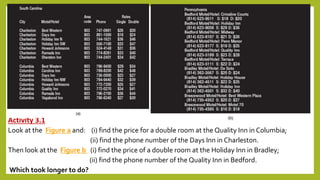
Activity 3.1
Look at the Figure a and: (i) find the price for a double room at the Quality Inn in Columbia;
(ii) find the phone number of the Days Inn in Charleston.
Then look at the Figure b (i) find the price of a double room at the Holiday Inn in Bradley;
(ii) find the phone number of the Quality Inn in Bedford.
Which took longer to do?
DESIGN IMPLICATIONS - ATTENTION
 Make information salient when it needs attending to at a
given stage of a task.
 Use techniques like animated graphics, color, underlining,
ordering of items, sequencing of different information,
and spacing of items to achieve this.
 Avoid cluttering the interface with too much information.
DESIGN IMPLICATIONS - ATTENTION
This especially applies to the use of color, sound, and
graphics: there is a temptation to use lots of them,
resulting in a mishmash of media that is distracting
and annoying rather than helping the user attend to
relevant information.
DESIGN IMPLICATIONS - ATTENTION
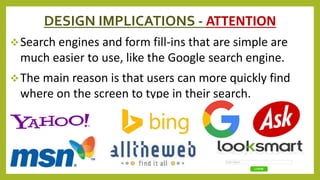
Search engines and form fill-ins that are simple are
much easier to use, like the Google search engine.
The main reason is that users can more quickly find
where on the screen to type in their search.
PERCEPTION
Perception refers to how information is acquired
from the environment, via the different sense
organs (e.g., eyes, ears, fingers) and transformed
into experiences of objects, events, sounds, and
tastes (Roth, 1986).
It is a complex process, involving other cognitive
processes such as memory, attention, and language.
PERCEPTION
Vision is the most dominant sense for sighted
individuals, followed by hearing and touch.
DESIGN IMPLICATION --PERCEPTION
Representations of information need to be designed
to be perceptible and recognizable across different
media:
Icons and other graphical representations should
enable users to readily distinguish their meaning.
Bordering and spacing are effective visual ways of
grouping information that makes it easier to
perceive and locate items.
DESIGN IMPLICATION --PERCEPTION
 Sound
 Speech Output
 Text
 Tactile feedback
MEMORY
Memory involves recalling various kinds of
knowledge that allow us to act appropriately.
It is very versatile, enabling us to do many things.
MEMORY
Two memory processes:
 recall-directed,
recognition-based scanning.
Questions
 Define conceptual model.
 Define Perception in cognitive process.
 A 3D video game, say a car-racing game with a steering wheel and
tactile, audio, and visual feedback. What conceptual models are the
above application based on?
 Which conceptual model or combination of models do you think is most
suited to “download music off the web”?
 Define Experiential cognition and Reflective cognition.
 Explain conceptual model based on activities.
 Discuss User’s model, Designer Model and system image
Questions
 Explain conceptual model based on Objects.
 What is User Centered Design and what is the importance of it.
 What conceptual models are the required for “web browser”
application?
 Explain different types of emotions and the user experience
 List and Explain Cognition process with design implications.
 Discuss Expressive and Frustrating Interfaces
 Discuss Pervasive Technologies

Cognitive aspects - Mary Margarat

  • 1.
    COGNITIVE ASPECTS AND SOCIAL,EMOTIONAL INTERACTION Mary MargaratValentine
  • 2.
    Topics The main aimsof this chapter are to:  Explain what cognition is and why it is important for interaction design.  Discuss what attention is and its effects on our ability to multitask.  Describe how memory can be enhanced through technology aids.  Explain what mental models are.  Show the difference between classic internal cognitive frameworks (e.g. mental models) and more recent external cognitive approaches (e.g. distributed cognition) that have been applied to HCI.  Enable you to try to elicit a mental model and be able to understand what it means.
  • 3.
    Imagine trying todrive a car by using just a computer keyboard. The four arrow keys are used for steering, the space bar for braking, and the return key for accelerating. To indicate left you need to press the F1 key and to indicate right the F2 key. To sound your horn you need to press the F3 key. To switch the headlights on you need to use the F4 key and, to switch the windscreen wipers on, the F5 key. Now imagine as you are driving along a road a ball is suddenly kicked in front of you.What would you do? Bash the arrow keys and the space bar madly while pressing the F4 key? How would you rate your chances of missing the ball?
  • 4.
    Cognition  Cognition refersto what goes on in human’s mind when they carry out everyday activities.  Norman (1993) distinguishes between two general modes:  Experiential cognition  Reflective cognition.
  • 5.
    Experiential cognition  Experientialcognition is a state of mind in which we perceive, act, and react to events around us effectively and effortlessly.  It requires reaching a certain level of expertise and engagement. Examples include driving a car, reading a book, having a conversation, and playing a video game.
  • 6.
    Reflective cognition Reflective cognitioninvolves thinking, comparing, and decision-making. This kind of cognition is what leads to new ideas and creativity. Examples include designing, learning, and writing a book.
  • 7.
    Cognition Processes Attention Perception andrecognition Memory Learning Reading, speaking, and listening Problem-solving, planning, reasoning, decision-making.
  • 8.
    Attention  Attention isthe process of selecting things to concentrate on, at a point in time, from the range of possibilities available.  Attention involves our auditory and/or visual senses.
  • 9.
    Attention  Attention allowsus to focus on information that is relevant to what we are doing.  The extent to which this process is easy or difficult depends on (i) whether we have clear goals (ii) whether the information we need is salient in the environment.
  • 10.
    Attention  Attention allowsus to focus on information that is relevant to what we are doing.  The extent to which this process is easy or difficult depends on (i) whether we have clear goals (ii) whether the information we need is salient in the environment.
  • 11.
    Activity 3.1 Look atthe Figure a and: (i) find the price for a double room at the Quality Inn in Columbia; (ii) find the phone number of the Days Inn in Charleston. Then look at the Figure b (i) find the price of a double room at the Holiday Inn in Bradley; (ii) find the phone number of the Quality Inn in Bedford. Which took longer to do?
  • 12.
    DESIGN IMPLICATIONS -ATTENTION  Make information salient when it needs attending to at a given stage of a task.  Use techniques like animated graphics, color, underlining, ordering of items, sequencing of different information, and spacing of items to achieve this.  Avoid cluttering the interface with too much information.
  • 13.
    DESIGN IMPLICATIONS -ATTENTION This especially applies to the use of color, sound, and graphics: there is a temptation to use lots of them, resulting in a mishmash of media that is distracting and annoying rather than helping the user attend to relevant information.
  • 14.
    DESIGN IMPLICATIONS -ATTENTION Search engines and form fill-ins that are simple are much easier to use, like the Google search engine. The main reason is that users can more quickly find where on the screen to type in their search.
  • 15.
    PERCEPTION Perception refers tohow information is acquired from the environment, via the different sense organs (e.g., eyes, ears, fingers) and transformed into experiences of objects, events, sounds, and tastes (Roth, 1986). It is a complex process, involving other cognitive processes such as memory, attention, and language.
  • 16.
    PERCEPTION Vision is themost dominant sense for sighted individuals, followed by hearing and touch.
  • 17.
    DESIGN IMPLICATION --PERCEPTION Representationsof information need to be designed to be perceptible and recognizable across different media: Icons and other graphical representations should enable users to readily distinguish their meaning. Bordering and spacing are effective visual ways of grouping information that makes it easier to perceive and locate items.
  • 18.
    DESIGN IMPLICATION --PERCEPTION Sound  Speech Output  Text  Tactile feedback
  • 19.
    MEMORY Memory involves recallingvarious kinds of knowledge that allow us to act appropriately. It is very versatile, enabling us to do many things.
  • 20.
    MEMORY Two memory processes: recall-directed, recognition-based scanning.
  • 21.
    Questions  Define conceptualmodel.  Define Perception in cognitive process.  A 3D video game, say a car-racing game with a steering wheel and tactile, audio, and visual feedback. What conceptual models are the above application based on?  Which conceptual model or combination of models do you think is most suited to “download music off the web”?  Define Experiential cognition and Reflective cognition.  Explain conceptual model based on activities.  Discuss User’s model, Designer Model and system image
  • 22.
    Questions  Explain conceptualmodel based on Objects.  What is User Centered Design and what is the importance of it.  What conceptual models are the required for “web browser” application?  Explain different types of emotions and the user experience  List and Explain Cognition process with design implications.  Discuss Expressive and Frustrating Interfaces  Discuss Pervasive Technologies

Editor's Notes

  • #7 Norman points out that both modes are essential for everyday life, but that each requires different kinds of technological support.