
CMake introduction
1- PRINCIPLES AND POTENTIALS 
1.1- INTRO 
1.2- WORKFLOW 
2- CROSSPLATEFORM USAGES 
2.1- USEFUL VARIABLES AND USE 
2.2- GUI AND CACHE 
3- FIND PACKAGE 
4- ADVANCED AND MORE 
5- INSTALLATION, EXPORT, PACKAGE 
(NOT PRESENTED HERE) 
jerome.esnault@inria.fr 02 July 2014 - 2
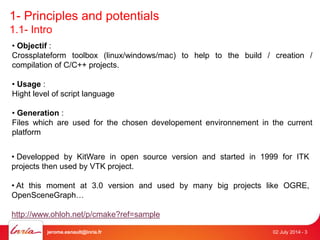
1- Principles and potentials 
1.1- Intro 
• Objectif : 
Crossplateform toolbox (linux/windows/mac) to help to the build / creation / 
compilation of C/C++ projects. 
• Usage : 
Hight level of script language 
• Generation : 
Files which are used for the chosen developement environnement in the current 
platform 
• Developped by KitWare in open source version and started in 1999 for ITK 
projects then used by VTK project. 
• At this moment at 3.0 version and used by many big projects like OGRE, 
OpenSceneGraph… 
http://www.ohloh.net/p/cmake?ref=sample 
jerome.esnault@inria.fr 02 July 2014 - 3
1- Principles and potentials 
CMake / Ctest / CPack 
Compiler 
jerome.esnault@inria.fr 02 July 2014 - 4 
Modules 
CMake 
[*.cmake] 
[*.in] 
Sources C/C++/Java CMakeLists.txt / Ctest scripts 
CMakeCache.txt 
Native build system files [MakeFiles, sln…] 
Targets [executables, libraries, plugins] 
1.2- Workflow
2- CROSSPLATEFORM USAGES 
Cmake [options] <path-to-source> 
$ cd projectName 
$ mkdir build && cd build 
$ cmake .. 
$ make install 
$ cd projectName 
$ mkdir build && cd build 
$ cmake-gui .. 
$ make install 
Generators / IDE compatibilities : 
• Borland 
• MinGW 
• Nmake 
• Unix 
• Visual Studio 6/7/8/9/10/11 
• Xcode 
• codeBlocks 
• Eclipse 
• QtCreator 
3 tree structures : 
• CMAKE_SOURCE_DIR 
• CMAKE_BINARY_DIR 
• CMAKE_INSTALL_PREFIX 
OR 
jerome.esnault@inria.fr 02 July 2014 - 5
2- CROSSPLATEFORM USAGES 
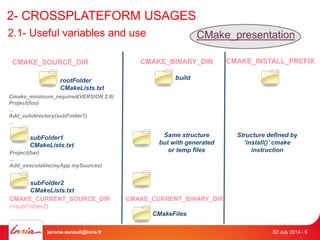
2.1- Useful variables and use CMake_presentation 
CMAKE_SOURCE_DIR CMAKE_BINARY_DIR CMAKE_INSTALL_PREFIX 
rootFolder 
CMakeLists.txt 
Cmake_minimum_required(VERSION 2.8) 
Project(foo) 
… 
Add_subdirectory(subFolder1) 
… 
subFolder1 
CMakeLists.txt 
build 
Same structure 
but with generated 
or temp files 
Project(bar) 
… 
Add_executable(myApp mySources) 
subFolder2 
CMakeLists.txt 
CMAKE_CURRENT_SOURCE_DIR CMAKE_CURRENT_BINARY_DIR 
(=subFolder2) 
CMakeFiles 
Structure defined by 
‘install()’ cmake 
instruction 
jerome.esnault@inria.fr 02 July 2014 - 6
2- CROSSPLATEFORM USAGES 
2.1- Useful variables and use CMake_Useful_Variables 
CMAKE_SOURCE_DIR 
(=path to rootFolder) 
CMAKE_BINARY_DIR 
(=path to build) 
CMAKE_PROJECT_NAME (=foo) CMAKE_LIBRARY_OUTPUT_DIRECTORY 
CMAKE_ARCHIVE_OUTPUT_DIRECTORY 
CMAKE_RUNTIME_OUTPUT_DIRECTORY 
PROJECT_NAME (=bar) 
UNIX WIN32 APPLE 
MSVC 
jerome.esnault@inria.fr 02 July 2014 - 7 
bool 
Place where target name will be generated, see: 
Add_executable(name sources) 
Add_library(name srouces [STATIC|SHARED])
2- CROSSPLATEFORM USAGES 
2.1- Useful variables and use 
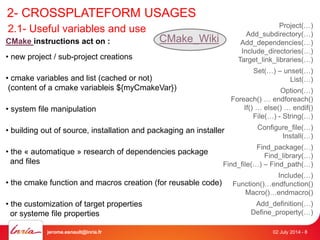
CMake instructions act on : 
• new project / sub-project creations 
CMake_Wiki 
• cmake variables and list (cached or not) 
(content of a cmake variableis ${myCmakeVar}) 
• system file manipulation 
• building out of source, installation and packaging an installer 
• the « automatique » research of dependencies package 
and files 
• the cmake function and macros creation (for reusable code) 
• the customization of target properties 
or systeme file properties 
Project(…) 
Add_subdirectory(…) 
Add_dependencies(…) 
Include_directories(…) 
Target_link_libraries(…) 
Set(…) – unset(…) 
List(…) 
Option(…) 
Foreach() … endforeach() 
If() … else() … endif() 
File(…) - String(…) 
Configure_file(…) 
Install(…) 
Find_package(…) 
Find_library(…) 
Find_file(…) – Find_path(…) 
Include(…) 
Function()…endfunction() 
Macro()…endmacro() 
Add_definition(…) 
Define_property(…) 
jerome.esnault@inria.fr 02 July 2014 - 8
2- CROSSPLATEFORM USAGES 
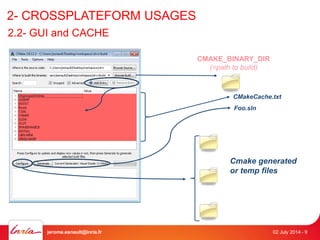
2.2- GUI and CACHE 
CMAKE_BINARY_DIR 
(=path to build) 
CMakeCache.txt 
Foo.sln 
Cmake generated 
or temp files 
jerome.esnault@inria.fr 02 July 2014 - 9
2- CROSSPLATEFORM USAGES 
QUESTION ? 
EXAMPLES with current IBR projects, 
Showing differences between 
spixel_warp 
Ulrvr 
Ibr_common 
jerome.esnault@inria.fr 02 July 2014 - 10
3- Find Package 
3.1- How to use 
CMake_find 
find_package(<package> [version] [EXACT] [QUIET] 
[REQUIRED] [[COMPONENTS] [components...]] 
[CONFIG|NO_MODULE] 
[NO_POLICY_SCOPE] 
[NAMES name1 [name2 ...]] 
[CONFIGS config1 [config2 ...]] 
[HINTS path1 [path2 ... ]] 
[PATHS path1 [path2 ... ]] 
[PATH_SUFFIXES suffix1 [suffix2 ...]] 
[NO_DEFAULT_PATH] 
[NO_CMAKE_ENVIRONMENT_PATH] 
[NO_CMAKE_PATH] 
[NO_SYSTEM_ENVIRONMENT_PATH] 
[NO_CMAKE_PACKAGE_REGISTRY] 
[NO_CMAKE_BUILDS_PATH] 
[NO_CMAKE_SYSTEM_PATH] 
[NO_CMAKE_SYSTEM_PACKAGE_REGISTRY] 
[CMAKE_FIND_ROOT_PATH_BOTH | 
ONLY_CMAKE_FIND_ROOT_PATH | 
NO_CMAKE_FIND_ROOT_PATH]) 
2 ways : 
1. With a Find<package>.cmake module file 
2. With a cmake config file provided by the dependency 
jerome.esnault@inria.fr 02 July 2014 - 11
3- Find Package 
3.1- How to use 
CMake_find 
2 ways : 
1. With a Find<package>.cmake module file 
find_package (foo) Will look for Findfoo.cmake into : 1- CMAKE_MODULE_PATH list of dirs if not empty 
2- ${CMAKE_ROOT}/Modules 
The objective of a Findfoo.cmake try to locate libraries and includes files (and executables) to 
let user then use cmake variable to abstract paths and names whatever is the platform. 
Findfoo.cmake may use : 
find_library (<VAR> name1 [path1 path2 ...]) 
find_path (<VAR> name1 [path1 path2 ...]) 
find_file (<VAR> name1 [path1 path2 ...]) 
find_program (<VAR> name1 [path1 path2 ...]) 
FIND_PACKAGE_HANDLE_STANDARD_ARGS(<name> 
Paths may be set using : 
* foo_DIR cmake variable 
* $ENV{name} cmake variable 
* [HKEY_LOCAL_MACHINE …] 
(DEFAULT_MSG|"Custom failure message") <var1>...<varN> ) 
For find_* cmake instructions, some additional global list of dirs may be set with : 
CMAKE_INCLUDE_PATH 
CMAKE_LIBRARY_PATH 
CMAKE_PREFIX_PATH 
jerome.esnault@inria.fr 02 July 2014 - 12
3- Find Package 
3.1- How to use 
CMake_find 
2 ways : 
1. With a Find<package>.cmake module file 
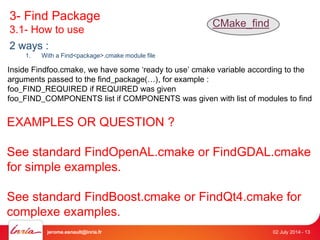
Inside Findfoo.cmake, we have some ‘ready to use’ cmake variable according to the 
arguments passed to the find_package(…), for example : 
foo_FIND_REQUIRED if REQUIRED was given 
foo_FIND_COMPONENTS list if COMPONENTS was given with list of modules to find 
EXAMPLES OR QUESTION ? 
See standard FindOpenAL.cmake or FindGDAL.cmake 
for simple examples. 
See standard FindBoost.cmake or FindQt4.cmake for 
complexe examples. 
jerome.esnault@inria.fr 02 July 2014 - 13
3- Find Package 
3.1- How to use 
CMake_find 
2 ways : 
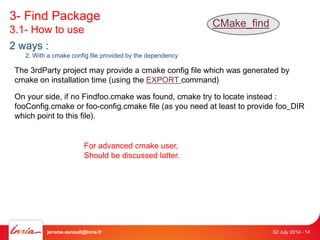
2. With a cmake config file provided by the dependency 
The 3rdParty project may provide a cmake config file which was generated by 
cmake on installation time (using the EXPORT command) 
On your side, if no Findfoo.cmake was found, cmake try to locate instead : 
fooConfig.cmake or foo-config.cmake file (as you need at least to provide foo_DIR 
which point to this file). 
For advanced cmake user, 
Should be discussed latter. 
jerome.esnault@inria.fr 02 July 2014 - 14
4- ADVANCED AND MORE 
For compiler command line: 
CMAKE_CXX_FLAGS cmake var 
For preprocessors : 
add_definitions(-DFOO -DBAR ...) 
configure_file(<input> <output> 
For more examples: 
suitesparse-metis-for-windows 
[COPYONLY] [ESCAPE_QUOTES] [@ONLY] 
[NEWLINE_STYLE [UNIX|DOS|WIN32|LF|CRLF] ]) 
For custom targets : 
add_custom_target(Name [ALL] [command1 [args1...]] 
[COMMAND command2 [args2...] ...] 
[DEPENDS depend depend depend ... ] 
[WORKING_DIRECTORY dir] 
[COMMENT comment] [VERBATIM] 
[SOURCES src1 [src2...]]) 
For installation (see doxygen example) : 
Install(…) (multiples signatures) 
jerome.esnault@inria.fr 02 July 2014 - 15
5-INSTALLATION, EXPORT, PACKAGE 
TIPS here 
And here 
jerome.esnault@inria.fr 02 July 2014 - 16
ANDROID && iOS toolchain 
• ANDROID : https://github.com/taka-no-me/android-cmake 
• iOS : https://code.google.com/p/ios-cmake/ 
• Global integration with Qt and QtCreator topic : 
(http://qt-project.org/forums/viewthread/36359) 
jerome.esnault@inria.fr 02 July 2014 - 17

short_intro_to_CMake_(inria_REVES_team)

  • 1.
  • 2.
    1- PRINCIPLES ANDPOTENTIALS 1.1- INTRO 1.2- WORKFLOW 2- CROSSPLATEFORM USAGES 2.1- USEFUL VARIABLES AND USE 2.2- GUI AND CACHE 3- FIND PACKAGE 4- ADVANCED AND MORE 5- INSTALLATION, EXPORT, PACKAGE (NOT PRESENTED HERE) jerome.esnault@inria.fr 02 July 2014 - 2
  • 3.
    1- Principles andpotentials 1.1- Intro • Objectif : Crossplateform toolbox (linux/windows/mac) to help to the build / creation / compilation of C/C++ projects. • Usage : Hight level of script language • Generation : Files which are used for the chosen developement environnement in the current platform • Developped by KitWare in open source version and started in 1999 for ITK projects then used by VTK project. • At this moment at 3.0 version and used by many big projects like OGRE, OpenSceneGraph… http://www.ohloh.net/p/cmake?ref=sample jerome.esnault@inria.fr 02 July 2014 - 3
  • 4.
    1- Principles andpotentials CMake / Ctest / CPack Compiler jerome.esnault@inria.fr 02 July 2014 - 4 Modules CMake [*.cmake] [*.in] Sources C/C++/Java CMakeLists.txt / Ctest scripts CMakeCache.txt Native build system files [MakeFiles, sln…] Targets [executables, libraries, plugins] 1.2- Workflow
  • 5.
    2- CROSSPLATEFORM USAGES Cmake [options] <path-to-source> $ cd projectName $ mkdir build && cd build $ cmake .. $ make install $ cd projectName $ mkdir build && cd build $ cmake-gui .. $ make install Generators / IDE compatibilities : • Borland • MinGW • Nmake • Unix • Visual Studio 6/7/8/9/10/11 • Xcode • codeBlocks • Eclipse • QtCreator 3 tree structures : • CMAKE_SOURCE_DIR • CMAKE_BINARY_DIR • CMAKE_INSTALL_PREFIX OR jerome.esnault@inria.fr 02 July 2014 - 5
  • 6.
    2- CROSSPLATEFORM USAGES 2.1- Useful variables and use CMake_presentation CMAKE_SOURCE_DIR CMAKE_BINARY_DIR CMAKE_INSTALL_PREFIX rootFolder CMakeLists.txt Cmake_minimum_required(VERSION 2.8) Project(foo) … Add_subdirectory(subFolder1) … subFolder1 CMakeLists.txt build Same structure but with generated or temp files Project(bar) … Add_executable(myApp mySources) subFolder2 CMakeLists.txt CMAKE_CURRENT_SOURCE_DIR CMAKE_CURRENT_BINARY_DIR (=subFolder2) CMakeFiles Structure defined by ‘install()’ cmake instruction jerome.esnault@inria.fr 02 July 2014 - 6
  • 7.
    2- CROSSPLATEFORM USAGES 2.1- Useful variables and use CMake_Useful_Variables CMAKE_SOURCE_DIR (=path to rootFolder) CMAKE_BINARY_DIR (=path to build) CMAKE_PROJECT_NAME (=foo) CMAKE_LIBRARY_OUTPUT_DIRECTORY CMAKE_ARCHIVE_OUTPUT_DIRECTORY CMAKE_RUNTIME_OUTPUT_DIRECTORY PROJECT_NAME (=bar) UNIX WIN32 APPLE MSVC jerome.esnault@inria.fr 02 July 2014 - 7 bool Place where target name will be generated, see: Add_executable(name sources) Add_library(name srouces [STATIC|SHARED])
  • 8.
    2- CROSSPLATEFORM USAGES 2.1- Useful variables and use CMake instructions act on : • new project / sub-project creations CMake_Wiki • cmake variables and list (cached or not) (content of a cmake variableis ${myCmakeVar}) • system file manipulation • building out of source, installation and packaging an installer • the « automatique » research of dependencies package and files • the cmake function and macros creation (for reusable code) • the customization of target properties or systeme file properties Project(…) Add_subdirectory(…) Add_dependencies(…) Include_directories(…) Target_link_libraries(…) Set(…) – unset(…) List(…) Option(…) Foreach() … endforeach() If() … else() … endif() File(…) - String(…) Configure_file(…) Install(…) Find_package(…) Find_library(…) Find_file(…) – Find_path(…) Include(…) Function()…endfunction() Macro()…endmacro() Add_definition(…) Define_property(…) jerome.esnault@inria.fr 02 July 2014 - 8
  • 9.
    2- CROSSPLATEFORM USAGES 2.2- GUI and CACHE CMAKE_BINARY_DIR (=path to build) CMakeCache.txt Foo.sln Cmake generated or temp files jerome.esnault@inria.fr 02 July 2014 - 9
  • 10.
    2- CROSSPLATEFORM USAGES QUESTION ? EXAMPLES with current IBR projects, Showing differences between spixel_warp Ulrvr Ibr_common jerome.esnault@inria.fr 02 July 2014 - 10
  • 11.
    3- Find Package 3.1- How to use CMake_find find_package(<package> [version] [EXACT] [QUIET] [REQUIRED] [[COMPONENTS] [components...]] [CONFIG|NO_MODULE] [NO_POLICY_SCOPE] [NAMES name1 [name2 ...]] [CONFIGS config1 [config2 ...]] [HINTS path1 [path2 ... ]] [PATHS path1 [path2 ... ]] [PATH_SUFFIXES suffix1 [suffix2 ...]] [NO_DEFAULT_PATH] [NO_CMAKE_ENVIRONMENT_PATH] [NO_CMAKE_PATH] [NO_SYSTEM_ENVIRONMENT_PATH] [NO_CMAKE_PACKAGE_REGISTRY] [NO_CMAKE_BUILDS_PATH] [NO_CMAKE_SYSTEM_PATH] [NO_CMAKE_SYSTEM_PACKAGE_REGISTRY] [CMAKE_FIND_ROOT_PATH_BOTH | ONLY_CMAKE_FIND_ROOT_PATH | NO_CMAKE_FIND_ROOT_PATH]) 2 ways : 1. With a Find<package>.cmake module file 2. With a cmake config file provided by the dependency jerome.esnault@inria.fr 02 July 2014 - 11
  • 12.
    3- Find Package 3.1- How to use CMake_find 2 ways : 1. With a Find<package>.cmake module file find_package (foo) Will look for Findfoo.cmake into : 1- CMAKE_MODULE_PATH list of dirs if not empty 2- ${CMAKE_ROOT}/Modules The objective of a Findfoo.cmake try to locate libraries and includes files (and executables) to let user then use cmake variable to abstract paths and names whatever is the platform. Findfoo.cmake may use : find_library (<VAR> name1 [path1 path2 ...]) find_path (<VAR> name1 [path1 path2 ...]) find_file (<VAR> name1 [path1 path2 ...]) find_program (<VAR> name1 [path1 path2 ...]) FIND_PACKAGE_HANDLE_STANDARD_ARGS(<name> Paths may be set using : * foo_DIR cmake variable * $ENV{name} cmake variable * [HKEY_LOCAL_MACHINE …] (DEFAULT_MSG|"Custom failure message") <var1>...<varN> ) For find_* cmake instructions, some additional global list of dirs may be set with : CMAKE_INCLUDE_PATH CMAKE_LIBRARY_PATH CMAKE_PREFIX_PATH jerome.esnault@inria.fr 02 July 2014 - 12
  • 13.
    3- Find Package 3.1- How to use CMake_find 2 ways : 1. With a Find<package>.cmake module file Inside Findfoo.cmake, we have some ‘ready to use’ cmake variable according to the arguments passed to the find_package(…), for example : foo_FIND_REQUIRED if REQUIRED was given foo_FIND_COMPONENTS list if COMPONENTS was given with list of modules to find EXAMPLES OR QUESTION ? See standard FindOpenAL.cmake or FindGDAL.cmake for simple examples. See standard FindBoost.cmake or FindQt4.cmake for complexe examples. jerome.esnault@inria.fr 02 July 2014 - 13
  • 14.
    3- Find Package 3.1- How to use CMake_find 2 ways : 2. With a cmake config file provided by the dependency The 3rdParty project may provide a cmake config file which was generated by cmake on installation time (using the EXPORT command) On your side, if no Findfoo.cmake was found, cmake try to locate instead : fooConfig.cmake or foo-config.cmake file (as you need at least to provide foo_DIR which point to this file). For advanced cmake user, Should be discussed latter. jerome.esnault@inria.fr 02 July 2014 - 14
  • 15.
    4- ADVANCED ANDMORE For compiler command line: CMAKE_CXX_FLAGS cmake var For preprocessors : add_definitions(-DFOO -DBAR ...) configure_file(<input> <output> For more examples: suitesparse-metis-for-windows [COPYONLY] [ESCAPE_QUOTES] [@ONLY] [NEWLINE_STYLE [UNIX|DOS|WIN32|LF|CRLF] ]) For custom targets : add_custom_target(Name [ALL] [command1 [args1...]] [COMMAND command2 [args2...] ...] [DEPENDS depend depend depend ... ] [WORKING_DIRECTORY dir] [COMMENT comment] [VERBATIM] [SOURCES src1 [src2...]]) For installation (see doxygen example) : Install(…) (multiples signatures) jerome.esnault@inria.fr 02 July 2014 - 15
  • 16.
    5-INSTALLATION, EXPORT, PACKAGE TIPS here And here jerome.esnault@inria.fr 02 July 2014 - 16
  • 17.
    ANDROID && iOStoolchain • ANDROID : https://github.com/taka-no-me/android-cmake • iOS : https://code.google.com/p/ios-cmake/ • Global integration with Qt and QtCreator topic : (http://qt-project.org/forums/viewthread/36359) jerome.esnault@inria.fr 02 July 2014 - 17

Editor's Notes

  • #18 http://qt-project.org/forums/viewthread/36359