$ make install


    http://fedoraproject.org/wiki/User:Misaakidis
sudoers

INSTALL LINUX :)
Software Extensibility
●   8.162 petaflops (Rmax)
●   Linux-based enhanced operating system
Installing from Source Code
                       WHY?

●   No available binary packages
●   Incompatibility with libraries
●   Customizing the program:
    ●   adding fixes
    ●   removing unneeded features
    ●   enabling compile-time options for better performance
Step 1: Get Source Code

●   Project's web page
●   FTP Servers
●   SVN websites:
       –   SourceForge
       –   FreeBSD
       –   GCC...
Step 2: Extract files

●   Usually in GNU tarball format with the extension
    .tar.gz (or .tar.bz2 if bzip2 compression is used).

●   LICENSE (or COPYING)
●   README
●   INSTALL
Step 3: Configure

                      # sh ./configure

●   will examine your computer for it's characteristics,
    presence of specific features including
    dependencies, enable/disable options etc.
●


●   *[--help] :)
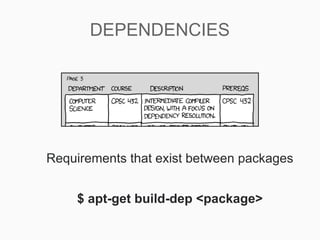
DEPENDENCIES


Requirements that exist between packages


    $ apt-get build-dep <package>
Step 4: make

●   Compilation of source code
Step 4: make install

                           $ make install

●   Alternative:
                       $ make checkinstall
       –   Create a .deb package monitoring the changes made, so
           uninstalling and updating is easier
$ python setup.py install


      $ install.sh
     $ uninstall.sh
Package Management in Linux


                                        Isaakidis Marios
                   Escuela Universitaria de Informàtica
                     Universidad Politècnica de Madrid
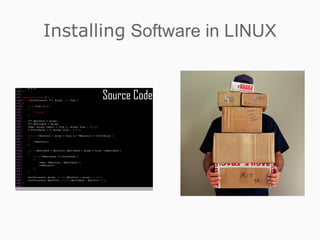
Installing Software in LINUX
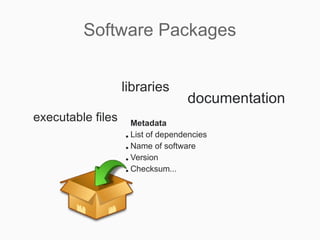
Software Packages


Files containing precompiled binaries of software
Software Packages


                   libraries
                                   documentation
executable files     Metadata
                   ● List of dependencies


                   ● Name of software


                   ● Version


                   ● Checksum...
Package Management Systems
          (PMS)


Software packages are administrated by
package managers, a collection of software
tools included by default on all LINUX
distributions
Package Management Systems
            Benefits
Provide tools for installing, updating, removing and managing the
 software on your system.
Allow you to install new or upgraded software directly across a
 network.
Tell you what software package a particular file belongs to or
 what files a package contains.
Maintain a database of packages on the system and their status,
 so that you can determine what packages or versions are
 installed on your system.
Provide dependency checking, so that you don't mess up your
 system with incompatible software.
Provide GPG, PGP, MD5, or other signature verification tools.
Provide tools for building packages.
Package Management Systems


Red Hat Package Manager   Debian GNU/LINUX
        RPM               Package Manager
RPM Packages

An RPM package has the form package-version-release.architecture.rpm

                     audacity-1.2.3-11.x86_64.rpm


is consisted of three main parts:
 the header contains all information about the package
 the signature used to validate the source of package
 the archive composed by the actual files needed for the installation
Building an RPM package

A spec file contains all the information
required to build a package, including a
description of the software, instructions
telling the rpmbuild command how to build
the package, and a list of the files included
and where they get installed.
Managing RPM packages

yum is a meta-packager that gives you the
ability to easily install a package (that might
not exist in your hard drive) and it's
dependencies through the command:
     $ yum install [name of package]


It also supports commands like update,
remove and search for easier administration
of rpm packages.
Managing packages in Debian
              dpkg

dpkg is the very core of the Debian PMS,
like rpm command in Red Hat's PMS.
Through it's calls you can install, remove
and provide information about .deb
packages.
Advanced Packaging Tool
                    APT
a front-end for dpkg providing http, ftp and file archive access methods.


It is as powerful as its sources. The sources.list file contains entries in the
following format:
             deb [server-type] [address] [directories] [areas]
            deb-src [server-type] [address] [directories] [areas]
 Most archives are FTP or HTTP servers, but you can also insert rsh or
 SSH server or even a CD or a directory from your computer. Be sure to
 execute as root $ apt-get update after modifying the sources.
$ apt-get install [program]       APT installs the latest version of the package
                                  in all the available sources. In every following
                                  situation, can add the version you prefer by
             Building an RPM package
                                  [package]=[version number / stable /unstable
                                  / testing]

$ apt-get upgrade                 APT will actually upgrade to the newest stable
                                  versions all packages installed in your system
   A spec file contains allcauses apt-get to install/remove
$ apt-get build-dep [program]  build-dep     the information
   required to build a package,source to satisfy the a
                               packages in an attempt
                               dependencies for a     including build
                                                          package.

$ apt-get source [program] the APT will fetch source packages from the
   description of                 software, instructions
   telling the rpmbuild command how to followed by
                               packages you requested. If
                                                                 build
                               --compile it will create a .deb binay package
   the package, and a using dpkg-buildpackage that you can later
                                list of the files included
                               install
   and where they get installed.
$ apt-get check                   check is a diagnostic tool; it updates the
                                  package cache and checks for broken
                                  dependencies.

$ apt-get remove [program]        APT removes the packages, though leaving it's
                                  configuration files on system
$ apt-get clean                   clean clears out the      local   repository   of
                                  retrieved package files
Package Managers with GUI


PackageKit, a GUI package manager aiming to unify all the software graphical tools
                         used in different distributions
Package Managers with GUI


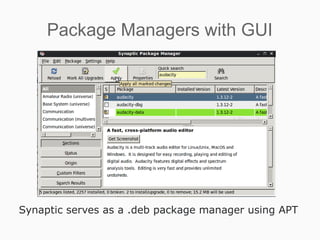
Synaptic serves as a .deb package manager using APT
Package Managers with GUI


Ubuntu Software Center offering 35707 packages categorized in “Departments”
Android market for mobiles and tablets
Provides the option of SELLING applications and installing them with just one click
The future of PMS in LINUX

$ make install

  • 1.
    $ make install http://fedoraproject.org/wiki/User:Misaakidis
  • 2.
  • 3.
  • 4.
    8.162 petaflops (Rmax) ● Linux-based enhanced operating system
  • 5.
    Installing from SourceCode WHY? ● No available binary packages ● Incompatibility with libraries ● Customizing the program: ● adding fixes ● removing unneeded features ● enabling compile-time options for better performance
  • 6.
    Step 1: GetSource Code ● Project's web page ● FTP Servers ● SVN websites: – SourceForge – FreeBSD – GCC...
  • 7.
    Step 2: Extractfiles ● Usually in GNU tarball format with the extension .tar.gz (or .tar.bz2 if bzip2 compression is used). ● LICENSE (or COPYING) ● README ● INSTALL
  • 8.
    Step 3: Configure # sh ./configure ● will examine your computer for it's characteristics, presence of specific features including dependencies, enable/disable options etc. ● ● *[--help] :)
  • 9.
    DEPENDENCIES Requirements that existbetween packages $ apt-get build-dep <package>
  • 10.
    Step 4: make ● Compilation of source code
  • 11.
    Step 4: makeinstall $ make install ● Alternative: $ make checkinstall – Create a .deb package monitoring the changes made, so uninstalling and updating is easier
  • 12.
    $ python setup.pyinstall $ install.sh $ uninstall.sh
  • 13.
    Package Management inLinux Isaakidis Marios Escuela Universitaria de Informàtica Universidad Politècnica de Madrid
  • 14.
  • 15.
    Software Packages Files containingprecompiled binaries of software
  • 16.
    Software Packages libraries documentation executable files Metadata ● List of dependencies ● Name of software ● Version ● Checksum...
  • 17.
    Package Management Systems (PMS) Software packages are administrated by package managers, a collection of software tools included by default on all LINUX distributions
  • 18.
    Package Management Systems Benefits Provide tools for installing, updating, removing and managing the software on your system. Allow you to install new or upgraded software directly across a network. Tell you what software package a particular file belongs to or what files a package contains. Maintain a database of packages on the system and their status, so that you can determine what packages or versions are installed on your system. Provide dependency checking, so that you don't mess up your system with incompatible software. Provide GPG, PGP, MD5, or other signature verification tools. Provide tools for building packages.
  • 19.
    Package Management Systems RedHat Package Manager Debian GNU/LINUX RPM Package Manager
  • 20.
    RPM Packages An RPMpackage has the form package-version-release.architecture.rpm audacity-1.2.3-11.x86_64.rpm is consisted of three main parts: the header contains all information about the package the signature used to validate the source of package the archive composed by the actual files needed for the installation
  • 21.
    Building an RPMpackage A spec file contains all the information required to build a package, including a description of the software, instructions telling the rpmbuild command how to build the package, and a list of the files included and where they get installed.
  • 22.
    Managing RPM packages yumis a meta-packager that gives you the ability to easily install a package (that might not exist in your hard drive) and it's dependencies through the command: $ yum install [name of package] It also supports commands like update, remove and search for easier administration of rpm packages.
  • 23.
    Managing packages inDebian dpkg dpkg is the very core of the Debian PMS, like rpm command in Red Hat's PMS. Through it's calls you can install, remove and provide information about .deb packages.
  • 24.
    Advanced Packaging Tool APT a front-end for dpkg providing http, ftp and file archive access methods. It is as powerful as its sources. The sources.list file contains entries in the following format: deb [server-type] [address] [directories] [areas] deb-src [server-type] [address] [directories] [areas] Most archives are FTP or HTTP servers, but you can also insert rsh or SSH server or even a CD or a directory from your computer. Be sure to execute as root $ apt-get update after modifying the sources.
  • 25.
    $ apt-get install[program] APT installs the latest version of the package in all the available sources. In every following situation, can add the version you prefer by Building an RPM package [package]=[version number / stable /unstable / testing] $ apt-get upgrade APT will actually upgrade to the newest stable versions all packages installed in your system A spec file contains allcauses apt-get to install/remove $ apt-get build-dep [program] build-dep the information required to build a package,source to satisfy the a packages in an attempt dependencies for a including build package. $ apt-get source [program] the APT will fetch source packages from the description of software, instructions telling the rpmbuild command how to followed by packages you requested. If build --compile it will create a .deb binay package the package, and a using dpkg-buildpackage that you can later list of the files included install and where they get installed. $ apt-get check check is a diagnostic tool; it updates the package cache and checks for broken dependencies. $ apt-get remove [program] APT removes the packages, though leaving it's configuration files on system $ apt-get clean clean clears out the local repository of retrieved package files
  • 26.
    Package Managers withGUI PackageKit, a GUI package manager aiming to unify all the software graphical tools used in different distributions
  • 27.
    Package Managers withGUI Synaptic serves as a .deb package manager using APT
  • 28.
    Package Managers withGUI Ubuntu Software Center offering 35707 packages categorized in “Departments”
  • 29.
    Android market formobiles and tablets Provides the option of SELLING applications and installing them with just one click
  • 30.
    The future ofPMS in LINUX