www.edureka.co/cloudcomputing 
Introduction to 
Cloud Computing with AWS 
View Cloud Computing Course details at www.edureka.co/cloudcomputing
How it Works? 
LIVE Online Class 
Class Recording in LMS 
24/7 Post Class Support 
Module Wise Quiz 
Project Work 
Verifiable Certificate 
Slide 2 Twitter @edurekaIN, Facebook /edurekaIN, use #askEdureka for Questions www.edureka.co/cloudcomputing
Objectives 
At the end of this module, you will be able to 
 Understand Cloud Computing 
 Cloud Attributes / Service Models / Deployment Models 
 Introduction to Amazon Web Services 
 Typical Use Cases 
 Various Service Offerings from AWS 
 Simple Demo 
Slide 3 Twitter @edurekaIN, Facebook /edurekaIN, use #askEdureka for Questions www.edureka.co/cloudcomputing
Importance of Cloud Computing 
“We believe we are moving out of The Ice Age, The Iron Age, The Industrial Age, The Information Age to The 
participation age. You get on the Net and you do stuff. You IM (Instant Message), you blog, you take pictures, 
you publish, you podcast, you transact, you distance learn, you telemedicine. You are participating on the 
Internet, not just viewing stuff. We build the infrastructure that goes in the data centre that facilitates the 
participation age. 
- Scott McNealy, former CEO, Sun Microsystems 
SMAC (Social Mobile Analytics Cloud) Era 
We are in SMAC Era and Cloud would be the Base for three pillars (Social, Mobile, Analytics) of SMAC 
Slide 4 Twitter @edurekaIN, Facebook /edurekaIN, use #askEdureka for Questions www.edureka.co/cloudcomputing
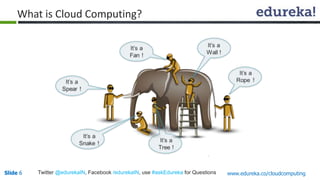
What is Cloud Computing? 
According to Forrester, Cloud Computing is: 
“A form of standardized IT-based capability – such as Internet-based services, software, or 
ITinfrastructure – offered by a service provider that is accessible via Internet protocols from 
any computer, is always available and scales automatically to adjust to demand, is either pay-per- 
use or advertising-based, has Web or programmatic-based control interfaces, and enables 
full customer self-service.” 
Slide 5 Twitter @edurekaIN, Facebook /edurekaIN, use #askEdureka for Questions www.edureka.co/cloudcomputing
What is Cloud Computing? 
Slide 6 Twitter @edurekaIN, Facebook /edurekaIN, use #askEdureka for Questions www.edureka.co/cloudcomputing
Gartner Hype Cycle 
Slide 7 Twitter @edurekaIN, Facebook /edurekaIN, use #askEdureka for Questions www.edureka.co/cloudcomputing
Attributes / Service Models / Deployment Models 
Broad Network 
Access 
Software as a Service 
(SaaS) 
CRM, Email, Social 
Collaboration, Payment 
and Reconciliation 
Public Cloud 
(multi-tenant) 
Attributes 
Service 
Models 
Rapid Elasticity 
Measured Service 
/Pay as you go 
On Demand self-service 
Resource Pooling 
Infrastructure as a 
Service (IaaS) 
Compute, Storage, 
Network, Desktop, 
Hybrid 
Platform as a Service 
(PaaS) 
Middleware, Database, 
Build/Dev/Test 
Anything as a 
Service (XaaS) 
Community 
(Special purpose/group) 
Private Cloud 
(single-tenant) 
Deployment 
Models 
Slide 8 Twitter @edurekaIN, Facebook /edurekaIN, use #askEdureka for Questions www.edureka.co/cloudcomputing
Cloud Services Market Growth 
Almost 3-5 Years back 
A Forrester report “Sizing the Cloud” notes: 
“The cloud computing market will rise from 
$40.7 billion this year to more than $241 
billion in 2020, with a year-to-year growth 
of over 20 percent. 
Estimates tremendous growth in SaaS, 
with its market size estimated to be over 
80 percent of the global public cloud 
market.” 
Slide 9 Twitter @edurekaIN, Facebook /edurekaIN, use #askEdureka for Questions www.edureka.co/cloudcomputing
Amazon Web Services 
 What is AWS? 
 Overview of AWS Products 
» Compute, Storage, Database, App Services, Deployment and Management, Networking 
 AWS Free Tier 
» 1 Year free tier with all services 
 Basic Key Words 
» AMI, Instance, Volume, Snapshot 
Slide 10 Twitter @edurekaIN, Facebook /edurekaIN, use #askEdureka for Questions www.edureka.co/cloudcomputing
Why AWS? 
Slide 11 Twitter @edurekaIN, Facebook /edurekaIN, use #askEdureka for Questions www.edureka.co/cloudcomputing
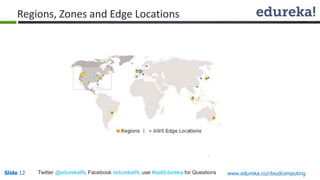
Regions, Zones and Edge Locations 
Slide 12 Twitter @edurekaIN, Facebook /edurekaIN, use #askEdureka for Questions www.edureka.co/cloudcomputing
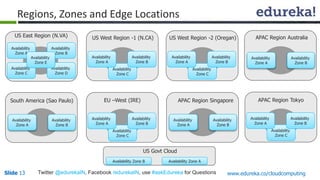
Regions, Zones and Edge Locations 
US East Region (N.VA) 
Availability 
Zone A 
Availability 
Zone C 
Availability 
Zone B 
Availability 
Zone D 
Availability 
Zone E 
US West Region -1 (N.CA) 
Availability 
Zone C 
Availability 
Zone A 
Availability 
Zone B 
US West Region -2 (Oregan) 
Availability 
Zone C 
Availability 
Zone A 
Availability 
Zone B 
APAC Region Australia 
Availability 
Zone A 
Availability 
Zone B 
South America (Sao Paulo) EU –West (IRE) 
Availability 
Zone A 
Availability 
Zone B 
Availability 
Zone C 
Availability 
Zone A 
Availability 
Zone B 
APAC Region Singapore APAC Region Tokyo 
Availability 
Zone A 
Availability 
Zone B 
Availability 
Zone C 
Availability 
Zone A 
Availability 
Zone B 
US Govt Cloud 
Availability Zone B 
Availability Zone A 
Slide 13 Twitter @edurekaIN, Facebook /edurekaIN, use #askEdureka for Questions www.edureka.co/cloudcomputing
Compute EC2 
 Web Service that enables to launch and manage server instance 
 Instances available in different size and configuration 
 Use only the capacity you need and pay only what you use 
 Increase the capacity dynamically when the demand raises and vice versa 
 Supports both Vertical and Horizontal Scaling 
 PreBuilt AMI available from market place 
Slide 14 Twitter @edurekaIN, Facebook /edurekaIN, use #askEdureka for Questions www.edureka.co/cloudcomputing
EC2 Instance Types 
 On-Demand Instances: 
» Let you pay for the capacity by hour with no long term commitment 
» Frees from complexities of planning, purchasing and maintenance 
 Reserved Instances: 
» Gives option of one time payment to reserve and receive significant discount on the usage 
» After onetime payment instance is reserved and no further commitment 
 Spot Instances: 
» Allows customer to bid on unused EC2 capacity 
» The spot price changes periodically based on supply and demand 
» Customers whose bids meet or exceed it gain access to the available spot instances 
Slide 15 Twitter @edurekaIN, Facebook /edurekaIN, use #askEdureka for Questions www.edureka.co/cloudcomputing
EBS – Elastic Block Storage 
 Provides high available, highly reliable storage volumes 
 Suitable for database, file system or raw block storage 
 Can be from 1GB to 1TB 
 Created volume can be attached to any EC2 instance 
 Multiple volume can be attached to one instances 
 Snapshot of the volume can be taken for backup and sharing 
Slide 16 Twitter @edurekaIN, Facebook /edurekaIN, use #askEdureka for Questions www.edureka.co/cloudcomputing
S3 – Simple Storage Service 
 Storage for the Internet 
 Makes web scale computing / storage easier 
 Simple to use 
 Provides API / SDK access 
 Stores object upto 5 TB in size 
 Full control of access rights 
Slide 17 Twitter @edurekaIN, Facebook /edurekaIN, use #askEdureka for Questions www.edureka.co/cloudcomputing
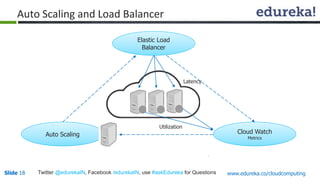
Auto Scaling and Load Balancer 
Elastic Load 
Balancer 
Cloud Watch 
Metrics 
Auto Scaling 
Utilization 
Latency 
Slide 18 Twitter @edurekaIN, Facebook /edurekaIN, use #askEdureka for Questions www.edureka.co/cloudcomputing
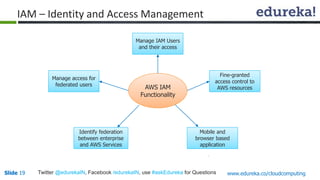
IAM – Identity and Access Management 
Manage IAM Users 
and their access 
AWS IAM 
Functionality 
Fine-granted 
access control to 
AWS resources 
Mobile and 
browser based 
application 
Manage access for 
federated users 
Identify federation 
between enterprise 
and AWS Services 
Slide 19 Twitter @edurekaIN, Facebook /edurekaIN, use #askEdureka for Questions www.edureka.co/cloudcomputing
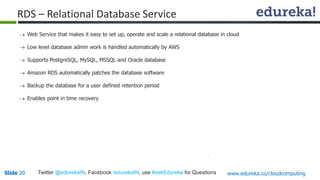
RDS – Relational Database Service 
 Web Service that makes it easy to set up, operate and scale a relational database in cloud 
 Low level database admin work is handled automatically by AWS 
 Supports PostgreSQL, MySQL, MSSQL and Oracle database 
 Amazon RDS automatically patches the database software 
 Backup the database for a user defined retention period 
 Enables point in time recovery 
Slide 20 Twitter @edurekaIN, Facebook /edurekaIN, use #askEdureka for Questions www.edureka.co/cloudcomputing
Free Tier 
 EC2 - 750 hours per month of Windows, Linux, RHEL, or SLES t2.micro instance usage 
 S3 - 5 GB of Standard Storage, 20,000 Get Requests, 2,000 Put Requests 
 EBS - 30 GB of Amazon EBS: any combination of General Purpose (SSD) or Magnetic, 2,000,000 I/OS 
(with EBS Magnetic), 1 GB of snapshot storage 
 RDS - 750 Hours per month of Micro DB Instance usage, 20 GB of DB Storage, 20 GB for Backups, 
10,000,000 I/Os 
 ELB - 750 Hours per month, 15 GB of Data Processing 
Ref: http://aws.amazon.com/free/ 
Slide 21 Twitter @edurekaIN, Facebook /edurekaIN, use #askEdureka for Questions www.edureka.co/cloudcomputing
AWS Economics Center 
 Provides access to information, tools and resources 
 White Paper - http://aws.amazon.com/whitepapers/ 
 TCO Cost Comparison - http://aws.amazon.com/tco-calculator/ 
 AWS Simple Calculator - http://calculator.s3.amazonaws.com/index.html 
Slide 22 Twitter @edurekaIN, Facebook /edurekaIN, use #askEdureka for Questions www.edureka.co/cloudcomputing
Course Curriculum 
 Module 1 
» Introduction to Cloud Computing 
 Module 2 
» Amazon EC2 and Amazon EBS 
 Module 3 
» Amazon Storage Services : S3, RRS, Glaciers 
 Module 4 
» Scaling and Load Distribution in AWS 
 Module 5 
» Identity and Access Management Techniques (IAM) 
 Module 6 
» Multiple AWS Services and managing the resources 
lifecycle 
 Module 7 
» AWS Architecture and Design 
 Module 8 
» Project Discussion 
Slide 23 Twitter @edurekaIN, Facebook /edurekaIN, use #askEdureka for Questions www.edureka.co/cloudcomputing
Questions 
Slide 24 www.edureka.co/cloudcomputing
Introduction to Cloud Computing with AWS

Introduction to Cloud Computing with AWS

  • 1.
    www.edureka.co/cloudcomputing Introduction to Cloud Computing with AWS View Cloud Computing Course details at www.edureka.co/cloudcomputing
  • 2.
    How it Works? LIVE Online Class Class Recording in LMS 24/7 Post Class Support Module Wise Quiz Project Work Verifiable Certificate Slide 2 Twitter @edurekaIN, Facebook /edurekaIN, use #askEdureka for Questions www.edureka.co/cloudcomputing
  • 3.
    Objectives At theend of this module, you will be able to  Understand Cloud Computing  Cloud Attributes / Service Models / Deployment Models  Introduction to Amazon Web Services  Typical Use Cases  Various Service Offerings from AWS  Simple Demo Slide 3 Twitter @edurekaIN, Facebook /edurekaIN, use #askEdureka for Questions www.edureka.co/cloudcomputing
  • 4.
    Importance of CloudComputing “We believe we are moving out of The Ice Age, The Iron Age, The Industrial Age, The Information Age to The participation age. You get on the Net and you do stuff. You IM (Instant Message), you blog, you take pictures, you publish, you podcast, you transact, you distance learn, you telemedicine. You are participating on the Internet, not just viewing stuff. We build the infrastructure that goes in the data centre that facilitates the participation age. - Scott McNealy, former CEO, Sun Microsystems SMAC (Social Mobile Analytics Cloud) Era We are in SMAC Era and Cloud would be the Base for three pillars (Social, Mobile, Analytics) of SMAC Slide 4 Twitter @edurekaIN, Facebook /edurekaIN, use #askEdureka for Questions www.edureka.co/cloudcomputing
  • 5.
    What is CloudComputing? According to Forrester, Cloud Computing is: “A form of standardized IT-based capability – such as Internet-based services, software, or ITinfrastructure – offered by a service provider that is accessible via Internet protocols from any computer, is always available and scales automatically to adjust to demand, is either pay-per- use or advertising-based, has Web or programmatic-based control interfaces, and enables full customer self-service.” Slide 5 Twitter @edurekaIN, Facebook /edurekaIN, use #askEdureka for Questions www.edureka.co/cloudcomputing
  • 6.
    What is CloudComputing? Slide 6 Twitter @edurekaIN, Facebook /edurekaIN, use #askEdureka for Questions www.edureka.co/cloudcomputing
  • 7.
    Gartner Hype Cycle Slide 7 Twitter @edurekaIN, Facebook /edurekaIN, use #askEdureka for Questions www.edureka.co/cloudcomputing
  • 8.
    Attributes / ServiceModels / Deployment Models Broad Network Access Software as a Service (SaaS) CRM, Email, Social Collaboration, Payment and Reconciliation Public Cloud (multi-tenant) Attributes Service Models Rapid Elasticity Measured Service /Pay as you go On Demand self-service Resource Pooling Infrastructure as a Service (IaaS) Compute, Storage, Network, Desktop, Hybrid Platform as a Service (PaaS) Middleware, Database, Build/Dev/Test Anything as a Service (XaaS) Community (Special purpose/group) Private Cloud (single-tenant) Deployment Models Slide 8 Twitter @edurekaIN, Facebook /edurekaIN, use #askEdureka for Questions www.edureka.co/cloudcomputing
  • 9.
    Cloud Services MarketGrowth Almost 3-5 Years back A Forrester report “Sizing the Cloud” notes: “The cloud computing market will rise from $40.7 billion this year to more than $241 billion in 2020, with a year-to-year growth of over 20 percent. Estimates tremendous growth in SaaS, with its market size estimated to be over 80 percent of the global public cloud market.” Slide 9 Twitter @edurekaIN, Facebook /edurekaIN, use #askEdureka for Questions www.edureka.co/cloudcomputing
  • 10.
    Amazon Web Services  What is AWS?  Overview of AWS Products » Compute, Storage, Database, App Services, Deployment and Management, Networking  AWS Free Tier » 1 Year free tier with all services  Basic Key Words » AMI, Instance, Volume, Snapshot Slide 10 Twitter @edurekaIN, Facebook /edurekaIN, use #askEdureka for Questions www.edureka.co/cloudcomputing
  • 11.
    Why AWS? Slide11 Twitter @edurekaIN, Facebook /edurekaIN, use #askEdureka for Questions www.edureka.co/cloudcomputing
  • 12.
    Regions, Zones andEdge Locations Slide 12 Twitter @edurekaIN, Facebook /edurekaIN, use #askEdureka for Questions www.edureka.co/cloudcomputing
  • 13.
    Regions, Zones andEdge Locations US East Region (N.VA) Availability Zone A Availability Zone C Availability Zone B Availability Zone D Availability Zone E US West Region -1 (N.CA) Availability Zone C Availability Zone A Availability Zone B US West Region -2 (Oregan) Availability Zone C Availability Zone A Availability Zone B APAC Region Australia Availability Zone A Availability Zone B South America (Sao Paulo) EU –West (IRE) Availability Zone A Availability Zone B Availability Zone C Availability Zone A Availability Zone B APAC Region Singapore APAC Region Tokyo Availability Zone A Availability Zone B Availability Zone C Availability Zone A Availability Zone B US Govt Cloud Availability Zone B Availability Zone A Slide 13 Twitter @edurekaIN, Facebook /edurekaIN, use #askEdureka for Questions www.edureka.co/cloudcomputing
  • 14.
    Compute EC2 Web Service that enables to launch and manage server instance  Instances available in different size and configuration  Use only the capacity you need and pay only what you use  Increase the capacity dynamically when the demand raises and vice versa  Supports both Vertical and Horizontal Scaling  PreBuilt AMI available from market place Slide 14 Twitter @edurekaIN, Facebook /edurekaIN, use #askEdureka for Questions www.edureka.co/cloudcomputing
  • 15.
    EC2 Instance Types  On-Demand Instances: » Let you pay for the capacity by hour with no long term commitment » Frees from complexities of planning, purchasing and maintenance  Reserved Instances: » Gives option of one time payment to reserve and receive significant discount on the usage » After onetime payment instance is reserved and no further commitment  Spot Instances: » Allows customer to bid on unused EC2 capacity » The spot price changes periodically based on supply and demand » Customers whose bids meet or exceed it gain access to the available spot instances Slide 15 Twitter @edurekaIN, Facebook /edurekaIN, use #askEdureka for Questions www.edureka.co/cloudcomputing
  • 16.
    EBS – ElasticBlock Storage  Provides high available, highly reliable storage volumes  Suitable for database, file system or raw block storage  Can be from 1GB to 1TB  Created volume can be attached to any EC2 instance  Multiple volume can be attached to one instances  Snapshot of the volume can be taken for backup and sharing Slide 16 Twitter @edurekaIN, Facebook /edurekaIN, use #askEdureka for Questions www.edureka.co/cloudcomputing
  • 17.
    S3 – SimpleStorage Service  Storage for the Internet  Makes web scale computing / storage easier  Simple to use  Provides API / SDK access  Stores object upto 5 TB in size  Full control of access rights Slide 17 Twitter @edurekaIN, Facebook /edurekaIN, use #askEdureka for Questions www.edureka.co/cloudcomputing
  • 18.
    Auto Scaling andLoad Balancer Elastic Load Balancer Cloud Watch Metrics Auto Scaling Utilization Latency Slide 18 Twitter @edurekaIN, Facebook /edurekaIN, use #askEdureka for Questions www.edureka.co/cloudcomputing
  • 19.
    IAM – Identityand Access Management Manage IAM Users and their access AWS IAM Functionality Fine-granted access control to AWS resources Mobile and browser based application Manage access for federated users Identify federation between enterprise and AWS Services Slide 19 Twitter @edurekaIN, Facebook /edurekaIN, use #askEdureka for Questions www.edureka.co/cloudcomputing
  • 20.
    RDS – RelationalDatabase Service  Web Service that makes it easy to set up, operate and scale a relational database in cloud  Low level database admin work is handled automatically by AWS  Supports PostgreSQL, MySQL, MSSQL and Oracle database  Amazon RDS automatically patches the database software  Backup the database for a user defined retention period  Enables point in time recovery Slide 20 Twitter @edurekaIN, Facebook /edurekaIN, use #askEdureka for Questions www.edureka.co/cloudcomputing
  • 21.
    Free Tier EC2 - 750 hours per month of Windows, Linux, RHEL, or SLES t2.micro instance usage  S3 - 5 GB of Standard Storage, 20,000 Get Requests, 2,000 Put Requests  EBS - 30 GB of Amazon EBS: any combination of General Purpose (SSD) or Magnetic, 2,000,000 I/OS (with EBS Magnetic), 1 GB of snapshot storage  RDS - 750 Hours per month of Micro DB Instance usage, 20 GB of DB Storage, 20 GB for Backups, 10,000,000 I/Os  ELB - 750 Hours per month, 15 GB of Data Processing Ref: http://aws.amazon.com/free/ Slide 21 Twitter @edurekaIN, Facebook /edurekaIN, use #askEdureka for Questions www.edureka.co/cloudcomputing
  • 22.
    AWS Economics Center  Provides access to information, tools and resources  White Paper - http://aws.amazon.com/whitepapers/  TCO Cost Comparison - http://aws.amazon.com/tco-calculator/  AWS Simple Calculator - http://calculator.s3.amazonaws.com/index.html Slide 22 Twitter @edurekaIN, Facebook /edurekaIN, use #askEdureka for Questions www.edureka.co/cloudcomputing
  • 23.
    Course Curriculum Module 1 » Introduction to Cloud Computing  Module 2 » Amazon EC2 and Amazon EBS  Module 3 » Amazon Storage Services : S3, RRS, Glaciers  Module 4 » Scaling and Load Distribution in AWS  Module 5 » Identity and Access Management Techniques (IAM)  Module 6 » Multiple AWS Services and managing the resources lifecycle  Module 7 » AWS Architecture and Design  Module 8 » Project Discussion Slide 23 Twitter @edurekaIN, Facebook /edurekaIN, use #askEdureka for Questions www.edureka.co/cloudcomputing
  • 24.
    Questions Slide 24www.edureka.co/cloudcomputing