OPERATING
SYSTEM: CSET209
OUTLINE
 Cloud Computing
 History and concept
 Service and Deployment Models
History and Concept of
Cloud Computing
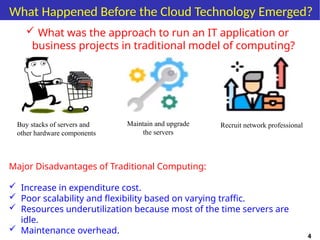
What Happened Before the Cloud Technology Emerged?
 What was the approach to run an IT application or
business projects in traditional model of computing?
4
Buy stacks of servers and
other hardware components
Maintain and upgrade
the servers
Recruit network professional
Major Disadvantages of Traditional Computing:
 Increase in expenditure cost.
 Poor scalability and flexibility based on varying traffic.
 Resources underutilization because most of the time servers are
idle.
 Maintenance overhead.
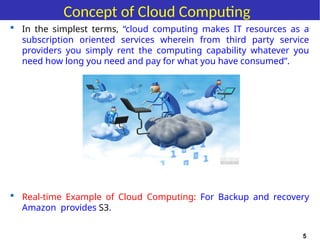
 In the simplest terms, “cloud computing makes IT resources as a
subscription oriented services wherein from third party service
providers you simply rent the computing capability whatever you
need how long you need and pay for what you have consumed”.
Concept of Cloud Computing
 Real-time Example of Cloud Computing: For Backup and recovery
Amazon provides S3.
5
6
Manjrasoft
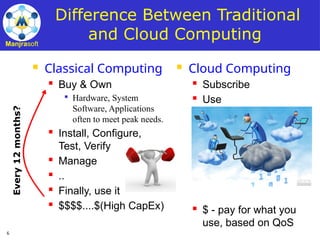
Difference Between Traditional
and Cloud Computing
 Classical Computing
 Buy & Own

Hardware, System
Software, Applications
often to meet peak needs.
 Install, Configure,
Test, Verify
 Manage
 ..
 Finally, use it
 $$$$....$(High CapEx)
 Cloud Computing
 Subscribe
 Use
 $ - pay for what you
use, based on QoS
Every
12
months?
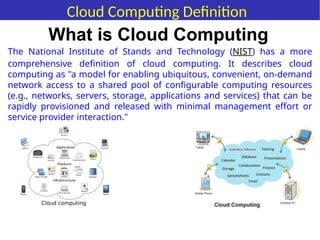
The National Institute of Stands and Technology (NIST) has a more
comprehensive definition of cloud computing. It describes cloud
computing as "a model for enabling ubiquitous, convenient, on-demand
network access to a shared pool of configurable computing resources
(e.g., networks, servers, storage, applications and services) that can be
rapidly provisioned and released with minimal management effort or
service provider interaction."
What is Cloud Computing
Cloud Computing Definition
Major Cloud Service Providers
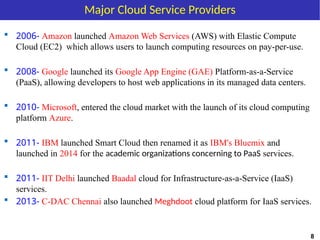
 2006- Amazon launched Amazon Web Services (AWS) with Elastic Compute
Cloud (EC2) which allows users to launch computing resources on pay-per-use.
 2008- Google launched its Google App Engine (GAE) Platform-as-a-Service
(PaaS), allowing developers to host web applications in its managed data centers.
 2010- Microsoft, entered the cloud market with the launch of its cloud computing
platform Azure.
 2011- IBM launched Smart Cloud then renamed it as IBM's Bluemix and
launched in 2014 for the academic organizations concerning to PaaS services.
 2011- IIT Delhi launched Baadal cloud for Infrastructure-as-a-Service (IaaS)
services.
 2013- C-DAC Chennai also launched Meghdoot cloud platform for IaaS services.
8
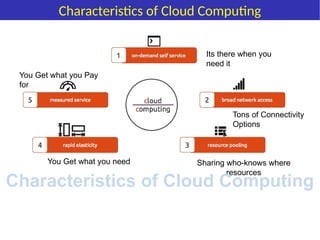
Its there when you
need it
Tons of Connectivity
Options
Sharing who-knows where
resources
You Get what you need
You Get what you Pay
for
Characteristics of Cloud Computing
Advantages of Cloud Computing
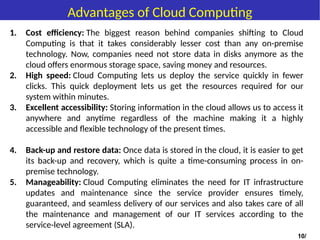
1. Cost efficiency: The biggest reason behind companies shifting to Cloud
Computing is that it takes considerably lesser cost than any on-premise
technology. Now, companies need not store data in disks anymore as the
cloud offers enormous storage space, saving money and resources.
2. High speed: Cloud Computing lets us deploy the service quickly in fewer
clicks. This quick deployment lets us get the resources required for our
system within minutes.
3. Excellent accessibility: Storing information in the cloud allows us to access it
anywhere and anytime regardless of the machine making it a highly
accessible and flexible technology of the present times.
4. Back-up and restore data: Once data is stored in the cloud, it is easier to get
its back-up and recovery, which is quite a time-consuming process in on-
premise technology.
5. Manageability: Cloud Computing eliminates the need for IT infrastructure
updates and maintenance since the service provider ensures timely,
guaranteed, and seamless delivery of our services and also takes care of all
the maintenance and management of our IT services according to the
service-level agreement (SLA).
10/
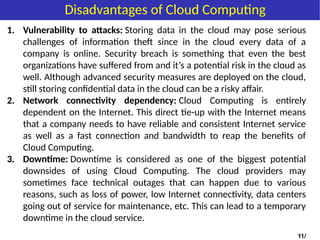
1. Vulnerability to attacks: Storing data in the cloud may pose serious
challenges of information theft since in the cloud every data of a
company is online. Security breach is something that even the best
organizations have suffered from and it’s a potential risk in the cloud as
well. Although advanced security measures are deployed on the cloud,
still storing confidential data in the cloud can be a risky affair.
2. Network connectivity dependency: Cloud Computing is entirely
dependent on the Internet. This direct tie-up with the Internet means
that a company needs to have reliable and consistent Internet service
as well as a fast connection and bandwidth to reap the benefits of
Cloud Computing.
3. Downtime: Downtime is considered as one of the biggest potential
downsides of using Cloud Computing. The cloud providers may
sometimes face technical outages that can happen due to various
reasons, such as loss of power, low Internet connectivity, data centers
going out of service for maintenance, etc. This can lead to a temporary
downtime in the cloud service.
11/
Disadvantages of Cloud Computing
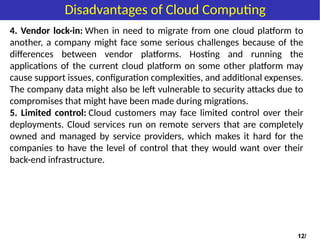
4. Vendor lock-in: When in need to migrate from one cloud platform to
another, a company might face some serious challenges because of the
differences between vendor platforms. Hosting and running the
applications of the current cloud platform on some other platform may
cause support issues, configuration complexities, and additional expenses.
The company data might also be left vulnerable to security attacks due to
compromises that might have been made during migrations.
5. Limited control: Cloud customers may face limited control over their
deployments. Cloud services run on remote servers that are completely
owned and managed by service providers, which makes it hard for the
companies to have the level of control that they would want over their
back-end infrastructure.
12/
Disadvantages of Cloud Computing
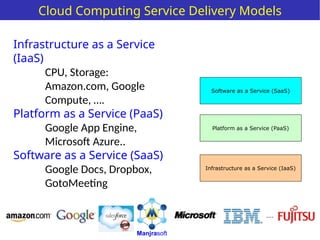
Cloud Computing Service Delivery Models
Infrastructure as a Service
(IaaS)
CPU, Storage:
Amazon.com, Google
Compute, ….
Platform as a Service (PaaS)
Google App Engine,
Microsoft Azure..
Software as a Service (SaaS)
Google Docs, Dropbox,
GotoMeeting
Infrastructure as a Service (IaaS)
Software as a Service (SaaS)
Platform as a Service (PaaS)
Manjrasoft
....
• Software as a service (SaaS) is a software distribution model in which a third-
party provider hosts applications and makes them available to customers over
the Internet.
• SaaS removes the need for organizations to install and run applications on their
own computers or in their own data centres. This eliminates the expense of
hardware acquisition, provisioning and maintenance, as well as software
licensing, installation and support. Other benefits of the SaaS model include:
 Flexible payments: Rather than purchasing software to install, or additional
hardware to support it, customers subscribe to a SaaS offering. Generally, they
pay for this service on a monthly basis using a pay-as-you-go model.
 Scalable usage: Cloud services like SaaS offer high scalability, which gives
customers the option to access more, or fewer, services or features on-demand.
 Automatic updates: Rather than purchasing new software, customers can rely
on a SaaS provider to automatically perform updates and patch management.
 Accessibility and persistence: Since SaaS applications are delivered over the
Internet, users can access them from any Internet-enabled device and location.
Software-as-a-Service (SaaS)
Platform as a service (PaaS) is a cloud
computing model in which a third-
party provider delivers hardware and
software tools -- usually those needed
for application development -- to users
over the internet. A PaaS provider hosts
the hardware and software on its own
infrastructure. As a result, PaaS frees
users from having to install in-house
hardware and software to develop or run
a new application.
Platform-as-a-Service (PaaS)
Infrastructure as a service (IaaS) is a form
of cloud computing that provides
virtualized computing resources over the
internet.
In an IaaS model, a cloud provider hosts
the infrastructure components traditionally
present in an on-premises data center,
including servers, storage and networking
hardware, as well as the virtualization or
hypervisor layer.
The IaaS provider also supplies a range of
services to accompany those infrastructure
components. These can include detailed
billing, monitoring, log access, security,
load balancing and clustering, as well as
storage resiliency, such as backup,
replication and recovery.
IaaS customers access resources and services
through the internet, and can use the cloud
provider's services to install the remaining
elements of an application stack. The provider
is often a third-party organization that
specializes in selling IaaS.
Amazon Web Services (AWS) and
Google Cloud Platform (GCP) are examples of
independent IaaS providers.
Infrastructure-as-a-Service (IaaS)
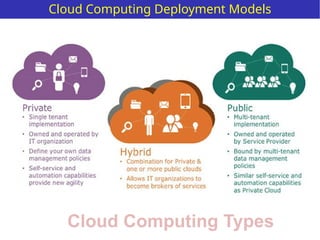
Cloud Computing Types
Cloud Computing Deployment Models
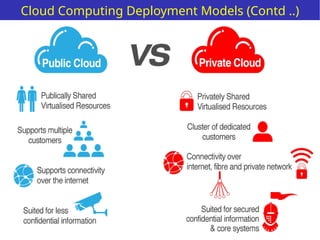
Cloud Computing Deployment Models (Contd ..)
19
Manjrasoft
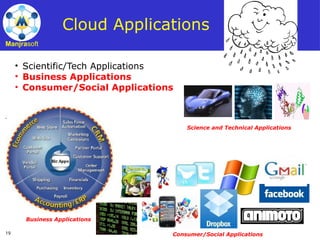
Cloud Applications
• Scientific/Tech Applications
• Business Applications
• Consumer/Social Applications
Science and Technical Applications
Business Applications
Consumer/Social Applications
20
Manjrasoft
Cloud Computing Applications
i. Storing File Online
Cloud Computing provides a benefit to store and access the software
with the help of internet connection to the Cloud. The interface provided is
very easy to operate and is economical too.
ii. Video Making and Editing Software
There are many software available which can access with the help of the
cloud. This software helps to create and modify the videos. The videos
create or modify are stored in the cloud itself and we can access anytime.
iii. File Converters
There are many applications which utilize to change to format of the file
such that from HTML to pdf and so on. This software is available at cloud
and access from anywhere with the help of internet connection.
21
Manjrasoft
Cloud Computing Applications
iv. Anti-Virus Applications
There is software which is stored in the cloud and from there they fix the system. All
the viruses and the malware are detected and analyzed by the software and the
system is fixed. They also come up with a feature of downloading the software.
v. E-commerce Application
With the help of e-commerce application in the cloud, user and e-business allow
responding quickly to the opportunities which are emerging. It also allows the user
to respond quickly to the market opportunities and the challenges. Business tycoons
focuse on the usage of cloud computing without keeping time in the mind. Cloud-
based e-commerce applications allow the companies, business leaders to evaluate
new opportunities and making things done with the minimum amount possible.
vi. Business Process
Business management applications are based on the cloud service provider. The
business utilizes the cloud computing to store the necessary data and all the relevant
information. This information can be anything such as the personal data of the
customer, analyzed records, and many more.
22
Manjrasoft
Cloud Architecture
Self Study
tungal/presentations/ad2012
23
Thanks Note

Cloud Computing.pptx operating systems ka part

  • 1.
  • 2.
    OUTLINE  Cloud Computing History and concept  Service and Deployment Models
  • 3.
    History and Conceptof Cloud Computing
  • 4.
    What Happened Beforethe Cloud Technology Emerged?  What was the approach to run an IT application or business projects in traditional model of computing? 4 Buy stacks of servers and other hardware components Maintain and upgrade the servers Recruit network professional Major Disadvantages of Traditional Computing:  Increase in expenditure cost.  Poor scalability and flexibility based on varying traffic.  Resources underutilization because most of the time servers are idle.  Maintenance overhead.
  • 5.
     In thesimplest terms, “cloud computing makes IT resources as a subscription oriented services wherein from third party service providers you simply rent the computing capability whatever you need how long you need and pay for what you have consumed”. Concept of Cloud Computing  Real-time Example of Cloud Computing: For Backup and recovery Amazon provides S3. 5
  • 6.
    6 Manjrasoft Difference Between Traditional andCloud Computing  Classical Computing  Buy & Own  Hardware, System Software, Applications often to meet peak needs.  Install, Configure, Test, Verify  Manage  ..  Finally, use it  $$$$....$(High CapEx)  Cloud Computing  Subscribe  Use  $ - pay for what you use, based on QoS Every 12 months?
  • 7.
    The National Instituteof Stands and Technology (NIST) has a more comprehensive definition of cloud computing. It describes cloud computing as "a model for enabling ubiquitous, convenient, on-demand network access to a shared pool of configurable computing resources (e.g., networks, servers, storage, applications and services) that can be rapidly provisioned and released with minimal management effort or service provider interaction." What is Cloud Computing Cloud Computing Definition
  • 8.
    Major Cloud ServiceProviders  2006- Amazon launched Amazon Web Services (AWS) with Elastic Compute Cloud (EC2) which allows users to launch computing resources on pay-per-use.  2008- Google launched its Google App Engine (GAE) Platform-as-a-Service (PaaS), allowing developers to host web applications in its managed data centers.  2010- Microsoft, entered the cloud market with the launch of its cloud computing platform Azure.  2011- IBM launched Smart Cloud then renamed it as IBM's Bluemix and launched in 2014 for the academic organizations concerning to PaaS services.  2011- IIT Delhi launched Baadal cloud for Infrastructure-as-a-Service (IaaS) services.  2013- C-DAC Chennai also launched Meghdoot cloud platform for IaaS services. 8
  • 9.
    Its there whenyou need it Tons of Connectivity Options Sharing who-knows where resources You Get what you need You Get what you Pay for Characteristics of Cloud Computing Characteristics of Cloud Computing
  • 10.
    Advantages of CloudComputing 1. Cost efficiency: The biggest reason behind companies shifting to Cloud Computing is that it takes considerably lesser cost than any on-premise technology. Now, companies need not store data in disks anymore as the cloud offers enormous storage space, saving money and resources. 2. High speed: Cloud Computing lets us deploy the service quickly in fewer clicks. This quick deployment lets us get the resources required for our system within minutes. 3. Excellent accessibility: Storing information in the cloud allows us to access it anywhere and anytime regardless of the machine making it a highly accessible and flexible technology of the present times. 4. Back-up and restore data: Once data is stored in the cloud, it is easier to get its back-up and recovery, which is quite a time-consuming process in on- premise technology. 5. Manageability: Cloud Computing eliminates the need for IT infrastructure updates and maintenance since the service provider ensures timely, guaranteed, and seamless delivery of our services and also takes care of all the maintenance and management of our IT services according to the service-level agreement (SLA). 10/
  • 11.
    1. Vulnerability toattacks: Storing data in the cloud may pose serious challenges of information theft since in the cloud every data of a company is online. Security breach is something that even the best organizations have suffered from and it’s a potential risk in the cloud as well. Although advanced security measures are deployed on the cloud, still storing confidential data in the cloud can be a risky affair. 2. Network connectivity dependency: Cloud Computing is entirely dependent on the Internet. This direct tie-up with the Internet means that a company needs to have reliable and consistent Internet service as well as a fast connection and bandwidth to reap the benefits of Cloud Computing. 3. Downtime: Downtime is considered as one of the biggest potential downsides of using Cloud Computing. The cloud providers may sometimes face technical outages that can happen due to various reasons, such as loss of power, low Internet connectivity, data centers going out of service for maintenance, etc. This can lead to a temporary downtime in the cloud service. 11/ Disadvantages of Cloud Computing
  • 12.
    4. Vendor lock-in:When in need to migrate from one cloud platform to another, a company might face some serious challenges because of the differences between vendor platforms. Hosting and running the applications of the current cloud platform on some other platform may cause support issues, configuration complexities, and additional expenses. The company data might also be left vulnerable to security attacks due to compromises that might have been made during migrations. 5. Limited control: Cloud customers may face limited control over their deployments. Cloud services run on remote servers that are completely owned and managed by service providers, which makes it hard for the companies to have the level of control that they would want over their back-end infrastructure. 12/ Disadvantages of Cloud Computing
  • 13.
    Cloud Computing ServiceDelivery Models Infrastructure as a Service (IaaS) CPU, Storage: Amazon.com, Google Compute, …. Platform as a Service (PaaS) Google App Engine, Microsoft Azure.. Software as a Service (SaaS) Google Docs, Dropbox, GotoMeeting Infrastructure as a Service (IaaS) Software as a Service (SaaS) Platform as a Service (PaaS) Manjrasoft ....
  • 14.
    • Software asa service (SaaS) is a software distribution model in which a third- party provider hosts applications and makes them available to customers over the Internet. • SaaS removes the need for organizations to install and run applications on their own computers or in their own data centres. This eliminates the expense of hardware acquisition, provisioning and maintenance, as well as software licensing, installation and support. Other benefits of the SaaS model include:  Flexible payments: Rather than purchasing software to install, or additional hardware to support it, customers subscribe to a SaaS offering. Generally, they pay for this service on a monthly basis using a pay-as-you-go model.  Scalable usage: Cloud services like SaaS offer high scalability, which gives customers the option to access more, or fewer, services or features on-demand.  Automatic updates: Rather than purchasing new software, customers can rely on a SaaS provider to automatically perform updates and patch management.  Accessibility and persistence: Since SaaS applications are delivered over the Internet, users can access them from any Internet-enabled device and location. Software-as-a-Service (SaaS)
  • 15.
    Platform as aservice (PaaS) is a cloud computing model in which a third- party provider delivers hardware and software tools -- usually those needed for application development -- to users over the internet. A PaaS provider hosts the hardware and software on its own infrastructure. As a result, PaaS frees users from having to install in-house hardware and software to develop or run a new application. Platform-as-a-Service (PaaS)
  • 16.
    Infrastructure as aservice (IaaS) is a form of cloud computing that provides virtualized computing resources over the internet. In an IaaS model, a cloud provider hosts the infrastructure components traditionally present in an on-premises data center, including servers, storage and networking hardware, as well as the virtualization or hypervisor layer. The IaaS provider also supplies a range of services to accompany those infrastructure components. These can include detailed billing, monitoring, log access, security, load balancing and clustering, as well as storage resiliency, such as backup, replication and recovery. IaaS customers access resources and services through the internet, and can use the cloud provider's services to install the remaining elements of an application stack. The provider is often a third-party organization that specializes in selling IaaS. Amazon Web Services (AWS) and Google Cloud Platform (GCP) are examples of independent IaaS providers. Infrastructure-as-a-Service (IaaS)
  • 17.
    Cloud Computing Types CloudComputing Deployment Models
  • 18.
    Cloud Computing DeploymentModels (Contd ..)
  • 19.
    19 Manjrasoft Cloud Applications • Scientific/TechApplications • Business Applications • Consumer/Social Applications Science and Technical Applications Business Applications Consumer/Social Applications
  • 20.
    20 Manjrasoft Cloud Computing Applications i.Storing File Online Cloud Computing provides a benefit to store and access the software with the help of internet connection to the Cloud. The interface provided is very easy to operate and is economical too. ii. Video Making and Editing Software There are many software available which can access with the help of the cloud. This software helps to create and modify the videos. The videos create or modify are stored in the cloud itself and we can access anytime. iii. File Converters There are many applications which utilize to change to format of the file such that from HTML to pdf and so on. This software is available at cloud and access from anywhere with the help of internet connection.
  • 21.
    21 Manjrasoft Cloud Computing Applications iv.Anti-Virus Applications There is software which is stored in the cloud and from there they fix the system. All the viruses and the malware are detected and analyzed by the software and the system is fixed. They also come up with a feature of downloading the software. v. E-commerce Application With the help of e-commerce application in the cloud, user and e-business allow responding quickly to the opportunities which are emerging. It also allows the user to respond quickly to the market opportunities and the challenges. Business tycoons focuse on the usage of cloud computing without keeping time in the mind. Cloud- based e-commerce applications allow the companies, business leaders to evaluate new opportunities and making things done with the minimum amount possible. vi. Business Process Business management applications are based on the cloud service provider. The business utilizes the cloud computing to store the necessary data and all the relevant information. This information can be anything such as the personal data of the customer, analyzed records, and many more.
  • 22.
  • 23.