Cloud Computing

Prof. Erwin M. Globio, MSIT
      Resource Speaker
http://eglobiotraining.com/


        http://eglobiotraining.com/
What is Cloud Computing?
• “A style of computing where scalable and
  elastic IT-related capabilities are provided ‘as
  a service’ to customers using Internet
  Technologies” .


                   http://eglobiotraining.com/
The Needs
• Users needs Application Software (such as
  office applications)
• Business needs Infrastructure (Software for
  enterprise business operation and Hardware
  for network and storage)
• Developers needs Platform (such as ROR
  working on a server environment)


                  http://eglobiotraining.com/
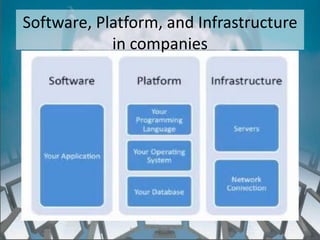
Software, Platform, and Infrastructure
            in companies


              http://eglobiotraining.com/
Current Set-Up
• Users installs the software in the PC.(Cost of
  buying licensed software)
• Business invest hardware, software and
  infrastructure to automate their business
  process and store transactional data. (Capital
  Expenditure on server farm, storage and
  firewall)
• Application Developer Companies invests on
  platform for application development.

                   http://eglobiotraining.com/
Disadvantage of the Current Set Up
•   Cost of Acquisition
•   Cost of Installation, Set up and training
•   Cost of Maintenance
•   Cost of Scaling Hardware
•   Cost of Disposal


                      http://eglobiotraining.com/
The Green Solution
• Cloud Computing both answers the computing
  needs of the users, business, and developers
  and counteracts the disadvantages of the
  current set up.
• It is where software applications, data storage,
  and processing capacity are accessed over the
  internet.


                   http://eglobiotraining.com/
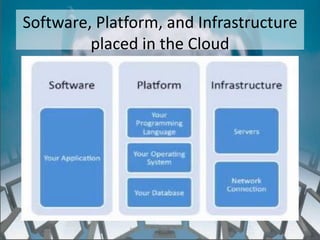
Software, Platform, and Infrastructure
         placed in the Cloud


              http://eglobiotraining.com/
http://eglobiotraining.com/
Cloud Computing Explained
• Allow users to run applications and store data
  online.
• Each offers a different level of user flexibility
  and control


                    http://eglobiotraining.com/
SAAS – Software As A Service
• Allow users to run online applications


                   http://eglobiotraining.com/
PAAS – Platform As A Service
• Allows users to create their own cloud
  applications using supplier – specific tools and
  languages


                   http://eglobiotraining.com/
IAAS – Infrastructure As A Service
• Allows users to run any applications as they
  please on cloud hardware of their own choice


                  http://eglobiotraining.com/
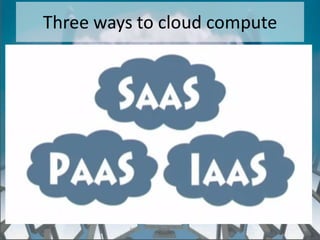
Three ways to cloud compute
• SAAS – Software As A Service
• IAAS – Infrastructure As A Service
• PAAS – Platform As A Service


                   http://eglobiotraining.com/
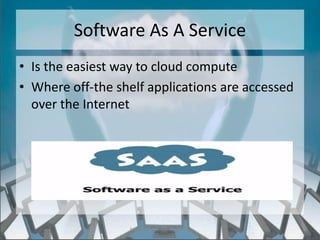
Software As A Service
• Is the easiest way to cloud compute
• Where off-the shelf applications are accessed
  over the Internet


                  http://eglobiotraining.com/
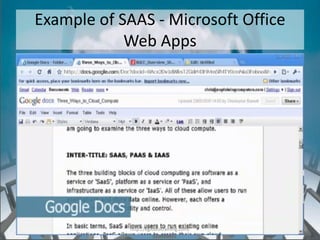
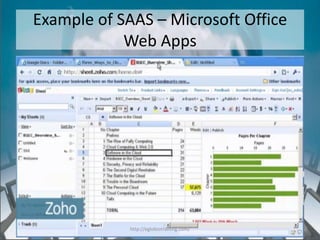
Example of SAAS - Microsoft Office
            Web Apps


            http://eglobiotraining.com/
Example of SAAS – Microsoft Office
            Web Apps


            http://eglobiotraining.com/
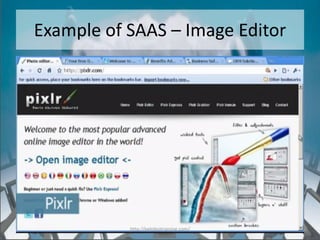
Example of SAAS – Image Editor


           http://eglobiotraining.com/
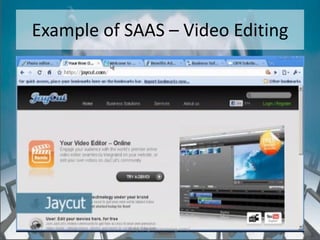
Example of SAAS – Video Editing


           http://eglobiotraining.com/
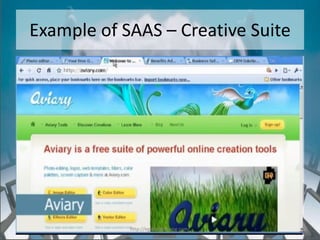
Example of SAAS – Creative Suite


            http://eglobiotraining.com/
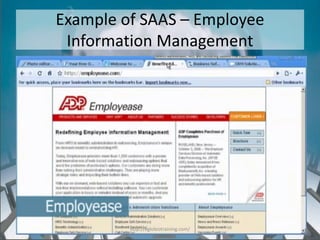
Example of SAAS – Employee
 Information Management


         http://eglobiotraining.com/
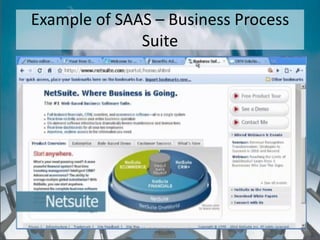
Example of SAAS – Business Process
              Suite


             http://eglobiotraining.com/
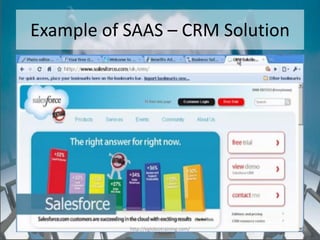
Example of SAAS – CRM Solution


           http://eglobiotraining.com/
SAAS Pros and Cons
• Free or via paid subscription
• Accessible to any computer or internet
  enabled mobile device
• Facilitates collaborative working
• Generic applications not always suitable for
  business use


                   http://eglobiotraining.com/
PAAS – Platform As A Service
• Provides environment and tools for creating
  for creating new online applications


                  http://eglobiotraining.com/
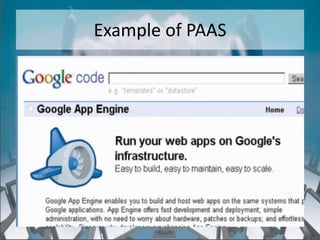
Example of PAAS


    http://eglobiotraining.com/
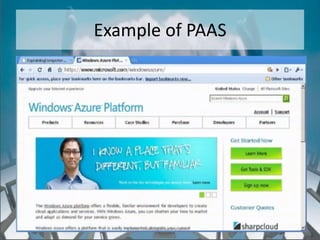
Example of PAAS


    http://eglobiotraining.com/
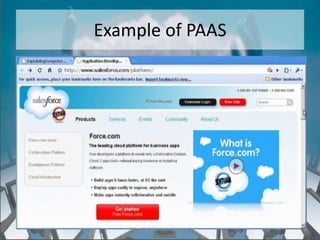
Example of PAAS


    http://eglobiotraining.com/
PAAS Pros and Cons
• Rapid development at low cost
• Private or Public Deployment
• Limits developers to provider languages and
  tools
• Risk of Vendor Lock - in


                  http://eglobiotraining.com/
IAAS – Infrastructure As A Service


             http://eglobiotraining.com/
Advantage of Cloud Computing
• Economies of Scale – underutilization and
  misappropriated hardware become a thing of
  the past. The cloud enables compute, storage
  and RAM resources to be more efficiently
  managed, provisioned and scaled, all within a
  shared environment.


                  http://eglobiotraining.com/
Advantage of Cloud Computing
• Cost Control – knowing exactly what you are
  using and how much that usage will cost you
  allows for a much stricter control over
  expenditures.
• “Disposable IT” – companies have the ability
  to create, use and destroy infrastructure
  based on their business needs.


                  http://eglobiotraining.com/
Advantage of Cloud Computing
• Burstable Workloads– scaling based on
  demand allows organizations to efficiently use
  infrastructure in a timely basis.
• Avoiding Capital Expenditure – with cloud
  computing, infrastructure becomes an
  operating expense with no need to amortize
  hardware costs over time.


                   http://eglobiotraining.com/
Types of Cloud Deployment
             Infrastructure
• Private (single tenant environment)
  – Hosted and on premises(in house)
• Public (shared environment)
• Hybrid (combination)


                   http://eglobiotraining.com/
In Summary how will you know if it is
         cloud computing
• If its offered as a Service whether software,
  Infrastructure or Platform its cloud computing.
  Think of it as if you are renting the use of the
  software, infrastructure and platform.
  e.g. Google Docs, pixelator, GoGrid.com,prezi,
    NetSuite, Amazon's Elastic Compute Cloud (AWS),
    but IBM, VMware,HP, Salesforce.com’s Force.com,
    Google’s App Engine, andMicrosoft’s Azure


                   http://eglobiotraining.com/
Resource Speaker’ s Contact Details:

       Prof. Erwin M. Globio, MSIT
 Owner and Senior Technical Trainer of
           eglobiotraining.com
  IT Professor of Far Eastern University
   Mobile Numbers: +639393741359 /
              +639323956678
Email: erwin_globio@eglobiotraining.com
  Website: http://eglobiotraining.com/


              http://eglobiotraining.com/
For more information about the training and seminars

Please join my group on Facebook
https://www.facebook.com/groups/itseminars/

Help me with my advocacy of giving FREE Seminars
https://www.facebook.com/groups/allfreeseminars/

Like my Facebook Pages

https://www.facebook.com/eglobiotraining

https://www.facebook.com/resourcespeaker
                    http://eglobiotraining.com/
http://eglobiotraining.com/

Cloud computing

  • 1.
    Cloud Computing Prof. ErwinM. Globio, MSIT Resource Speaker http://eglobiotraining.com/ http://eglobiotraining.com/
  • 2.
    What is CloudComputing? • “A style of computing where scalable and elastic IT-related capabilities are provided ‘as a service’ to customers using Internet Technologies” . http://eglobiotraining.com/
  • 3.
    The Needs • Usersneeds Application Software (such as office applications) • Business needs Infrastructure (Software for enterprise business operation and Hardware for network and storage) • Developers needs Platform (such as ROR working on a server environment) http://eglobiotraining.com/
  • 4.
    Software, Platform, andInfrastructure in companies http://eglobiotraining.com/
  • 5.
    Current Set-Up • Usersinstalls the software in the PC.(Cost of buying licensed software) • Business invest hardware, software and infrastructure to automate their business process and store transactional data. (Capital Expenditure on server farm, storage and firewall) • Application Developer Companies invests on platform for application development. http://eglobiotraining.com/
  • 6.
    Disadvantage of theCurrent Set Up • Cost of Acquisition • Cost of Installation, Set up and training • Cost of Maintenance • Cost of Scaling Hardware • Cost of Disposal http://eglobiotraining.com/
  • 7.
    The Green Solution •Cloud Computing both answers the computing needs of the users, business, and developers and counteracts the disadvantages of the current set up. • It is where software applications, data storage, and processing capacity are accessed over the internet. http://eglobiotraining.com/
  • 8.
    Software, Platform, andInfrastructure placed in the Cloud http://eglobiotraining.com/
  • 9.
  • 10.
    Cloud Computing Explained •Allow users to run applications and store data online. • Each offers a different level of user flexibility and control http://eglobiotraining.com/
  • 11.
    SAAS – SoftwareAs A Service • Allow users to run online applications http://eglobiotraining.com/
  • 12.
    PAAS – PlatformAs A Service • Allows users to create their own cloud applications using supplier – specific tools and languages http://eglobiotraining.com/
  • 13.
    IAAS – InfrastructureAs A Service • Allows users to run any applications as they please on cloud hardware of their own choice http://eglobiotraining.com/
  • 14.
    Three ways tocloud compute • SAAS – Software As A Service • IAAS – Infrastructure As A Service • PAAS – Platform As A Service http://eglobiotraining.com/
  • 15.
    Software As AService • Is the easiest way to cloud compute • Where off-the shelf applications are accessed over the Internet http://eglobiotraining.com/
  • 16.
    Example of SAAS- Microsoft Office Web Apps http://eglobiotraining.com/
  • 17.
    Example of SAAS– Microsoft Office Web Apps http://eglobiotraining.com/
  • 18.
    Example of SAAS– Image Editor http://eglobiotraining.com/
  • 19.
    Example of SAAS– Video Editing http://eglobiotraining.com/
  • 20.
    Example of SAAS– Creative Suite http://eglobiotraining.com/
  • 21.
    Example of SAAS– Employee Information Management http://eglobiotraining.com/
  • 22.
    Example of SAAS– Business Process Suite http://eglobiotraining.com/
  • 23.
    Example of SAAS– CRM Solution http://eglobiotraining.com/
  • 24.
    SAAS Pros andCons • Free or via paid subscription • Accessible to any computer or internet enabled mobile device • Facilitates collaborative working • Generic applications not always suitable for business use http://eglobiotraining.com/
  • 25.
    PAAS – PlatformAs A Service • Provides environment and tools for creating for creating new online applications http://eglobiotraining.com/
  • 26.
    Example of PAAS http://eglobiotraining.com/
  • 27.
    Example of PAAS http://eglobiotraining.com/
  • 28.
    Example of PAAS http://eglobiotraining.com/
  • 29.
    PAAS Pros andCons • Rapid development at low cost • Private or Public Deployment • Limits developers to provider languages and tools • Risk of Vendor Lock - in http://eglobiotraining.com/
  • 30.
    IAAS – InfrastructureAs A Service http://eglobiotraining.com/
  • 31.
    Advantage of CloudComputing • Economies of Scale – underutilization and misappropriated hardware become a thing of the past. The cloud enables compute, storage and RAM resources to be more efficiently managed, provisioned and scaled, all within a shared environment. http://eglobiotraining.com/
  • 32.
    Advantage of CloudComputing • Cost Control – knowing exactly what you are using and how much that usage will cost you allows for a much stricter control over expenditures. • “Disposable IT” – companies have the ability to create, use and destroy infrastructure based on their business needs. http://eglobiotraining.com/
  • 33.
    Advantage of CloudComputing • Burstable Workloads– scaling based on demand allows organizations to efficiently use infrastructure in a timely basis. • Avoiding Capital Expenditure – with cloud computing, infrastructure becomes an operating expense with no need to amortize hardware costs over time. http://eglobiotraining.com/
  • 34.
    Types of CloudDeployment Infrastructure • Private (single tenant environment) – Hosted and on premises(in house) • Public (shared environment) • Hybrid (combination) http://eglobiotraining.com/
  • 35.
    In Summary howwill you know if it is cloud computing • If its offered as a Service whether software, Infrastructure or Platform its cloud computing. Think of it as if you are renting the use of the software, infrastructure and platform. e.g. Google Docs, pixelator, GoGrid.com,prezi, NetSuite, Amazon's Elastic Compute Cloud (AWS), but IBM, VMware,HP, Salesforce.com’s Force.com, Google’s App Engine, andMicrosoft’s Azure http://eglobiotraining.com/
  • 36.
    Resource Speaker’ sContact Details: Prof. Erwin M. Globio, MSIT Owner and Senior Technical Trainer of eglobiotraining.com IT Professor of Far Eastern University Mobile Numbers: +639393741359 / +639323956678 Email: erwin_globio@eglobiotraining.com Website: http://eglobiotraining.com/ http://eglobiotraining.com/
  • 37.
    For more informationabout the training and seminars Please join my group on Facebook https://www.facebook.com/groups/itseminars/ Help me with my advocacy of giving FREE Seminars https://www.facebook.com/groups/allfreeseminars/ Like my Facebook Pages https://www.facebook.com/eglobiotraining https://www.facebook.com/resourcespeaker http://eglobiotraining.com/
  • 38.