By:
Prateek Verma
ASU2013010100051
 Introduction
 What is cloud computing
 How cloud computing works
 Uses of cloud computing
 How cloud computing stores data
 Factors affecting cloud computing
 Pros and Cons of cloud computing
 Building blocks of cloud computing
 Cloud computing is where computing
resources are stored in a virtual online
“cloud” rather than a local desktop or
organization data center.
• Cloud Computing is a general term used to
describe a new class of network based
computing that takes place over the
internet.
• Basically a step on from utility components.
• Using the internet for communication and
transport provide hardware , software and
networking services to clients.
Link: http://computer.howstuffworks.com/cloud-
computing/cloud-computing.html
 It helps us to use applications without
installation
 We access the personal files and data from
any computer with internet access.
 This technology allows much more efficient
computation by centralizing storage, memory
and processing
Link :http://www.cloud-lounge.org/where-is-my-
data-being-stored.html
 https://en.wikipedia.org/wiki/Cloud_storage
There are two major factors that effect
cloud computing services:
 Usage fees
 Bandwidth caps
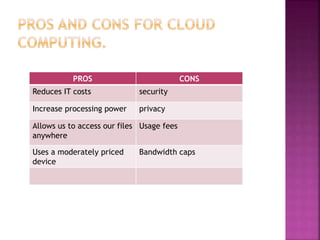
PROS CONS
Reduces IT costs security
Increase processing power privacy
Allows us to access our files
anywhere
Usage fees
Uses a moderately priced
device
Bandwidth caps
There are three building blocks of cloud
computing :-
 SAAS (Software as a service)
 PAAS (Platform as a service)
 IAAS (Infrastructure as a service)
 SaaS is a cloud computing layer most people
have interacted with one and are likely to
use in their day to day lives .
 Software as a service is where computing
applications are accessed through the
internet .
 SaaS eliminates the need to download ,install
and run applications on local computers.
 These applications are managed by a third
party vendor.. Example: Google docs.
 A one to many model is used for software
delivery.
 Software management is done from a
centralized location.
 Access to the commercial application is
gained via the internet.
 The end users need not worry about software
patches and upgrades.
 Application programming interfaces enable
integration with other applications.
 No fixed costs
 Device interdependecy
 collaborative-allows multiple sharing of
information
 Constant updates
o The main disadvantage of SaaS is that it’s,
limited to browser capabilities.
o Another drawback of SaaS is the security
concerns that surround it.
o PaaS is a software environment used to
develop and run applications .
o PaaS can be defined as a computing platform
that enables the creation , testing , and
implementation of software easily and
quickly without the complexities of buying
and maintaining the infrastructure and
additional software.
Examples: Google app engine , MS Azure and
force.com
 Has services that allow testing,
development, hosting and maintenance of
applications.
 The platform can be accessed by multiple
users.
 Development support
 Tools with handle subscription and billing
management.
 Cost reduction
 Streamlined application development and
management
 Increased mobility
 Reduced technical maintenence
 The main disadvantage of PaaS is its
restrictive nature. Despite the fact that it
makes the development of online
applications easy , developers are restricted
to the programming language and tools
provided by the PaaS Vendor.
 The final and most fundamental layer of
cloud computing is infrastructure as a
service, it is sometimes referred to as
hardware as a service. In this computing
infrastructure, networking and storage are
delivered over the internet. An enterprise
can purchase the services on demand.
 Example: Amazon web services
 IaaS is the most fundamental building block,
it covers the areas where PaaS and SaaS do
not; making at the ideal solution.
 Resources and infrastructure are distributed
as a service.
 Enables dynamic scaling
 Multiple users utilize a single piece of
hardware.
Presentation on cloud computing

Presentation on cloud computing

  • 1.
  • 2.
     Introduction  Whatis cloud computing  How cloud computing works  Uses of cloud computing  How cloud computing stores data  Factors affecting cloud computing  Pros and Cons of cloud computing  Building blocks of cloud computing
  • 3.
     Cloud computingis where computing resources are stored in a virtual online “cloud” rather than a local desktop or organization data center.
  • 4.
    • Cloud Computingis a general term used to describe a new class of network based computing that takes place over the internet. • Basically a step on from utility components. • Using the internet for communication and transport provide hardware , software and networking services to clients.
  • 5.
  • 6.
     It helpsus to use applications without installation  We access the personal files and data from any computer with internet access.  This technology allows much more efficient computation by centralizing storage, memory and processing
  • 7.
  • 8.
  • 9.
    There are twomajor factors that effect cloud computing services:  Usage fees  Bandwidth caps
  • 10.
    PROS CONS Reduces ITcosts security Increase processing power privacy Allows us to access our files anywhere Usage fees Uses a moderately priced device Bandwidth caps
  • 11.
    There are threebuilding blocks of cloud computing :-  SAAS (Software as a service)  PAAS (Platform as a service)  IAAS (Infrastructure as a service)
  • 12.
     SaaS isa cloud computing layer most people have interacted with one and are likely to use in their day to day lives .  Software as a service is where computing applications are accessed through the internet .  SaaS eliminates the need to download ,install and run applications on local computers.  These applications are managed by a third party vendor.. Example: Google docs.
  • 13.
     A oneto many model is used for software delivery.  Software management is done from a centralized location.  Access to the commercial application is gained via the internet.  The end users need not worry about software patches and upgrades.  Application programming interfaces enable integration with other applications.
  • 14.
     No fixedcosts  Device interdependecy  collaborative-allows multiple sharing of information  Constant updates
  • 15.
    o The maindisadvantage of SaaS is that it’s, limited to browser capabilities. o Another drawback of SaaS is the security concerns that surround it.
  • 16.
    o PaaS isa software environment used to develop and run applications . o PaaS can be defined as a computing platform that enables the creation , testing , and implementation of software easily and quickly without the complexities of buying and maintaining the infrastructure and additional software. Examples: Google app engine , MS Azure and force.com
  • 17.
     Has servicesthat allow testing, development, hosting and maintenance of applications.  The platform can be accessed by multiple users.  Development support  Tools with handle subscription and billing management.
  • 18.
     Cost reduction Streamlined application development and management  Increased mobility  Reduced technical maintenence
  • 19.
     The maindisadvantage of PaaS is its restrictive nature. Despite the fact that it makes the development of online applications easy , developers are restricted to the programming language and tools provided by the PaaS Vendor.
  • 20.
     The finaland most fundamental layer of cloud computing is infrastructure as a service, it is sometimes referred to as hardware as a service. In this computing infrastructure, networking and storage are delivered over the internet. An enterprise can purchase the services on demand.  Example: Amazon web services  IaaS is the most fundamental building block, it covers the areas where PaaS and SaaS do not; making at the ideal solution.
  • 21.
     Resources andinfrastructure are distributed as a service.  Enables dynamic scaling  Multiple users utilize a single piece of hardware.

Editor's Notes

  • #6 http://computer.howstuffworks.com/cloud-computing/cloud-computing.htm